Why no system restore point

wsplawn

New member
Local time
3:40 PM
Messages
74
Today I downloaded some software that I wish I hadn't. I thought, no problem, I'll just restore to a point prior to the download. I seemed to remember that my system was setup so that whenever I install software a restore point is created automatically.

To my surprise, however, I did not have a system restore point of any kind for the last several days. I wonder if I invertantly changed some settings or what?
 

My Computer

OS
Windows XP
Type create rest into the start menu and see if system restore is on - configure it as necessary.
 

My Computer

Computer Manufacturer/Model Number
Sony Vaio Z46GDU
OS
Windows 7 Ultimate x86-64
CPU
[email protected] 1066MHz FSB
Motherboard
Sony branded
Memory
6GB DDR3 1066MHz
Graphics Card(s)
9300M GS 256MB Dedicated (Speed) + Intel4500MHD (Stamina)
Sound Card
Realtek HD Audio
Monitor(s) Displays
13.1' WXGA
Screen Resolution
1600x900
Hard Drives
320GB 7200RPM w/ 16MB cache
Internet Speed
1MB/s
Today I downloaded some software that I wish I hadn't. I thought, no problem, I'll just restore to a point prior to the download. I seemed to remember that my system was setup so that whenever I install software a restore point is created automatically.

To my surprise, however, I did not have a system restore point of any kind for the last several days. I wonder if I invertantly changed some settings or what?


To be on the safe side run a virus scan, its probably ok, but who knows.

Regarding the SR point, did you shut it off? Go to task scheduler and see when SR is scheduled to operate. Go to start menu and type in task scheduler.
Is the partition where your backups are stored, full, due to system image or something else?
 
Last edited:

My Computer

Computer type
PC/Desktop
Computer Manufacturer/Model Number
Dell XPS 420
OS
Windows 10, Home Clean Install
CPU
Intel Core2 processsor Q8200(2.33Ghz 1333FSB) Quad Core Tech
Motherboard
Dell
Memory
6 gb
Graphics Card(s)
ATI Radeon 256MB HD3650
Sound Card
Intergrated 7.1 Channel Audio
Monitor(s) Displays
Dell SP2009W 20"
Hard Drives
640 GB Serial ATA Hard drive
Cooling
Fan
Keyboard
Dell USB Keyboard
Mouse
Dell Premium Optical USB
Internet Speed
DSL 2.85
It's odd that you mention this today. I had the exact same thing happen to me earlier today. I installed something, regretted it, and looked for a restore point. Normally, I have one or more every day. To my surprise there hasn't been one since 12/20 and I have no idea why.
 

My Computer

Computer Manufacturer/Model Number
Custom
OS
Windows 7 Ultimate RTM (Technet)
CPU
3.00 gigahertz Intel Core2 Duo E8400
Motherboard
ASUSTeK Computer INC. P5K/EPU Rev 1.xx
Memory
4GB
Graphics Card(s)
ATI Radeon X1950 Pro
Sound Card
Built in HD Audio
Monitor(s) Displays
22" Gateway LCD
Screen Resolution
1920 x 1200
Hard Drives
ST3160023A [Hard drive] (160.04 GB) -- drive 0, rev 8.01, ST3500630AS [Hard drive] (500.11 GB) -- drive 2, rev 3.AAK
ST3500630AS [Hard drive] (500.11 GB) -- drive 1, rev 3.AAK
Keyboard
Logitech G11
Mouse
Microsoft Wireless Laser Mouse 5000
Internet Speed
13.44 Mbps
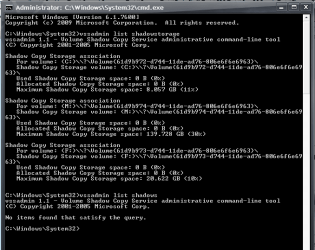
Did you guys check what is going on with your shadowstorage? Type vssadmin list shadowstorage into an elevated command prompt and hit Enter. Have a look what's allocated and used. If there is a fair amount used, then type vssadmin list shadows to show you the restore points that are in there - they are time stamped. Once you have those facts, we'll go from there.
 

My Computer

Computer Manufacturer/Model Number
HP, Dell, Gateway, Toshiba - 4 laptops and 2 desktops
OS
Vista, Windows7, Mint Mate, Zorin, Windows 8
CPU
from 1.6GHz Duo to i7
Monitor(s) Displays
2x HP w2207
Hard Drives
5x HDD, 7x SSD, 12x Externals
Keyboard
with trackball - no mices
Mouse
Trackball mice
Internet Speed
DSL 6000
I just check and System Restore tells me there have been NO restore points created on this system... Funny, I have 6 or 7 of them two days ago...
 

My Computer

Computer Manufacturer/Model Number
Home Grown
OS
Windows 7 Ultimate (64)
CPU
i7-2600K
Motherboard
Asus P8P67-M Pro
Memory
G.SKILL Ripjaws X Series 8GB (2 x 4GB)
Graphics Card(s)
ATI 5750
Sound Card
On-Board
Monitor(s) Displays
LG W2486L
Screen Resolution
1920X1080
Hard Drives
Intel X-25M 80 Gig SSD | Intel X-25M 160 Gig SSD | WD Black 500MB - External eSata
PSU
Zalman ZM770-XT 770 Watts
Case
Antec 180 mini
Cooling
Cooler Master V8
Internet Speed
15MB - Cable
Other Info
Sissy OC - 4.6 @ 1.3175 24/7 | 18' Idle - 55' Load
Here's my results running "vssadmin list shadowstorage" and "vssadmin list shadows: Something very wrong with this picture, like system restore may be something you can't count on!
 

Attachments

  • shadow.png
    shadow.png
    14 KB · Views: 136

My Computer

Computer Manufacturer/Model Number
Home Grown
OS
Windows 7 Ultimate (64)
CPU
i7-2600K
Motherboard
Asus P8P67-M Pro
Memory
G.SKILL Ripjaws X Series 8GB (2 x 4GB)
Graphics Card(s)
ATI 5750
Sound Card
On-Board
Monitor(s) Displays
LG W2486L
Screen Resolution
1920X1080
Hard Drives
Intel X-25M 80 Gig SSD | Intel X-25M 160 Gig SSD | WD Black 500MB - External eSata
PSU
Zalman ZM770-XT 770 Watts
Case
Antec 180 mini
Cooling
Cooler Master V8
Internet Speed
15MB - Cable
Other Info
Sissy OC - 4.6 @ 1.3175 24/7 | 18' Idle - 55' Load
Hmm, indeed there are nil shadows. Go to Computer > Properties > Advanced System settings (in the left pane on top) > System Protection Tab. There you can set it on (Configure) and also create a first restore point.
Note: By default, the system backup is turned off.
 

My Computer

Computer Manufacturer/Model Number
HP, Dell, Gateway, Toshiba - 4 laptops and 2 desktops
OS
Vista, Windows7, Mint Mate, Zorin, Windows 8
CPU
from 1.6GHz Duo to i7
Monitor(s) Displays
2x HP w2207
Hard Drives
5x HDD, 7x SSD, 12x Externals
Keyboard
with trackball - no mices
Mouse
Trackball mice
Internet Speed
DSL 6000
7 will only create a restore point if there hasn't been one in the last 7 days.

None at all is a different issue.
 

My Computers

System One System Two

  • Computer type
    PC/Desktop
    OS
    7 X64
    CPU
    i5 8400
    Motherboard
    gigabyte b365m ds3h
    Memory
    2x8gb 3200mhz
    Hard Drives
    various
    PSU
    pure power 11 400w cm
    Case
    Coolermaster
    Cooling
    cryorig m9i
  • Computer type
    PC/Desktop
    OS
    7x64
    CPU
    g5400
    Motherboard
    ga b365m ds3h
    Memory
    8gb ddr4 2400
    PSU
    xfx pro 450w
I manually created a restore point and that was successful. I also looked at configure and increased the allotted storage space although the default should have been more than sufficient. I also went into Task Scheduler and setup a restore point to be created every 24 hrs.

With that said I've been seeing this problem come and go since the original Win 7 install, including all the betas in the last 6 months... Additionally, I installed 3 apps yesterday and would normally expect restore points to be created prior to those installs.

Based my experience and the constant post I see regarding this issue, I'm thinking there's an inherent problem here. I won't lose much sleep over it as I have a good backup routine so until it's resolved all is fine.

But it's cool feature and it would be nice to know it's reliable...
 

My Computer

Computer Manufacturer/Model Number
Home Grown
OS
Windows 7 Ultimate (64)
CPU
i7-2600K
Motherboard
Asus P8P67-M Pro
Memory
G.SKILL Ripjaws X Series 8GB (2 x 4GB)
Graphics Card(s)
ATI 5750
Sound Card
On-Board
Monitor(s) Displays
LG W2486L
Screen Resolution
1920X1080
Hard Drives
Intel X-25M 80 Gig SSD | Intel X-25M 160 Gig SSD | WD Black 500MB - External eSata
PSU
Zalman ZM770-XT 770 Watts
Case
Antec 180 mini
Cooling
Cooler Master V8
Internet Speed
15MB - Cable
Other Info
Sissy OC - 4.6 @ 1.3175 24/7 | 18' Idle - 55' Load
An XP/Win7 dual boot setup can wipe out Win7 restore points every time you start up XP. The Win7 partition has to be hidden from XP (when in XP) to stop it happening. Look for Stop_XP.reg to fix it.
 

My Computer

OS
Windows 7
Back
Top