Solved Why the “users” folder is shared automatically?

Jamal NUMAN

New member
Member
VIP
Local time
3:03 PM
Messages
144
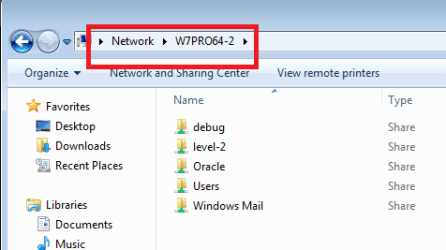
Why the “users” folder is shared automatically?

[FONT=&quot]Why the “users” folder is shared automatically?[/FONT]
[FONT=&quot] [/FONT]
[FONT=&quot]I didn’t shared the “users” folder while it is shared automatically (attached)
[/FONT]
[FONT=&quot] [/FONT]
[FONT=&quot]What might be the issue here?[/FONT]
[FONT=&quot] [/FONT]
[FONT=&quot]Thank you[/FONT]
[FONT=&quot] [/FONT]
[FONT=&quot]Best[/FONT]
[FONT=&quot] [/FONT]
[FONT=&quot]Jamal[/FONT]
 

Attachments

  • Clip_1063.jpg
    Clip_1063.jpg
    83.4 KB · Views: 9

My Computer

OS
Windows 7 Ultimate x64
[FONT=&quot]Why the “users” folder is shared automatically?[/FONT]
[FONT=&quot] [/FONT]
[FONT=&quot]I didn’t shared the “users” folder while it is shared automatically (attached)
[/FONT]
[FONT=&quot] [/FONT]
[FONT=&quot]What might be the issue here?[/FONT]
[FONT=&quot] [/FONT]
[FONT=&quot]Thank you[/FONT]
[FONT=&quot] [/FONT]
[FONT=&quot]Best[/FONT]
[FONT=&quot] [/FONT]
[FONT=&quot]Jamal[/FONT]

Hi Jamal NUMAN,

Please check a similar post which should answer your query:

http://www.sevenforums.com/network-sharing/8819-why-user-folder-shared-when-you-share-folder.html

Let us know if it helps.
 

My Computer

Computer type
PC/Desktop
OS
Winndows 7 32 bit
[FONT=&quot]Why the “users” folder is shared automatically?[/FONT]

[FONT=&quot]I didn’t shared the “users” folder while it is shared automatically (attached)
[/FONT]

[FONT=&quot]What might be the issue here?[/FONT]

[FONT=&quot]Thank you[/FONT]

[FONT=&quot]Best[/FONT]

[FONT=&quot]Jamal[/FONT]

Hi Jamal NUMAN,

Please check a similar post which should answer your query:

http://www.sevenforums.com/network-sharing/8819-why-user-folder-shared-when-you-share-folder.html

Let us know if it helps.
That post does seem to contain a couple of ways to turn to off sharing for the user folder, but I've yet to see anyone attempt to answer why this folder was shared.
 

My Computer

Computer type
Laptop
Computer Manufacturer/Model Number
Employer provided Dell Latitude
OS
W7 Pro SP1 64bit
CPU
i7
Memory
8GB
Graphics Card(s)
Intel HD Graphics
Hard Drives
crappy SSD
Antivirus
Employer mandated Symantec Endpoint Protection
Browser
Pale Moon 64bit, IE11 64bit & Chrome 64bit
[FONT=&quot]Why the “users” folder is shared automatically?[/FONT]

[FONT=&quot]I didn’t shared the “users” folder while it is shared automatically (attached)
[/FONT]

[FONT=&quot]What might be the issue here?[/FONT]

[FONT=&quot]Thank you[/FONT]

[FONT=&quot]Best[/FONT]

[FONT=&quot]Jamal[/FONT]
Can you actually see anything under the user folder?
 

My Computer

Computer type
Laptop
Computer Manufacturer/Model Number
Employer provided Dell Latitude
OS
W7 Pro SP1 64bit
CPU
i7
Memory
8GB
Graphics Card(s)
Intel HD Graphics
Hard Drives
crappy SSD
Antivirus
Employer mandated Symantec Endpoint Protection
Browser
Pale Moon 64bit, IE11 64bit & Chrome 64bit
It is typically shared because it contains the Public folders and Libraries for Homegroup.
 

My Computer

Computer type
PC/Desktop
Computer Manufacturer/Model Number
Custom Built
OS
Windows 10 Pro x64, Windows 8.1 Pro x64, Windows 7 Ultimate x64 SP1,
CPU
INTEL i9-7920X LGA 2066
Motherboard
Gigabyte X299-WU8 F3
Memory
64 GB (4 X 16 GB) G-Skill V Series DDR4 3200 Quad Channel
Graphics Card(s)
EVGA GTX 1060 SC 3 GB
Sound Card
Realtek Onboard ALC1220
Monitor(s) Displays
2 x Samsung S27E310
Screen Resolution
1920x1080
Hard Drives
Samsung 2 x 970 EVO Plus 500 GB NVMe
1 x 6TB WD 6003FZBX SATA
1 x 6TB WD 60EFRX SATA
12 x 3TB WD 30EFRX SATA
PSU
Seasonic X-1050
Case
Thermaltake Armor+
Cooling
Corsair H80i V2 Liquid AOI Cooler
Keyboard
Logitech G510s
Mouse
Logitech MX Master 2S
Internet Speed
200 Mb/s
Antivirus
ESET NOD32 13.1
Browser
EDGE (Dev, Canary, Beta), Chrome
Other Info
ASUS RT-AC68U router
Malwarebytes 4.0.4
It is typically shared because it contains the Public folders and Libraries for Homegroup.
That was my thought too, but many people are not thrilled that MS opted to share this stuff be default. They make the mistake of selecting Home network without understanding the type of connection that they might have to their neighbors via some ISPs :-(
 

My Computer

Computer type
Laptop
Computer Manufacturer/Model Number
Employer provided Dell Latitude
OS
W7 Pro SP1 64bit
CPU
i7
Memory
8GB
Graphics Card(s)
Intel HD Graphics
Hard Drives
crappy SSD
Antivirus
Employer mandated Symantec Endpoint Protection
Browser
Pale Moon 64bit, IE11 64bit & Chrome 64bit
I can tell you why, because if the C:Users folder wasn't shared then none of the other folders which reside in the Users folder would be shareable. All permissions for the sub folders are controlled through the Users folder.

You can easily un-share any folder inside the Users folder by just right clicking and choose "Share With" then choose "Nobody", in fact this is how it's done, leave the Users folder shared then un-share the folders you don't want to share, very simple.

The facts are that the Users folders is shared by default in Windows 7 and for good reason, however, they lock down the C:>Users>Username folder, this makes it so that only the music, docs, videos, pictures folders are the only ones being shared by default. The rest of the Users>Username folders, Desktop, favorites, Games, etc. are locked down unless you remove the lock from the C:Users>Username folder, Security Tab, advanced, Add, Everyone, etc.

In Windows 8 they have wisely done away with that lock and instead added another interface in explorer with big icons which clearly shows every folder which resides inside the C:>Users folder, you can easily right click each one and change the share settings. This is a much better method compared to messing with the NTFS Security settings.

The bigger problem is that if the C:Users folder wasn't shared by default then everyone would be in here wondering why sharing doesn't work and I would be here explaining why it won't work unless you first enable sharing through the Sharing Tab of the C:>Users folder.

How is that for an attempt at answering this question. :)
 

My Computer

Computer type
PC/Desktop
Computer Manufacturer/Model Number
Home built
OS
Windows 7 Ult, Windows 8.1 Pro,
CPU
Q9650-4.275GHz, E8600 4.5GHz, E6750-3.8GHz
Motherboard
Evga 780i FTW
Memory
G.Skill PC2 9600 1200Mhz 5 5 5 15 2T
Graphics Card(s)
GTX480
Sound Card
Asus Xonar D2
Monitor(s) Displays
HannsG
Screen Resolution
1680X1050
Hard Drives
GSkill Phoenix Pro 120GB SSD
PSU
ThermalTake Toughpower 1000Watt modular
Case
ThermalTake XaserV
Cooling
Xigmatek S1283
Keyboard
Logitech G15
Mouse
Logitech G9
Internet Speed
T1
[FONT=&quot]Why the “users” folder is shared automatically?[/FONT]

[FONT=&quot]I didn’t shared the “users” folder while it is shared automatically (attached)
[/FONT]

[FONT=&quot]What might be the issue here?[/FONT]

[FONT=&quot]Thank you[/FONT]

[FONT=&quot]Best[/FONT]

[FONT=&quot]Jamal[/FONT]

Hi Jamal NUMAN,

Please check a similar post which should answer your query:

http://www.sevenforums.com/network-sharing/8819-why-user-folder-shared-when-you-share-folder.html

Let us know if it helps.


[FONT=&quot]Thank you very much SandeepP for the help. It works fine.[/FONT]
[FONT=&quot] [/FONT]
[FONT=&quot]Best[/FONT]
[FONT=&quot] [/FONT]
[FONT=&quot]Jamal[/FONT]
 

Attachments

  • Clip_1092.jpg
    Clip_1092.jpg
    115.9 KB · Views: 4

My Computer

OS
Windows 7 Ultimate x64
[FONT=&quot]Why the “users” folder is shared automatically?[/FONT]

[FONT=&quot]I didn’t shared the “users” folder while it is shared automatically (attached)
[/FONT]

[FONT=&quot]What might be the issue here?[/FONT]

[FONT=&quot]Thank you[/FONT]

[FONT=&quot]Best[/FONT]

[FONT=&quot]Jamal[/FONT]

Hi Jamal NUMAN,

Please check a similar post which should answer your query:

http://www.sevenforums.com/network-sharing/8819-why-user-folder-shared-when-you-share-folder.html

Let us know if it helps.


[FONT=&quot]Thank you very much SandeepP for the help. It works fine.[/FONT]
[FONT=&quot] [/FONT]
[FONT=&quot]Best[/FONT]
[FONT=&quot] [/FONT]
[FONT=&quot]Jamal[/FONT]

Hi Jamal NUMAN,

Its great to hear that your query was answered. Feel free to contact us for any future queries.
 

My Computer

Computer type
PC/Desktop
OS
Winndows 7 32 bit
Since the OP has the desired answer, I suppose that it is okay for us to slightly highjack the thread.

I can tell you why, because if the C:Users folder wasn't shared then none of the other folders which reside in the Users folder would be shareable.
~~~
How is that for an attempt at answering this question. :)
Thanks for your time and answer.

Why must the C:\User folder be shared in order to share a sub-folder?

No other root folder has this restriction.

As shared:
sharing1.png

As seen remotely:
sharing2.png


Edit: It appears that the OP did not get the desired answer after all...
http://www.sevenforums.com/network-...older-particular-user-particular-machine.html
 
Last edited:

My Computer

Computer type
Laptop
Computer Manufacturer/Model Number
Employer provided Dell Latitude
OS
W7 Pro SP1 64bit
CPU
i7
Memory
8GB
Graphics Card(s)
Intel HD Graphics
Hard Drives
crappy SSD
Antivirus
Employer mandated Symantec Endpoint Protection
Browser
Pale Moon 64bit, IE11 64bit & Chrome 64bit
Since the OP has the desired answer, I suppose that it is okay for us to slightly highjack the thread.

I can tell you why, because if the C:Users folder wasn't shared then none of the other folders which reside in the Users folder would be shareable.
~~~
How is that for an attempt at answering this question. :)
Thanks for your time and answer.

Why must the C:\User folder be shared in order to share a sub-folder?

No other root folder has this restriction.


As shared:
View attachment 266510


As seen remotely:
View attachment 266511


Edit: It appears that the OP did not get the desired answer after all...
http://www.sevenforums.com/network-...older-particular-user-particular-machine.html

https://login.live.com/login.srf?wa...28v=ws.10%29.aspx&lc=1033&id=254354&mkt=en-US
 

My Computer

Computer type
PC/Desktop
Computer Manufacturer/Model Number
Dell 755
OS
Windows 7 Ultimate x64
CPU
E6550
Motherboard
Stock Q35 Chipset Based
Memory
8GB DDR2
Hard Drives
1TB
Keyboard
Microsoft Comfort 2000
Mouse
Microsoft
Antivirus
None
Browser
FireFox
Back
Top