WiFi Adapter Missing

Yeah, ran scannow and it found no errors.

I'm downloading Ubuntu now and will get back to you with hopefully good results.
 

My Computer

Computer type
Laptop
Computer Manufacturer/Model Number
HP G6-1b79dx
OS
Windows 7 x64
Antivirus
Avast
Browser
Chrome
SFC /scannow is still showing up with no errors.

I'm downloading Ubuntu now and will get back to you with hopefully good results!
 

My Computer

Computer type
Laptop
Computer Manufacturer/Model Number
HP G6-1b79dx
OS
Windows 7 x64
Antivirus
Avast
Browser
Chrome

My Computer

Computer type
Laptop
Computer Manufacturer/Model Number
ACER ASPIRE 5742G
OS
Microsoft Windows 7 Home Premium 64-bits 7601 Multiprocessor Free Service Pack 1
CPU
Intel(R) Core(TM) i3 CPU M 370 @ 2.40GHz
Motherboard
Acer Aspire 5742G
Memory
4,00 GB
Graphics Card(s)
ATI Mobility Radeon HD 5400 Series
Sound Card
(1) AMD High Definition Audio Device (2) Realtek High Defi
Screen Resolution
1366 x 768 x 32 bits (4294967296 colors) @ 60 Hz
Hard Drives
WDC WD5000BEVT-22ZAT0
Alright, under additional drivers it says no proprietary drivers are in use.

Did the steps on the link you sent and no help either.

Do I need to install Ubuntu? Right now I'm just booting from USB.
 

My Computer

Computer type
Laptop
Computer Manufacturer/Model Number
HP G6-1b79dx
OS
Windows 7 x64
Antivirus
Avast
Browser
Chrome
Alright, under additional drivers it says no proprietary drivers are in use.

Did the steps on the link you sent and no help either.

Do I need to install Ubuntu? Right now I'm just booting from USB.
Live CD is fine, no need to install. I think to wireless adapter just died.

In ubuntu live cd open terminal as explained before. Then do:

Code:
sudo  su  -
lspci

Does it show the wireless thing in the output?
 

My Computer

Computer type
Laptop
Computer Manufacturer/Model Number
ACER ASPIRE 5742G
OS
Microsoft Windows 7 Home Premium 64-bits 7601 Multiprocessor Free Service Pack 1
CPU
Intel(R) Core(TM) i3 CPU M 370 @ 2.40GHz
Motherboard
Acer Aspire 5742G
Memory
4,00 GB
Graphics Card(s)
ATI Mobility Radeon HD 5400 Series
Sound Card
(1) AMD High Definition Audio Device (2) Realtek High Defi
Screen Resolution
1366 x 768 x 32 bits (4294967296 colors) @ 60 Hz
Hard Drives
WDC WD5000BEVT-22ZAT0
I'll do that but something interesting happened when I went back to windows.

It said drivers were installing an I go t hopeful. Then it said that the Intel 5 series/3400 chipset family PCI and express root port 3 are ready to use. But that the network controller is "device unplugged." Doesn't sound too good
 

My Computer

Computer type
Laptop
Computer Manufacturer/Model Number
HP G6-1b79dx
OS
Windows 7 x64
Antivirus
Avast
Browser
Chrome
I did it and the two Realtek controllers are the ethernet and then an unassigned class: realtek semiconductor Co., rts5116 PCI express card reader.
 

My Computer

Computer type
Laptop
Computer Manufacturer/Model Number
HP G6-1b79dx
OS
Windows 7 x64
Antivirus
Avast
Browser
Chrome
I did it and the two Realtek controllers are the ethernet and then an unassigned class: realtek semiconductor Co., rts5116 PCI express card reader.
A card reader is for reading SD-cards from digital camera or video camera for example.

Linux can't find the wifi adapter as well
 

My Computer

Computer type
Laptop
Computer Manufacturer/Model Number
ACER ASPIRE 5742G
OS
Microsoft Windows 7 Home Premium 64-bits 7601 Multiprocessor Free Service Pack 1
CPU
Intel(R) Core(TM) i3 CPU M 370 @ 2.40GHz
Motherboard
Acer Aspire 5742G
Memory
4,00 GB
Graphics Card(s)
ATI Mobility Radeon HD 5400 Series
Sound Card
(1) AMD High Definition Audio Device (2) Realtek High Defi
Screen Resolution
1366 x 768 x 32 bits (4294967296 colors) @ 60 Hz
Hard Drives
WDC WD5000BEVT-22ZAT0
I'll do that but something interesting happened when I went back to windows.

It said drivers were installing an I go t hopeful. Then it said that the Intel 5 series/3400 chipset family PCI and express root port 3 are ready to use. But that the network controller is "device unplugged." Doesn't sound too good
Anything changed in device manager? "other devices" or "network" group
 

My Computer

Computer type
Laptop
Computer Manufacturer/Model Number
ACER ASPIRE 5742G
OS
Microsoft Windows 7 Home Premium 64-bits 7601 Multiprocessor Free Service Pack 1
CPU
Intel(R) Core(TM) i3 CPU M 370 @ 2.40GHz
Motherboard
Acer Aspire 5742G
Memory
4,00 GB
Graphics Card(s)
ATI Mobility Radeon HD 5400 Series
Sound Card
(1) AMD High Definition Audio Device (2) Realtek High Defi
Screen Resolution
1366 x 768 x 32 bits (4294967296 colors) @ 60 Hz
Hard Drives
WDC WD5000BEVT-22ZAT0
No nothing else has changed in Ubuntu
 

My Computer

Computer type
Laptop
Computer Manufacturer/Model Number
HP G6-1b79dx
OS
Windows 7 x64
Antivirus
Avast
Browser
Chrome
I think your wifi adapter died. Buy a new one... an usb version... cost you about $10
 

My Computer

Computer type
Laptop
Computer Manufacturer/Model Number
ACER ASPIRE 5742G
OS
Microsoft Windows 7 Home Premium 64-bits 7601 Multiprocessor Free Service Pack 1
CPU
Intel(R) Core(TM) i3 CPU M 370 @ 2.40GHz
Motherboard
Acer Aspire 5742G
Memory
4,00 GB
Graphics Card(s)
ATI Mobility Radeon HD 5400 Series
Sound Card
(1) AMD High Definition Audio Device (2) Realtek High Defi
Screen Resolution
1366 x 768 x 32 bits (4294967296 colors) @ 60 Hz
Hard Drives
WDC WD5000BEVT-22ZAT0
Huh, any ideas how that may have happened?
 

My Computer

Computer type
Laptop
Computer Manufacturer/Model Number
HP G6-1b79dx
OS
Windows 7 x64
Antivirus
Avast
Browser
Chrome
Huh, any ideas how that may have happened?
Things don't live forever... not a computer, not a harddisk, not a television, even you will die sometime. Why.....? Just bad luck
 

My Computer

Computer type
Laptop
Computer Manufacturer/Model Number
ACER ASPIRE 5742G
OS
Microsoft Windows 7 Home Premium 64-bits 7601 Multiprocessor Free Service Pack 1
CPU
Intel(R) Core(TM) i3 CPU M 370 @ 2.40GHz
Motherboard
Acer Aspire 5742G
Memory
4,00 GB
Graphics Card(s)
ATI Mobility Radeon HD 5400 Series
Sound Card
(1) AMD High Definition Audio Device (2) Realtek High Defi
Screen Resolution
1366 x 768 x 32 bits (4294967296 colors) @ 60 Hz
Hard Drives
WDC WD5000BEVT-22ZAT0
Haha just making sure it wasn't overheating or some other thing.

But thanks for all your help! A huge help.
 

My Computer

Computer type
Laptop
Computer Manufacturer/Model Number
HP G6-1b79dx
OS
Windows 7 x64
Antivirus
Avast
Browser
Chrome
I really wish what just happened didn't...

So I started investigating for a new PCIe and so I decided to look at what I had and where it was. Of course, when I took it off and put it back in the computer recognized it. But now it won't connect to the network and device manager showing the error message that it isn't working properly.

Where do I go? Is it even the wireless adapter that's broken or is it something else?
 

My Computer

Computer type
Laptop
Computer Manufacturer/Model Number
HP G6-1b79dx
OS
Windows 7 x64
Antivirus
Avast
Browser
Chrome
I really wish what just happened didn't...

So I started investigating for a new PCIe and so I decided to look at what I had and where it was. Of course, when I took it off and put it back in the computer recognized it. But now it won't connect to the network and device manager showing the error message that it isn't working properly.

Where do I go? Is it even the wireless adapter that's broken or is it something else?
So you swapped it with a new wireless network card? What error in device manager?

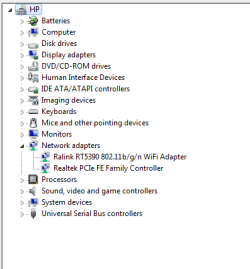
Post screenshot of device manager->network
 

My Computer

Computer type
Laptop
Computer Manufacturer/Model Number
ACER ASPIRE 5742G
OS
Microsoft Windows 7 Home Premium 64-bits 7601 Multiprocessor Free Service Pack 1
CPU
Intel(R) Core(TM) i3 CPU M 370 @ 2.40GHz
Motherboard
Acer Aspire 5742G
Memory
4,00 GB
Graphics Card(s)
ATI Mobility Radeon HD 5400 Series
Sound Card
(1) AMD High Definition Audio Device (2) Realtek High Defi
Screen Resolution
1366 x 768 x 32 bits (4294967296 colors) @ 60 Hz
Hard Drives
WDC WD5000BEVT-22ZAT0
Sorry I'll clarify. I didn't buy a new card, I simply took the old one out and put it back in. I then went to to the Ralink website after noticing the error and installed the appropriate driver. Did an uninstall, re-install, and the uninstall and since then have had my Wifi back.

Here's a picture of the device manager.

Device_Manager2.PNG
 

My Computer

Computer type
Laptop
Computer Manufacturer/Model Number
HP G6-1b79dx
OS
Windows 7 x64
Antivirus
Avast
Browser
Chrome
That is great news well done ... And many thanks to Kaktussoft for his input in this Post ..
 

My Computer

Computer Manufacturer/Model Number
W530-3630QM1
OS
windows 7 home 64bit
CPU
INTEL-CORE I7
Memory
16GB
Hard Drives
750GB
Browser
Chrome
Thanks again for all the help!

But once again, issues arise. So while it stays connected, sometimes the network goes bad and then I get the yellow error message. To fix I uninstall, re install driver that actually deletes the driver?, and then it works again. Any thoughts? It's getting annoying constantly re installing drivers three times a day.
 

My Computer

Computer type
Laptop
Computer Manufacturer/Model Number
HP G6-1b79dx
OS
Windows 7 x64
Antivirus
Avast
Browser
Chrome
Thanks again for all the help!

But once again, issues arise. So while it stays connected, sometimes the network goes bad and then I get the yellow error message. To fix I uninstall, re install driver that actually deletes the driver?, and then it works again. Any thoughts? It's getting annoying constantly re installing drivers three times a day.
What is the error in device manager?

"I get the yellow error message"=> you mean in device manager?

A simple reboot fixes the problem as well?
 

My Computer

Computer type
Laptop
Computer Manufacturer/Model Number
ACER ASPIRE 5742G
OS
Microsoft Windows 7 Home Premium 64-bits 7601 Multiprocessor Free Service Pack 1
CPU
Intel(R) Core(TM) i3 CPU M 370 @ 2.40GHz
Motherboard
Acer Aspire 5742G
Memory
4,00 GB
Graphics Card(s)
ATI Mobility Radeon HD 5400 Series
Sound Card
(1) AMD High Definition Audio Device (2) Realtek High Defi
Screen Resolution
1366 x 768 x 32 bits (4294967296 colors) @ 60 Hz
Hard Drives
WDC WD5000BEVT-22ZAT0
Back
Top