
Wifi continuously drops connectivity

stars1234

New member
Member
Local time
1:07 PM
Messages
29
Win7 home 64bit on Gateway laptop.
My laptop Wifi keeps dropping.
InSSider shows the beacon signal strength of my router, -25dB; well above other networks near me, at -80dB.
My router is the only broadcaster on its channel.
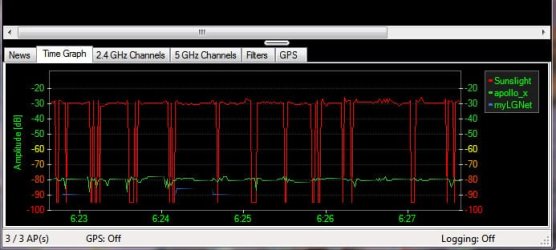
InSSider shows receiving the signal at -25 dB, but then drops down to -95dB (which is complete loss) then back up. It may be up for three or four seconds or only a second before dropping. The up/down is continuous.
Control panel shows no warnings. Everything is installed correctly.
I power cycled the router as well as the modem, uninstalled/reinstalled the drivers for the wifi adapter. Installed newer wifi drivers.
I changed channels on the router.
Changed authentication type, then back to WPA2.
ipconfig release all /renew
SSID is not hidden.
Replaced the router and tried everything again.
--signal still up then down then up/down--changing routers gives same results.

Connectivity is constant with Ethernet (non-wireless) connection.

Last night, between 12 a.m and 6 a.m. the wifi signal was steady. No drop out at all. But after 6 the connection is never up for more than a few seconds before going down.
Unable to locate any potential interference--appliances that may have been off during the solid time.
On a different computer, the local network and wifi has good connectivity. InSSider shows the signal coming from the router to be steady, no drop out.

Any ideas?

Here is a screen shot of what InSSider shows. My wireless router connectivity is the red line. You can see its signal strength is strong, then drops to nothing, then back up and repeats. these cycles are happening within a minute. this is without anything trying access the network. When I try to access the internet (either through a program or through a browser), probably 45 times out of 50, as soon as I click on a link, the connection drops.
 

Attachments
  • router.jpg
    router.jpg
    33.1 KB · Views: 22
Last edited:

My Computer My Computer

Computer type
Laptop
Computer Manufacturer/Model Number
Gateway NV53A laptop
OS
Windows 7 Home Premium 64 bit, SP1
CPU
AMD phenom II X2
Memory
4 GB DDR 3
Graphics Card(s)
ATKI Mobility Radeo HD4250

My Computer My Computer

Computer type
PC/Desktop
Computer Manufacturer/Model Number
Home built
OS
Windows 7 Ult, Windows 8.1 Pro,
CPU
Q9650-4.275GHz, E8600 4.5GHz, E6750-3.8GHz
Motherboard
Evga 780i FTW
Memory
G.Skill PC2 9600 1200Mhz 5 5 5 15 2T
Graphics Card(s)
GTX480
Sound Card
Asus Xonar D2
Monitor(s) Displays
HannsG
Screen Resolution
1680X1050
Hard Drives
GSkill Phoenix Pro 120GB SSD
PSU
ThermalTake Toughpower 1000Watt modular
Case
ThermalTake XaserV
Cooling
Xigmatek S1283
Keyboard
Logitech G15
Mouse
Logitech G9
Internet Speed
T1
thanks! Finally, a reply. I had tried all those other things but forgot about safe mode. Guess what--the adapter is stable in safe mode, yay. Now to try and find the needle in the haystack. there are a zillion services running and security/system updates from MS. it shouldn't take me longer than five or six days to go through it all. but, at least, now there is a place to begin.
 

My Computer My Computer

Computer type
Laptop
Computer Manufacturer/Model Number
Gateway NV53A laptop
OS
Windows 7 Home Premium 64 bit, SP1
CPU
AMD phenom II X2
Memory
4 GB DDR 3
Graphics Card(s)
ATKI Mobility Radeo HD4250
thanks! Finally, a reply. I had tried all those other things but forgot about safe mode. Guess what--the adapter is stable in safe mode, yay. Now to try and find the needle in the haystack. there are a zillion services running and security/system updates from MS. it shouldn't take me longer than five or six days to go through it all. but, at least, now there is a place to begin.

It may help to open task manager to see what is running then turn off the ones that are using network resources, this should narrow it down pretty fast.
 

My Computer My Computer

Computer type
PC/Desktop
Computer Manufacturer/Model Number
Home built
OS
Windows 7 Ult, Windows 8.1 Pro,
CPU
Q9650-4.275GHz, E8600 4.5GHz, E6750-3.8GHz
Motherboard
Evga 780i FTW
Memory
G.Skill PC2 9600 1200Mhz 5 5 5 15 2T
Graphics Card(s)
GTX480
Sound Card
Asus Xonar D2
Monitor(s) Displays
HannsG
Screen Resolution
1680X1050
Hard Drives
GSkill Phoenix Pro 120GB SSD
PSU
ThermalTake Toughpower 1000Watt modular
Case
ThermalTake XaserV
Cooling
Xigmatek S1283
Keyboard
Logitech G15
Mouse
Logitech G9
Internet Speed
T1
thanks.
i spoke a little too soon. I checked safe mode late at night. InSSider showed the dropout to have stopped from the router and Win7 showed connectivity was fine. Those seem to be 2 separate issues. But the time of night was in play too. wee morning hours, connectivity is stable. This morning, 8 a.m. Safe mode is just as bad as normal mode.
I think though, the dropout from the router that InSSider shows on my Win7 is not a true reading, but may have something to with an OS oroblem or the wifi adapter going down? Reason-- on an XP system, InSSider shows No dropout from the router during the same time period & the XP machine retains wifi connectivity.

So, I still have the problem: Win7 system-- loses wifi connectivity several times a minute, InSSider shows dropout from the router (I believe this may be dropout because of the wifi adapter loses connectivity); during the same time period XP machine does not lose it's wifi, InSSider shows no dropout from the router. Safe Mode is the same as real mode. Ethernet LAN works fine both machines.
 
Last edited:

My Computer My Computer

Computer type
Laptop
Computer Manufacturer/Model Number
Gateway NV53A laptop
OS
Windows 7 Home Premium 64 bit, SP1
CPU
AMD phenom II X2
Memory
4 GB DDR 3
Graphics Card(s)
ATKI Mobility Radeo HD4250
Here's a screen shot I just took of the Win 7 box connectivity. If anything, the dropout seems to be worse than the screen shot from yesterday. The same graph on my XP box is steady at about -30bB. I suppose that means it is the link on the Win7 box that is failing and not the router? The two systems are within 5 feet of each other. the failure began a week ago. No changes or downloads had been made to the system immediately prior to things going wrong. It makes WiFi impossible on my Win7 system.
 

Attachments

  • router 2pm.jpg
    router 2pm.jpg
    47.4 KB · Views: 3

My Computer My Computer

Computer type
Laptop
Computer Manufacturer/Model Number
Gateway NV53A laptop
OS
Windows 7 Home Premium 64 bit, SP1
CPU
AMD phenom II X2
Memory
4 GB DDR 3
Graphics Card(s)
ATKI Mobility Radeo HD4250
Looking at Event Viewer, I see Critical Errors taking place every few seconds from
NlaSvc Event 4205
"Gateway resolution failed on interface {5d2edf99-9da0-425a-b616-544f408a87aa} for 192.168.1.1 with error: 0x43"
--The computer works to reestablish the connection. upon doing that, the connection drops and another Critical Event shows up
from the Dhcp-Client Event 1002
"The IP address lease 192.168.1.53 for the Network Card with network address 0xEC55F92283E2 has been denied by the DHCP server 192.168.1.1 (The DHCP Server sent a DHCPNACK message)."
 

My Computer My Computer

Computer type
Laptop
Computer Manufacturer/Model Number
Gateway NV53A laptop
OS
Windows 7 Home Premium 64 bit, SP1
CPU
AMD phenom II X2
Memory
4 GB DDR 3
Graphics Card(s)
ATKI Mobility Radeo HD4250
Out of frustration, I replaced the network adapter card (WiFi) in the computer. It made no difference. connectivity to the router still drops, several times a minute. I have replaced the router, the Wifi card. What does that leave? Mobo and soft/firm wear and/or configuration problems? Back to square one? What am I missing? -- reload the OS--I really do not want to do that.
 

My Computer My Computer

Computer type
Laptop
Computer Manufacturer/Model Number
Gateway NV53A laptop
OS
Windows 7 Home Premium 64 bit, SP1
CPU
AMD phenom II X2
Memory
4 GB DDR 3
Graphics Card(s)
ATKI Mobility Radeo HD4250
Out of frustration, I replaced the network adapter card (WiFi) in the computer. It made no difference. connectivity to the router still drops, several times a minute. I have replaced the router, the Wifi card. What does that leave? Mobo and soft/firm wear and/or configuration problems? Back to square one? What am I missing? -- reload the OS--I really do not want to do that.

It could be a virus or something else causing the problem. Have you run any virus scans?
 

My Computer My Computer

Computer type
PC/Desktop
Computer Manufacturer/Model Number
Home built
OS
Windows 7 Ult, Windows 8.1 Pro,
CPU
Q9650-4.275GHz, E8600 4.5GHz, E6750-3.8GHz
Motherboard
Evga 780i FTW
Memory
G.Skill PC2 9600 1200Mhz 5 5 5 15 2T
Graphics Card(s)
GTX480
Sound Card
Asus Xonar D2
Monitor(s) Displays
HannsG
Screen Resolution
1680X1050
Hard Drives
GSkill Phoenix Pro 120GB SSD
PSU
ThermalTake Toughpower 1000Watt modular
Case
ThermalTake XaserV
Cooling
Xigmatek S1283
Keyboard
Logitech G15
Mouse
Logitech G9
Internet Speed
T1
I did more virus and malware scans, live, boot time, root kits. Results were negative.
Last Friday, connectivity was impossible--not lasting more than 3 seconds. It was that way all day and night.
On Saturday, connectivity was stable! --nothing had changed, at least not with my system.
Sunday, back down again, but not as bad as Friday. Sunday night, system up all night.
--I do not know what is going on.
My network is in my house. All others around me are in houses.
I did notice that when I lose connectivity, one network near me is on. When I have connectivity, it is off.
Its level is 50dB below mine. That is where all in-range networks are compared to what my router is broadcasting.
Today, Monday, I have connectivity again and it is solid--not one noticed dropout.
Checking InSSider shows the network that is on when I have dropout is not broadcasting.

could it be the neighbor's network that is knocking me off? I don't see how that is possible unless it is putting out some kind of RF that is interfering. (we are not on the same channel--I am on 11, it is on 6.)
If it is the neighbor, I suppose there is not much I can do about it or even trace it to him.

Thanks for all the help in trying to figure this out.
 

My Computer My Computer

Computer type
Laptop
Computer Manufacturer/Model Number
Gateway NV53A laptop
OS
Windows 7 Home Premium 64 bit, SP1
CPU
AMD phenom II X2
Memory
4 GB DDR 3
Graphics Card(s)
ATKI Mobility Radeo HD4250
I did more virus and malware scans, live, boot time, root kits. Results were negative.
Last Friday, connectivity was impossible--not lasting more than 3 seconds. It was that way all day and night.
On Saturday, connectivity was stable! --nothing had changed, at least not with my system.
Sunday, back down again, but not as bad as Friday. Sunday night, system up all night.
--I do not know what is going on.
My network is in my house. All others around me are in houses.
I did notice that when I lose connectivity, one network near me is on. When I have connectivity, it is off.
Its level is 50dB below mine. That is where all in-range networks are compared to what my router is broadcasting.
Today, Monday, I have connectivity again and it is solid--not one noticed dropout.
Checking InSSider shows the network that is on when I have dropout is not broadcasting.

could it be the neighbor's network that is knocking me off? I don't see how that is possible unless it is putting out some kind of RF that is interfering. (we are not on the same channel--I am on 11, it is on 6.)
If it is the neighbor, I suppose there is not much I can do about it or even trace it to him.

Thanks for all the help in trying to figure this out.

If you can post the results of the InSSIDer read out maybe it will tell me more.
 

My Computer My Computer

Computer type
PC/Desktop
Computer Manufacturer/Model Number
Home built
OS
Windows 7 Ult, Windows 8.1 Pro,
CPU
Q9650-4.275GHz, E8600 4.5GHz, E6750-3.8GHz
Motherboard
Evga 780i FTW
Memory
G.Skill PC2 9600 1200Mhz 5 5 5 15 2T
Graphics Card(s)
GTX480
Sound Card
Asus Xonar D2
Monitor(s) Displays
HannsG
Screen Resolution
1680X1050
Hard Drives
GSkill Phoenix Pro 120GB SSD
PSU
ThermalTake Toughpower 1000Watt modular
Case
ThermalTake XaserV
Cooling
Xigmatek S1283
Keyboard
Logitech G15
Mouse
Logitech G9
Internet Speed
T1
Old thread... but I will post anyway. Your guy with the "netgear" that seams to appear and disappear when you are having the dissociation problems. Being as the "netgear" appears and disappears makes me wonder if it is not someone playing with a bit of arp poisoning. It could just be packet collision, but I find the particulars a little suspect. If the "netgear" has the same mac every time maybe you could disallow that mac:address on your router firewall and see if the problem does not resolve. It could be forcing a disconnect in order to sniff the packets on the reconnect. Obviously that is just hypothetical scenario. But you might look into that possibility. If it is the case, with the right software you should be able to see if anyone is directing packets with a disconnect command in them at your router or your machine.
I am also having allot of disassociation problems on my wireless setup. That is what brought me to this thread. If you figure it out before me please make sure to post the solution. In my case my access point also locks out all wifi occasionally which is a pain. Because my router is very remote from my connection and I can't always just walk or drive over there and reset it.
 

My Computer My Computer

Computer type
PC/Desktop
Computer Manufacturer/Model Number
Custom
OS
Win7 pro x64
CPU
Q8300 2.5ghz socket775
Motherboard
XFX750i
Memory
6gig Corsair XMS2
Graphics Card(s)
bleh, GT430 (originaly sli'd gt9500's)
Hard Drives
Many, Many hard drives
Antivirus
Currently-Avast
Browser
firefox
Back
Top