
You are using an out of date browser. It may not display this or other websites correctly.
You should upgrade or use an alternative browser.
You should upgrade or use an alternative browser.
WiFi stopped working randomly on custom PC
- Thread starter dannyjerome0
- Start date
- Local time
- 10:07 AM
- Messages
- 33
My Computer
At a glance
Windows 7 Home Premium 64bitIntel Core i5 2500k8GB DDR3 @ 1333MhzGTX 465 (2) in SLI
- OS
- Windows 7 Home Premium 64bit
- CPU
- Intel Core i5 2500k
- Motherboard
- Gigabyte GA-Z68XP-UD4
- Memory
- 8GB DDR3 @ 1333Mhz
- Graphics Card(s)
- GTX 465 (2) in SLI
- Sound Card
- Realtek Onboard HD Audio
- Screen Resolution
- 1920 x 1200
- Hard Drives
- Western Digital Caviar Black 1 TB
- PSU
- Corsair TX850
- Case
- Rosewill Challenger
- Cooling
- Thermaltake SpinQ CPU cooler
- Local time
- 10:07 AM
- Messages
- 33
What settings specifically would I need to change? I'm not that familiar with networking but I can navigate the router pretty easily due to all the trial and error I've gone through.
My Computer
At a glance
Windows 7 Home Premium 64bitIntel Core i5 2500k8GB DDR3 @ 1333MhzGTX 465 (2) in SLI
- OS
- Windows 7 Home Premium 64bit
- CPU
- Intel Core i5 2500k
- Motherboard
- Gigabyte GA-Z68XP-UD4
- Memory
- 8GB DDR3 @ 1333Mhz
- Graphics Card(s)
- GTX 465 (2) in SLI
- Sound Card
- Realtek Onboard HD Audio
- Screen Resolution
- 1920 x 1200
- Hard Drives
- Western Digital Caviar Black 1 TB
- PSU
- Corsair TX850
- Case
- Rosewill Challenger
- Cooling
- Thermaltake SpinQ CPU cooler

- Local time
- 9:07 AM
- Messages
- 265
At the DHCP you should change the following (mind you , the wording may be a bit different):
IP pool Starting Address: 192.168.1.100
Netmask (if applicable): 255.255.255.0
Size of Pool: 50
DNS1: 75.75.76.76
DNS2: 75.75.75.75
You may also want to disable DHCP for IPv6, just to be on the safe side.
And make sure that all your computers' network adapters are set to automatically get IP addresses.
IP pool Starting Address: 192.168.1.100
Netmask (if applicable): 255.255.255.0
Size of Pool: 50
DNS1: 75.75.76.76
DNS2: 75.75.75.75
You may also want to disable DHCP for IPv6, just to be on the safe side.
And make sure that all your computers' network adapters are set to automatically get IP addresses.
My Computer
At a glance
Windows 7 Pro
- Computer type
- PC/Desktop
- OS
- Windows 7 Pro
- Local time
- 10:07 AM
- Messages
- 33
At the DHCP you should change the following (mind you , the wording may be a bit different):
IP pool Starting Address: 192.168.1.100
Netmask (if applicable): 255.255.255.0
Size of Pool: 50
DNS1: 75.75.76.76
DNS2: 75.75.75.75
You may also want to disable DHCP for IPv6, just to be on the safe side.
And make sure that all your computers' network adapters are set to automatically get IP addresses.
Here are all the settings I can change:
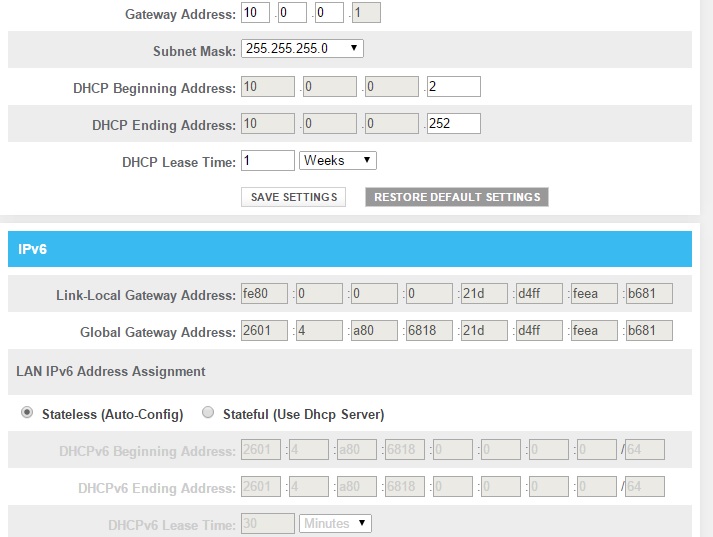
Above is under Local IP Network. When I go to XFINITY Network there are no settings that I can change. When I go to WiFi I can change key and security info.
My Computer
At a glance
Windows 7 Home Premium 64bitIntel Core i5 2500k8GB DDR3 @ 1333MhzGTX 465 (2) in SLI
- OS
- Windows 7 Home Premium 64bit
- CPU
- Intel Core i5 2500k
- Motherboard
- Gigabyte GA-Z68XP-UD4
- Memory
- 8GB DDR3 @ 1333Mhz
- Graphics Card(s)
- GTX 465 (2) in SLI
- Sound Card
- Realtek Onboard HD Audio
- Screen Resolution
- 1920 x 1200
- Hard Drives
- Western Digital Caviar Black 1 TB
- PSU
- Corsair TX850
- Case
- Rosewill Challenger
- Cooling
- Thermaltake SpinQ CPU cooler
- Local time
- 9:07 AM
- Messages
- 265
OK,
set the Default Gateway address to 192.168.1.1
leave subnet mask as is
DHCP beginning address at 192.168.1.100
DHCP ending address at 192.168.1.150
we are going to leave IPv6 as it is, but on your computer's wireless adapter settings - uncheck IPv6.
After this is done - unplug your wireless USB adapter and then plug it back in.
set the Default Gateway address to 192.168.1.1
leave subnet mask as is
DHCP beginning address at 192.168.1.100
DHCP ending address at 192.168.1.150
we are going to leave IPv6 as it is, but on your computer's wireless adapter settings - uncheck IPv6.
After this is done - unplug your wireless USB adapter and then plug it back in.
My Computer
At a glance
Windows 7 Pro
- Computer type
- PC/Desktop
- OS
- Windows 7 Pro
- Local time
- 10:07 AM
- Messages
- 33
OK,
set the Default Gateway address to 192.168.1.1
leave subnet mask as is
DHCP beginning address at 192.168.1.100
DHCP ending address at 192.168.1.150
we are going to leave IPv6 as it is, but on your computer's wireless adapter settings - uncheck IPv6.
After this is done - unplug your wireless USB adapter and then plug it back in.
Okay, I will do this. I'm at work all day so I won't respond for another 8 hours or so. Thanks in advance for all your help!
My Computer
At a glance
Windows 7 Home Premium 64bitIntel Core i5 2500k8GB DDR3 @ 1333MhzGTX 465 (2) in SLI
- OS
- Windows 7 Home Premium 64bit
- CPU
- Intel Core i5 2500k
- Motherboard
- Gigabyte GA-Z68XP-UD4
- Memory
- 8GB DDR3 @ 1333Mhz
- Graphics Card(s)
- GTX 465 (2) in SLI
- Sound Card
- Realtek Onboard HD Audio
- Screen Resolution
- 1920 x 1200
- Hard Drives
- Western Digital Caviar Black 1 TB
- PSU
- Corsair TX850
- Case
- Rosewill Challenger
- Cooling
- Thermaltake SpinQ CPU cooler
- Local time
- 10:07 AM
- Messages
- 33
OK,
set the Default Gateway address to 192.168.1.1
leave subnet mask as is
DHCP beginning address at 192.168.1.100
DHCP ending address at 192.168.1.150
we are going to leave IPv6 as it is, but on your computer's wireless adapter settings - uncheck IPv6.
After this is done - unplug your wireless USB adapter and then plug it back in.
I think this worked! I have no idea why or how my WiFi stopped working out of nowhere, but so far I've run several Speedtests and my download speed is always around 25 - 30mbps! (I just noticed that I was simultaneously downloading Windows updates after the fresh install) I will update if this changes but so far so good. Thanks a bunch!

My Computer
At a glance
Windows 7 Home Premium 64bitIntel Core i5 2500k8GB DDR3 @ 1333MhzGTX 465 (2) in SLI
- OS
- Windows 7 Home Premium 64bit
- CPU
- Intel Core i5 2500k
- Motherboard
- Gigabyte GA-Z68XP-UD4
- Memory
- 8GB DDR3 @ 1333Mhz
- Graphics Card(s)
- GTX 465 (2) in SLI
- Sound Card
- Realtek Onboard HD Audio
- Screen Resolution
- 1920 x 1200
- Hard Drives
- Western Digital Caviar Black 1 TB
- PSU
- Corsair TX850
- Case
- Rosewill Challenger
- Cooling
- Thermaltake SpinQ CPU cooler
- Local time
- 10:07 AM
- Messages
- 33
I regret to say that it appears to be not working still. 
For some reason, it was working great last night. Today, I can barely do anything. Steam will not login, websites intermittently work and stop working. Baffled. Speedtest results go from 40mbps to 0.01mbps and everything in between.
For some reason, it was working great last night. Today, I can barely do anything. Steam will not login, websites intermittently work and stop working. Baffled. Speedtest results go from 40mbps to 0.01mbps and everything in between.
My Computer
At a glance
Windows 7 Home Premium 64bitIntel Core i5 2500k8GB DDR3 @ 1333MhzGTX 465 (2) in SLI
- OS
- Windows 7 Home Premium 64bit
- CPU
- Intel Core i5 2500k
- Motherboard
- Gigabyte GA-Z68XP-UD4
- Memory
- 8GB DDR3 @ 1333Mhz
- Graphics Card(s)
- GTX 465 (2) in SLI
- Sound Card
- Realtek Onboard HD Audio
- Screen Resolution
- 1920 x 1200
- Hard Drives
- Western Digital Caviar Black 1 TB
- PSU
- Corsair TX850
- Case
- Rosewill Challenger
- Cooling
- Thermaltake SpinQ CPU cooler
- Local time
- 10:07 AM
- Messages
- 33
Bummer
Did you uncheck the IPv6 on your network adapter?
Yes I did.
My Computer
At a glance
Windows 7 Home Premium 64bitIntel Core i5 2500k8GB DDR3 @ 1333MhzGTX 465 (2) in SLI
- OS
- Windows 7 Home Premium 64bit
- CPU
- Intel Core i5 2500k
- Motherboard
- Gigabyte GA-Z68XP-UD4
- Memory
- 8GB DDR3 @ 1333Mhz
- Graphics Card(s)
- GTX 465 (2) in SLI
- Sound Card
- Realtek Onboard HD Audio
- Screen Resolution
- 1920 x 1200
- Hard Drives
- Western Digital Caviar Black 1 TB
- PSU
- Corsair TX850
- Case
- Rosewill Challenger
- Cooling
- Thermaltake SpinQ CPU cooler
- Local time
- 10:07 AM
- Messages
- 33
Yep, everything is still the same.
My Computer
At a glance
Windows 7 Home Premium 64bitIntel Core i5 2500k8GB DDR3 @ 1333MhzGTX 465 (2) in SLI
- OS
- Windows 7 Home Premium 64bit
- CPU
- Intel Core i5 2500k
- Motherboard
- Gigabyte GA-Z68XP-UD4
- Memory
- 8GB DDR3 @ 1333Mhz
- Graphics Card(s)
- GTX 465 (2) in SLI
- Sound Card
- Realtek Onboard HD Audio
- Screen Resolution
- 1920 x 1200
- Hard Drives
- Western Digital Caviar Black 1 TB
- PSU
- Corsair TX850
- Case
- Rosewill Challenger
- Cooling
- Thermaltake SpinQ CPU cooler
- Local time
- 9:07 AM
- Messages
- 265
OK, let's set a static IP on your computer. Open your network adapter's IPv4 settings and select "Use the following IP address" option, then enter:
IP: 192.168.1.50
Netmask: 255.255.255.0
Default Gateway 192.168.1.1
DNS1: 75.75.76.76
DNS2: 75.75.75.75
Let me know if there is a difference.
IP: 192.168.1.50
Netmask: 255.255.255.0
Default Gateway 192.168.1.1
DNS1: 75.75.76.76
DNS2: 75.75.75.75
Let me know if there is a difference.
My Computer
At a glance
Windows 7 Pro
- Computer type
- PC/Desktop
- OS
- Windows 7 Pro
- Local time
- 10:07 AM
- Messages
- 33
OK, let's set a static IP on your computer. Open your network adapter's IPv4 settings and select "Use the following IP address" option, then enter:
IP: 192.168.1.50
Netmask: 255.255.255.0
Default Gateway 192.168.1.1
DNS1: 75.75.76.76
DNS2: 75.75.75.75
Let me know if there is a difference.
Okay, I did that. I ran a Speedtest and got ~35mbps down. However, it started rapidly declining in successive tests again. Now, it's not working again. It always works for a couple of minutes, then poops out.
My Computer
At a glance
Windows 7 Home Premium 64bitIntel Core i5 2500k8GB DDR3 @ 1333MhzGTX 465 (2) in SLI
- OS
- Windows 7 Home Premium 64bit
- CPU
- Intel Core i5 2500k
- Motherboard
- Gigabyte GA-Z68XP-UD4
- Memory
- 8GB DDR3 @ 1333Mhz
- Graphics Card(s)
- GTX 465 (2) in SLI
- Sound Card
- Realtek Onboard HD Audio
- Screen Resolution
- 1920 x 1200
- Hard Drives
- Western Digital Caviar Black 1 TB
- PSU
- Corsair TX850
- Case
- Rosewill Challenger
- Cooling
- Thermaltake SpinQ CPU cooler
- Local time
- 9:07 AM
- Messages
- 265
Annoying 
Let's try something else. Unplug your wireless adapter, go to Device Manager and uninstall the wireless adapter drivers. Restart the computer, then plug in the adapter, without installing the vendor's drivers, just let windows install the generic ones. Test and report.
Let's try something else. Unplug your wireless adapter, go to Device Manager and uninstall the wireless adapter drivers. Restart the computer, then plug in the adapter, without installing the vendor's drivers, just let windows install the generic ones. Test and report.
My Computer
At a glance
Windows 7 Pro
- Computer type
- PC/Desktop
- OS
- Windows 7 Pro
- Local time
- 10:07 AM
- Messages
- 33
Yeah, Windows cannot find a driver. I tried checking automatic update and it still can't find a driver. I even let it browse my Windows installation disc and it could not find a driver.
My Computer
At a glance
Windows 7 Home Premium 64bitIntel Core i5 2500k8GB DDR3 @ 1333MhzGTX 465 (2) in SLI
- OS
- Windows 7 Home Premium 64bit
- CPU
- Intel Core i5 2500k
- Motherboard
- Gigabyte GA-Z68XP-UD4
- Memory
- 8GB DDR3 @ 1333Mhz
- Graphics Card(s)
- GTX 465 (2) in SLI
- Sound Card
- Realtek Onboard HD Audio
- Screen Resolution
- 1920 x 1200
- Hard Drives
- Western Digital Caviar Black 1 TB
- PSU
- Corsair TX850
- Case
- Rosewill Challenger
- Cooling
- Thermaltake SpinQ CPU cooler
Similar threads
- Replies
- 8
- Views
- 3K
- Replies
- 2
- Views
- 3K

- Replies
- 2
- Views
- 4K
- Replies
- 15
- Views
- 44K
