Wiindows 7 64 bit High CPU Usage and stuttering

Everfader

New member
Local time
5:16 PM
Messages
15
I recently installed windows 64 bit on my computer, it installed fine but I am getting this extremely high cpu usage for no reason, even games really stutter. So I got all of the updates and disables mscorsvw.exe , disable the windows media player network sharing service and the HD audio controller which worked for some people but it has not done anything unfortunatly. My specs are 500w power supply which is bronze certified which has one amp on the 12v rail. an lenovo a55 8985 with a Core 2 duo E6300 1.86 ghz 4gb or ddr2 ram, an evga 8800gts 512 video card.

I even tried installed a 32bit version of windows 7 but I get the exact same problem , windows xp works though.

Is there anything I could do ?
 

My Computer My Computer

Computer type
PC/Desktop
Computer Manufacturer/Model Number
Lenovo a55 8985
OS
Windows 7 64 bit
CPU
Intel Core 2 Duo E6300 1.86ghz
Memory
4gb ddr2
Graphics Card(s)
Nvidia 8800gts 512 EVGA
Antivirus
Vipre
Browser
Google Chrome
I recently installed windows 64 bit on my computer, it installed fine but I am getting this extremely high cpu usage for no reason, even games really stutter. So I got all of the updates and disables mscorsvw.exe , disable the windows media player network sharing service and the HD audio controller which worked for some people but it has not done anything unfortunatly. My specs are 500w power supply which is bronze certified which has one amp on the 12v rail. an lenovo a55 8985 with a Core 2 duo E6300 1.86 ghz 4gb or ddr2 ram, an evga 8800gts 512 video card.

I even tried installed a 32bit version of windows 7 but I get the exact same problem , windows xp works though.

Is there anything I could do ?

Your post makes no mention of any attempt to determine what is using the resources. See if the following helps;

http://www.sevenforums.com/performa...i-find-out-what-program-using-all-my-cpu.html

HTH
 

My Computer My Computer

Computer type
PC/Desktop
Computer Manufacturer/Model Number
Custom Built
OS
Windows 7 Professional x64
CPU
Intel i5 quad processor
Motherboard
DP67BG
Memory
16 GB
Graphics Card(s)
Radeon HD 5770
Sound Card
Realtek High Definition Audio
Monitor(s) Displays
Samsung SyncMaster
Screen Resolution
1920X1080
Hard Drives
WD 2TB (SATA Internal)
WD 1TB (USB External)
PSU
Corsair GS800
Case
Tower (Generic)
Cooling
3 Internal Fans
Keyboard
MS Wireless
Mouse
MS Optical Wired
Internet Speed
54 mbps
Antivirus
Emsisoft
Browser
IE-Version 9, Palemoon-Version 24.2.0
I recently installed windows 64 bit on my computer, it installed fine but I am getting this extremely high cpu usage for no reason, even games really stutter. So I got all of the updates and disables mscorsvw.exe , disable the windows media player network sharing service and the HD audio controller which worked for some people but it has not done anything unfortunatly. My specs are 500w power supply which is bronze certified which has one amp on the 12v rail. an lenovo a55 8985 with a Core 2 duo E6300 1.86 ghz 4gb or ddr2 ram, an evga 8800gts 512 video card.

I even tried installed a 32bit version of windows 7 but I get the exact same problem , windows xp works though.

Is there anything I could do ?

Your post makes no mention of any attempt to determine what is using the resources. See if the following helps;

http://www.sevenforums.com/performa...i-find-out-what-program-using-all-my-cpu.html

HTH

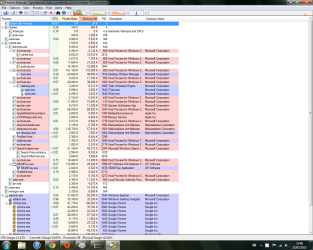
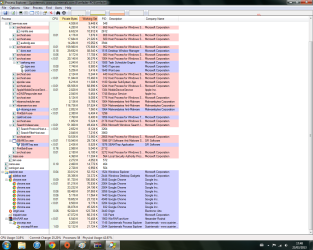
hey thanks for the reply here is an image of process explorer Sorry I am a noob
 

My Computer My Computer

Computer type
PC/Desktop
Computer Manufacturer/Model Number
Lenovo a55 8985
OS
Windows 7 64 bit
CPU
Intel Core 2 Duo E6300 1.86ghz
Memory
4gb ddr2
Graphics Card(s)
Nvidia 8800gts 512 EVGA
Antivirus
Vipre
Browser
Google Chrome
Is it me or does anyone else not see any image posted:geek: Everfader, I think you may have forgotten to add the image / screencap of your task manager. If you don't know how show us the pic, you can use a place like imgur.com to host your image and copy the link over here :)
 

My Computer My Computer

Computer type
PC/Desktop
Computer Manufacturer/Model Number
Custom Build
OS
Windows 7 Ultimate x64
CPU
FX 8350 @ 4.8ghz, turbo clocked to 5.4ghz
Motherboard
Asus Sabertooth FX990 Gen 3.0 R2.0
Memory
Mushkin Enhanced Blackline 16GB 1760mhz 10-10-9-24 T1
Graphics Card(s)
Gigabyte-660 Windforce OC- GPU Clock 1212MHz /3504MHz ram
Sound Card
Creative Sound Blaster Recon3D PCIe Sound Card
Monitor(s) Displays
Samsung SyncMaster S27B350H (HDMI)
Screen Resolution
1920x1080 60HZ
Hard Drives
1 x SSD Crucial M4 256GB (Primary OS)
3 x HDD WD 1TB
4 x HDD 2TB
1 x HDD 160GB (Secondary Backup OS)
Raid SATA III 6GB/s 4-port PCI-e Controller Card, Marvel 88SE9215 chipset
PSU
Chieftec-650-14CS (Modular) 80 Plus Gold-650 Watt
Case
Akasa Venom Toxic Gaming Big tower ( Custom Black ) Ver 2.0
Cooling
Water 2.0 PRO / GEIL Cyclone VRM / 6x120mm 2x220mm 2x140mm
Keyboard
Logitech G19
Mouse
Wireless Notebook Presenter Mouse 8000
Internet Speed
Fiber GBS
Antivirus
Don't Announce it to the world :)
Browser
Gotta have at least 1!

My Computer My Computer

Computer type
PC/Desktop
Computer Manufacturer/Model Number
Home made Desktop
OS
Windows 10 Pro. 64/ version 1709 Windows 7 Pro/64
CPU
Intel i7-6800K @ 4.3
Motherboard
ASUS X-99 Deluxe II
Memory
Corsair Platinum 16 gig @2400
Graphics Card(s)
EVGA GTX 1070 OC
Monitor(s) Displays
Asus 27" LED LCD/VE278Q
Screen Resolution
1920-1080 or 1280-720 HDMI
Hard Drives
INTEL SSD 730-240 Gb Sata 3.0/
PSU
EVGA Platium 1200W
Case
Phanteks Luxe Tempered Glass 8 fans/ one radiator
Cooling
XSPC/ Water Cooled CPU
Keyboard
Das 4 Professional
Mouse
Logitech M705/MX Anywhere 2-S
Internet Speed
100 mbits
Antivirus
Microsoft Security Essentials/ Malwarebytes Premium 3.0/ SAS
Browser
I.E. 11 default/Firefox/ ISP Time Warner Cable/Spectrum
Other Info
LG BluRay Burner/
Sound system-KLipsch-THX/
Icy Dock ssd Hot Swap bays.

Attachments

  • Processexplorer1.png
    Processexplorer1.png
    81.9 KB · Views: 18

My Computer My Computer

Computer type
PC/Desktop
Computer Manufacturer/Model Number
Lenovo a55 8985
OS
Windows 7 64 bit
CPU
Intel Core 2 Duo E6300 1.86ghz
Memory
4gb ddr2
Graphics Card(s)
Nvidia 8800gts 512 EVGA
Antivirus
Vipre
Browser
Google Chrome
I have googled some more for you and came across this solution, maybe you could see if this helps you any? *I have solved this, IDE ATA/ATAPI driver problem. A loose SATA connection caused the HDD driver to revert to slowest mode: PIO. I went to control panel> system> Hardware >device manager and looked at the properties of eachIDE channel under advanced settings. The second Primary IDE channel had "PIO only" under Current Transfer Mode. I uninstalled the driver and rebooted. Windows XP automatically repaired the driver and set it to Ultra DMA mode 6, and the problem was solved.*

Also, sorry Layback bear :(
 

My Computer My Computer

Computer type
PC/Desktop
Computer Manufacturer/Model Number
Custom Build
OS
Windows 7 Ultimate x64
CPU
FX 8350 @ 4.8ghz, turbo clocked to 5.4ghz
Motherboard
Asus Sabertooth FX990 Gen 3.0 R2.0
Memory
Mushkin Enhanced Blackline 16GB 1760mhz 10-10-9-24 T1
Graphics Card(s)
Gigabyte-660 Windforce OC- GPU Clock 1212MHz /3504MHz ram
Sound Card
Creative Sound Blaster Recon3D PCIe Sound Card
Monitor(s) Displays
Samsung SyncMaster S27B350H (HDMI)
Screen Resolution
1920x1080 60HZ
Hard Drives
1 x SSD Crucial M4 256GB (Primary OS)
3 x HDD WD 1TB
4 x HDD 2TB
1 x HDD 160GB (Secondary Backup OS)
Raid SATA III 6GB/s 4-port PCI-e Controller Card, Marvel 88SE9215 chipset
PSU
Chieftec-650-14CS (Modular) 80 Plus Gold-650 Watt
Case
Akasa Venom Toxic Gaming Big tower ( Custom Black ) Ver 2.0
Cooling
Water 2.0 PRO / GEIL Cyclone VRM / 6x120mm 2x220mm 2x140mm
Keyboard
Logitech G19
Mouse
Wireless Notebook Presenter Mouse 8000
Internet Speed
Fiber GBS
Antivirus
Don't Announce it to the world :)
Browser
Gotta have at least 1!
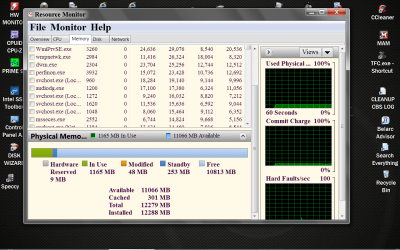
I would suggest starting with closing all those web pages. You are using a lot of Chrome and I.E.
Could you give us a picture of this before and after closing all the web use.
How often do you reboot your computer?

Resource Monitor RAM.PNG
 

My Computer My Computer

Computer type
PC/Desktop
Computer Manufacturer/Model Number
Home made Desktop
OS
Windows 10 Pro. 64/ version 1709 Windows 7 Pro/64
CPU
Intel i7-6800K @ 4.3
Motherboard
ASUS X-99 Deluxe II
Memory
Corsair Platinum 16 gig @2400
Graphics Card(s)
EVGA GTX 1070 OC
Monitor(s) Displays
Asus 27" LED LCD/VE278Q
Screen Resolution
1920-1080 or 1280-720 HDMI
Hard Drives
INTEL SSD 730-240 Gb Sata 3.0/
PSU
EVGA Platium 1200W
Case
Phanteks Luxe Tempered Glass 8 fans/ one radiator
Cooling
XSPC/ Water Cooled CPU
Keyboard
Das 4 Professional
Mouse
Logitech M705/MX Anywhere 2-S
Internet Speed
100 mbits
Antivirus
Microsoft Security Essentials/ Malwarebytes Premium 3.0/ SAS
Browser
I.E. 11 default/Firefox/ ISP Time Warner Cable/Spectrum
Other Info
LG BluRay Burner/
Sound system-KLipsch-THX/
Icy Dock ssd Hot Swap bays.
Could it be indexing?
 

My Computer My Computer

Computer type
PC/Desktop
OS
Windows 7 Home Premium 64bit

My Computer My Computer

Computer type
PC/Desktop
Computer Manufacturer/Model Number
Home made Desktop
OS
Windows 10 Pro. 64/ version 1709 Windows 7 Pro/64
CPU
Intel i7-6800K @ 4.3
Motherboard
ASUS X-99 Deluxe II
Memory
Corsair Platinum 16 gig @2400
Graphics Card(s)
EVGA GTX 1070 OC
Monitor(s) Displays
Asus 27" LED LCD/VE278Q
Screen Resolution
1920-1080 or 1280-720 HDMI
Hard Drives
INTEL SSD 730-240 Gb Sata 3.0/
PSU
EVGA Platium 1200W
Case
Phanteks Luxe Tempered Glass 8 fans/ one radiator
Cooling
XSPC/ Water Cooled CPU
Keyboard
Das 4 Professional
Mouse
Logitech M705/MX Anywhere 2-S
Internet Speed
100 mbits
Antivirus
Microsoft Security Essentials/ Malwarebytes Premium 3.0/ SAS
Browser
I.E. 11 default/Firefox/ ISP Time Warner Cable/Spectrum
Other Info
LG BluRay Burner/
Sound system-KLipsch-THX/
Icy Dock ssd Hot Swap bays.

My Computer My Computer

Computer type
PC/Desktop
Computer Manufacturer/Model Number
Custom Built
OS
Windows 7 Professional x64
CPU
Intel i5 quad processor
Motherboard
DP67BG
Memory
16 GB
Graphics Card(s)
Radeon HD 5770
Sound Card
Realtek High Definition Audio
Monitor(s) Displays
Samsung SyncMaster
Screen Resolution
1920X1080
Hard Drives
WD 2TB (SATA Internal)
WD 1TB (USB External)
PSU
Corsair GS800
Case
Tower (Generic)
Cooling
3 Internal Fans
Keyboard
MS Wireless
Mouse
MS Optical Wired
Internet Speed
54 mbps
Antivirus
Emsisoft
Browser
IE-Version 9, Palemoon-Version 24.2.0
Thank you Sir George. I didn't know that. Good information.
 

My Computer My Computer

Computer type
PC/Desktop
Computer Manufacturer/Model Number
Home made Desktop
OS
Windows 10 Pro. 64/ version 1709 Windows 7 Pro/64
CPU
Intel i7-6800K @ 4.3
Motherboard
ASUS X-99 Deluxe II
Memory
Corsair Platinum 16 gig @2400
Graphics Card(s)
EVGA GTX 1070 OC
Monitor(s) Displays
Asus 27" LED LCD/VE278Q
Screen Resolution
1920-1080 or 1280-720 HDMI
Hard Drives
INTEL SSD 730-240 Gb Sata 3.0/
PSU
EVGA Platium 1200W
Case
Phanteks Luxe Tempered Glass 8 fans/ one radiator
Cooling
XSPC/ Water Cooled CPU
Keyboard
Das 4 Professional
Mouse
Logitech M705/MX Anywhere 2-S
Internet Speed
100 mbits
Antivirus
Microsoft Security Essentials/ Malwarebytes Premium 3.0/ SAS
Browser
I.E. 11 default/Firefox/ ISP Time Warner Cable/Spectrum
Other Info
LG BluRay Burner/
Sound system-KLipsch-THX/
Icy Dock ssd Hot Swap bays.
Indexing should only be occurring when the computer is on with low usage. Unless the user has asked Windows 7 to rebuild the index.

I did notice that GFI anti malware and Malwarebytes Anti Malware are both running.

This will help. Pay close attendsion to #7 & 8

http://www.sevenforums.com/tutorials/11728-optimize-windows-7-a.htmlhttp://www.sevenforums.com/tutorials/11728-optimize-windows-7-a.html


I thought Malwarebytes was okay to run in conjunction with an AV? Maybe exclude each program's folders in the other's scan option?
 

My Computer My Computer

Computer type
PC/Desktop
OS
Windows 7 Home Premium 64bit
I have googled some more for you and came across this solution, maybe you could see if this helps you any? *I have solved this, IDE ATA/ATAPI driver problem. A loose SATA connection caused the HDD driver to revert to slowest mode: PIO. I went to control panel> system> Hardware >device manager and looked at the properties of eachIDE channel under advanced settings. The second Primary IDE channel had "PIO only" under Current Transfer Mode. I uninstalled the driver and rebooted. Windows XP automatically repaired the driver and set it to Ultra DMA mode 6, and the problem was solved.*

Also, sorry Layback bear :([/QUOTE

I gave it a shot and all of the modes were listed as ultra mode 6,5,2 there was no pio but on of the channels showed no mode, Maybe I needed a driver

Anyway could you check my specs and could it be that my cpu is bottlenecking my system thanks for all of your help :D
 

My Computer My Computer

Computer type
PC/Desktop
Computer Manufacturer/Model Number
Lenovo a55 8985
OS
Windows 7 64 bit
CPU
Intel Core 2 Duo E6300 1.86ghz
Memory
4gb ddr2
Graphics Card(s)
Nvidia 8800gts 512 EVGA
Antivirus
Vipre
Browser
Google Chrome
It is just that I have tried alot of things like I said in the first post the same thing also happens with 32 bit of windows 7 but xp works dunno...
 

My Computer My Computer

Computer type
PC/Desktop
Computer Manufacturer/Model Number
Lenovo a55 8985
OS
Windows 7 64 bit
CPU
Intel Core 2 Duo E6300 1.86ghz
Memory
4gb ddr2
Graphics Card(s)
Nvidia 8800gts 512 EVGA
Antivirus
Vipre
Browser
Google Chrome
GFI anti malware is only good if the owner of the computer has installed it. Their are some phony GFI Modules that get installed without the owner knowing it.
As far as I know MAM will run with most anti virus programs but their are so many anti virus programs it's hard to keep track of.

Now I think we need some input from the OP what has been tried and what has worked.
 

My Computer My Computer

Computer type
PC/Desktop
Computer Manufacturer/Model Number
Home made Desktop
OS
Windows 10 Pro. 64/ version 1709 Windows 7 Pro/64
CPU
Intel i7-6800K @ 4.3
Motherboard
ASUS X-99 Deluxe II
Memory
Corsair Platinum 16 gig @2400
Graphics Card(s)
EVGA GTX 1070 OC
Monitor(s) Displays
Asus 27" LED LCD/VE278Q
Screen Resolution
1920-1080 or 1280-720 HDMI
Hard Drives
INTEL SSD 730-240 Gb Sata 3.0/
PSU
EVGA Platium 1200W
Case
Phanteks Luxe Tempered Glass 8 fans/ one radiator
Cooling
XSPC/ Water Cooled CPU
Keyboard
Das 4 Professional
Mouse
Logitech M705/MX Anywhere 2-S
Internet Speed
100 mbits
Antivirus
Microsoft Security Essentials/ Malwarebytes Premium 3.0/ SAS
Browser
I.E. 11 default/Firefox/ ISP Time Warner Cable/Spectrum
Other Info
LG BluRay Burner/
Sound system-KLipsch-THX/
Icy Dock ssd Hot Swap bays.
I have look at you specs and they are limited but things can be done to help. Windows 7 need more ram than XP does.

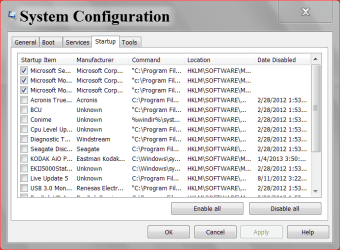
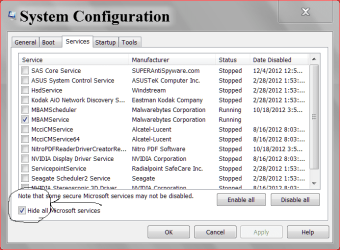
Could you post these. As per post #10
-------

This will help. Pay close attentions to #7 & 8

Optimize Windows 7
-------


msconfig Start UP.PNG

services msconfig.PNG
 

My Computer My Computer

Computer type
PC/Desktop
Computer Manufacturer/Model Number
Home made Desktop
OS
Windows 10 Pro. 64/ version 1709 Windows 7 Pro/64
CPU
Intel i7-6800K @ 4.3
Motherboard
ASUS X-99 Deluxe II
Memory
Corsair Platinum 16 gig @2400
Graphics Card(s)
EVGA GTX 1070 OC
Monitor(s) Displays
Asus 27" LED LCD/VE278Q
Screen Resolution
1920-1080 or 1280-720 HDMI
Hard Drives
INTEL SSD 730-240 Gb Sata 3.0/
PSU
EVGA Platium 1200W
Case
Phanteks Luxe Tempered Glass 8 fans/ one radiator
Cooling
XSPC/ Water Cooled CPU
Keyboard
Das 4 Professional
Mouse
Logitech M705/MX Anywhere 2-S
Internet Speed
100 mbits
Antivirus
Microsoft Security Essentials/ Malwarebytes Premium 3.0/ SAS
Browser
I.E. 11 default/Firefox/ ISP Time Warner Cable/Spectrum
Other Info
LG BluRay Burner/
Sound system-KLipsch-THX/
Icy Dock ssd Hot Swap bays.
I tried turning off everything but still the same thing happens just have a look at my hardware specs at the top of my post and see if there is any problem
 

My Computer My Computer

Computer type
PC/Desktop
Computer Manufacturer/Model Number
Lenovo a55 8985
OS
Windows 7 64 bit
CPU
Intel Core 2 Duo E6300 1.86ghz
Memory
4gb ddr2
Graphics Card(s)
Nvidia 8800gts 512 EVGA
Antivirus
Vipre
Browser
Google Chrome
Please post the two pictures of your computer msconfig as the post above. (#17)

Have you read and understand all the things in in post #10 and #17?

Optimize Windows 7

As in post #17 I have seen your specs. No they will not set the world on fire but they will work.

Now let me know if you want new hardware or if you want the most you can get out of what you have now.
 

My Computer My Computer

Computer type
PC/Desktop
Computer Manufacturer/Model Number
Home made Desktop
OS
Windows 10 Pro. 64/ version 1709 Windows 7 Pro/64
CPU
Intel i7-6800K @ 4.3
Motherboard
ASUS X-99 Deluxe II
Memory
Corsair Platinum 16 gig @2400
Graphics Card(s)
EVGA GTX 1070 OC
Monitor(s) Displays
Asus 27" LED LCD/VE278Q
Screen Resolution
1920-1080 or 1280-720 HDMI
Hard Drives
INTEL SSD 730-240 Gb Sata 3.0/
PSU
EVGA Platium 1200W
Case
Phanteks Luxe Tempered Glass 8 fans/ one radiator
Cooling
XSPC/ Water Cooled CPU
Keyboard
Das 4 Professional
Mouse
Logitech M705/MX Anywhere 2-S
Internet Speed
100 mbits
Antivirus
Microsoft Security Essentials/ Malwarebytes Premium 3.0/ SAS
Browser
I.E. 11 default/Firefox/ ISP Time Warner Cable/Spectrum
Other Info
LG BluRay Burner/
Sound system-KLipsch-THX/
Icy Dock ssd Hot Swap bays.
There's a lot going on behind the scenes after a fresh install of Windows 7. Not only search indexing but also update checking/downloading, Disk Defragmentation and Prefetch/Superfetch file building. Running on minimum required hardware will take longer for Windows to "settle-in". I would give it a week to catch up. Longer if you don't have a high speed internet connection. Prefetch is updated on each re-boot so it would be wise to re-boot every day for a while if it's not your normal procedure.

Also, your CPU has two cores and no Hyper-Threading so everything will take longer. I would avoid programs like Chrome that require a lot of modules to run. Pick and choose your activities to keep the number of processes to a minimum.

Forgot to mention:
Increasing the pagefile size may help also. There's a point where the size of the pagefile gives reduced benefits but I would try 3x your memory or 12GB for a while.
 
Last edited:

My Computer My Computer

Computer type
PC/Desktop
Computer Manufacturer/Model Number
Built 2/11/2011
OS
Windows 7 Pro-x64
CPU
i7-2600 3.4GHz - 3.8GHz Turbo
Motherboard
Intel DH67BL-B3
Memory
8Gb - 2x4GB, Muskin 991770 PC3-1333
Graphics Card(s)
Integrated Intel HD 2000
Sound Card
Integrated Intel 10.1 HD, RealTek ALC892
Monitor(s) Displays
Asus LCD VH222H, Haier HL24XSL2a
Screen Resolution
1920x1080, 1920x1080
Hard Drives
Crucial SSD C300-128Gb,
Western Digital WD5002AALX - 500Gb,
Western Digital WD7501AALS - 750Gb
PSU
Seasonic 650W 80+ Gold Modular
Case
Rosewill Defender
Cooling
Stock CPU, Four 120mm case fans, PCH fan added
Keyboard
Logitech EX100 Y-RBH94 Wireless
Mouse
Logitech EX100 M-RCE95 Wireless
Internet Speed
3.0/1.5 Mbs
Antivirus
Microsoft Security Essentials
Browser
Microsoft Internet Explorer 11
Other Info
Antec Veris Premier-Multimedia IR Station,
Cyber Accoustics-3602 Speakers,
AFT XM-5U Card Reader,
Hauppauge TV-HVR-2250,
Sony LX300 USB Turntable
Back
Top