Will Your Games Run on Windows 7?

Airbot

----------------------
VIP
SF Team
Local time
3:01 PM
Messages
18,396
Will Windows 7 run your games? The short answer is, mostly, yes. We just spent the last week installing and running through 22 different games, of varying ages, going back as far as Quake II. We also ran some of the newest, hottest titles, including several using the Games for Window logo program, which is supposed to be a sort of "Good Housekeeping" seal for PC games. If the game has the Games for Windows logo, so the thinking goes, then it should at least install and run properly.
Before we dive in, though, a caveat. Windows 7 is a beta OS, so some of the glitches and problems we encountered may well be fixed. Still, some of the problems we ran into were surprising, to say the least. On the other hand, the majority of games did seem to run just fine.
Before we talk about specific game titles, we'll spend a little time checking out the new Games Explorer. The Games Explorer in Vista is a somewhat unfinished concept. Windows 7 improves on the Games Explorer in incremental but important ways, much as it improves on other aspects of Vista. We'll check out those improvements, as well as see just how well some of those new features work.

More..Will Your Games Run on Windows 7? - Gaming by ExtremeTech
 

My Computer

Computer type
PC/Desktop
Computer Manufacturer/Model Number
Airbot 2.0
OS
Windows 7 Ultimate x64 SP1
CPU
Core i7 920 (D0) @ 4Ghz, *26c idle *65c full load on air
Motherboard
Asus P6X58D Premium - Sata 6Gb/s - USB 3.0
Memory
12GB DDR3 Corsair Dominator -CMD12GX3M6A1600C8 at 1600MHz
Graphics Card(s)
Zotac Geforce GTX 770
Sound Card
ASUS Xonar D2X
Monitor(s) Displays
1 LG 24" Flatron W2453V-PF 1 Samsung 24" P2450H both 2ms RT
Screen Resolution
1920x1080@60hz
Hard Drives
1 Samsung 250GB 840 Evo SSD
1 OCZ Vertex2 180GB SSD
1 TB Samsung Spinpoint F1 7200RPM 32MB cache
2 500GB WD Caviar Blacks 7200RPM 32MB cache (WD5001AALS)

Pioneer DVD Burner DVR-S18M
PSU
Corsair HX1000W
Case
Cooler Master HAF 932
Cooling
Case Fans *3 230mm, *1 140mm/CPU - *Tuniq Tower 120 Extreme
Keyboard
Logitech Wireless MK700
Mouse
Logitech Wireless MK700
Internet Speed
DL 15 Mbps UL 0.98 Mbps
Antivirus
None
Browser
Firefox Nightly
Other Info
Processor-7.7 *RAM- 7.9 *Graphics-7.9 *Gaming Graphics- 7.9 *SSD- 7.8 W.E.I final score= 7.7
*Phone- LG Nexus 5
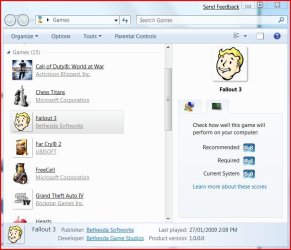
I don't know what they did wrong, but Fallout 3 does appear in the games explorer..... they should've come here for help ;)

gamesexplorer.JPG

Wouldn't bother me if it didn't though. I don't use the games explorer.
 

My Computer

Computer type
PC/Desktop
Computer Manufacturer/Model Number
Systems by SmartEyeball
OS
8 Pro x64
CPU
i7 3770K 4.6GHz
Motherboard
ASUS P8Z77 WS
Memory
16GB G.Skill Trident X 2666mhz
Graphics Card(s)
x2 EVGA 780 Ti Superclocked SLI
Sound Card
SB X-FI Surround 5.1 PRO USB / ATH-AD900 Headphones
Monitor(s) Displays
x3 Dell U2410 / 58" Samsung
Screen Resolution
5760*1200/ 1920*1200
Hard Drives
2x Intel 520 240GB (RAID 0) * 2x WD Caviar Blacks 2TB (RAID 0) * 2TB WD Caviar Black * Sony Optirac DVD
PSU
Silverstone Strider Evolution 1200W
Case
Thermaltake Level 10 GT Snow Edition
Cooling
Noctua NH-D14
Keyboard
Topre Realforce // Ducky Shine MX Black // Filco Ninja TKL
Mouse
Thermaltake Theron (Highly Recommended) + Razer Imperator
Antivirus
MSE
Browser
IE, FF, WaterFox
Other Info
GT Extreme V2 Sim Racing Cockpit + 40" LCD and K/B Mouse stand ▼
Fanatec CSR Elite Wheel + Clubsport V1 Pedals + CSR shifter/7G-H ▼Saitek X52 Pro ▼ TrackIR 5 Pro
Buttkicker v2 Seat Rumbler with Dedicated 5.1 and Sub Woofer attached to frame ▼
=
Bloody Big Grin
I just tried Far Cry 2 and Gta4 on my installation of windows 7, and all I can say is: holy crap! this OS has unleashed the power of my somewhat unbalanced system. I have an xfx 9800gt with 512 megs of ddr3, running on an amd 64x2 athlon 3800+ with 2 gigs of ddr2. This x-mas I was a bit disappointed when those 2 games ran kinda crappy on my new "super card". After trying them with windows 7, I could see just how much the 3800+ dual core was borderline for those games and that video card. Luckily this upgrade was just the thing to breathe some new life into my system, taking alot of weight off the cpu's with W7's lighter footprint and optimization (or whatever its called, call it magic if you want). I finally have these games playing in "mostly ultra"/highest res possible, with amazing framerates (super smooth, minimum of 30fps). and just think, they havent even finished smoothing things out. this OS is going to be the greatest ever when it hits the shelves, and as far as i'm concerned, it already is. If anyone is wondering if games will run as good or better than with vista, the answer is a definate YES. btw, i saw an article with 3d benchmark scores that showed otherwise on their testbeds, but after trying for myself, I had proof that in real life, those figures had nothing to do with whats really goin on. getting some games to run can be a bit quirky, but its worth it. this is the second generation of OS's "optimized for multi-core", making vista look like my gramma trying to dribble and slam dunk. if my 3800+ can do so well, imagine when i upgrade to a quad core running at least 10ghz.., my god , what a beautiful dream. one which will be a reality very soon. Muhahahahhhah. thanks microsoft for FINALLY getting it right!
 

My Computer

Computer Manufacturer/Model Number
Compaq
OS
windows 7
CPU
Amd Athlon 64 x2 3800+
Motherboard
Asus A8M2N-LA (NodusM3) micro-atx
Memory
2048MB
Graphics Card(s)
XFX 9800 GT 512MB DDR3
Sound Card
Realtek integrated
Monitor(s) Displays
Acer 19"
Screen Resolution
1280x1024
Hard Drives
Samsung SP2504C SCSI 250GB
PSU
El-Cheapo 480watt (Heden psx-a830)
Case
Compaq Presario
Cooling
Fan:Psu,Case,cpu,gpu Heatsink:cpu,gpu, chipset
Keyboard
compaq multimedia
Mouse
Microsoft intellimoose 5000 wireless
Internet Speed
8Mega adsl
Other Info
Wireless Tv-out, Wireless Headphones, Nvidia Pencil-holder/Clock/calendar/Rectal-Thermometer/Note-Pad.
Monopoly is N.G. on 64 bit

I can run my game, but cannot adjust the visual to not take up the entire screen, cutting off the toolbars, etc. Tried compatibility mode with no success either. :(
 

My Computer

OS
Windows 7
I can run my game, but cannot adjust the visual to not take up the entire screen, cutting off the toolbars, etc. Tried compatibility mode with no success either. :(

Me too. Shogun Total War does not work!
 

My Computer

Computer Manufacturer/Model Number
Gigabyte
OS
Windows 7 Ultimate x64
CPU
AMD Phenom II X4 965 3.4GHz Black Edition
Motherboard
GA-MA785GM-US2H v.1.1
Memory
16 GB DDR2 1066MHz
Graphics Card(s)
NVIDIA Geforce GTS 250 OC 1GB, NVIDIA Geforce 9400 GT 1GB OC
Sound Card
Realtek Intergrated
Monitor(s) Displays
17'' LCD High Quality LG Display
Screen Resolution
1280X1024
Hard Drives
1TB Seagate Baracuda
1TB Western Digital Green Power
2TB Western Digital
500GB Seagate
250GB Seagate
75GB Seagate
640GB WD
All of which are 7200.11RPM 32MB Cache; 3.0Gbps/6.0Gbps RAID or AHCI
PSU
1000W Power Supply Antec + Corsair HX1000W Dual PSUs
Case
Alienware Predator 7-Bay Full Tower 1.5 ATX Gaming Case
Cooling
Liquid Cooling
Keyboard
Microsoft Wireless Keyboard Comfort 4000
Mouse
Microsoft Wireless Mouse 6000 v2
Internet Speed
1000Mbps
Other Info
OC processor to 6.1GHz!!!
Processor Score 7.9; RAM 7.8; GPU 7.3; GPUPart2 7.2; HDD 6.1
Back
Top