
Solved win 10 upgrade forced on win 7 computer

Maxxwire

New member
Guru
Local time
1:34 AM
Messages
1,251
On 7-28-2015 Win 10 tried and failed to install on my win 7 computer as evidenced in WU installed updates log. This happened without my knowledge or my permission. Previously to this unwanted and unsolicited attempt to install I have either not installed or uninstalled every update that relates to the win 10 installation which have been posted here on the forum.
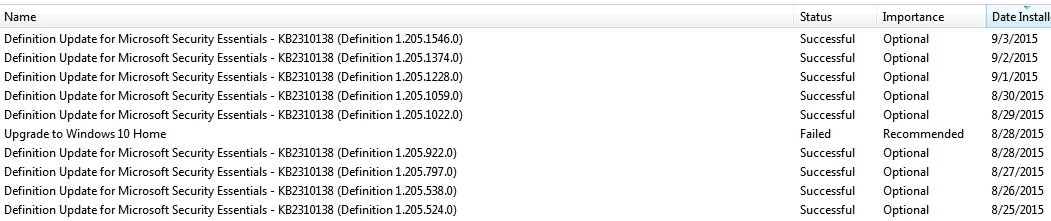
Win%2010%20Failed.jpg


At the root of my C drive there still exists a 3.91 GB file entitled $Windows.~BT which contains the win 10 installer.

I have 3 basic questions:

1) Should I be concerned that win 10 will make more unsolicited attempts to install in the future?

2) Will Win 10 ever be able to successfully install without the precursor updates installed?

3) Is there any safe way to remove the $Windows.~BT folder from taking up almost 4GB on my C drive or will MS simply replace it again without my permission?

Maxx
 
Last edited:

My Computer

Computer Manufacturer/Model Number
HP HPE 270f
OS
Windows 7 x64 Home Premium
CPU
Intel Core i7 930 @ 2.8 Ghz Socket 1366 LGA
Motherboard
Pegatron Truckee v1.04E41
Memory
8 GB 1366 Mhz DDR3 (PC3-10700) RAM
Graphics Card(s)
ATI Radeon 5770 1 GB DDR5 RAM
Sound Card
Realtech High Definition
Monitor(s) Displays
32" Sony Bravia
Screen Resolution
1366 X 768
Hard Drives
Intel 25nm 120 GB Series 320 SSD HD Tune- 265 MBps Read/ 130 MBps Write

LaCie 1TB + 1TB RAID 0 eSATA Drive HD Tune- 160 MBps Read/ 90 MBps Write
Keyboard
Logitech Illuminated
Mouse
Logitech MX Revolution
Internet Speed
36.4 Mbps Maximum on a 37 Mbps Motorola SB501 Modem
Thanks for the link Adams Seven, but months ago I had already followed the advice in that thread concerning uninstalling various updates related to the Win 10 'upgrade' to the letter which is why I am so fortunately posting this using Win 7 and not Win 10. I don't understand how MS can still attempt to force Win 10 on my Win 7 computer when I have not requested it and have tried my best to avoid it.

I am wondering if the $Windows.~BT Win 10 installation file can be used to make more attempts to try to install Win 10 on my Win 7 computer without my consent or will MS just give up after this initial failed attempt?

Maxx
 
Last edited:

My Computer

Computer Manufacturer/Model Number
HP HPE 270f
OS
Windows 7 x64 Home Premium
CPU
Intel Core i7 930 @ 2.8 Ghz Socket 1366 LGA
Motherboard
Pegatron Truckee v1.04E41
Memory
8 GB 1366 Mhz DDR3 (PC3-10700) RAM
Graphics Card(s)
ATI Radeon 5770 1 GB DDR5 RAM
Sound Card
Realtech High Definition
Monitor(s) Displays
32" Sony Bravia
Screen Resolution
1366 X 768
Hard Drives
Intel 25nm 120 GB Series 320 SSD HD Tune- 265 MBps Read/ 130 MBps Write

LaCie 1TB + 1TB RAID 0 eSATA Drive HD Tune- 160 MBps Read/ 90 MBps Write
Keyboard
Logitech Illuminated
Mouse
Logitech MX Revolution
Internet Speed
36.4 Mbps Maximum on a 37 Mbps Motorola SB501 Modem

My Computer

Computer type
PC/Desktop
Computer Manufacturer/Model Number
Custom assembled by me :}
OS
Win-7-Pro64bit 7-H-Prem-64bit
CPU
i7-5930K 2nd i9-9940x both water blocked VRM's too
Motherboard
ASUS SABERTOOTH X99 2nd ASUS x299 Apex
Memory
Trident-z 3200C14 2nd Trident-z 3600C16
Graphics Card(s)
EVGA 1080ti ftw3 2nd Titan Xp both water blocked
Sound Card
Built-in Realtek
Monitor(s) Displays
1-AOC G2460PG 24"G-Sync 144Hz/ 2nd 1-ASUS VG248QE 24" 144Hz
Screen Resolution
1920 x 1080 144Hz
Hard Drives
2-Samsung M.2 Evo & Evo Plus
2-Samsung 850 EVO 500GB SSD's/ 3-2.5 W.D. Black 1tb-&3-1tb/3-3.5 WD Black 1tb hdd's
PSU
EVGA SuperNOVA 1000-P2 2nd 1200-P2
Case
2-Corsair Obsidian Series 450D Black ATX Mid Tower
Cooling
Custom water loops
Keyboard
Logitech G710+/ 2nd Logitech G910
Mouse
2-RedDragon M901 Perdition 16400 dpi Gaming mouse = wired
Internet Speed
Comcast Ping 19ms 89.31mbps download speed 6.12mbps upload
Antivirus
Malwarebytes Pro/ Superantispyware Pro
Browser
FireFox & Pale moon
Other Info
2nd ASUS X299 Apex/Intel i9-9940x with Custom water loop/7H-Prem-x64/Corsair 450D case/Ram Trident-z 3600C16 4x8gb / Samsung970Evo plus 500gb SSD/Dual ssd EZ swap evo/PSU EVGA SuperNova 1200w-P2 80+Platinum/GPU Titan Xp /8-ML-140 on push-pull on 2-280GTX rads
ThrashZone- I finally ended up at the 'scared and very confused windows 10' thread which you have often recommended and I found the following advise which was given to Win 7 owners who have been the victim of an unsolicited Win 10 update as I was...

if you un-hide your system files - you will find windows 10 is already on your hard drive
if you check your windows updates history - you will find the update has failed several times already..

This has been an on going issue - many claim it does not download or try to install without your permission..

You must disable GWX.exe services/processes from within task manager
You must rename GWX folder in system32 and syswow64
you must go into windows updates and right click the update and select Hide

you must delete $Windows.~BT folder (and / if) $Windows.~WS folder

I have followed these suggestions as best I could (couldn't find GWX service nor the GTX folder in syswow64 on my Win 7 computer) and in doing so I am hoping that there will not be another attempt by MS to force the installation of an OS on my computer that I do not want.

Maxx
 

My Computer

Computer Manufacturer/Model Number
HP HPE 270f
OS
Windows 7 x64 Home Premium
CPU
Intel Core i7 930 @ 2.8 Ghz Socket 1366 LGA
Motherboard
Pegatron Truckee v1.04E41
Memory
8 GB 1366 Mhz DDR3 (PC3-10700) RAM
Graphics Card(s)
ATI Radeon 5770 1 GB DDR5 RAM
Sound Card
Realtech High Definition
Monitor(s) Displays
32" Sony Bravia
Screen Resolution
1366 X 768
Hard Drives
Intel 25nm 120 GB Series 320 SSD HD Tune- 265 MBps Read/ 130 MBps Write

LaCie 1TB + 1TB RAID 0 eSATA Drive HD Tune- 160 MBps Read/ 90 MBps Write
Keyboard
Logitech Illuminated
Mouse
Logitech MX Revolution
Internet Speed
36.4 Mbps Maximum on a 37 Mbps Motorola SB501 Modem
Back
Top