Win 7 32 bit to 64 bit install tutorial?

NED11WILS

New member
Local time
6:54 PM
Messages
24
There is such plethora of information now that I have been unable to simply find a good straightforward tutorial. I want to install win 7 Ultimate 64 bit to replace my 32 bit Ultimate. My PC is capable. There is so much junk and conversation out there that finding the pure info is a topic unto itself! Will someone please direct me to where I can learn how to install the 64 bit version hopefully without disturbing the Data on my drive.

Thanks much.
 

My Computer

Computer type
Laptop
Computer Manufacturer/Model Number
hp
OS
Windows 7 Starter x32
CPU
Intel Atom N470
Memory
2GB
Hard Drives
232GB
Antivirus
Norton 360
Browser
IE10
You cant upgrade from 32 to 64bit, it has to be a fresh install.
 

My Computer

Computer type
PC/Desktop
OS
Windows 11
z3010. Thanks for the lesson in tech semantics. I never knew that it was not considered an upgrade if a fresh install was required. This is quit useful in obtaining a 64 bit ver.;)
 

My Computer

Computer type
Laptop
Computer Manufacturer/Model Number
hp
OS
Windows 7 Starter x32
CPU
Intel Atom N470
Memory
2GB
Hard Drives
232GB
Antivirus
Norton 360
Browser
IE10
If you're planning to install Win 7 64 bits on your Intel Atom N470 laptop, don't do it.
- Windows 7 Starter doesn't have a 64 bits version. You're going to need another license.
- 64 bits is only mandatory if you have more than 4G of memory. If you have 4G or less, use Win 32 bits OS.
 

My Computers

System One System Two

  • Computer type
    PC/Desktop
    Computer Manufacturer/Model Number
    custom build
    OS
    Windows 7 HP 64
    CPU
    i5 6600K - 800MHz to 4200MHz
    Motherboard
    GA-Z170-HD3P
    Memory
    4+4G GSkill DDR4 3000
    Graphics Card(s)
    IG - Intel 530
    Monitor(s) Displays
    Samsung 226BW
    Screen Resolution
    1680x1050
    Hard Drives
    (1) -1 SM951 – 128GB M.2 AHCI PCIe SSD drive for Windows 7 and Lubuntu
    (2) -1 WD SATA 3 - 1T for Data
    (3) -1 WD SATA 3 - 1T for backup
    PSU
    Thermaltake 450W TR2 gold
    Keyboard
    Old and good Chicony mechanical keyboard
    Mouse
    Logitech mX performance - 9 buttons (had to disable some)
    Internet Speed
    500Mb/s
    Browser
    Firefox 64
    Other Info
    TinyWall firewall
  • Computer type
    Laptop
    System Manufacturer/Model Number
    Asus Q550LF
    OS
    Windows 7 Pro
    CPU
    i7-4500U 800MHz to 3.0GHz
    Motherboard
    Asus Q550LF
    Memory
    (4+4)G DDR3 1600
    Graphics Card(s)
    IG intel 4400 + NVIDIA GeForce GT 745M
    Sound Card
    Realtek
    Monitor(s) Displays
    LG Display LP156WF4-SPH1
    Screen Resolution
    1920 x 1080
    Hard Drives
    BX500 120G SSD for Windows and programs +
    1T HDD for data
    Internet Speed
    500 Mb/s
    Browser
    Firefox
    Other Info
    TinyWall firewall
Megahertz07, Thanks for your input. I must have listed my HP210 Mini as my machine in the profile. The item that I am putting a 64 bit system into is an eMachine PC:

Model ET1331G
Total amount of system memory 8.00 GB RAM
System type 32-bit operating system
Number of processor cores 2
hdd Samsung HD753LJ 750GB
 

My Computer

Computer type
Laptop
Computer Manufacturer/Model Number
hp
OS
Windows 7 Starter x32
CPU
Intel Atom N470
Memory
2GB
Hard Drives
232GB
Antivirus
Norton 360
Browser
IE10
If the eMachine came with win 7 you have a COA sticker with a license key on it.
For witch type (H,HP, PRO or Ultimate) is the license key?
 

My Computers

System One System Two

  • Computer type
    PC/Desktop
    Computer Manufacturer/Model Number
    custom build
    OS
    Windows 7 HP 64
    CPU
    i5 6600K - 800MHz to 4200MHz
    Motherboard
    GA-Z170-HD3P
    Memory
    4+4G GSkill DDR4 3000
    Graphics Card(s)
    IG - Intel 530
    Monitor(s) Displays
    Samsung 226BW
    Screen Resolution
    1680x1050
    Hard Drives
    (1) -1 SM951 – 128GB M.2 AHCI PCIe SSD drive for Windows 7 and Lubuntu
    (2) -1 WD SATA 3 - 1T for Data
    (3) -1 WD SATA 3 - 1T for backup
    PSU
    Thermaltake 450W TR2 gold
    Keyboard
    Old and good Chicony mechanical keyboard
    Mouse
    Logitech mX performance - 9 buttons (had to disable some)
    Internet Speed
    500Mb/s
    Browser
    Firefox 64
    Other Info
    TinyWall firewall
  • Computer type
    Laptop
    System Manufacturer/Model Number
    Asus Q550LF
    OS
    Windows 7 Pro
    CPU
    i7-4500U 800MHz to 3.0GHz
    Motherboard
    Asus Q550LF
    Memory
    (4+4)G DDR3 1600
    Graphics Card(s)
    IG intel 4400 + NVIDIA GeForce GT 745M
    Sound Card
    Realtek
    Monitor(s) Displays
    LG Display LP156WF4-SPH1
    Screen Resolution
    1920 x 1080
    Hard Drives
    BX500 120G SSD for Windows and programs +
    1T HDD for data
    Internet Speed
    500 Mb/s
    Browser
    Firefox
    Other Info
    TinyWall firewall
Megahertz07. It is a $30 PC that I bought from a secondhand store. Originally was XP but a previous owner installed Win 7 Ultimate- I have the key. The machine has the 8GB of RAM because I added-on without doing my homework first and finding that 32 bit systems allow a maximum of 4GB. I think that I have the website that I need to move forward:
https://www.microsoft.com/en-us/software-download/windows7

Thanks for getting back to me.
 

My Computer

Computer type
Laptop
Computer Manufacturer/Model Number
hp
OS
Windows 7 Starter x32
CPU
Intel Atom N470
Memory
2GB
Hard Drives
232GB
Antivirus
Norton 360
Browser
IE10
If you have a retail license you can download a copy of win 7 64 SP1 from Win 7 Iso download

But remember that ALL brands (H, HP, Pro or Ultimate) installation disks has all versions.
If you have any brand of win 7 64 SP1 you can install the ultimate version (just remove the \sources\ei.cfg file)
Download ei.cfg Removal Utility 1.2.1
Don't forget to detach ALL other disks from the MB and delete all partitions on the target disk.
Win 7 clean install

For the updates my suggestion is to use Simplix (single file with all updates but without the telemetry)
Simplix 19.5.15
 

My Computers

System One System Two

  • Computer type
    PC/Desktop
    Computer Manufacturer/Model Number
    custom build
    OS
    Windows 7 HP 64
    CPU
    i5 6600K - 800MHz to 4200MHz
    Motherboard
    GA-Z170-HD3P
    Memory
    4+4G GSkill DDR4 3000
    Graphics Card(s)
    IG - Intel 530
    Monitor(s) Displays
    Samsung 226BW
    Screen Resolution
    1680x1050
    Hard Drives
    (1) -1 SM951 – 128GB M.2 AHCI PCIe SSD drive for Windows 7 and Lubuntu
    (2) -1 WD SATA 3 - 1T for Data
    (3) -1 WD SATA 3 - 1T for backup
    PSU
    Thermaltake 450W TR2 gold
    Keyboard
    Old and good Chicony mechanical keyboard
    Mouse
    Logitech mX performance - 9 buttons (had to disable some)
    Internet Speed
    500Mb/s
    Browser
    Firefox 64
    Other Info
    TinyWall firewall
  • Computer type
    Laptop
    System Manufacturer/Model Number
    Asus Q550LF
    OS
    Windows 7 Pro
    CPU
    i7-4500U 800MHz to 3.0GHz
    Motherboard
    Asus Q550LF
    Memory
    (4+4)G DDR3 1600
    Graphics Card(s)
    IG intel 4400 + NVIDIA GeForce GT 745M
    Sound Card
    Realtek
    Monitor(s) Displays
    LG Display LP156WF4-SPH1
    Screen Resolution
    1920 x 1080
    Hard Drives
    BX500 120G SSD for Windows and programs +
    1T HDD for data
    Internet Speed
    500 Mb/s
    Browser
    Firefox
    Other Info
    TinyWall firewall
Megahertz07. I am a bit overwhelmed by that tutorial section. And this ei.cfg file? I don't really get it. Remove it? I still do not really understand what it is. It stops my Ultimate from being the selected Win 7 installation? But how would the download know which ver of Win 7 to install anyway until I somewhere provide the Product ID? I downloaded the 64 bit ISO on to my computer and then to a USB with the USB-DVD Download Tool. Something tells me that I should have used the ei.config thing first? Do I need to run it on the ISO and then load the USB? As to partitions my computer has none. Open the 'Computer' and all you see is C: and CD Drive D: which I discovered today will no longer Write hence using the USB.

I am entirely new to this. Thanks for the info.
 

My Computer

Computer type
Laptop
Computer Manufacturer/Model Number
hp
OS
Windows 7 Starter x32
CPU
Intel Atom N470
Memory
2GB
Hard Drives
232GB
Antivirus
Norton 360
Browser
IE10
Running the ei.config on the iso turns the iso into a multiple version iso (all versions are actually present in the original iso, it just needs unlocking). When you install, you will presented with a list of versions - Home, Ultimate etc - and you select the one you have a serial for.
 

My Computer

Computer type
PC/Desktop
Computer Manufacturer/Model Number
self build
OS
Windows 7 Pro x64 sp1
CPU
i7 4770K
Motherboard
MSI B85M-E45
Memory
8GB Corsair Vengeance 1600MHz
Graphics Card(s)
onboard
Monitor(s) Displays
LG 27MP35
Screen Resolution
1920-1080
Hard Drives
Seagate 2TB
PSU
Cooler Master GX 750
Case
Antec 300
Cooling
Seidon 120V
Internet Speed
60/18
Antivirus
MSE
Browser
Firefox
badcrc. So I was correct in thinking that I have to run the ei.cfg removal tool before doing the USB-DVD operation? It seems obvious but am asking anyhow. Thank you for the explanation on exactly what it does.
 

My Computer

Computer type
Laptop
Computer Manufacturer/Model Number
hp
OS
Windows 7 Starter x32
CPU
Intel Atom N470
Memory
2GB
Hard Drives
232GB
Antivirus
Norton 360
Browser
IE10
As I wrote above, an original Windows 7/8 ISO installation disk has all brands (H, HP, Pro or Ultimate).
ei.cfg has the information of what is the default to be installed.
When used on an original Windows 7/8 ISO image, ei.cfg Removal Utility will disable the
ei.cfg file, thus converting a disc image into a "universal" disc image.
 

My Computers

System One System Two

  • Computer type
    PC/Desktop
    Computer Manufacturer/Model Number
    custom build
    OS
    Windows 7 HP 64
    CPU
    i5 6600K - 800MHz to 4200MHz
    Motherboard
    GA-Z170-HD3P
    Memory
    4+4G GSkill DDR4 3000
    Graphics Card(s)
    IG - Intel 530
    Monitor(s) Displays
    Samsung 226BW
    Screen Resolution
    1680x1050
    Hard Drives
    (1) -1 SM951 – 128GB M.2 AHCI PCIe SSD drive for Windows 7 and Lubuntu
    (2) -1 WD SATA 3 - 1T for Data
    (3) -1 WD SATA 3 - 1T for backup
    PSU
    Thermaltake 450W TR2 gold
    Keyboard
    Old and good Chicony mechanical keyboard
    Mouse
    Logitech mX performance - 9 buttons (had to disable some)
    Internet Speed
    500Mb/s
    Browser
    Firefox 64
    Other Info
    TinyWall firewall
  • Computer type
    Laptop
    System Manufacturer/Model Number
    Asus Q550LF
    OS
    Windows 7 Pro
    CPU
    i7-4500U 800MHz to 3.0GHz
    Motherboard
    Asus Q550LF
    Memory
    (4+4)G DDR3 1600
    Graphics Card(s)
    IG intel 4400 + NVIDIA GeForce GT 745M
    Sound Card
    Realtek
    Monitor(s) Displays
    LG Display LP156WF4-SPH1
    Screen Resolution
    1920 x 1080
    Hard Drives
    BX500 120G SSD for Windows and programs +
    1T HDD for data
    Internet Speed
    500 Mb/s
    Browser
    Firefox
    Other Info
    TinyWall firewall
Okay-okay!!! I was hoping that I might be able to get away with running it on the converted iso.
 

My Computer

Computer type
Laptop
Computer Manufacturer/Model Number
hp
OS
Windows 7 Starter x32
CPU
Intel Atom N470
Memory
2GB
Hard Drives
232GB
Antivirus
Norton 360
Browser
IE10
32 to 64 win7

As I wrote above, an original Windows 7/8 ISO installation disk has all brands (H, HP, Pro or Ultimate).
ei.cfg has the information of what is the default to be installed.
When used on an original Windows 7/8 ISO image, ei.cfg Removal Utility will disable the
ei.cfg file, thus converting a disc image into a "universal" disc image.


Well sir before you become so aggravated with my thickheaded ways be informed that my Ultimate is the default installation in any case.


As it turns out I have bigger problems because my system is UEFI and it does not wish to boot with the usb installer. I have tried the RUFUS method from the following link: How to Create UEFI Bootable USB Drive to Install Windows 7 | Windows OS Hub


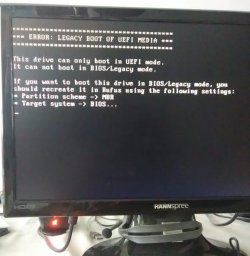
The error message "This device can only boot in UEFI Mode" appears when the installation usb is selected in the boot order.
 

My Computer

Computer type
Laptop
Computer Manufacturer/Model Number
hp
OS
Windows 7 Starter x32
CPU
Intel Atom N470
Memory
2GB
Hard Drives
232GB
Antivirus
Norton 360
Browser
IE10
NED11WILS,
When you access your boot menu, do you have access to UEFI and Legacy Boot Options?

If you created the USB in UEFI (nonCSM) and you can't boot, you are most likely trying to legacy boot a UEFI boot USB, won't work. My P7-1234 is very quirky on booting from USB on various distros of Linux, Black Arch, Kali works fine, New version of Linux Lite, Old Linux Lite 2.002 beta won't boot period.

Change your partition scheme on Rufus to MBR, Target becomes Bios or UEFI (nonCSM) works for me sometimes. on P7 USB installers. Operative word SOMETIMES!
 

My Computer

Computer type
PC/Desktop
Computer Manufacturer/Model Number
HP Desktop & Compaq Laptop
OS
Win 10 x64, Linux Lite, Win 7 x64, BlackArch, & Kali
Hard Drives
Samsung 850 Pro 256Gb,
Hitachi HDD 1Tb,
Crucial MX SSD 250Gb
Segate 3Tb USB 3.0 Ext. Backup HDD
Internet Speed
150Mbps dn, 20Mbps up
Antivirus
Avast Free, Malwarebytes Anti-Exploit & Anti-Ransomware
Browser
Firefox, Chrome, Opera, & VPN
Are you sure your BIOS is UEFI? Old computers only has Legacy-MBR option.

Windows 64 bits can be installed as Legacy-MBR or UEFI-GPT (If BIOS is UEFI)
To install as UEFI you must boot the installation disk as UEFI, not Legacy.

A USB flash disk Win 7 installation disk must have a \efi\boot folder (not found on the original iso)

- Format the USB flash disk as Fat32
- Copy all iso files and folders to the USB flash disk.
- Rename \sources\ei.cfg to \sources\ei.cfg.org
- Copy the \boot folder (attached) to \efi\boot
391487d1473287656-windows-7-installer-stuck-setup-starting-efi.jpg

Boot folder
Start the computer and launch the boot menu and choose to boot the installation disk as UEFI.
 

My Computers

System One System Two

  • Computer type
    PC/Desktop
    Computer Manufacturer/Model Number
    custom build
    OS
    Windows 7 HP 64
    CPU
    i5 6600K - 800MHz to 4200MHz
    Motherboard
    GA-Z170-HD3P
    Memory
    4+4G GSkill DDR4 3000
    Graphics Card(s)
    IG - Intel 530
    Monitor(s) Displays
    Samsung 226BW
    Screen Resolution
    1680x1050
    Hard Drives
    (1) -1 SM951 – 128GB M.2 AHCI PCIe SSD drive for Windows 7 and Lubuntu
    (2) -1 WD SATA 3 - 1T for Data
    (3) -1 WD SATA 3 - 1T for backup
    PSU
    Thermaltake 450W TR2 gold
    Keyboard
    Old and good Chicony mechanical keyboard
    Mouse
    Logitech mX performance - 9 buttons (had to disable some)
    Internet Speed
    500Mb/s
    Browser
    Firefox 64
    Other Info
    TinyWall firewall
  • Computer type
    Laptop
    System Manufacturer/Model Number
    Asus Q550LF
    OS
    Windows 7 Pro
    CPU
    i7-4500U 800MHz to 3.0GHz
    Motherboard
    Asus Q550LF
    Memory
    (4+4)G DDR3 1600
    Graphics Card(s)
    IG intel 4400 + NVIDIA GeForce GT 745M
    Sound Card
    Realtek
    Monitor(s) Displays
    LG Display LP156WF4-SPH1
    Screen Resolution
    1920 x 1080
    Hard Drives
    BX500 120G SSD for Windows and programs +
    1T HDD for data
    Internet Speed
    500 Mb/s
    Browser
    Firefox
    Other Info
    TinyWall firewall
That's where I was goin' @Megahertz07
You most probably will have two boot options
 

My Computer

Computer type
PC/Desktop
Computer Manufacturer/Model Number
HP Desktop & Compaq Laptop
OS
Win 10 x64, Linux Lite, Win 7 x64, BlackArch, & Kali
Hard Drives
Samsung 850 Pro 256Gb,
Hitachi HDD 1Tb,
Crucial MX SSD 250Gb
Segate 3Tb USB 3.0 Ext. Backup HDD
Internet Speed
150Mbps dn, 20Mbps up
Antivirus
Avast Free, Malwarebytes Anti-Exploit & Anti-Ransomware
Browser
Firefox, Chrome, Opera, & VPN
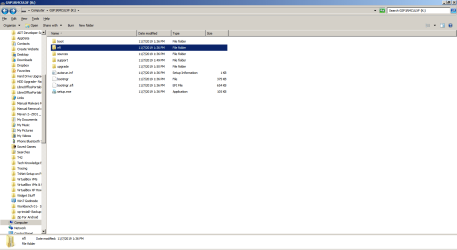
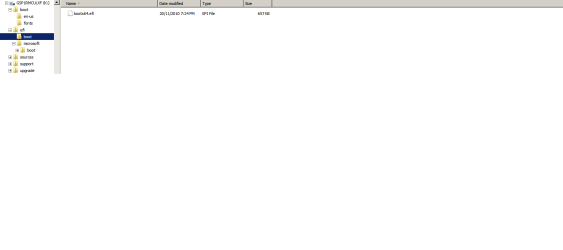
Guys, Thank you! It has been some days since I have been able to return to this very necessary project. Megahertz07 your willingness to take the time to supply a boot folder is saintly. I do appear to have the correct tree that you show in your reply and it seems to already have that boot folder. I have followed instructions numerous times to create the UEFI USB with RUFUS and using the manual method (set of commands from elevated prompt with with Diskpart and formatting in fat32). Each time results appear to be identical on the resulting USB. I have included attachments of the parent folder and of the tree.


SNICK, back to the question of choosing UEFI. I am certain that is what the computer is set for from reading the error message. As to options for a boot you can see that the boot device simply is indicated by "SandisK" the usb brand. I have attached images of the computer screen. It seems that the machine does not see something that is on the USB.


Where to from here?
 

Attachments

  • Bootable USB Insatallation.png
    Bootable USB Insatallation.png
    80.8 KB · Views: 1
  • win7 USB Boot- Installer Tree.png
    win7 USB Boot- Installer Tree.png
    18.4 KB · Views: 1
  • Select Boot Device.jpg
    Select Boot Device.jpg
    80.4 KB · Views: 19
  • ERROR- LEGACY BOOT OF UEFI MEDIA.jpg
    ERROR- LEGACY BOOT OF UEFI MEDIA.jpg
    122.6 KB · Views: 19

My Computer

Computer type
Laptop
Computer Manufacturer/Model Number
hp
OS
Windows 7 Starter x32
CPU
Intel Atom N470
Memory
2GB
Hard Drives
232GB
Antivirus
Norton 360
Browser
IE10
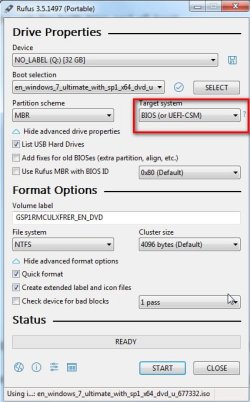
You are trying to boot the usb in legacy (bios) mode. You must have set up the usb via rufus for efi boot only.

Suggest you recreate the usb for both bios and efi-csm boot.

rufus.jpg

The trick here is to press ALT+E if you want ntfs and it isn't already showing above.
 
Last edited:

My Computers

System One System Two

  • Computer type
    PC/Desktop
    OS
    7 X64
    CPU
    i5 8400
    Motherboard
    gigabyte b365m ds3h
    Memory
    2x8gb 3200mhz
    Hard Drives
    various
    PSU
    pure power 11 400w cm
    Case
    Coolermaster
    Cooling
    cryorig m9i
  • Computer type
    PC/Desktop
    OS
    7x64
    CPU
    g5400
    Motherboard
    ga b365m ds3h
    Memory
    8gb ddr4 2400
    PSU
    xfx pro 450w
It will only boot as UEFI IF you BIOS is UEFI that seems that it's not.

You didn't pay attention on what I wrote:
The Win 7 installation disk has two folders to boot from
\boot = to boot as Legacy (on a usb disk it must have MBR set (active)
\efi\microsoft\boot\fonts = to boot the DVD as UEFI

You must add the boot folder attached to \efi\boot
391487d1473287656-windows-7-installer-stuck-setup-starting-efi.jpg


I don't think you have an UEFI BIOS so it won't boot as UEFI.
 

My Computers

System One System Two

  • Computer type
    PC/Desktop
    Computer Manufacturer/Model Number
    custom build
    OS
    Windows 7 HP 64
    CPU
    i5 6600K - 800MHz to 4200MHz
    Motherboard
    GA-Z170-HD3P
    Memory
    4+4G GSkill DDR4 3000
    Graphics Card(s)
    IG - Intel 530
    Monitor(s) Displays
    Samsung 226BW
    Screen Resolution
    1680x1050
    Hard Drives
    (1) -1 SM951 – 128GB M.2 AHCI PCIe SSD drive for Windows 7 and Lubuntu
    (2) -1 WD SATA 3 - 1T for Data
    (3) -1 WD SATA 3 - 1T for backup
    PSU
    Thermaltake 450W TR2 gold
    Keyboard
    Old and good Chicony mechanical keyboard
    Mouse
    Logitech mX performance - 9 buttons (had to disable some)
    Internet Speed
    500Mb/s
    Browser
    Firefox 64
    Other Info
    TinyWall firewall
  • Computer type
    Laptop
    System Manufacturer/Model Number
    Asus Q550LF
    OS
    Windows 7 Pro
    CPU
    i7-4500U 800MHz to 3.0GHz
    Motherboard
    Asus Q550LF
    Memory
    (4+4)G DDR3 1600
    Graphics Card(s)
    IG intel 4400 + NVIDIA GeForce GT 745M
    Sound Card
    Realtek
    Monitor(s) Displays
    LG Display LP156WF4-SPH1
    Screen Resolution
    1920 x 1080
    Hard Drives
    BX500 120G SSD for Windows and programs +
    1T HDD for data
    Internet Speed
    500 Mb/s
    Browser
    Firefox
    Other Info
    TinyWall firewall
Back
Top