
Win 7 build 7100 64-bit, problems with 8GB's of memory

SlinkyMan

New member
Local time
7:24 AM
Messages
3
Hello,

I just installed Windows 7 RC (build 7100) and am having problems access all 8GB's of installed memory. According to Windows, 8GB's of memory are installed but only 2.75GB's are "usable". However, BIOS reports 8GB's are installed.

Is this is a bug with build 7100 or a hardware issue? I'm using an nForce 780I SLI MOBO. I've double checked the MOBO specs and it specifies that it supports 8GB's of memory.
 

Attachments
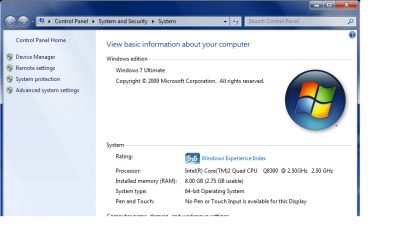
  • pic.png
    pic.png
    39.5 KB · Views: 192

My Computer My Computer

At a glance

Windows 7 64-bit RC
OS
Windows 7 64-bit RC
My computer uses and recognized 8Gb of RAM but it didn't when I first put the new RAM in. It showed in the BIOS but not in Windows. I fiddled around it Windows started recognizing it but I'll be jiggered if I remember what I did.

When I repartitioned and did a clean install of RC1 it recognized all my RAM without a problem.
 

My Computer My Computer

At a glance

Windows7 beta 7000Intel E65508GbNvidia 8500 GT
Computer Manufacturer/Model Number
Home Built
OS
Windows7 beta 7000
CPU
Intel E6550
Motherboard
Intel DP35DP
Memory
8Gb
Graphics Card(s)
Nvidia 8500 GT
Sound Card
Intel onboard sound
Monitor(s) Displays
Two Gateway 22" LCD monitors
Screen Resolution
1680x1050
Hard Drives
Two 500Gb 7200rpm SATA
Yep same here, i had this problem just with 4.00gb ram tho, it only let me use 2.97gb, but i did a fresh install, and its working a charm. Someone in a previous post, mention something about memory remapping?

Enzo.
 

My Computer My Computer

At a glance

W7 RTM Ultimate x64Intel Q8400 @ 2.66GHZ4GB DDR2-800Gainward GTS 450 GLH 1GB Edition
Computer Manufacturer/Model Number
Custom Build
OS
W7 RTM Ultimate x64
CPU
Intel Q8400 @ 2.66GHZ
Motherboard
Gigabyte GA-EG45M-UD2H
Memory
4GB DDR2-800
Graphics Card(s)
Gainward GTS 450 GLH 1GB Edition
Sound Card
Integrated 8 Channel
Monitor(s) Displays
AOC 23.6 Inch Widescreen LCD
Screen Resolution
1920x1080
Hard Drives
Seagate 500GB Internal
Western Digital 1TB Internal

Hitachi 1TB External
PSU
Apevia Java Power 500W
Case
Cooler Master HAF 922 Black
Cooling
Stock Intel CPU Fan
Keyboard
HP SK-2960 Multimedia Keyboard
Mouse
Logitech M350 Wireless Gaming Mouse
Internet Speed
1.5MB
As Enzo mentioned, I'd double double the memory re-mapping feature in BIOS as well.

Have you had 8GB installed and usable on another x64 build/OS prior to installing the RC? Or is the first time you've tried using all the 8GB or x64?
 

My Computer My Computer

At a glance

8 Pro x64i7 3770K 4.6GHz16GB G.Skill Trident X 2666mhzx2 EVGA 780 Ti Superclocked SLI
Computer type
PC/Desktop
Computer Manufacturer/Model Number
Systems by SmartEyeball
OS
8 Pro x64
CPU
i7 3770K 4.6GHz
Motherboard
ASUS P8Z77 WS
Memory
16GB G.Skill Trident X 2666mhz
Graphics Card(s)
x2 EVGA 780 Ti Superclocked SLI
Sound Card
SB X-FI Surround 5.1 PRO USB / ATH-AD900 Headphones
Monitor(s) Displays
x3 Dell U2410 / 58" Samsung
Screen Resolution
5760*1200/ 1920*1200
Hard Drives
2x Intel 520 240GB (RAID 0) * 2x WD Caviar Blacks 2TB (RAID 0) * 2TB WD Caviar Black * Sony Optirac DVD
PSU
Silverstone Strider Evolution 1200W
Case
Thermaltake Level 10 GT Snow Edition
Cooling
Noctua NH-D14
Keyboard
Topre Realforce // Ducky Shine MX Black // Filco Ninja TKL
Mouse
Thermaltake Theron (Highly Recommended) + Razer Imperator
Antivirus
MSE
Browser
IE, FF, WaterFox
Other Info
GT Extreme V2 Sim Racing Cockpit + 40" LCD and K/B Mouse stand ▼
Fanatec CSR Elite Wheel + Clubsport V1 Pedals + CSR shifter/7G-H ▼Saitek X52 Pro ▼ TrackIR 5 Pro
Buttkicker v2 Seat Rumbler with Dedicated 5.1 and Sub Woofer attached to frame ▼
=
Bloody Big Grin
I performed an upgrade from Vista 64-bit Enterprise to Windows 7 build 7100. I know upgrades are always bad but I got lazy.

I've done quite a bit of forum hunting regarding memory remapping for my particular MOBO but can't seem to find how to do it from BIOS.

So far i've:

-Run all Windows updates
-Installed all latest drivers, some Vista 64-bit drivers, some Windows 7 specific
-Refreshed Windows Experience Index a hundred times

However, Windows still reports only 2.75GB's of memory "usable". I guess my next step is to perform a clean install.
 

My Computer My Computer

At a glance

Windows 7 64-bit RC
OS
Windows 7 64-bit RC
Yeap, with any OS, cutting corners is a bad option, and will just reign havoc on your system further down the track, fresh install is the only way, i refuse to upgrade. :)

Good luck :P

Enzo.
 

My Computer My Computer

At a glance

W7 RTM Ultimate x64Intel Q8400 @ 2.66GHZ4GB DDR2-800Gainward GTS 450 GLH 1GB Edition
Computer Manufacturer/Model Number
Custom Build
OS
W7 RTM Ultimate x64
CPU
Intel Q8400 @ 2.66GHZ
Motherboard
Gigabyte GA-EG45M-UD2H
Memory
4GB DDR2-800
Graphics Card(s)
Gainward GTS 450 GLH 1GB Edition
Sound Card
Integrated 8 Channel
Monitor(s) Displays
AOC 23.6 Inch Widescreen LCD
Screen Resolution
1920x1080
Hard Drives
Seagate 500GB Internal
Western Digital 1TB Internal

Hitachi 1TB External
PSU
Apevia Java Power 500W
Case
Cooler Master HAF 922 Black
Cooling
Stock Intel CPU Fan
Keyboard
HP SK-2960 Multimedia Keyboard
Mouse
Logitech M350 Wireless Gaming Mouse
Internet Speed
1.5MB
Problem solved. Format reinstall resolved the issue.

Cheers
 

My Computer My Computer

At a glance

Windows 7 64-bit RC
OS
Windows 7 64-bit RC
No problem :)

Enzo.
 

My Computer My Computer

At a glance

W7 RTM Ultimate x64Intel Q8400 @ 2.66GHZ4GB DDR2-800Gainward GTS 450 GLH 1GB Edition
Computer Manufacturer/Model Number
Custom Build
OS
W7 RTM Ultimate x64
CPU
Intel Q8400 @ 2.66GHZ
Motherboard
Gigabyte GA-EG45M-UD2H
Memory
4GB DDR2-800
Graphics Card(s)
Gainward GTS 450 GLH 1GB Edition
Sound Card
Integrated 8 Channel
Monitor(s) Displays
AOC 23.6 Inch Widescreen LCD
Screen Resolution
1920x1080
Hard Drives
Seagate 500GB Internal
Western Digital 1TB Internal

Hitachi 1TB External
PSU
Apevia Java Power 500W
Case
Cooler Master HAF 922 Black
Cooling
Stock Intel CPU Fan
Keyboard
HP SK-2960 Multimedia Keyboard
Mouse
Logitech M350 Wireless Gaming Mouse
Internet Speed
1.5MB
Back
Top