Solved Did a clean install of Windows 7 64 bit - problems with everything

Mahavira

New member
Local time
8:37 AM
Messages
16
Sorry for the vague title but pretty close to everything is not working properly...

Ok, I got a new CPU and motherboard, and did a clean install of windows 7 ultimate onto a formatted hard drive. Installing drivers afterwards has proven very difficult (it frequently says the program is corrupt even when it's from the manufacturer's disk) - sometimes I can brute force through by repeated attempts (particularly in safe mode) but I'm not convinced anything works afterwards, and almost no web sites display properly - frames won't show, graphics are distorted, frequent 400 errors, walls of gibberish text, links don't do anything, the works. It happened with IE 8 (which installed from the disk), it happened wiht IE 11 after I upgraded, and I installed google chrome to see if it was an IE problem, and it doesn't appear to be. Sometimes refreshing helps a bit, but not usually (and it rarely fixes everything). I haven't even gotten to install any applications to see if they work. I installed 200 or so updates through windows update, but that's about it - I can't even manage to get into mcafee to install my virus program.

I'm not sure if this is a hardware or software problem. If it's software its either the drivers for the hardware or windows itself. Windows doesn't show anything being wrong or not working, either. Are there any tests I can do to see if I need to just go back to the store and replace my hardware?
 

My Computer My Computer

At a glance

Windows 7 Ultimate 64 bitIntel Core i7-4790k 4.0 ghz (4 cores 8 threads)8gb 1600 mhzNvidia 750 Ti
Computer type
PC/Desktop
Computer Manufacturer/Model Number
custom buiuld
OS
Windows 7 Ultimate 64 bit
CPU
Intel Core i7-4790k 4.0 ghz (4 cores 8 threads)
Motherboard
Asus B85-Plus
Memory
8gb 1600 mhz
Graphics Card(s)
Nvidia 750 Ti
Hard Drives
Seagate 2 tb
Antivirus
none yet
Browser
usually Internet Explorer
Hello and welcome Mahavira mate first up what pack is the Ultimate coming in - retail or OEM?. Now because if it is an OEM then that activation code will be tied to the old board, and without permission from Microsoft you will not be able to use it on the new motherboard. (That is you can contact Microsoft by phone explain you had to have a new motherboard and can you use the old OEM to load the new board they are usually quite obliging) The retail version you can use more than once so which is it before we go delving into deeper water.
 

My Computer My Computer

At a glance

Desk1 7 Home Prem / Desk2 10 Pro / Main lap A...Desk1 i5 3750K / Laptop i7 GTX 860M / Desk2 i...Desk1 8GB (1866) / Desk2 16GB (1333) / Laptop...Desk 1& 2NVidia GTX 650 & Laptops on board Intel
Computer type
PC/Desktop
Computer Manufacturer/Model Number
Own build (new) Desk1 / Asus ROG Win 7 / Desk2 1st build
OS
Desk1 7 Home Prem / Desk2 10 Pro / Main lap Asus ROG 10 Pro 2 laptop Toshiba 7 Pro Asus P2520 7 & 10
CPU
Desk1 i5 3750K / Laptop i7 GTX 860M / Desk2 i5 2500
Motherboard
Desk1 Asus P877-V / Desk2 Gigabyte H67 UD3H / Laptop ?
Memory
Desk1 8GB (1866) / Desk2 16GB (1333) / Laptop 8Gb DDR3
Graphics Card(s)
Desk 1& 2NVidia GTX 650 & Laptops on board Intel
Sound Card
Desk 1 & 2 -XONAR DG Realtek High Def audio Laptop
Monitor(s) Displays
Desk 1 Benq HD 2450 / Desk2 Philips 24" / Laptop 17.5"
Screen Resolution
1920x1080 D1 & D2 & Laptop 1
Hard Drives
Desk1 Samsung 120GB 830 SSD
Asus ROG 256GB 850 Pro SSD
Desk2 Samsung 840 256 SSD
Toshiba 120GB EVO
PSU
Desk 1 Corsair HX 1050/ Laptop ? / Desk 2 Corsair HX 650
Case
Desk 1 Cooler HAF XM ? Toshiba laptop / Desk2 Coolermaster
Cooling
Fans on all Desk1 -2 Desk2 - all Coolermasters 5 Laptop ?
Keyboard
Desk 1 MS Sidewinder X6 Desk 2 MS Sidewinder X 4
Mouse
Desk 1&2 - Gigabyte MS 900 gamer - laptop - Logitec wireless
Internet Speed
ADSL2+
Other Info
One other Desktop (tester) and spare Toshba laptop both with SSD's
Running Kaspersky 2016 ISS on all machines config'd identically
Logitec audio stereo systems on each machine (x3)
Canon MG5250MFC
Router/modem TP-Link running WPA2SK
Thank you for responding. The windows disk is retail.
 

My Computer My Computer

At a glance

Windows 7 Ultimate 64 bitIntel Core i7-4790k 4.0 ghz (4 cores 8 threads)8gb 1600 mhzNvidia 750 Ti
Computer type
PC/Desktop
Computer Manufacturer/Model Number
custom buiuld
OS
Windows 7 Ultimate 64 bit
CPU
Intel Core i7-4790k 4.0 ghz (4 cores 8 threads)
Motherboard
Asus B85-Plus
Memory
8gb 1600 mhz
Graphics Card(s)
Nvidia 750 Ti
Hard Drives
Seagate 2 tb
Antivirus
none yet
Browser
usually Internet Explorer
Ok that is good Maharive now mate the disk itself just might be bad for whatever reason so as you have the activation code use this as this will give you the "freshest" ISO of Windows - whatever version - and you will not be downloading so many updates as a lot will come with the ISO.
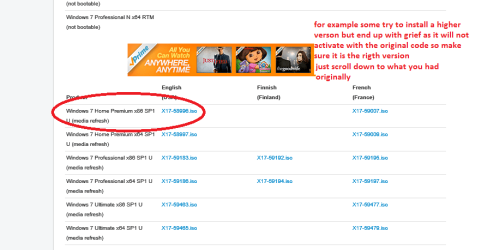
http://www.sevenforums.com/tutorials/219487-clean-reinstall-factory-oem-windows-7-a.html#post1839164 Just make sure you pick the correct version - bit wise. See my pic for what it will appear as.
Any problems post back in Gregs tutorial and he can guide you far better than I - however I have used this a few times myself and it does save a lot of work apart form having to make a bootable disk or stick.

If this doesn't work then we shall have to look elsewhere.
 

Attachments

  • ISO.PNG
    ISO.PNG
    22.9 KB · Views: 3

My Computer My Computer

At a glance

Desk1 7 Home Prem / Desk2 10 Pro / Main lap A...Desk1 i5 3750K / Laptop i7 GTX 860M / Desk2 i...Desk1 8GB (1866) / Desk2 16GB (1333) / Laptop...Desk 1& 2NVidia GTX 650 & Laptops on board Intel
Computer type
PC/Desktop
Computer Manufacturer/Model Number
Own build (new) Desk1 / Asus ROG Win 7 / Desk2 1st build
OS
Desk1 7 Home Prem / Desk2 10 Pro / Main lap Asus ROG 10 Pro 2 laptop Toshiba 7 Pro Asus P2520 7 & 10
CPU
Desk1 i5 3750K / Laptop i7 GTX 860M / Desk2 i5 2500
Motherboard
Desk1 Asus P877-V / Desk2 Gigabyte H67 UD3H / Laptop ?
Memory
Desk1 8GB (1866) / Desk2 16GB (1333) / Laptop 8Gb DDR3
Graphics Card(s)
Desk 1& 2NVidia GTX 650 & Laptops on board Intel
Sound Card
Desk 1 & 2 -XONAR DG Realtek High Def audio Laptop
Monitor(s) Displays
Desk 1 Benq HD 2450 / Desk2 Philips 24" / Laptop 17.5"
Screen Resolution
1920x1080 D1 & D2 & Laptop 1
Hard Drives
Desk1 Samsung 120GB 830 SSD
Asus ROG 256GB 850 Pro SSD
Desk2 Samsung 840 256 SSD
Toshiba 120GB EVO
PSU
Desk 1 Corsair HX 1050/ Laptop ? / Desk 2 Corsair HX 650
Case
Desk 1 Cooler HAF XM ? Toshiba laptop / Desk2 Coolermaster
Cooling
Fans on all Desk1 -2 Desk2 - all Coolermasters 5 Laptop ?
Keyboard
Desk 1 MS Sidewinder X6 Desk 2 MS Sidewinder X 4
Mouse
Desk 1&2 - Gigabyte MS 900 gamer - laptop - Logitec wireless
Internet Speed
ADSL2+
Other Info
One other Desktop (tester) and spare Toshba laptop both with SSD's
Running Kaspersky 2016 ISS on all machines config'd identically
Logitec audio stereo systems on each machine (x3)
Canon MG5250MFC
Router/modem TP-Link running WPA2SK
Got a more recent disk image, reinstalled, telling windows not to try and install drivers (I'd read somewhere that other programs trying to do this was one reason nvidia graphics drivers fail to install). Results were interesting. Chipset driver and sound driver went in fine. Graphics drivers still wouldn't install (nvidia claims this is usually caused by the download being corrupt, and the fact that it usually botches while the thing is trying to unpack would support this, though they say it also can happen when there's other software trying to do something). In terms of the internet (the main way I can tell things aren't working properly) - this time around I had more success (but not enough) with McAfee's website - I actually got to download the installer, but wasn't able to install (it failed partway in). I kept getting the following errors:

Trouble processing request
HTTP 400 bad request
distorted images and bands of inappropriate colors (this may be because I was using the windows default video driver at the time)
constantly having to re-log in to the website
characters out of place - there's be a number where a letter was clearly intended.
the installer appeared to lose connection a few times (sometimes it didn't even start up properly - just a blank window - the only reason I got as far in as I did is that I downloaded the installer to my hard drive and kept trying).

I'm beginning to wonder if this is a problem with the ethernet card on the motherboard - the ethernet driver on the manufacturer disk immediately said "application is corrupt" and while I was able to install the ethernet driver that I'd downloaded to a thumb drive, the internet still didn't seem to like me much.
 

My Computer My Computer

At a glance

Windows 7 Ultimate 64 bitIntel Core i7-4790k 4.0 ghz (4 cores 8 threads)8gb 1600 mhzNvidia 750 Ti
Computer type
PC/Desktop
Computer Manufacturer/Model Number
custom buiuld
OS
Windows 7 Ultimate 64 bit
CPU
Intel Core i7-4790k 4.0 ghz (4 cores 8 threads)
Motherboard
Asus B85-Plus
Memory
8gb 1600 mhz
Graphics Card(s)
Nvidia 750 Ti
Hard Drives
Seagate 2 tb
Antivirus
none yet
Browser
usually Internet Explorer
Just run all rounds of windows update. When that`s fully done (no more updates) then check device manager for any driver issues.

Start again wipe that install out.
 

My Computer My Computer

At a glance

Windows 10 Pro x64Intel Core i7 6700KGSkill TridentZ RGB 16GB 3600 16-16-16-36EVGA GTX 980 Ti SC x2
Computer type
PC/Desktop
Computer Manufacturer/Model Number
Skylake Special #666
OS
Windows 10 Pro x64
CPU
Intel Core i7 6700K
Motherboard
Asus Sabertooth Z170 Mark 1
Memory
GSkill TridentZ RGB 16GB 3600 16-16-16-36
Graphics Card(s)
EVGA GTX 980 Ti SC x2
Sound Card
Realtek High Definition
Monitor(s) Displays
AOC G2460PG
Screen Resolution
1920 x 1080 144Hz
Hard Drives
Samsung 860 Pro 256GB, Seagate Barracuda 4TB x2
PSU
EVGA 1000 P2, EVGA White Custom Braided Cables
Case
Corsair Vengeance C70 Gunmetal Black
Cooling
Corsair H100i v2, Corsair ML120 x2, Thermal Grizzly Kryonaut
Keyboard
Logitech G910 Orion Spectrum
Mouse
Logitech G700s
Internet Speed
Verizon Fios Quantum Gateway 75/75
Antivirus
Windows Defender, Malwarebytes Free 3.8.3
Browser
Chrome
Other Info
Corsair SP120 x4, LG Blu-ray Drive, Durabrand HT-395 100 Watt Dolby Digital Amp, Corsair H2100 Wireless 7.1 Headset
Please start over and this time follow the steps in Clean Reinstall Windows 7 . The steps for drivers are printed in red so you can't miss them. Forcing drivers Win7 doesn't want will cause problems like you are seeing. This is not XP but the first driver-complete OS. It's rare there are more than a few drivers still missing in Device Manager after all rounds of Updates are done.

If you will stick only with the tools and methods provided in tutorial then you will get and keep a perfect install for as long as you do. MucAfee is the worst possible program one could inflict on Win7. I would use Panda Cloud which is more aggressive than MSE but also takes no toll on performance.
 
Thank you for the feedback. Your advice is precisely the opposite of everything I've ever been told (probably dating from prior versions of windows) which may be why I'm screwing this up - it isn't what you don't know but what you know that isn't so that really fouls you up. I'm less hung up on using McAfee than the fact that their website regularly gives me the errors I'm "looking for" to see if things are fixed.

I'll try again after work tomorrow (I've been losing too much sleep fighting this). Presuming I continue to have problems after going through the tutorial exactly, is hardware the next likely culprit?
 

My Computer My Computer

At a glance

Windows 7 Ultimate 64 bitIntel Core i7-4790k 4.0 ghz (4 cores 8 threads)8gb 1600 mhzNvidia 750 Ti
Computer type
PC/Desktop
Computer Manufacturer/Model Number
custom buiuld
OS
Windows 7 Ultimate 64 bit
CPU
Intel Core i7-4790k 4.0 ghz (4 cores 8 threads)
Motherboard
Asus B85-Plus
Memory
8gb 1600 mhz
Graphics Card(s)
Nvidia 750 Ti
Hard Drives
Seagate 2 tb
Antivirus
none yet
Browser
usually Internet Explorer
You can test the hardware first with boot disks provided in Troubleshooting Steps for Windows 7
if you want to get that out of the way.

Otherwise I'd do the install first since you need a good one anyway and it may obviate the need for hardware testing if it goes well.

Its best to be fully rested and eager to learn when tackling a Clean Reinstall Windows 7 since it compiles everything we've learned in tens of thousands of installs we've directly helped with here since beta, and has been used by over a million consumers without a single complaint so we know it's solid advice.
 
I reinstalled, went through windows update until they stopped saying there were any updates other than language packs. I had to manually install the ethernet driver, and a couple of drivers from the motherboard manufacturer's disk (windows wasn't identifying a few devices). I am still having trouble with web pages not displaying correctly (distorted images, bad color, bands of what look like "snow" on old tv sets and blocks of gibberish text), links not working, I tried to download panda antivirus and it said some of the installation files were corrupt and I should redownload (it decided to finish installing for whatever reason). I looked at windows update and noted several updates that had failed outright or were listed as pending and didn't change regardless of whether I restarted or not (there were also a number of updates that had a successful install listed prior to a failed and pending install). I suppose it's possible that some or all of these were superceded by other updates and that's why they failed or were left pending, but as they're nearly all listed as recommended or important, and I'm still having problems, I thought I'd mention them.


The list is as follows:

Failed Windows Updates

Update for Internet Explorer 8 Compatibility view lists for Windows 7 for x64 based systems (KB2598845)

nVidia Graphics Adapter WDDM 1.1, Graphics Adapter WDDM1.2, Graphics Adapter WDDM 1.3 – Nvidia GeForce GTW 750 Ti [NB windows did find a display driver of some kind but given that this is listed as recommended and I am having display problems it probably needs correction – unfortunately as described earlier in this set of posts I can’t manually install a graphics driver except through brute force repetition]

Pending and never stops pending

Security Update for Microsoft .net framework 3.5.1 on Windows 7 and Windows Server R2 SP1 for x64 based systems (KB2656356)

Security Update for Microsoft .net framework 3.5.1 on Windows 7 and Windows Server R2 SP1 for x64 based systems (KB2789645)

Update for Windows 7 for x64 based systems (KB2515325)

Update for Windows 7 for x64 based systems (KB2913152)

Update for Windows 7 for x64 based systems (KB2978092)

Update for Windows 7 for x64 based systems (KB2970228)

Cumulative security update for Internet Explorer 11 for Windows 7 for x64 based systems (KB3003057) [NB a cumulative update for IE 8 with the same KB number was successfully installed]

Security update for windows 7 for x64 based systems (KB2984981)

Security update for windows 7 for x64 based systems (KB2912390)

Update for Windows 7 for x64 based systems (KB2732487)

Update for Windows 7 for x64 based systems (KB982018)

Update for Windows 7 for x64 based systems (KB2977728)

Update for Windows 7 for x64 based systems (KB2994023)

Update for Windows 7 for x64 based systems (KB2929755)

Update for Windows 7 for x64 based systems (KB2647753)
 

My Computer My Computer

At a glance

Windows 7 Ultimate 64 bitIntel Core i7-4790k 4.0 ghz (4 cores 8 threads)8gb 1600 mhzNvidia 750 Ti
Computer type
PC/Desktop
Computer Manufacturer/Model Number
custom buiuld
OS
Windows 7 Ultimate 64 bit
CPU
Intel Core i7-4790k 4.0 ghz (4 cores 8 threads)
Motherboard
Asus B85-Plus
Memory
8gb 1600 mhz
Graphics Card(s)
Nvidia 750 Ti
Hard Drives
Seagate 2 tb
Antivirus
none yet
Browser
usually Internet Explorer
Hi,
Please don't completely foul up a clean install by putting Mcafee on it :shock:
Mcafee is not compatible with any version of windows !
 

My Computer My Computer

At a glance

Win-7-Pro64bit 7-H-Prem-64biti7-5930K 2nd i9-9940x both water blocked VRM'...Trident-z 3200C14 2nd Trident-z 3600C16EVGA 1080ti ftw3 2nd Titan Xp both water blocked
Computer type
PC/Desktop
Computer Manufacturer/Model Number
Custom assembled by me :}
OS
Win-7-Pro64bit 7-H-Prem-64bit
CPU
i7-5930K 2nd i9-9940x both water blocked VRM's too
Motherboard
ASUS SABERTOOTH X99 2nd ASUS x299 Apex
Memory
Trident-z 3200C14 2nd Trident-z 3600C16
Graphics Card(s)
EVGA 1080ti ftw3 2nd Titan Xp both water blocked
Sound Card
Built-in Realtek
Monitor(s) Displays
1-AOC G2460PG 24"G-Sync 144Hz/ 2nd 1-ASUS VG248QE 24" 144Hz
Screen Resolution
1920 x 1080 144Hz
Hard Drives
2-Samsung M.2 Evo & Evo Plus
2-Samsung 850 EVO 500GB SSD's/ 3-2.5 W.D. Black 1tb-&3-1tb/3-3.5 WD Black 1tb hdd's
PSU
EVGA SuperNOVA 1000-P2 2nd 1200-P2
Case
2-Corsair Obsidian Series 450D Black ATX Mid Tower
Cooling
Custom water loops
Keyboard
Logitech G710+/ 2nd Logitech G910
Mouse
2-RedDragon M901 Perdition 16400 dpi Gaming mouse = wired
Internet Speed
Comcast Ping 19ms 89.31mbps download speed 6.12mbps upload
Antivirus
Malwarebytes Pro/ Superantispyware Pro
Browser
FireFox & Pale moon
Other Info
2nd ASUS X299 Apex/Intel i9-9940x with Custom water loop/7H-Prem-x64/Corsair 450D case/Ram Trident-z 3600C16 4x8gb / Samsung970Evo plus 500gb SSD/Dual ssd EZ swap evo/PSU EVGA SuperNova 1200w-P2 80+Platinum/GPU Titan Xp /8-ML-140 on push-pull on 2-280GTX rads
For what it's worth, I haven't yet (nor do I intend to). The McAfee site is valuable inasmuch as the website itself reliably causes the display and linkage errors. I most recently attempted to install panda but that didn't work either (the downloader started, downloaded some files, said they were corrupt, and tried to install anyway (with the level of success one might expect)). At present I have no applications installed other than base windows and the few drivers which windows was unable to provide.
 

My Computer My Computer

At a glance

Windows 7 Ultimate 64 bitIntel Core i7-4790k 4.0 ghz (4 cores 8 threads)8gb 1600 mhzNvidia 750 Ti
Computer type
PC/Desktop
Computer Manufacturer/Model Number
custom buiuld
OS
Windows 7 Ultimate 64 bit
CPU
Intel Core i7-4790k 4.0 ghz (4 cores 8 threads)
Motherboard
Asus B85-Plus
Memory
8gb 1600 mhz
Graphics Card(s)
Nvidia 750 Ti
Hard Drives
Seagate 2 tb
Antivirus
none yet
Browser
usually Internet Explorer
Since the Display adapter provided by Windows Update failed, what display adapter do you now have in Device Manager?

If it is Standard VGA this is only a placeholder driver which must be replaced as explained in Clean Reinstall Windows 7. What driver is provided on the Support Downloads webpage for your model Display device? Please provide us a link to that page.
 
Windows found a driver nVidia GeForce GTX 750 Ti version 9.18.13.4052 and installed that, but seemed to want to install the other "nVidia Graphics Adapter WDDM 1.1, Graphics Adapter WDDM1.2, Graphics Adapter WDDM 1.3 – Nvidia GeForce GTW 750 Ti"

In terms of your question on what the support downloads page says to use, I'm having difficulty finding such a page either on the laptop I'm using to ask these questions or on the main computer (where the windows website is rarely even acknowledging that I'm attempting a search - links I click on are find but entering text into a search box and either pressing enter or clicking the button does nothing). I'm sorry to be so unhelpful but the microsoft website keeps pointing me to pages that don't seem to be what you're talking about.

One windows page eventually pointed me here Graphics Cards - GTX750TI-2GD5 - ASUS but this is a much older driver than the one listed on Nvidia's website.

I followed the instructions in the tutorial until step 7 - the exception being that I was unable to install panda cloud due to the errors described above. I have not begun installing any other applications because I don't want to cause any complicating factors from other software.
 

My Computer My Computer

At a glance

Windows 7 Ultimate 64 bitIntel Core i7-4790k 4.0 ghz (4 cores 8 threads)8gb 1600 mhzNvidia 750 Ti
Computer type
PC/Desktop
Computer Manufacturer/Model Number
custom buiuld
OS
Windows 7 Ultimate 64 bit
CPU
Intel Core i7-4790k 4.0 ghz (4 cores 8 threads)
Motherboard
Asus B85-Plus
Memory
8gb 1600 mhz
Graphics Card(s)
Nvidia 750 Ti
Hard Drives
Seagate 2 tb
Antivirus
none yet
Browser
usually Internet Explorer
What MS website are you trying to access? Your specs say you have a Custom build, so you should have a graphics card, correct? Well if the Display driver delivered by Windows Updates does not work correctly for your display device, then the next stop is the video card's Support Download's webpage to find the driver for your model card.

If you know for sure it uses Nivida drivers then you can also have Nvidia Downloads page scan your PC for the correct driver. Be sure to watch for and click on all the prompts to install the scanner and enabling software needed to do this. NVIDIA Driver Downloads - Automatically Detect NVIDIA Products
 
:ditto:

If you have a 750 Ti then you go to nvidia.com to download the latest driver, doing a custom clean install.

Here`s your driver.

Drivers | GeForce
 

My Computer My Computer

At a glance

Windows 10 Pro x64Intel Core i7 6700KGSkill TridentZ RGB 16GB 3600 16-16-16-36EVGA GTX 980 Ti SC x2
Computer type
PC/Desktop
Computer Manufacturer/Model Number
Skylake Special #666
OS
Windows 10 Pro x64
CPU
Intel Core i7 6700K
Motherboard
Asus Sabertooth Z170 Mark 1
Memory
GSkill TridentZ RGB 16GB 3600 16-16-16-36
Graphics Card(s)
EVGA GTX 980 Ti SC x2
Sound Card
Realtek High Definition
Monitor(s) Displays
AOC G2460PG
Screen Resolution
1920 x 1080 144Hz
Hard Drives
Samsung 860 Pro 256GB, Seagate Barracuda 4TB x2
PSU
EVGA 1000 P2, EVGA White Custom Braided Cables
Case
Corsair Vengeance C70 Gunmetal Black
Cooling
Corsair H100i v2, Corsair ML120 x2, Thermal Grizzly Kryonaut
Keyboard
Logitech G910 Orion Spectrum
Mouse
Logitech G700s
Internet Speed
Verizon Fios Quantum Gateway 75/75
Antivirus
Windows Defender, Malwarebytes Free 3.8.3
Browser
Chrome
Other Info
Corsair SP120 x4, LG Blu-ray Drive, Durabrand HT-395 100 Watt Dolby Digital Amp, Corsair H2100 Wireless 7.1 Headset
Ah, I follow you now. I had originally thought you were talking about some microsoft site with a list of the drivers it provides via windows update and was not finding such a thing.

As I mention earlier in the thread, I had immense difficulty installing this (either the current version or the older version on the manufacturer's dvd), and as more recent advice was that forcing drivers was not a good idea until all else had failed, I didn't do it this iteration. Basically when trying to install these nvidia drivers I get a sequence of errors:

1) while unpacking the files the installer crashes saying "7-Zip error" - this happens at different percentages of unpacking
2) sometimes it gets all the way through that and crashes while installing, leaving one or more component (there is the base driver and 3 3-D related components) uninstalled
3) after 20-30 times (slightly fewer in safe mode) you can get all the way through and it will claim to be properly installed.

I haven't gone through this process on this iteration of my attempted install as earlier comments had suggested I shouldn't force drivers unless necessary, and as at least some of my problems appear also to relate to my internet connection (I can't see how a bad video driver will cause a "bad request" error to come up when I click on a link) it was possible that the graphics driver was not the only or even primary problem.

The nvidia tech support forums indicate that there are 2 possible causes of these problems: 1) the downloaded file is corrupt and needs to be redownloaded (I tend to discount this in this case as both the manufacturer's disk and several download attempts all show this problem) and 2) 3rd party software is interfering - as this has occurred on an otherwise clean install of windows I can only assume that means windows itself, probably something to do with the hardware auto-update - this is why in a previous iteration of installing windows I tried telling windows not to automatically update drivers).
 

My Computer My Computer

At a glance

Windows 7 Ultimate 64 bitIntel Core i7-4790k 4.0 ghz (4 cores 8 threads)8gb 1600 mhzNvidia 750 Ti
Computer type
PC/Desktop
Computer Manufacturer/Model Number
custom buiuld
OS
Windows 7 Ultimate 64 bit
CPU
Intel Core i7-4790k 4.0 ghz (4 cores 8 threads)
Motherboard
Asus B85-Plus
Memory
8gb 1600 mhz
Graphics Card(s)
Nvidia 750 Ti
Hard Drives
Seagate 2 tb
Antivirus
none yet
Browser
usually Internet Explorer
How could you think that I was referring to some MS driver list when the steps couldn't be clearer following Clean Reinstall Windows 7 and are even printed in red so you don't miss exactly how drivers are best handled?

Are you following these steps which assure you get and keep a perfect install as a million others have done without a single complaint? What partitions did you delete and save during install?

You said that Windows Update did deliver one driver for your Display adapter which was installed, correct? What is the exact problem with that driver? If you didn't give it a chance before installing another driver then roll it back now on the Device Manager>Display adapter>Driver tab.
 
The exact problem with the driver is that as I have mentioned, websites do not display properly in IE. Several of the errors I'm getting in IE are obviously display related - colors are off, there are bands of static, etc.. Windows update appeared to think there was something wrong with that driver because it tried (and failed) to download additional nvidia programs. I have been giving the driver a chance and it is giving me obviously display related errors. I have not installed a newer driver this run through and was describing what happened in previous failed attempts. I am sorry if I was unclear in this regard. As of my post at 12:40, the only drivers I had installed that were not the ones chosen by windows without my input were for the LAN card, and for a couple of unknown devices (the chipset, a USB 3 controller).
 

My Computer My Computer

At a glance

Windows 7 Ultimate 64 bitIntel Core i7-4790k 4.0 ghz (4 cores 8 threads)8gb 1600 mhzNvidia 750 Ti
Computer type
PC/Desktop
Computer Manufacturer/Model Number
custom buiuld
OS
Windows 7 Ultimate 64 bit
CPU
Intel Core i7-4790k 4.0 ghz (4 cores 8 threads)
Motherboard
Asus B85-Plus
Memory
8gb 1600 mhz
Graphics Card(s)
Nvidia 750 Ti
Hard Drives
Seagate 2 tb
Antivirus
none yet
Browser
usually Internet Explorer
Back
Top