Solved Win 7 Explorer

yazterfari

New member
Local time
4:35 AM
Messages
6
Location
UK
Hi:

Why is it when you expand a folder in the left hand panel in win explorer does the folder appear at the bottom of the panel so you can only see the first sub folder.

I would like to see all sub folder when I expand a folder in the left hand panel.

Also, when I double click a folder in the right hand panel it does not expand in the left hand panel as it does in Win XP.

Can any of the above be done??
 

My Computer

OS
Windows 7 Ultimate x64
CPU
LGA1156 CPU (3.6 Overclocked to 4.2)
Motherboard
GIGABYTE GA-H55M-UD2H
Memory
4GB
Graphics Card(s)
nvidia geforce gt 430 dual fan
Monitor(s) Displays
19" OPTIQUEST Q19WB & LG 19" LCD TV 19LG3000
Screen Resolution
1440 x 900
Hard Drives
2 x Seagate ST31000528AS ATA
Seagate FA GoFlex Desk USB (1TB)
Seagate FreeAgent USB (1TB)
PSU
Standard 500 Watt
Case
Generic Micro ATX Case
Cooling
Gel Coolant
Keyboard
Generic QWERTY Keyboard
Mouse
Logitec Lasar
Internet Speed
Broadband
Hi:

Why is it when you expand a folder in the left hand panel in win explorer does the folder appear at the bottom of the panel so you can only see the first sub folder.

I would like to see all sub folder when I expand a folder in the left hand panel.

Also, when I double click a folder in the right hand panel it does not expand in the left hand panel as it does in Win XP.

Can any of the above be done??

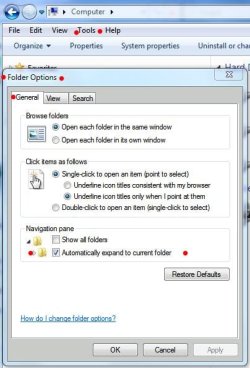
The Expand all folders setting should help. The 'Show all folders' setting shows all user folders and control panel items. I leave this unchecked to keep the pane 'clean'.

James
 

Attachments

  • Auto Expand.JPG
    Auto Expand.JPG
    45.1 KB · Views: 7

My Computer

OS
Win7U 64 RTM
CPU
Q9550
Motherboard
GA-EP45-UD3R
Memory
8GB Gskill
Graphics Card(s)
ASUS|EAH4850/HTDI/1GD3/A
Sound Card
xfi Plat
Monitor(s) Displays
Dell 2405fpw
Screen Resolution
1920x1200
Hard Drives
Seagate & WD sata Drives
PSU
Antec
Case
Antec
Keyboard
MS Natural Ergonomic 4000
Mouse
Logitech MX610 USB Cordless

My Computer

Computer type
PC/Desktop
Computer Manufacturer/Model Number
Self built custom
OS
64-bit Windows 11 Pro for Workstations
CPU
Intel i7-8700K OC'd to 5 GHz
Motherboard
ASUS ROG Maximus XI Formula Z390
Memory
64 GB (4x16GB) G.SKILL TridentZ RGB DDR4 3600 MHz
Graphics Card(s)
ASUS ROG-STRIX-GTX1080TI-O11G-GAMING
Sound Card
Integrated
Monitor(s) Displays
2 x Samsung Odyssey G7 27"
Screen Resolution
2560x1440
Hard Drives
1TB Samsung 990 PRO M.2,
4TB Samsung 990 PRO PRO M.2,
TerraMaster F8 SSD Plus NAS
PSU
Seasonic Prime Titanium 850W
Case
Thermaltake Core P3
Cooling
Corsair Hydro H115i
Keyboard
Logitech wireless K800
Mouse
Logitech MX Master 4
Internet Speed
2 Gb/s Download and 100 Mb/s Upload
Antivirus
Malwarebyte Anti-Malware Premium
Browser
Google Chrome
Other Info
Logitech Z625 speaker system,
Logitech BRIO 4K Pro webcam,
HP Color LaserJet Pro MFP M477fdn,
APC SMART-UPS RT 1000 XL - SURT1000XLI,
Galaxy S23 Plus phone
If you double click on the folder in the left hand pane, it should expand to all the subfolders - at least mine does.
 

My Computer

Computer Manufacturer/Model Number
HP, Dell, Gateway, Toshiba - 4 laptops and 2 desktops
OS
Vista, Windows7, Mint Mate, Zorin, Windows 8
CPU
from 1.6GHz Duo to i7
Monitor(s) Displays
2x HP w2207
Hard Drives
5x HDD, 7x SSD, 12x Externals
Keyboard
with trackball - no mices
Mouse
Trackball mice
Internet Speed
DSL 6000
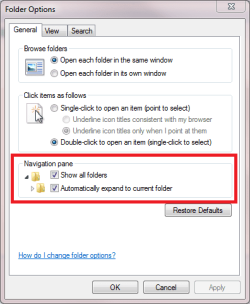
It should work better if you enable these two settings in Folder Options:

Folder_options_2.png

Kari

EDIT: I was too slow, once again...
 

My Computer

Computer type
Laptop
Computer Manufacturer/Model Number
HP ENVY 17-1150eg
OS
Windows 10 Pro x64 EN-GB
CPU
1.6 GHz Intel Core i7-720QM Processor
Memory
6 GB
Graphics Card(s)
ATI Mobility Radeon HD 5850 Graphics
Sound Card
Beats sound system with integrated subwoofer
Monitor(s) Displays
17" laptop display, 22" LED and 32" Full HD TV through HDMI
Screen Resolution
1600*900 (1), 1920*1080 (2&3)
Hard Drives
Internal: 2 x 500 GB SATA Hard Disk Drive 7200 rpm
External: 2TB for backups, 3TB USB3 network drive for media
Cooling
As Envy runs a bit warm, I have it on a Cooler Master pad
Keyboard
Logitech diNovo Media Desktop Laser (bluetooth)
Mouse
Logitech Performance Mouse MX
Internet Speed
50/10 Mbps VDSL
Antivirus
Windows Defender 4.3.9431.0
Browser
Maxthon 3.5.2., IE11
Hi All:

Thanks very much for you help, working fine now.
 
Last edited by a moderator:

My Computer

OS
Windows 7 Ultimate x64
CPU
LGA1156 CPU (3.6 Overclocked to 4.2)
Motherboard
GIGABYTE GA-H55M-UD2H
Memory
4GB
Graphics Card(s)
nvidia geforce gt 430 dual fan
Monitor(s) Displays
19" OPTIQUEST Q19WB & LG 19" LCD TV 19LG3000
Screen Resolution
1440 x 900
Hard Drives
2 x Seagate ST31000528AS ATA
Seagate FA GoFlex Desk USB (1TB)
Seagate FreeAgent USB (1TB)
PSU
Standard 500 Watt
Case
Generic Micro ATX Case
Cooling
Gel Coolant
Keyboard
Generic QWERTY Keyboard
Mouse
Logitec Lasar
Internet Speed
Broadband
Back
Top