Win 7 gets slow after hour+

Ranu

New member
Local time
7:12 AM
Messages
10
Location
Lithuania
Hello,

I'm new here and also on windows 7. I installed it yesterday and I have already met with few problems.

When 7 starts everything works fine but after hour or hour and a half it starts to work very slowly.

My PC: AMD Athlon 3200+
GeForce 7900gt
2GB Kingston RAM
200+320GB Hards


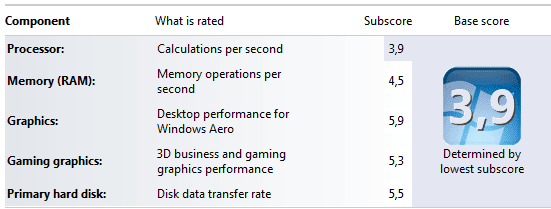
I use Ultimate version. Where can be the problems ? Is my PC not to strong to work with 7 ? How I could solve that problem ? Maybe I should turn off something ?

Thank,
Laurynas
 

Attachments
  • Untitled.png
    Untitled.png
    9.2 KB · Views: 24

My Computer

OS
Windows 7
CPU
AMD Athlon 3200+
Motherboard
ASUS A8N-E
Memory
2GB Kingston
Graphics Card(s)
GeForce 7900GT
Monitor(s) Displays
LG 1982U
Screen Resolution
1280 x 1024
Hard Drives
Maxtor 200GB
Western Digital 320
PSU
450W
Internet Speed
2.5Mbps
Hello,

I'm new here and also on windows 7. I installed it yesterday and I have already met with few problems.

When 7 starts everything works fine but after hour or hour and a half it starts to work very slowly.

My PC: AMD Athlon 3200+
GeForce 7900gt
2GB Kingston RAM
200+320GB Hards


I use Ultimate version. Where can be the problems ? Is my PC not to strong to work with 7 ? How I could solve that problem ? Maybe I should turn off something ?

Thank,
Laurynas

Try turning off Anti Virus.
If that does not work, press alt cntrl delete. You will be able to view the task manager. See what is using your memory when you are not running correctly.
 

My Computer

Computer type
PC/Desktop
Computer Manufacturer/Model Number
Dell XPS 420
OS
Windows 10, Home Clean Install
CPU
Intel Core2 processsor Q8200(2.33Ghz 1333FSB) Quad Core Tech
Motherboard
Dell
Memory
6 gb
Graphics Card(s)
ATI Radeon 256MB HD3650
Sound Card
Intergrated 7.1 Channel Audio
Monitor(s) Displays
Dell SP2009W 20"
Hard Drives
640 GB Serial ATA Hard drive
Cooling
Fan
Keyboard
Dell USB Keyboard
Mouse
Dell Premium Optical USB
Internet Speed
DSL 2.85
Try turning off Anti Virus.
If that does not work, press alt cntrl delete. You will be able to view the task manager. See what is using your memory when you are not running correctly.

+ 1 it could be an app with a memory leak

(A quicker way to bring up the task manager is to either press Ctrl+Shift+Esc or right-click on the task bar and select it from the context menu )

Since it's a fresh installation, it may also be a scheduled task that is kicking in. ie The search indexer
 

My Computer

Computer type
PC/Desktop
Computer Manufacturer/Model Number
Systems by SmartEyeball
OS
8 Pro x64
CPU
i7 3770K 4.6GHz
Motherboard
ASUS P8Z77 WS
Memory
16GB G.Skill Trident X 2666mhz
Graphics Card(s)
x2 EVGA 780 Ti Superclocked SLI
Sound Card
SB X-FI Surround 5.1 PRO USB / ATH-AD900 Headphones
Monitor(s) Displays
x3 Dell U2410 / 58" Samsung
Screen Resolution
5760*1200/ 1920*1200
Hard Drives
2x Intel 520 240GB (RAID 0) * 2x WD Caviar Blacks 2TB (RAID 0) * 2TB WD Caviar Black * Sony Optirac DVD
PSU
Silverstone Strider Evolution 1200W
Case
Thermaltake Level 10 GT Snow Edition
Cooling
Noctua NH-D14
Keyboard
Topre Realforce // Ducky Shine MX Black // Filco Ninja TKL
Mouse
Thermaltake Theron (Highly Recommended) + Razer Imperator
Antivirus
MSE
Browser
IE, FF, WaterFox
Other Info
GT Extreme V2 Sim Racing Cockpit + 40" LCD and K/B Mouse stand ▼
Fanatec CSR Elite Wheel + Clubsport V1 Pedals + CSR shifter/7G-H ▼Saitek X52 Pro ▼ TrackIR 5 Pro
Buttkicker v2 Seat Rumbler with Dedicated 5.1 and Sub Woofer attached to frame ▼
=
Bloody Big Grin
It works so slowly that it's even difficult to turn on task manager.
Antivirus: Kaspersky Internet Security 2010.

smarteyeball, how to check if the search indexer is scheduled ?

Thanks,
Laurynas
 

My Computer

OS
Windows 7
CPU
AMD Athlon 3200+
Motherboard
ASUS A8N-E
Memory
2GB Kingston
Graphics Card(s)
GeForce 7900GT
Monitor(s) Displays
LG 1982U
Screen Resolution
1280 x 1024
Hard Drives
Maxtor 200GB
Western Digital 320
PSU
450W
Internet Speed
2.5Mbps
Pagefile maxing out?

CPU getting hot?

Memory Leak?

TC
 

My Computer

Computer Manufacturer/Model Number
Custom Built
OS
Windows 7 Ultimate 64bit
CPU
Intel Quad Core Q9400 2.66ghz
Motherboard
MSI Nero 3
Memory
8GB PC2-6400 Corsair
Graphics Card(s)
Nvidia 8800GT 512mb
Sound Card
OnBoard Realtek HD
Monitor(s) Displays
Acer 24" H243H LCD
Screen Resolution
1920 x 1080
Hard Drives
120GB Seagate - OS & Programs,
1TB Seagate - Media storage,
1TB Seagate - Media2 storage
PSU
Antec Eartwatts 500W
Case
NZXT black finish, glass side, blue lighting
Cooling
Scythe CPU Cooler w/removable fan
Keyboard
Dell (old)
Mouse
Logitech G5 w/copper accents
Internet Speed
8mb download, 1mb upload
Other Info
2nd computer, asrock board, amd x2-6000 cpu (htpc use)
3rd computer, gigabyte GA-E7AUM-DS2H board, Intel E8400 cpu (htpc use)
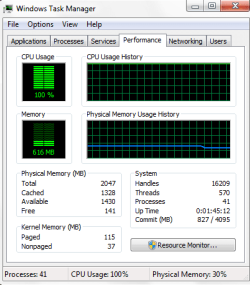
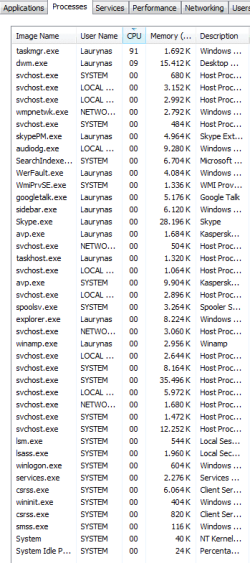
I have just had one more "down"

I took some screens.

PC is 100% loaded. I turned of Kaspersky and that didn't help..

Any more suggestions ?
 

Attachments

  • Untitled.png
    Untitled.png
    12.1 KB · Views: 13
  • Untitled1.png
    Untitled1.png
    14 KB · Views: 20

My Computer

OS
Windows 7
CPU
AMD Athlon 3200+
Motherboard
ASUS A8N-E
Memory
2GB Kingston
Graphics Card(s)
GeForce 7900GT
Monitor(s) Displays
LG 1982U
Screen Resolution
1280 x 1024
Hard Drives
Maxtor 200GB
Western Digital 320
PSU
450W
Internet Speed
2.5Mbps
Click "show processes from all users" and then post the screen shot again.
 

My Computer

Computer Manufacturer/Model Number
SevenForums
OS
7 Prof
CPU
Q9550
Motherboard
Maximus II Formula
Memory
2x2 Mushkin Ascent 8500
Graphics Card(s)
4870X2
Sound Card
X-Fi Xtreme Gamer
Monitor(s) Displays
LN32A550
Screen Resolution
1920x1080
Hard Drives
Intel G2 80GB
5x1TB
PSU
Corsair 1000
Case
Cosmos
Cooling
Yates^13
Keyboard
G15v1
Mouse
MX518
Internet Speed
6Mbps
I have just had one more "down"

I took some screens.

PC is 100% loaded. I turned of Kaspersky and that didn't help..

Any more suggestions ?

You might want to turn off Utorrent and make sure it's not set to turn on when you start Windows. It's eating up 29 percent of your cpu at the moment.
 

My Computer

Computer type
PC/Desktop
Computer Manufacturer/Model Number
Home built
OS
Windows 7 Ult, Windows 8.1 Pro,
CPU
Q9650-4.275GHz, E8600 4.5GHz, E6750-3.8GHz
Motherboard
Evga 780i FTW
Memory
G.Skill PC2 9600 1200Mhz 5 5 5 15 2T
Graphics Card(s)
GTX480
Sound Card
Asus Xonar D2
Monitor(s) Displays
HannsG
Screen Resolution
1680X1050
Hard Drives
GSkill Phoenix Pro 120GB SSD
PSU
ThermalTake Toughpower 1000Watt modular
Case
ThermalTake XaserV
Cooling
Xigmatek S1283
Keyboard
Logitech G15
Mouse
Logitech G9
Internet Speed
T1
I have just had one more "down"

I took some screens.

PC is 100% loaded. I turned of Kaspersky and that didn't help..

Any more suggestions ?

You might want to turn off Utorrent and make sure it's not set to turn on when you start Windows. It's eating up 29 percent of your cpu at the moment.

Yep, having other people download things from your computer isnt the greatest concept for speed, lol.

You could probably do with a processor upgrade too but thats up to you.

TC
 

My Computer

Computer Manufacturer/Model Number
Custom Built
OS
Windows 7 Ultimate 64bit
CPU
Intel Quad Core Q9400 2.66ghz
Motherboard
MSI Nero 3
Memory
8GB PC2-6400 Corsair
Graphics Card(s)
Nvidia 8800GT 512mb
Sound Card
OnBoard Realtek HD
Monitor(s) Displays
Acer 24" H243H LCD
Screen Resolution
1920 x 1080
Hard Drives
120GB Seagate - OS & Programs,
1TB Seagate - Media storage,
1TB Seagate - Media2 storage
PSU
Antec Eartwatts 500W
Case
NZXT black finish, glass side, blue lighting
Cooling
Scythe CPU Cooler w/removable fan
Keyboard
Dell (old)
Mouse
Logitech G5 w/copper accents
Internet Speed
8mb download, 1mb upload
Other Info
2nd computer, asrock board, amd x2-6000 cpu (htpc use)
3rd computer, gigabyte GA-E7AUM-DS2H board, Intel E8400 cpu (htpc use)
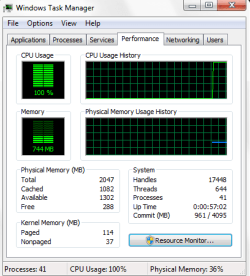
One more down. I noticed that is usually starts after 1 hour ~40minutes after PC start.

When the PC was slow I checker processes and "System Idle Program" was taking 40-90% of CPU.
Then I restarted PC, and it's the same, but PC works normally...

I have no idea what to do.. Please help..
 

Attachments

  • Untitled.png
    Untitled.png
    13.6 KB · Views: 71

My Computer

OS
Windows 7
CPU
AMD Athlon 3200+
Motherboard
ASUS A8N-E
Memory
2GB Kingston
Graphics Card(s)
GeForce 7900GT
Monitor(s) Displays
LG 1982U
Screen Resolution
1280 x 1024
Hard Drives
Maxtor 200GB
Western Digital 320
PSU
450W
Internet Speed
2.5Mbps
system idle process is actually the percentage of time your processor is NOT being used. On that screen shot, the 95% displayed means there is 95% of your cpu capacity available.
 
system idle process is actually the percentage of time your processor is NOT being used. On that screen shot, the 95% displayed means there is 95% of your cpu capacity available.

When PC was slow System Idle varied from 30 to 90%.
The performance tab showed 100% CPU usage and no other programs were running.
 

My Computer

OS
Windows 7
CPU
AMD Athlon 3200+
Motherboard
ASUS A8N-E
Memory
2GB Kingston
Graphics Card(s)
GeForce 7900GT
Monitor(s) Displays
LG 1982U
Screen Resolution
1280 x 1024
Hard Drives
Maxtor 200GB
Western Digital 320
PSU
450W
Internet Speed
2.5Mbps
With your hardware, windows 7 is going to run a little slower than XP. any time you install an operating system it's going to slow down after a while. and I noticed you were running Utorrent.. Is it possible that while it was running slow you had a freshly completed torrent... the file check after one is completed will slow your system down immensely.
 
It's not utorrent. I didn't turn it on this time, but it gets slow again and again.

Now it slowed after 5x minutes.

I'm doing nothing with PC, but usage of CPU is 100% I have no idea what to do.

Here are the screens from last "down"
 

Attachments

  • Untitled1.png
    Untitled1.png
    14.2 KB · Views: 45
  • Untitled.png
    Untitled.png
    11.8 KB · Views: 29

My Computer

OS
Windows 7
CPU
AMD Athlon 3200+
Motherboard
ASUS A8N-E
Memory
2GB Kingston
Graphics Card(s)
GeForce 7900GT
Monitor(s) Displays
LG 1982U
Screen Resolution
1280 x 1024
Hard Drives
Maxtor 200GB
Western Digital 320
PSU
450W
Internet Speed
2.5Mbps
Start ending process's one at a time, close google talk then skype etc. You have alot of background process's open for only 2gb of ram running ultimate edition.
 

My Computer

Computer type
PC/Desktop
Computer Manufacturer/Model Number
Custom
OS
Windows 7 64bit
CPU
Intel I7 4770k @4.5
Motherboard
Asus z87-pro
Memory
16GB corsair Vengence
Graphics Card(s)
EVGA GTX 980 TI SC acx2.0
Sound Card
XFI fatality gamer
Monitor(s) Displays
Samsung
Screen Resolution
1920 x 1080
Hard Drives
OCZ ssd Baracuda 1tb x2
PSU
Corsair 1200 watt
Case
NZXT Noctis 450
Cooling
Kraken X61
Keyboard
Logitech G510
Mouse
Razer naga
Internet Speed
100 down 25 up
Other Info
Nzxt Hue +
On the last down I turned off all the programs (Gtlak, Skype, Kaspersky). CPU usage varies 60-80% but it works very slowly.

And why it starts working so slowly if at the beginning everything works fine with many programs ? And after hours it starts to work slowly even without any running program..

Please, help me.. I'm really tired of restarting PC every single hour..
 

My Computer

OS
Windows 7
CPU
AMD Athlon 3200+
Motherboard
ASUS A8N-E
Memory
2GB Kingston
Graphics Card(s)
GeForce 7900GT
Monitor(s) Displays
LG 1982U
Screen Resolution
1280 x 1024
Hard Drives
Maxtor 200GB
Western Digital 320
PSU
450W
Internet Speed
2.5Mbps
Try uninstalling Kaspersky as a test. Even if it's not running a scan, it may be draining your resources at a monstrous rate. One personal example I can think of is Sunbelt's Vipre antivirus. It sometimes maxxes out on system resources when the email active protection is on. I suspect something similar is happening with Kaspersky.
 

My Computer

OS
Windows XP
Run a memory diagnostic and make sure it's not your RAM. After that, disable all startup programs, including antivirus. After that, run process monitor and watch the process that's hogging up the CPU cycles.
 

My Computer

Computer Manufacturer/Model Number
SevenForums
OS
7 Prof
CPU
Q9550
Motherboard
Maximus II Formula
Memory
2x2 Mushkin Ascent 8500
Graphics Card(s)
4870X2
Sound Card
X-Fi Xtreme Gamer
Monitor(s) Displays
LN32A550
Screen Resolution
1920x1080
Hard Drives
Intel G2 80GB
5x1TB
PSU
Corsair 1000
Case
Cosmos
Cooling
Yates^13
Keyboard
G15v1
Mouse
MX518
Internet Speed
6Mbps
If it were me, It's time to punt "reinstall" the Op system. Move to a safe distance and nuke it from space,...it's the only way to be sure.
 

My Computer

Computer type
PC/Desktop
Computer Manufacturer/Model Number
Home built
OS
Windows 7 Ult, Windows 8.1 Pro,
CPU
Q9650-4.275GHz, E8600 4.5GHz, E6750-3.8GHz
Motherboard
Evga 780i FTW
Memory
G.Skill PC2 9600 1200Mhz 5 5 5 15 2T
Graphics Card(s)
GTX480
Sound Card
Asus Xonar D2
Monitor(s) Displays
HannsG
Screen Resolution
1680X1050
Hard Drives
GSkill Phoenix Pro 120GB SSD
PSU
ThermalTake Toughpower 1000Watt modular
Case
ThermalTake XaserV
Cooling
Xigmatek S1283
Keyboard
Logitech G15
Mouse
Logitech G9
Internet Speed
T1
Hello again,

looks like that problem was found. I think it was Kaspersky fault. I uninstalled it and computers runs normally for 4 hours and 20 minutes now.

But there is one new problem.. I can't sit without antivirus and I do not want to keep Kaspersky unused because I bought the license only 2 months ago and license is valid for the next 2 months.

Why Kaspersky can be slowing me computer, where can be the problem ?

Thanks,
Laurynas
 

My Computer

OS
Windows 7
CPU
AMD Athlon 3200+
Motherboard
ASUS A8N-E
Memory
2GB Kingston
Graphics Card(s)
GeForce 7900GT
Monitor(s) Displays
LG 1982U
Screen Resolution
1280 x 1024
Hard Drives
Maxtor 200GB
Western Digital 320
PSU
450W
Internet Speed
2.5Mbps
Back
Top