Win 7 Hibernate

Buckeye25

New member
Local time
10:45 PM
Messages
17
Location
H town
Just wondering if you guys have noticed if hibernate option is missing on some builds of Win 7?? My colleage tried to tell me that she doesnt have the option to go to hibernate from start menu only sleep shutdown etc...

Has anyone noticed this?
 

My Computer

OS
XP,Vista, Windows 7

My Computer

Computer type
PC/Desktop
Computer Manufacturer/Model Number
Self built custom
OS
64-bit Windows 11 Pro for Workstations
CPU
Intel i7-8700K OC'd to 5 GHz
Motherboard
ASUS ROG Maximus XI Formula Z390
Memory
64 GB (4x16GB) G.SKILL TridentZ RGB DDR4 3600 MHz
Graphics Card(s)
ASUS ROG-STRIX-GTX1080TI-O11G-GAMING
Sound Card
Integrated
Monitor(s) Displays
2 x Samsung Odyssey G7 27"
Screen Resolution
2560x1440
Hard Drives
1TB Samsung 990 PRO M.2,
4TB Samsung 990 PRO PRO M.2,
TerraMaster F8 SSD Plus NAS
PSU
Seasonic Prime Titanium 850W
Case
Thermaltake Core P3
Cooling
Corsair Hydro H115i
Keyboard
Logitech wireless K800
Mouse
Logitech MX Master 4
Internet Speed
2 Gb/s Download and 100 Mb/s Upload
Antivirus
Malwarebyte Anti-Malware Premium
Browser
Google Chrome
Other Info
Logitech Z625 speaker system,
Logitech BRIO 4K Pro webcam,
HP Color LaserJet Pro MFP M477fdn,
APC SMART-UPS RT 1000 XL - SURT1000XLI,
Galaxy S23 Plus phone
so as far as you know its not turned off by default or something? I read somewhere that MS had the option removed for units with less then 4gb of memory due to time it took to resume something about the pagefile.
 

My Computer

OS
XP,Vista, Windows 7
There were plenty of hibernating issues with vista from what I heard. I know that mine doesn't work... They could have scrapped it for the beta or totally.
 

My Computer

OS
Vista Premium x64
Just wondering if you guys have noticed if hibernate option is missing on some builds of Win 7?? My colleage tried to tell me that she doesnt have the option to go to hibernate from start menu only sleep shutdown etc...

Has anyone noticed this?

I have hibernate set on my x86 Win7. Works great. Your friend needs to check the power plan. There is also a cmd to turn it back on. You have to run cmd as administrator.

powercfg /hibernate on

PhreePhly

PS: Hibernate works great in Vista as well.
 

My Computer

Computer Manufacturer/Model Number
MPC Transport T2500 Laptop
OS
Windows 7 x64 (RTM via MSDN)
CPU
Intel Core 2 Duo T9300 (2.5 GHz)
Motherboard
MPC
Memory
4 GB SODIMMS (System Max)
Graphics Card(s)
nVidia 8600M GS 256MB
Sound Card
Realtek On-Board
Monitor(s) Displays
15.4" LCD with a Dell 2005FPW 20" attached
Screen Resolution
1680x1050 (15.4") and 1680x1050 (20")
Hard Drives
Toshiba 2.5" 320 GB 7200 RPM
I discovered that disabling "Hybrid sleep" on advanced power options will add hibernation to the shutdown menu.

On a side note: My computer can only hibernate once, after that, if it has already hibernated once before during the session, it goes into a strange state where the power is never turned off, but I can't return to windows.
 

My Computer

OS
Windows 7
hibernates once

I discovered that disabling "Hybrid sleep" on advanced power options will add hibernation to the shutdown menu.

On a side note: My computer can only hibernate once, after that, if it has already hibernated once before during the session, it goes into a strange state where the power is never turned off, but I can't return to windows.

My notebook does the same thing. After the first time I hibernate, it turns the screen off and doesnt do anything. When I touch my keyboard, it makes that "ding" sound. Anyone have any ideas?
 

My Computer

OS
Windows 7

My Computer

Computer Manufacturer/Model Number
Tx2500z Tablet Pc/Homemade Server
OS
Windows 7 Ult x64(x2), HomePrem x32(x4), Server 08 (+VM), 08 R2 (VM) , SuSe 11.2 (VM), XP 32 (VM)
CPU
Turion X2 ultra (oh well came with laptop)/P4 @3.2 (yes P4)
Motherboard
IDK HP Motherboard / Intel DG965SS
Memory
OCZ Dual Channel 4GB kit/ 1gb Dual Channel
Graphics Card(s)
HD 3200 graphics /GMA x3100 (yay for intergrated!!)
Sound Card
Realtek HD Audio(mic working, well sort of)/Siig IC-70012
Monitor(s) Displays
built-in Hp 12" laptop screen/ Acer 19"
Screen Resolution
1280x800 /1440x900
Cooling
All Air Cooled
Mouse
Logi MX Rev. /MS Wheel Optical 1.1A /Logitech Optical Mouse
Internet Speed
College baby but its still routed through vpn to 1536k...
Other Info
love my wacom pen and pressure sensitivity...
wished it worked in 7, SUSE for that matter though
Hibernates Once

I found the problem to the hibernating once problem I had. It was my iso loader. virtual clone drive. uninstalled it and now hibernate works every time.
 

My Computer

OS
Windows 7
I discovered that disabling "Hybrid sleep" on advanced power options will add hibernation to the shutdown menu.

On a side note: My computer can only hibernate once, after that, if it has already hibernated once before during the session, it goes into a strange state where the power is never turned off, but I can't return to windows.

I've been having the same issues.
 

My Computer

OS
Windows 7 64-bit
CPU
[email protected]
Motherboard
P35
Memory
8gb Corsair PC6400
Graphics Card(s)
MSI HD 4850
Screen Resolution
1360x768
Hard Drives
4x 500gb Samsung
PSU
Corsair 520HX
Case
Rocketfish
I discovered that disabling "Hybrid sleep" on advanced power options will add hibernation to the shutdown menu.

On a side note: My computer can only hibernate once, after that, if it has already hibernated once before during the session, it goes into a strange state where the power is never turned off, but I can't return to windows.

How do I find "advanced power options" on Windows 7? I searched Control Panel and couldn't find them. Thanks.
 

My Computer

OS
windows 7
click the start orb type advanced power option and click the first icon that appears :)
 

My Computer

OS
Windows 7 32bit RTM
I enabled Hibernate on Windows 7. It works ... for a few seconds. When I hibernate the machine using either the menu or the power button it takes about 30 seconds to turn off, which is fine. Then after about another minute it turns back on and prompts for a login. And after that it stays on.

Has anyone else seen this? Any ideas how to fix it? Thanks.
 

My Computer

OS
windows 7
click the start orb type advanced power option and click the first icon that appears :)

Doing that I found

Configure advanced user profile properties
View advanced system settings
Manage advanced sharing settings

But not power settings.
 

My Computer

OS
windows 7
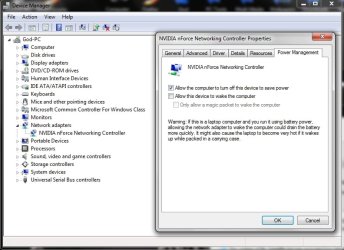
Have you gone to device manager and selected properties for your network adapter and set the power options not to wake with this device?

2009-05-24_220916.jpg
 

My Computer

Computer Manufacturer/Model Number
Home Brew
OS
Windows 7 Ultimate Vista Ultimate x64
CPU
Core 2 Duo E8500 3.16Ghz @ 3.8Ghz
Motherboard
eVGA 750i FTW
Memory
2x2Gigs Patriot PC2-6400 LL
Graphics Card(s)
Inno3D GeForce GTX260 216 SP
Monitor(s) Displays
ASUS VW222U 22" 2ms Response time
Screen Resolution
1680x1050
Hard Drives
SATA 150GB
SATA II 250GB
USB IDE 750GB Ext.
PSU
HYTEC 600W & Thermaltake 650W Toughpower Power Exp
Case
Thermaltake Armor LCS (Liquid Cooling System)
Cooling
Liquid Cooling System
Keyboard
Logitech G15 Gaming Keyboard
Mouse
Logitech G9 Gaming Mouse
Have you gone to device manager and selected properties for your network adapter and set the power options not to wake with this device?

Thanks, that seems to have worked. (I had a different network adapter.)
 

My Computer

OS
windows 7
Hibernate - start up - hibernate again - no power off

Hi

On a side note: My computer can only hibernate once, after that, if it has already hibernated once before during the session, it goes into a strange state where the power is never turned off, but I can't return to windows.

This question/remark isn't answered and I have this issue. I have the hibernate button and the computer does never go automaticaly to hibernate state.
Powersettings network card are off:
naamloos.png


My first hibernate shuts down fast, starts up after first hibernate is fast en everything works ok. Then I do a next hibernate and the computer does not shut down any more. I have to reset the computer and windows comes with the Safe Mode startup screen, where I select "Startup windows normaly", after that everything is working ok again.

What can I do, so I can do multiple hibernate's after each other, without a reboot?
Does anybody has a sollution for this? Thanks in advance.

Chillie

 
Last edited:

My Computer

OS
Windows 7 x64
Cooling
yes
I discovered that disabling "Hybrid sleep" on advanced power options will add hibernation to the shutdown menu.

On a side note: My computer can only hibernate once, after that, if it has already hibernated once before during the session, it goes into a strange state where the power is never turned off, but I can't return to windows.

thanks!that did my work!
 

My Computer

OS
Windows 7 86x
Motherboard
945gm
Memory
1gb
Graphics Card(s)
8400gs Biostar
Sound Card
Inbuilt 2 channel
Monitor(s) Displays
LG 17 inch
Hi

On a side note: My computer can only hibernate once, after that, if it has already hibernated once before during the session, it goes into a strange state where the power is never turned off, but I can't return to windows.

This question/remark isn't answered and I have this issue. I have the hibernate button and the computer does never go automaticaly to hibernate state.
Powersettings network card are off:
naamloos.png


My first hibernate shuts down fast, starts up after first hibernate is fast en everything works ok. Then I do a next hibernate and the computer does not shut down any more. I have to reset the computer and windows comes with the Safe Mode startup screen, where I select "Startup windows normaly", after that everything is working ok again.

What can I do, so I can do multiple hibernate's after each other, without a reboot?
Does anybody has a sollution for this? Thanks in advance.

Chillie
Hibernate doesnt work if your C drive is with less space. I believe close 700MB or 1GB space is required for hibernate to work.
I have RC, and all the time use only the hibernate option. Every 2-3 days are whenever my lappy is slow in responding, wil restart it. Other than which, only hibernate. Also the hibernate is real quick in shuttin down and bootin up.
 

My Computer

Computer Manufacturer/Model Number
MacBook Pro
OS
Lion
CPU
i5
Memory
4GB
Graphics Card(s)
Intel
Screen Resolution
1200x800
Hard Drives
Seagate FreeAgent GO 250GB Ext. HDD
Back
Top