BreeZeR
New member
Hey there!
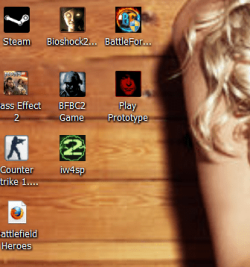
I have a preblem with my icons on my desktop.
And don't know what i have done to cause it
As the picture shows, there are som kind om extra icon on top of the right icon
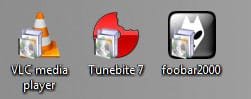
I have a preblem with my icons on my desktop.
And don't know what i have done to cause it
As the picture shows, there are som kind om extra icon on top of the right icon
My Computer
- OS
- Windows 7
- CPU
- 2.50 GHz
- Motherboard
- Asus IPIBL-LB
- Memory
- 4 GB
- Graphics Card(s)
- nVIDIA GeForce 9800 GT
- Sound Card
- Realtek ALC888/1200
- Monitor(s) Displays
- Philips
- Screen Resolution
- 1920x1080
- Hard Drives
- 1x300GB
3x500GB
1x1TB
- PSU
- One with a fan
- Case
- Small one (room for nothing in there)
- Cooling
- None
- Keyboard
- Logitech!
- Mouse
- Razer Copperhead
- Internet Speed
- 20/2

 Thanks