Win 7 Laptop cannot access files on fileserver.

yelrom

New member
Local time
7:47 PM
Messages
2
New Dell Laptop win 7 64 bit Home Premium. It is hooked up to a small network consisting of a 2003 R2 std server (used mainly as a shared file reservoir) and 4 XP COMPUTERS all part of "workgroup". The win7 laptop can see all of the computers & the FILESERVER & can also see & access a separate FTPSERVER computer ( not sure why I can't see the 2 networked printers but haven't pursued this yet). Internet works fine.
On trying to access the FILESERVER I am asked for a password to which the correct password does not work.
To verify that the network itself isn't the issue ( & I know this isn't the truest of statements) I installed two other computers (that were never part of this network) one with Vista-Home & another with XP-Home setting them as part of "workgroup" using identical computername & password as the win7 laptop. They both worked perfectly in the network. Only the laptop with windows 7 cant access FILESERVER.
Is it possible that I absolutely need win7 pro to have a chance of making this work
or any other ideas why?
 

My Computer

Computer Manufacturer/Model Number
Dell Studio 1747
OS
Windows 7 Home Premium 64 bit
CPU
Core i7 720
Memory
6 GB
Graphics Card(s)
ATI 4650
Monitor(s) Displays
Notebook 1600x1200 2nd Monitor 1920 x1200
Hard Drives
500 GB 7200 rpm
This might work for you to access shares on local server. I'm not sure what you are using for your server but this might help. Do this on the Win 7 machines.

Control Panel - Administrative Tools - Local Security Policy

Local Policies - Security Options

Network security: LAN Manager authentication level
Send LM & NTLM responses

Minimum session security for NTLM SSP
Disable Require 128-bit encryption
 

My Computer

Computer type
PC/Desktop
Computer Manufacturer/Model Number
Home built
OS
Windows 7 Ult, Windows 8.1 Pro,
CPU
Q9650-4.275GHz, E8600 4.5GHz, E6750-3.8GHz
Motherboard
Evga 780i FTW
Memory
G.Skill PC2 9600 1200Mhz 5 5 5 15 2T
Graphics Card(s)
GTX480
Sound Card
Asus Xonar D2
Monitor(s) Displays
HannsG
Screen Resolution
1680X1050
Hard Drives
GSkill Phoenix Pro 120GB SSD
PSU
ThermalTake Toughpower 1000Watt modular
Case
ThermalTake XaserV
Cooling
Xigmatek S1283
Keyboard
Logitech G15
Mouse
Logitech G9
Internet Speed
T1
Thanks for the reply.
However I cannot find Local Security Policy Local Policies nor Network Security anywheres in the computer. Maybe these controls are not provided in Windows 7 Home?
 

My Computer

Computer Manufacturer/Model Number
Dell Studio 1747
OS
Windows 7 Home Premium 64 bit
CPU
Core i7 720
Memory
6 GB
Graphics Card(s)
ATI 4650
Monitor(s) Displays
Notebook 1600x1200 2nd Monitor 1920 x1200
Hard Drives
500 GB 7200 rpm
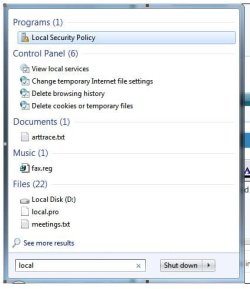
Go to Start and type inthe search box local . If it exist on your machine, it will show up top. Then you click it.

Noname.jpg
 

My Computer

Computer Manufacturer/Model Number
Lenovo ThinkPad T60
OS
Windows 7 Ultimate 64Bit
CPU
GenuineIntel Intel(R) Core(TM) DuoCore T2400 @ 1.83GHz
Motherboard
Intel(R) 82801G (ICH7 Family)
Memory
2.00 GB
Graphics Card(s)
Mobile Intel(R) 945 Express Chipset
Sound Card
SoundMAX Integrated Digital HD Audio
Monitor(s) Displays
ThinkPad Display
Screen Resolution
1400x1050
Hard Drives
100Gb SATA
Keyboard
Standard Keyboard
Mouse
HID-compliant Mouse
Internet Speed
Cable Broadband - 54Mbps
Other Info
Intel(R) PRO/1000 PL Network Connection
11a/b/g Wireless LAN Mini PCI Express Adapter
same issue

When I selected run and entered "local" I didn't get local security policy. I got "view local services", a folder called local storage, but nothing that related to what we need to do here.
 

My Computer

Computer Manufacturer/Model Number
Gateway NV59
OS
Windows 7 Home Premium
CPU
i5
Memory
4gig
Hard Drives
320
However...

When I type "local" in the run box of my other laptop running Windows 7 Ultimate(32bit), I do get the local security policy. Noob conclusion: without some sort of registry hack, Windows 7 pro, Ultimate or Enterprise is needed for this sort of networking...

Thoughts anyone....?

On a side note, a little program called Winlogon allows Windows 7 users to change their logon screens. It works on Windows 7 Pro, Ultimate and Enterprise, but doesn't seem to do diddly-squat(yes, i said diddly-squat...your day is complete) with Windows 7 Home Premium(64 bit).....
 

My Computer

Computer Manufacturer/Model Number
Gateway NV59
OS
Windows 7 Home Premium
CPU
i5
Memory
4gig
Hard Drives
320

My Computer

Computer Manufacturer/Model Number
Lenovo ThinkPad T60
OS
Windows 7 Ultimate 64Bit
CPU
GenuineIntel Intel(R) Core(TM) DuoCore T2400 @ 1.83GHz
Motherboard
Intel(R) 82801G (ICH7 Family)
Memory
2.00 GB
Graphics Card(s)
Mobile Intel(R) 945 Express Chipset
Sound Card
SoundMAX Integrated Digital HD Audio
Monitor(s) Displays
ThinkPad Display
Screen Resolution
1400x1050
Hard Drives
100Gb SATA
Keyboard
Standard Keyboard
Mouse
HID-compliant Mouse
Internet Speed
Cable Broadband - 54Mbps
Other Info
Intel(R) PRO/1000 PL Network Connection
11a/b/g Wireless LAN Mini PCI Express Adapter
Back
Top