Hi. i know this is a issue you guys have come across allot and ive checkt the stickys and allot around first but i havent seen anyonces descitption of what i have =/.
Thing happend around 2 mounths ago but i just restarted windows a few times and i got sound back. but i had it in my head all the time its time for a serious Formation and reinstallation. when im done with installation i have around 8 hours of sound then its gone =/. and heres more it likes to mess around with me..
So when i turn off my comp for more then 4 hours i get sound back what ever i did on it earlier.
If i get booted with a red X on my speaker by the winclock i have too uninstall realtek r2.64(will get soon why 2.64) uninstall the high Def controller in device manager. install drivers again and search for devices in that darn manager.
IF windows dosent find HD audio bus i have too go in too propetis on high def controller in D/M and klick update drivers and then the option i want too witch chouse driver, after klicking next and installing same drivers windows updater just did IT find the audio bus...
So once it finds the audio bus i have moustly around 1-2 min of sound and then it goes silent but the Vu in backplay devices and winamps vu jumps up and down toogether.. at this point ive tryed to repeat my process of installing and uninstalling but thats work up a horse'S A. it does nothing =/. so reboot it is and redo.
When i try too install realtek r2.65 it says there is no device with this driver signature somthing. i tryed in safemode, allso in that mode it skips the signature thinggy.. thats what it says it does but dosent do!-.-.
Sometimes when even realtek something manager is in the icon tray it says that ive unplugged my speakers, when i know that a cable for 57€ dose not just dissconnect its self or start too have poor connection within.
after a reboot the sound card is gone..
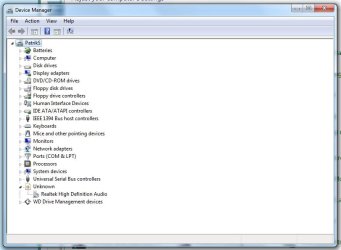
and windows never find it as a sound card in the device manager its categorized as unkown =/..
Ive made some reports from speccy when windows finds my soundcard but no sound is head and the secound speccy logg is when win7 cant fins that soundcard.
Other 2 are everest for thouse who want too have some idea of what hardware im talking about =).
Thing happend around 2 mounths ago but i just restarted windows a few times and i got sound back. but i had it in my head all the time its time for a serious Formation and reinstallation. when im done with installation i have around 8 hours of sound then its gone =/. and heres more it likes to mess around with me..
So when i turn off my comp for more then 4 hours i get sound back what ever i did on it earlier.
If i get booted with a red X on my speaker by the winclock i have too uninstall realtek r2.64(will get soon why 2.64) uninstall the high Def controller in device manager. install drivers again and search for devices in that darn manager.
IF windows dosent find HD audio bus i have too go in too propetis on high def controller in D/M and klick update drivers and then the option i want too witch chouse driver, after klicking next and installing same drivers windows updater just did IT find the audio bus...
So once it finds the audio bus i have moustly around 1-2 min of sound and then it goes silent but the Vu in backplay devices and winamps vu jumps up and down toogether.. at this point ive tryed to repeat my process of installing and uninstalling but thats work up a horse'S A. it does nothing =/. so reboot it is and redo.
When i try too install realtek r2.65 it says there is no device with this driver signature somthing. i tryed in safemode, allso in that mode it skips the signature thinggy.. thats what it says it does but dosent do!-.-.
Sometimes when even realtek something manager is in the icon tray it says that ive unplugged my speakers, when i know that a cable for 57€ dose not just dissconnect its self or start too have poor connection within.
after a reboot the sound card is gone..
and windows never find it as a sound card in the device manager its categorized as unkown =/..
Ive made some reports from speccy when windows finds my soundcard but no sound is head and the secound speccy logg is when win7 cant fins that soundcard.
Other 2 are everest for thouse who want too have some idea of what hardware im talking about =).
Attachments
My Computer
At a glance
Win7 32B
- OS
- Win7 32B