Win 7 not recognising actual internet connection

zoobaby

New member
Local time
7:11 AM
Messages
8
Hi,

My computer doesn't recognise that I am connected to the internet. It says I am not connected but connections are available, while further down the dialogue box it shows that I am indeed connected to my router (see attached pic).

Any ideas on how to correct this problem? It's affecting my ability to connect to the Homegroup and is generally driving me insane.

Many thanks.
 

Attachments

  • pic01.jpg
    pic01.jpg
    18.9 KB · Views: 9
Last edited:

My Computer My Computer

At a glance

Windows 7
OS
Windows 7
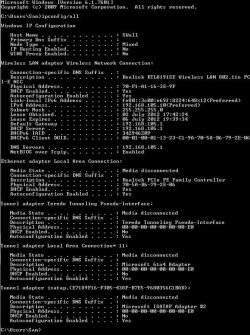
If you can post a screen shot of your ipconfig/all I should be able to help with this problem. :)
 

My Computer My Computer

At a glance

Windows 7 Ult, Windows 8.1 Pro,Q9650-4.275GHz, E8600 4.5GHz, E6750-3.8GHzG.Skill PC2 9600 1200Mhz 5 5 5 15 2TGTX480
Computer type
PC/Desktop
Computer Manufacturer/Model Number
Home built
OS
Windows 7 Ult, Windows 8.1 Pro,
CPU
Q9650-4.275GHz, E8600 4.5GHz, E6750-3.8GHz
Motherboard
Evga 780i FTW
Memory
G.Skill PC2 9600 1200Mhz 5 5 5 15 2T
Graphics Card(s)
GTX480
Sound Card
Asus Xonar D2
Monitor(s) Displays
HannsG
Screen Resolution
1680X1050
Hard Drives
GSkill Phoenix Pro 120GB SSD
PSU
ThermalTake Toughpower 1000Watt modular
Case
ThermalTake XaserV
Cooling
Xigmatek S1283
Keyboard
Logitech G15
Mouse
Logitech G9
Internet Speed
T1
Hi Chev65,

Thanks for taking the time to read and reply - please see screenshot. Fingers crossed you can find the problem. One small request - I'd appreciate "instructions for dummies" if you don't mind.

Thanks in advance.
 

Attachments

  • pic02.jpg
    pic02.jpg
    91.3 KB · Views: 11

My Computer My Computer

At a glance

Windows 7
OS
Windows 7
The ipconfig looks fine. Something must be blocking the connection, not sure what that might be.

Do you have AVG or iTunes installed on this system?
 

My Computer My Computer

At a glance

Windows 7 Ult, Windows 8.1 Pro,Q9650-4.275GHz, E8600 4.5GHz, E6750-3.8GHzG.Skill PC2 9600 1200Mhz 5 5 5 15 2TGTX480
Computer type
PC/Desktop
Computer Manufacturer/Model Number
Home built
OS
Windows 7 Ult, Windows 8.1 Pro,
CPU
Q9650-4.275GHz, E8600 4.5GHz, E6750-3.8GHz
Motherboard
Evga 780i FTW
Memory
G.Skill PC2 9600 1200Mhz 5 5 5 15 2T
Graphics Card(s)
GTX480
Sound Card
Asus Xonar D2
Monitor(s) Displays
HannsG
Screen Resolution
1680X1050
Hard Drives
GSkill Phoenix Pro 120GB SSD
PSU
ThermalTake Toughpower 1000Watt modular
Case
ThermalTake XaserV
Cooling
Xigmatek S1283
Keyboard
Logitech G15
Mouse
Logitech G9
Internet Speed
T1
I do have iTunes on there. But always have had it. Currently version 10 if that makes a difference.

No AVG - always used Norton.

Discovered this problem not long after I installed new version of Norton and also uninstalled Dreamweaver trial version. Suddenly Win 7 wanted to install updates every day without fail. This has subsided a little (now every 3 days or something less annoying - but still more often than expected). I remember I couldn't get rid of Dreamweaver and had to use a removal tool from Adobe website. Do you think that maybe something bad happened in removal stage?
 

My Computer My Computer

At a glance

Windows 7
OS
Windows 7
This must be an iTunes day or something, that's three in a row now.

See iTunes installs a service called Bonjour which causes all sorts of connection problems with Windows. This problem can pop up anytime after iTunes is installed. Norton can also sometimes block connection for unknown reasons.

If you can go into Windows services and disable the Bonjour service it should help fix this problem.

You can get there by typing services.msc in the run box.
 

My Computer My Computer

At a glance

Windows 7 Ult, Windows 8.1 Pro,Q9650-4.275GHz, E8600 4.5GHz, E6750-3.8GHzG.Skill PC2 9600 1200Mhz 5 5 5 15 2TGTX480
Computer type
PC/Desktop
Computer Manufacturer/Model Number
Home built
OS
Windows 7 Ult, Windows 8.1 Pro,
CPU
Q9650-4.275GHz, E8600 4.5GHz, E6750-3.8GHz
Motherboard
Evga 780i FTW
Memory
G.Skill PC2 9600 1200Mhz 5 5 5 15 2T
Graphics Card(s)
GTX480
Sound Card
Asus Xonar D2
Monitor(s) Displays
HannsG
Screen Resolution
1680X1050
Hard Drives
GSkill Phoenix Pro 120GB SSD
PSU
ThermalTake Toughpower 1000Watt modular
Case
ThermalTake XaserV
Cooling
Xigmatek S1283
Keyboard
Logitech G15
Mouse
Logitech G9
Internet Speed
T1
Thank you Chev65 for your help so far. It's really appreciated. I said good-night to Bonjour and I feel that it attempted to make a difference as the icons in the system tray actually changed from a blue "thinking about it" icon... to the little computer icon (cue lots of excitement from me thinking it had been successful as this is the icon I always used to see at start-up time)... to the red cross icon. See attached pic of icons if you're not sure what I mean.

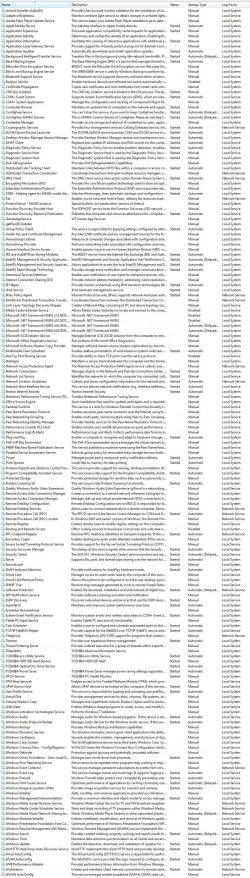
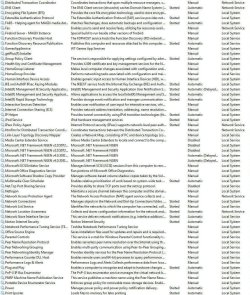
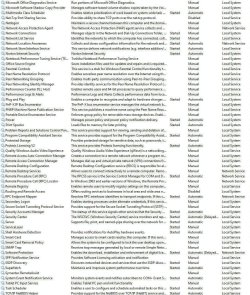
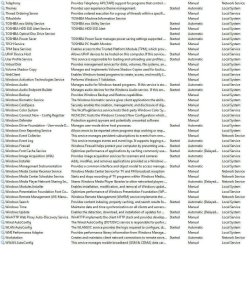
So - could there be yet another programme that's foiling me? I've attached the screen capture of the services dialogue box. There are sooo many! Would you mind to check if I should disable more?

Cheers.
 

Attachments

  • pic03.jpg
    pic03.jpg
    2.2 KB · Views: 65
  • pic04.jpg
    pic04.jpg
    651.1 KB · Views: 13

My Computer My Computer

At a glance

Windows 7
OS
Windows 7
I can't read the services, it's all too small on my end.

According to your ipconfig you should be online unless something is blocking the connection, Norton is a firm possibility. You don't want to know what I know about Norton but to most of us here it's worse than most any virus you might run into on the internet. Causes problems all the time IMO.
 

My Computer My Computer

At a glance

Windows 7 Ult, Windows 8.1 Pro,Q9650-4.275GHz, E8600 4.5GHz, E6750-3.8GHzG.Skill PC2 9600 1200Mhz 5 5 5 15 2TGTX480
Computer type
PC/Desktop
Computer Manufacturer/Model Number
Home built
OS
Windows 7 Ult, Windows 8.1 Pro,
CPU
Q9650-4.275GHz, E8600 4.5GHz, E6750-3.8GHz
Motherboard
Evga 780i FTW
Memory
G.Skill PC2 9600 1200Mhz 5 5 5 15 2T
Graphics Card(s)
GTX480
Sound Card
Asus Xonar D2
Monitor(s) Displays
HannsG
Screen Resolution
1680X1050
Hard Drives
GSkill Phoenix Pro 120GB SSD
PSU
ThermalTake Toughpower 1000Watt modular
Case
ThermalTake XaserV
Cooling
Xigmatek S1283
Keyboard
Logitech G15
Mouse
Logitech G9
Internet Speed
T1
Broken the screen capture into 4 files if you fancy looking.
 

Attachments

  • pic_a.jpg
    pic_a.jpg
    279.9 KB · Views: 10
  • pic_b.jpg
    pic_b.jpg
    276.5 KB · Views: 8
  • pic_c.jpg
    pic_c.jpg
    270.2 KB · Views: 8
  • pic_d.jpg
    pic_d.jpg
    224.3 KB · Views: 8

My Computer My Computer

At a glance

Windows 7
OS
Windows 7
From my point of view Norton is the only thing that might cause this type of connection problem, your ipconfig shows you online but since your not something is blocking the connection. At this point the process of elimination begins starting with Norton.
 

My Computer My Computer

At a glance

Windows 7 Ult, Windows 8.1 Pro,Q9650-4.275GHz, E8600 4.5GHz, E6750-3.8GHzG.Skill PC2 9600 1200Mhz 5 5 5 15 2TGTX480
Computer type
PC/Desktop
Computer Manufacturer/Model Number
Home built
OS
Windows 7 Ult, Windows 8.1 Pro,
CPU
Q9650-4.275GHz, E8600 4.5GHz, E6750-3.8GHz
Motherboard
Evga 780i FTW
Memory
G.Skill PC2 9600 1200Mhz 5 5 5 15 2T
Graphics Card(s)
GTX480
Sound Card
Asus Xonar D2
Monitor(s) Displays
HannsG
Screen Resolution
1680X1050
Hard Drives
GSkill Phoenix Pro 120GB SSD
PSU
ThermalTake Toughpower 1000Watt modular
Case
ThermalTake XaserV
Cooling
Xigmatek S1283
Keyboard
Logitech G15
Mouse
Logitech G9
Internet Speed
T1
Think you're on to something - Norton has been having problems since I got rid of Bonjour. Go figure. The last two days it has been having Error 8506, 422. Will have to investigate alternative virus protection methinks. Any suggestions?
 

My Computer My Computer

At a glance

Windows 7
OS
Windows 7
I use malware bytes for virus scans with real time protection turned off and Windows Defender which is built into Windows 8.

For Windows 7 you can use Microsoft security essentials.

When you remove Norton be sure and use the removal tool that is made for it.
 

My Computer My Computer

At a glance

Windows 7 Ult, Windows 8.1 Pro,Q9650-4.275GHz, E8600 4.5GHz, E6750-3.8GHzG.Skill PC2 9600 1200Mhz 5 5 5 15 2TGTX480
Computer type
PC/Desktop
Computer Manufacturer/Model Number
Home built
OS
Windows 7 Ult, Windows 8.1 Pro,
CPU
Q9650-4.275GHz, E8600 4.5GHz, E6750-3.8GHz
Motherboard
Evga 780i FTW
Memory
G.Skill PC2 9600 1200Mhz 5 5 5 15 2T
Graphics Card(s)
GTX480
Sound Card
Asus Xonar D2
Monitor(s) Displays
HannsG
Screen Resolution
1680X1050
Hard Drives
GSkill Phoenix Pro 120GB SSD
PSU
ThermalTake Toughpower 1000Watt modular
Case
ThermalTake XaserV
Cooling
Xigmatek S1283
Keyboard
Logitech G15
Mouse
Logitech G9
Internet Speed
T1
Back
Top