Solved Win 7 not using all memory

Resource Monitor is your friend.

WIN | type RESMON | ENTER key | Memory tab

Different people will how different values, but as long as you are not adding/removing devices then Hardware Reserved should stay constant. Mine is 259 MB.

Your Installed Memory should stay constant.

To get more insight into your physical memory, then I would like for you to run a PowerShell script which will put a file onto your Desktop. Please attach that file to your next post.

# **********************INSTRUCTIONS**************************
# STEP 1 ** RUN POWERSHELL AS ADMINISTRATOR ******************
# ************************************************************
#
# WIN key | type POWERSHELL | do NOT hit ENTER |
# in the PROGRAMS list, right-click on WINDOWS POWERSHELL |
# choose "Run as administrator" |
# Click on the YES button (if such appears)
#
# WIN key = key with Microsoft log on top
#
# for the guru:
# WIN | type POWERSHELL | CTRL+SHIFT+ENTER key combo | ALT+Y keycombo
# ************************************************************
# STEP 2 ** COPY AND PASTE ***********************************
# ************************************************************
#
# COPY the script using CTRL+C,
# COPY every line of script down thru both EXIT statements
#
# PASTE into Powershell
#----Right-Click at the PowerShell Prompt
#----(Ctrl+V does not work)
#
# Start copying with first script line without a # at start of the line
# Note: Actually, you can paste the entire file if you rather
#-------Lines starting with a # are ignored by PowerShell
# ************************************************************
# STEP 3 ** SCRIPT OUTPUT & SCRIPT PURPOSE *******************
# ************************************************************
# --The script output and purpose is given at the very front of the script
#
# --The script output and purpose is given at the very front of the script
#
# ************************************************************
# ***************** NOTE - POWERSHELL VERSION*****************
# if you receive this error msg:
#--The system can not find the path specified
# you may need to update your PowerShell
# you must be using Powershell 2.0 or later.
#
# To determine your Powershell version:
#---Run PowerShell
#---enter $host.version
#---you should see at least:
# Major Minor Build Revision
# ----- ----- ----- --------
# 2......0......-1.....-1
#
# If you do not see the above, update your Vista/Win 7.
# ************************************************************
# *************** NOTE - EXECUTION POLICY*********************
# If you haven't set the execution policy, you may need to:
#---Run PowerShell
#---enter SET-EXECUTIONPOLICY -EXECUTIONPOLICY REMOTESIGNED
# ************************************************************

PHP:
# ***********************************************
# OUTPUT: MemInfo.TXT file on your desktop
# contains info about your memory
# ***********************************************

function get-ID { 
  param ([string]$title, [int]$arraycnt, [int]$arrayndx) 
  $id = " " + $title + " "
  If ($arraycnt -ne 1) {$id = $id + [string]$arrayndx + " "}
  $id }
function get-title { param ([string]$id) 
  $hashes = ([int](51 - $id.length)/2)
  $hashstr = '#' * $hashes
  $title = $hashstr + $id + $hashstr
  If ($title.length -le 51) {$title += "#"}
  $title  }
$sterne = "*" * 79
$obj = New-Object PSObject
$os = gwmi win32_operatingsystem
$id = get-id "OS" 1 0

$PhyMemArray = @(gwmi win32_PhysicalMemoryArray)
$cnt = $phymemarray.count
for ($ndx=1; $ndx -le $cnt; $ndx++) {
  $d = $phymemarray[$ndx -1]
  $id = get-id "PHYSICAL MEMORY ARRAY" $cnt $ndx
  $obj | add-member -membertype noteproperty -name ( Get-title $Id ) -value $sterne
  $obj | add-member -membertype noteproperty -name (" Maximum Memory Capacity") -value([string][int]($d.maxcapacity/1048576) + " GB")
  $obj | add-member -membertype noteproperty -name (" Number of Memory Devices") -value($d.memorydevices)
}

$arr = @(gwmi win32_PhysicalMemory)
$cnt = $arr.count
for($i=1; $i -le $cnt; $i++){
  $d = $arr[$i-1]
  $id = get-id "PHYSICAL MEMORY" $cnt $i
  $obj | add-member -membertype noteproperty -name (get-title $id) -value $sterne
  $obj | add-member -membertype noteproperty -name ($id + "Bank Label") -value($d.banklabel)
#  $obj | add-member -membertype noteproperty -name ($id + "Tag") -value($d.tag)
  $obj | add-member -membertype noteproperty -name ($id + "Manufacturer") -value($d.manufacturer)
  $obj | add-member -membertype noteproperty -name ($id + "Part Number") -value($d.partnumber)
  $obj | add-member -membertype noteproperty -name ($id + "Serial Number") -value($d.serialnumber)
  $obj | add-member -membertype noteproperty -name ($id + "Capacity") -value([string][int]($d.capacity/1073741824) + " GB")
  $obj | add-member -membertype noteproperty -name ($id + "Device Locator") -value($d.devicelocator)
  $obj | add-member -membertype noteproperty -name ($id + "Data Width") -value($d.datawidth)
  $obj | add-member -membertype noteproperty -name ($id + "Speed") -value($d.speed)
}

$Arr = @(gwmi win32_memoryarray)
$cnt = $arr.count
for($i=1; $i -le $cnt; $i++){
  $d = $arr[$i-1];
  $id = get-id "MEMORY ARRAY" $CNT $I
  $obj | add-member -membertype noteproperty -name (get-title $id) -value $sterne
  $obj | add-member -membertype noteproperty -name ($id + "Device ID") -value($d.deviceid)
  $obj | add-member -membertype noteproperty -name ($id + "Starting Address") -value($d.startingaddress)
  $obj | add-member -membertype noteproperty -name ($id + "Ending Address") -value($d.endingaddress)
}

$Arr = @(gwmi win32_memorydevice)
$cnt = $arr.count
for($i=1; $i -le $cnt; $i++){
  $d = $arr[$i-1];
  $id = get-id "MEMORY DEVICE" $cnd $i
  $obj | add-member -membertype noteproperty -name (get-title $id) -value $sterne
#  $obj | add-member -membertype noteproperty -name ($id + "Device ID") -value($d.deviceid)
  $obj | add-member -membertype noteproperty -name ($id + "Starting Address") -value($d.startingaddress)
  $obj | add-member -membertype noteproperty -name ($id + "Ending Address") -value($d.endingaddress)
}
$obj > $env:userprofile\desktop\MemInfo.txt

EXIT
EXIT


ive tried to run the powershell but after i paste the script the powershell just closed
and nothing happen.. but thanks for the info tho.. i will make a new thread regarding with this problem.. thanks..
 

My Computer

OS
windows 7 home premium 64bit
Your Win 7 not using all memory

Not sure if it helps but is the RAM completely seated in the slots and lock applied.
I know when I put mine in it needed a good firm application of pressure to seat
in and when the lock comes down into fully retracted position it is in. How many slots for RAM do you have and how many are used and in what pattern. It may be important.

Also the RAM may not be compatible with your board.

Gary
 

My Computer

Computer type
PC/Desktop
OS
Microsoft Windows 7 Professional 64-bit 7601 Multiprocessor Free Service Pack 1
CPU
Intel(R) Core(TM) i7-4770 CPU @ 3.40GHz
Motherboard
ASUSTeK COMPUTER INC. Z87-C
Memory
16.00 GB
Graphics Card(s)
NVIDIA GeForce GTX 1060
Sound Card
Asus Xonar Essence STX
Monitor(s) Displays
2X Dell U2713H
Screen Resolution
2560 x 1440 x 32 bits (4294967296 colors) @ 59 Hz
Hard Drives
(1) INTEL SSDSC2CW120A3 ATA Device (2) WDC WD1001FALS-00J7B0 ATA Device (3) WDC WD10EARS-00MVWB0 ATA Device (4) Generic- SD/MMC/MS/MSPRO USB Device (5) HP Photosmart C6180 USB Device (6) SanDisk Cruzer Switch USB Device (7) ST2000DM 001-1
Antivirus
Avast Pro Antivirus
it does now i know the info on my mem.. but i just figured out something.. whenever i uncheck the maximum mem and the number of processor on the msconfig>boot advance option the hardware reserved backs to normal.. so do you think there is a problem with the mem or in the bios setting?
 

My Computer

OS
windows 7 home premium 64bit
gat,
your pushing my tolerance level.

Start your own thread.
 

My Computer

Computer Manufacturer/Model Number
Toshiba Satellite S875D-S7239 laptop
OS
MS Windows 7 Ultimate SP1 64-bit
CPU
AMD A10-4600M
Motherboard
AMD Pumori (Socket FT1)
Memory
6.00 GB Dual-Channel DDR3 @ 798MHz (11-11-12-28)
Graphics Card(s)
AMD Radeon HD 7660G
Sound Card
High Definition Audio Device
Monitor(s) Displays
Generic PnP Monitor (1600x900@60Hz)
Screen Resolution
1600x900@60Hz
Hard Drives
SSD 119GB Corsair CSSD-V128GB2 ATA Device
Keyboard
Standard PS/2 Keyboard
Mouse
HP Wireless Optical Mobile Mouse Model FHA-3410
Internet Speed
What the local pub, local coffee shop offers.
Other Info
Optical Drive:MATSHITA BD-CMB UJ160B ATA Device


Also have an Asus ha1002xp netbook with Win 7 Ultimate installed.
can you tell whats wrong with this? cuz my hardware reserved is more than 10mb? heheh

to help us keep responses and problems straight and to address our answers to the thread starter, I request that you start a fresh thread in which you state your problem.

Thanks for your understanding and cooperation,
karl
Thanks karl I missed that one.
 

My Computer

Computer type
PC/Desktop
Computer Manufacturer/Model Number
Home made Desktop
OS
Windows 10 Pro. 64/ version 1709 Windows 7 Pro/64
CPU
Intel i7-6800K @ 4.3
Motherboard
ASUS X-99 Deluxe II
Memory
Corsair Platinum 16 gig @2400
Graphics Card(s)
EVGA GTX 1070 OC
Monitor(s) Displays
Asus 27" LED LCD/VE278Q
Screen Resolution
1920-1080 or 1280-720 HDMI
Hard Drives
INTEL SSD 730-240 Gb Sata 3.0/
PSU
EVGA Platium 1200W
Case
Phanteks Luxe Tempered Glass 8 fans/ one radiator
Cooling
XSPC/ Water Cooled CPU
Keyboard
Das 4 Professional
Mouse
Logitech M705/MX Anywhere 2-S
Internet Speed
100 mbits
Antivirus
Microsoft Security Essentials/ Malwarebytes Premium 3.0/ SAS
Browser
I.E. 11 default/Firefox/ ISP Time Warner Cable/Spectrum
Other Info
LG BluRay Burner/
Sound system-KLipsch-THX/
Icy Dock ssd Hot Swap bays.
Thanks for all your help everyone. Hopefully I can figure out what's wrong.
Karl, I ran your script and here's what the mem file on my desktop said. Thanks


############## PHYSICAL MEMORY ARRAY ############### : ****************************************************************
***************
Maximum Memory Capacity : 1 GB
Number of Memory Devices : 2
################# PHYSICAL MEMORY ################## : ****************************************************************
***************
PHYSICAL MEMORY Bank Label : Bank0/1
PHYSICAL MEMORY Manufacturer :
PHYSICAL MEMORY Part Number :
PHYSICAL MEMORY Serial Number :
PHYSICAL MEMORY Capacity : 4 GB
PHYSICAL MEMORY Device Locator : A0
PHYSICAL MEMORY Data Width : 64
PHYSICAL MEMORY Speed : 800
################## MEMORY ARRAY ################### : ****************************************************************
***************
MEMORY ARRAY Device ID : Memory Array 0
MEMORY ARRAY Starting Address : 0
MEMORY ARRAY Ending Address : 71303167
################# MEMORY DEVICE 1 ################## : ****************************************************************
***************
MEMORY DEVICE 1 Starting Address : 67108864
MEMORY DEVICE 1 Ending Address : 4194303
################# MEMORY DEVICE 2 ################## : ****************************************************************
***************
MEMORY DEVICE 2 Starting Address : 67108864
MEMORY DEVICE 2 Ending Address : 0
 

My Computer

Computer Manufacturer/Model Number
Gigabyte GA-M61SME-S2
OS
Windows 7 64bit
CPU
AMD Athlon 64 X2 Dual Core
Motherboard
Gigabyte GA-M61SME-S2
Memory
8 gig
Graphics Card(s)
Geforce GTX560
Sound Card
Gigabyte
Monitor(s) Displays
acer AL1916W
Hard Drives
?
PSU
?
Case
?
Cooling
5 fans

My Computer

Computer Manufacturer/Model Number
Toshiba Satellite S875D-S7239 laptop
OS
MS Windows 7 Ultimate SP1 64-bit
CPU
AMD A10-4600M
Motherboard
AMD Pumori (Socket FT1)
Memory
6.00 GB Dual-Channel DDR3 @ 798MHz (11-11-12-28)
Graphics Card(s)
AMD Radeon HD 7660G
Sound Card
High Definition Audio Device
Monitor(s) Displays
Generic PnP Monitor (1600x900@60Hz)
Screen Resolution
1600x900@60Hz
Hard Drives
SSD 119GB Corsair CSSD-V128GB2 ATA Device
Keyboard
Standard PS/2 Keyboard
Mouse
HP Wireless Optical Mobile Mouse Model FHA-3410
Internet Speed
What the local pub, local coffee shop offers.
Other Info
Optical Drive:MATSHITA BD-CMB UJ160B ATA Device


Also have an Asus ha1002xp netbook with Win 7 Ultimate installed.
Really? Is there anyway to fix any of this without reinstalling? That takes so much time to reinstall all my programs and stuff. Can you tell what has gotten messed up?
I appreciate your help. Thanks
 
Last edited:

My Computer

Computer Manufacturer/Model Number
Gigabyte GA-M61SME-S2
OS
Windows 7 64bit
CPU
AMD Athlon 64 X2 Dual Core
Motherboard
Gigabyte GA-M61SME-S2
Memory
8 gig
Graphics Card(s)
Geforce GTX560
Sound Card
Gigabyte
Monitor(s) Displays
acer AL1916W
Hard Drives
?
PSU
?
Case
?
Cooling
5 fans
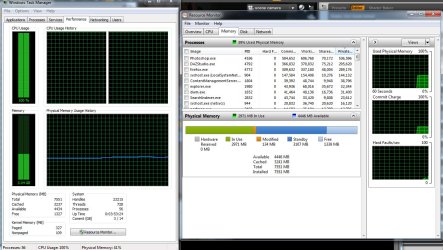
Here is a scene shot of where I was last night. I was in the middle of a render in Daz Studio 4.
 

Attachments

  • task man 7-24-12.jpg
    task man 7-24-12.jpg
    184.9 KB · Views: 37

My Computer

Computer Manufacturer/Model Number
Gigabyte GA-M61SME-S2
OS
Windows 7 64bit
CPU
AMD Athlon 64 X2 Dual Core
Motherboard
Gigabyte GA-M61SME-S2
Memory
8 gig
Graphics Card(s)
Geforce GTX560
Sound Card
Gigabyte
Monitor(s) Displays
acer AL1916W
Hard Drives
?
PSU
?
Case
?
Cooling
5 fans
I want to go back to your first post and clarify a couple of things. You said you "just upgraded to windows 7 64bit and went from two gig to 8 gig." Did you upgrade from Windows 7 32bit or something else? Did you use a Windows 7 OEM disk, a full install disk or an upgrade disk to do the clean install? Did you have any issues of any kind during the upgrade like Windows Updates not installing on first attempt, etc?

On the off chance that some glitch may have damaged or corrupted the system files and isn't allowing the memory to be properly recognized, you could try running a system file checker scan from an elevated command prompt (option two.) If any problems are found run the scan 3 times rebooting in between each scan. If SFC is able to fix any problems use your computer to see if the memory is being recognized and if the hardware reserve is other than 0MB.

http://www.sevenforums.com/tutorials/1538-sfc-scannow-command-system-file-checker.html

If SFC showed problems or not, you could also try doing a repair install which should preserve your user accounts, data, programs, system drivers, etc.

http://www.sevenforums.com/tutorials/3413-repair-install.html

If this doesn't fix things I think a clean install would be warranted. But all of this speculation is based on the assumption that this is a software issue. If you have an undiagnosed hardware issue even a clean install probably won't fix things. And nothing is jumping out at me from your screenshot of Daz Studio 4.
 

My Computer

Computer type
Laptop
Computer Manufacturer/Model Number
Sony Vaio VPCEB47GM Laptop
OS
Win 7 Pro 64-bit
CPU
Intel i5 2.4 Ghz
Memory
8GB DDR3
Graphics Card(s)
Intel HD 3000
Sound Card
IDT High Definition
Monitor(s) Displays
15.6 WGXA Anti-Glare LED
Screen Resolution
1280x800
Hard Drives
640Gb 7200rpm
Antivirus
MSE
Browser
Opera (primary) with IE9 backup
I used a proper windows 7 64 bit installation disk and made a clear install. I don,t remember if I did that before or after the ram was installed. Not sure if that matters. I'll try your scan procedure tonight. Thanks
 

My Computer

Computer Manufacturer/Model Number
Gigabyte GA-M61SME-S2
OS
Windows 7 64bit
CPU
AMD Athlon 64 X2 Dual Core
Motherboard
Gigabyte GA-M61SME-S2
Memory
8 gig
Graphics Card(s)
Geforce GTX560
Sound Card
Gigabyte
Monitor(s) Displays
acer AL1916W
Hard Drives
?
PSU
?
Case
?
Cooling
5 fans
Hey Mars, I wasn't able to use the prompt. I kept telling me I needed to be an administrator. I must've done soemthing wrong. Like I said, I'm not very much of a techie with the computer stuff. Trying...
 

My Computer

Computer Manufacturer/Model Number
Gigabyte GA-M61SME-S2
OS
Windows 7 64bit
CPU
AMD Athlon 64 X2 Dual Core
Motherboard
Gigabyte GA-M61SME-S2
Memory
8 gig
Graphics Card(s)
Geforce GTX560
Sound Card
Gigabyte
Monitor(s) Displays
acer AL1916W
Hard Drives
?
PSU
?
Case
?
Cooling
5 fans
Hey Mars, I wasn't able to use the prompt. I kept telling me I needed to be an administrator. I must've done soemthing wrong. Like I said, I'm not very much of a techie with the computer stuff. Trying...

Not a problem. Start > All Programs > Accessories > right-click Command Prompt > Run As Administrator (or, from Start Menu type in cmd > right-click Command Prompt > run as administrator.)
 

My Computer

Computer type
Laptop
Computer Manufacturer/Model Number
Sony Vaio VPCEB47GM Laptop
OS
Win 7 Pro 64-bit
CPU
Intel i5 2.4 Ghz
Memory
8GB DDR3
Graphics Card(s)
Intel HD 3000
Sound Card
IDT High Definition
Monitor(s) Displays
15.6 WGXA Anti-Glare LED
Screen Resolution
1280x800
Hard Drives
640Gb 7200rpm
Antivirus
MSE
Browser
Opera (primary) with IE9 backup
sarge,
Go To an Elevated Command Prompt


Elevated command prompt = Run CMD.EXE as administrator

WIN | type CMD.EXE | do not hit Enter |
in the PROGRAMS list, right-click on CMD.EXE |
choose "Run as administrator" |

Click on the YES button (if such appears)

WIN key = key with Microsoft log on top

for the guru:
WIN | type CMD.EXE | CTRL+SHIFT+ENTER key combo | ALT+Y keycombo
 

My Computer

Computer Manufacturer/Model Number
Toshiba Satellite S875D-S7239 laptop
OS
MS Windows 7 Ultimate SP1 64-bit
CPU
AMD A10-4600M
Motherboard
AMD Pumori (Socket FT1)
Memory
6.00 GB Dual-Channel DDR3 @ 798MHz (11-11-12-28)
Graphics Card(s)
AMD Radeon HD 7660G
Sound Card
High Definition Audio Device
Monitor(s) Displays
Generic PnP Monitor (1600x900@60Hz)
Screen Resolution
1600x900@60Hz
Hard Drives
SSD 119GB Corsair CSSD-V128GB2 ATA Device
Keyboard
Standard PS/2 Keyboard
Mouse
HP Wireless Optical Mobile Mouse Model FHA-3410
Internet Speed
What the local pub, local coffee shop offers.
Other Info
Optical Drive:MATSHITA BD-CMB UJ160B ATA Device


Also have an Asus ha1002xp netbook with Win 7 Ultimate installed.
Hi Sarge

Based on your motherboard, you have an option for dual channel memory configuration which is only available when you install 2 RAM of the same brand, size, chips and speed, which i understand you are using from G.Skill.

Q. What does your BIOS report as the total memory ....is it 8 GB (8192)? if not,then there is a high probability of RAM or slots being defective ....

if it does show 8GB, then it should probably be on the software side....
 

My Computer

Computer Manufacturer/Model Number
Nothing specific....what ever the clients provide for Repair
OS
Windows 7 ultimate x64
Solved! It was my mother board. It was going bad and not working the right way according to the guys at PC direct. Got a new processor and mobo. I'm off and running!
Thanks for all your help everyone. I sure appreciate it!
 

My Computer

Computer Manufacturer/Model Number
Gigabyte GA-M61SME-S2
OS
Windows 7 64bit
CPU
AMD Athlon 64 X2 Dual Core
Motherboard
Gigabyte GA-M61SME-S2
Memory
8 gig
Graphics Card(s)
Geforce GTX560
Sound Card
Gigabyte
Monitor(s) Displays
acer AL1916W
Hard Drives
?
PSU
?
Case
?
Cooling
5 fans
Solved! It was my mother board. It was going bad and not working the right way according to the guys at PC direct. Got a new processor and mobo. I'm off and running!
Thanks for all your help everyone. I sure appreciate it!

Sorry you had to spend more money but glad to hear it's fixed. Thanks for posting back. :thumbsup:
 

My Computer

Computer type
Laptop
Computer Manufacturer/Model Number
Sony Vaio VPCEB47GM Laptop
OS
Win 7 Pro 64-bit
CPU
Intel i5 2.4 Ghz
Memory
8GB DDR3
Graphics Card(s)
Intel HD 3000
Sound Card
IDT High Definition
Monitor(s) Displays
15.6 WGXA Anti-Glare LED
Screen Resolution
1280x800
Hard Drives
640Gb 7200rpm
Antivirus
MSE
Browser
Opera (primary) with IE9 backup
Well the mother board was a little salty. Spent $320 for the Asus mobo, AMD Phenom II and 8 new gig of Ram. But my computer is running real fast and this process with your help here on the boards has taught me some new things that will help me as I continue with upgrades in the future.
Thanks everyone.
 

My Computer

Computer Manufacturer/Model Number
Gigabyte GA-M61SME-S2
OS
Windows 7 64bit
CPU
AMD Athlon 64 X2 Dual Core
Motherboard
Gigabyte GA-M61SME-S2
Memory
8 gig
Graphics Card(s)
Geforce GTX560
Sound Card
Gigabyte
Monitor(s) Displays
acer AL1916W
Hard Drives
?
PSU
?
Case
?
Cooling
5 fans
Back
Top