
You are using an out of date browser. It may not display this or other websites correctly.
You should upgrade or use an alternative browser.
You should upgrade or use an alternative browser.
Solved Win 7 on Logical D: want to move to Primary C: or merge both
- Thread starter derelict
- Start date
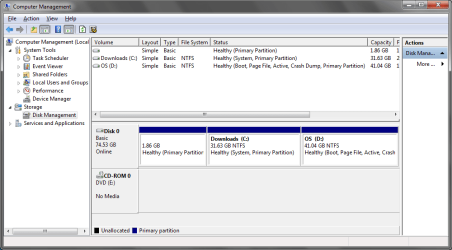
now reboot and post diskmanagemtnt screenshot again
My Computer
At a glance
Microsoft Windows 7 Home Premium 64-bits 7601...Intel(R) Core(TM) i3 CPU M 370 @ 2.40GHz4,00 GBATI Mobility Radeon HD 5400 Series
- Computer type
- Laptop
- Computer Manufacturer/Model Number
- ACER ASPIRE 5742G
- OS
- Microsoft Windows 7 Home Premium 64-bits 7601 Multiprocessor Free Service Pack 1
- CPU
- Intel(R) Core(TM) i3 CPU M 370 @ 2.40GHz
- Motherboard
- Acer Aspire 5742G
- Memory
- 4,00 GB
- Graphics Card(s)
- ATI Mobility Radeon HD 5400 Series
- Sound Card
- (1) AMD High Definition Audio Device (2) Realtek High Defi
- Screen Resolution
- 1366 x 768 x 32 bits (4294967296 colors) @ 60 Hz
- Hard Drives
- WDC WD5000BEVT-22ZAT0
Didn't boot.
All I get is a black screen with a small cursor flashing and nothing. I waited to see if it would ask for a DVD etc. nothing.
Connected it to an external caddy and attached it to another laptop to try and set the active flag back to C: - I had the same issue last night and it fixed it.
Working again. But, C: is back as active now.
Feel like im going in circles, might just format the whole thing and start from fresh.
All I get is a black screen with a small cursor flashing and nothing. I waited to see if it would ask for a DVD etc. nothing.
Connected it to an external caddy and attached it to another laptop to try and set the active flag back to C: - I had the same issue last night and it fixed it.
Working again. But, C: is back as active now.
Feel like im going in circles, might just format the whole thing and start from fresh.
My Computer
At a glance
Windows 7 Ultimate (32 bit)
- OS
- Windows 7 Ultimate (32 bit)

PW should not only see Win7 but if you want Win7 on D allow you to convert D to Primary, then you can follow these steps to resize into C while recovering the System boot files into Win7 by marking Active and running Startup Repair 3 times: Partition Recover Space Used by an Older OS
Are you following the tutorial above?
I was, until I hit the section where I require Win 7 boot/recovery disk. I have no DVDs atm, and I have no CDs to burn the ISO for PM either.
I guess my outlook has changed slightly in that I if I can get my boot files off C: and on to D: that might suffice - which is what I believe we are doing now by using EasyBCD to move the BOOTMGR
Didn't boot.
All I get is a black screen with a small cursor flashing and nothing. I waited to see if it would ask for a DVD etc. nothing.
Connected it to an external caddy and attached it to another laptop to try and set the active flag back to C: - I had the same issue last night and it fixed it.
Working again. But, C: is back as active now.
Feel like im going in circles, might just format the whole thing and start from fresh.
With NO DVD's burnt, you will be going round in circles.
My Computer
At a glance
ME/XP/Vista/Win7
- OS
- ME/XP/Vista/Win7
Guess I miss understood. I was under the impression I could use EasyBCD to move the boot files to D: and away from C: entirely. Thus meaning I could remove the boot files from C: and the computer would boot. I would still have the partition allocations as shown in the screen shots, and I would still have D: as my OS and C: as a now empty partition.
I didn't think I would require the boot discs for that.
I didn't think I would require the boot discs for that.
My Computer
At a glance
Windows 7 Ultimate (32 bit)
- OS
- Windows 7 Ultimate (32 bit)
How and why is startup repair needed when moving starting point of partition (assuming bootmgr, bcd store are already there and partition is active?PW should not only see Win7 but if you want Win7 on D allow you to convert D to Primary, then you can follow these steps to resize into C while recovering the System boot files into Win7 by marking Active and running Startup Repair 3 times: Partition Recover Space Used by an Older OS
Are you following the tutorial above?
answer: To modify the bcd store entries to point them to the new partition.
But then windows tries to start and doesn't know where C is because startpoint did change when moving partition. original C starting point doesn't contain a partition anymore and windows itself (not startup repair) assigns letter C to the startup partition with the OS.
But the poster has installed on D!! Yes ... in win7 the OS-partition is called as D!! I don't know how and why that happened. Is windows smart enough to detect it and modify that in registry?
My Computer
At a glance
Microsoft Windows 7 Home Premium 64-bits 7601...Intel(R) Core(TM) i3 CPU M 370 @ 2.40GHz4,00 GBATI Mobility Radeon HD 5400 Series
- Computer type
- Laptop
- Computer Manufacturer/Model Number
- ACER ASPIRE 5742G
- OS
- Microsoft Windows 7 Home Premium 64-bits 7601 Multiprocessor Free Service Pack 1
- CPU
- Intel(R) Core(TM) i3 CPU M 370 @ 2.40GHz
- Motherboard
- Acer Aspire 5742G
- Memory
- 4,00 GB
- Graphics Card(s)
- ATI Mobility Radeon HD 5400 Series
- Sound Card
- (1) AMD High Definition Audio Device (2) Realtek High Defi
- Screen Resolution
- 1366 x 768 x 32 bits (4294967296 colors) @ 60 Hz
- Hard Drives
- WDC WD5000BEVT-22ZAT0
easybcd DID copy bootmgr, bcd to the win7 drive (not move). It also modified the bcd-file a bit so it is bootable.
I'll advise you to do a clean install
- Install the BOOTMGR bootloader to the selected partition
- Make the selected partition active
- Install the bootloader to both the bootsector and the MBR of the selected partition
- Copy all entries from the old boot partition to the newly-selected one
- Update partition references to work with the new boot partition
I'll advise you to do a clean install
My Computer
At a glance
Microsoft Windows 7 Home Premium 64-bits 7601...Intel(R) Core(TM) i3 CPU M 370 @ 2.40GHz4,00 GBATI Mobility Radeon HD 5400 Series
- Computer type
- Laptop
- Computer Manufacturer/Model Number
- ACER ASPIRE 5742G
- OS
- Microsoft Windows 7 Home Premium 64-bits 7601 Multiprocessor Free Service Pack 1
- CPU
- Intel(R) Core(TM) i3 CPU M 370 @ 2.40GHz
- Motherboard
- Acer Aspire 5742G
- Memory
- 4,00 GB
- Graphics Card(s)
- ATI Mobility Radeon HD 5400 Series
- Sound Card
- (1) AMD High Definition Audio Device (2) Realtek High Defi
- Screen Resolution
- 1366 x 768 x 32 bits (4294967296 colors) @ 60 Hz
- Hard Drives
- WDC WD5000BEVT-22ZAT0

- Local time
- 4:26 PM
- Messages
- 50,634
OP installed from C instead of correctly booting the installer, which locked out C and forced installer to choose D for Win7. We see this a lot.
If he wanted to keep Win7 on D, OP was instructed to convert D to Primary so it could be marked Active. This tells WinRe where to write the System boot files.
Once marked Active, he needs to boot into System Recovery Options to run Startup Repair - Run 3 Separate Times with reboots as he was told repeatedly. This is not negotiable with discussions about whether he has a DVD or CD or not.
Once D starts on its own and is marked System Active, he can delete C and recover it's space using Partition Wizard Resize function.
If you now want to clean reinstall then boot the DVD or flash stick installer, use Custom Drive Options to delete all partitions and create new as you wish, install: Clean Install Windows 7
If he wanted to keep Win7 on D, OP was instructed to convert D to Primary so it could be marked Active. This tells WinRe where to write the System boot files.
Once marked Active, he needs to boot into System Recovery Options to run Startup Repair - Run 3 Separate Times with reboots as he was told repeatedly. This is not negotiable with discussions about whether he has a DVD or CD or not.
Once D starts on its own and is marked System Active, he can delete C and recover it's space using Partition Wizard Resize function.
If you now want to clean reinstall then boot the DVD or flash stick installer, use Custom Drive Options to delete all partitions and create new as you wish, install: Clean Install Windows 7
Bootmgr, bootsect and bcd are already on D and D partition is active. bcd looks fine as well (BCDEDIT /STORE D:\BOOT\BCD /ENUM ALL)OP installed from C instead of correctly booting the installer, which locked out C and forced installer to choose D for Win7. We see this a lot.
If he wanted to keep Win7 on D, OP was instructed to convert D to Primary so it could be marked Active. This tells WinRe where to write the System boot files.
Once marked Active, he needs to boot into System Recovery Options to run Startup Repair - Run 3 Separate Times with reboots as he was told repeatedly. This is not negotiable with discussions about whether he has a DVD or CD or not.
Once D starts on its own and is marked System Active, he can delete C and recover it's space using Partition Wizard Resize function.
If you now want to clean reinstall then boot the DVD or flash stick installer, use Custom Drive Options to delete all partitions and create new as you wish, install: Clean Install Windows 7
What more does "startup repair" fix? If he boots to D with D marked as active it displays a black screen just after bios screen. On that black screen is only a blinking cursor. No errors like:
-missing bootmgr
-corrupt bcd store
Can you explain that?
Last edited:
My Computer
At a glance
Microsoft Windows 7 Home Premium 64-bits 7601...Intel(R) Core(TM) i3 CPU M 370 @ 2.40GHz4,00 GBATI Mobility Radeon HD 5400 Series
- Computer type
- Laptop
- Computer Manufacturer/Model Number
- ACER ASPIRE 5742G
- OS
- Microsoft Windows 7 Home Premium 64-bits 7601 Multiprocessor Free Service Pack 1
- CPU
- Intel(R) Core(TM) i3 CPU M 370 @ 2.40GHz
- Motherboard
- Acer Aspire 5742G
- Memory
- 4,00 GB
- Graphics Card(s)
- ATI Mobility Radeon HD 5400 Series
- Sound Card
- (1) AMD High Definition Audio Device (2) Realtek High Defi
- Screen Resolution
- 1366 x 768 x 32 bits (4294967296 colors) @ 60 Hz
- Hard Drives
- WDC WD5000BEVT-22ZAT0
- Local time
- 4:26 PM
- Messages
- 50,634
Startup Repair will write the System boot files to Active partition if run up to 3 separate times with reboots in between. Startup Repair - Run 3 Separate Times
What D needs is the System flag. It is not yet the System partition. If Startup Repair x3 cannot write the System boot files to it and start it then it likely isn't fixable.
Startup Repair also fixes other tangential issues that may be blocking boot with the exception of disinfecting which should be done first using a boot disk or stick if there is question. Microsoft Standalone System Sweeper
What D needs is the System flag. It is not yet the System partition. If Startup Repair x3 cannot write the System boot files to it and start it then it likely isn't fixable.
Startup Repair also fixes other tangential issues that may be blocking boot with the exception of disinfecting which should be done first using a boot disk or stick if there is question. Microsoft Standalone System Sweeper
bootsector, bcd store, bootmgr where and are all on D. MBR is good as well, otherwise he can't boot from C either.Startup Repair will write the System boot files to Active partition if run up to 3 separate times with reboots in between.
What D needs is the System flag. It is not yet the System partition.
System partition means "from this partition it did boot", or does it mean something different? He DID mark D active, but the screenshot you're refering to was with an active C-partition.
He wasn't able to post a screenshot because .... system didn't boot. Let's wait for system repair actions anyway as you told
My Computer
At a glance
Microsoft Windows 7 Home Premium 64-bits 7601...Intel(R) Core(TM) i3 CPU M 370 @ 2.40GHz4,00 GBATI Mobility Radeon HD 5400 Series
- Computer type
- Laptop
- Computer Manufacturer/Model Number
- ACER ASPIRE 5742G
- OS
- Microsoft Windows 7 Home Premium 64-bits 7601 Multiprocessor Free Service Pack 1
- CPU
- Intel(R) Core(TM) i3 CPU M 370 @ 2.40GHz
- Motherboard
- Acer Aspire 5742G
- Memory
- 4,00 GB
- Graphics Card(s)
- ATI Mobility Radeon HD 5400 Series
- Sound Card
- (1) AMD High Definition Audio Device (2) Realtek High Defi
- Screen Resolution
- 1366 x 768 x 32 bits (4294967296 colors) @ 60 Hz
- Hard Drives
- WDC WD5000BEVT-22ZAT0
Similar threads
- Replies
- 2
- Views
- 3K
