Win 7 Premium activation error code 0xc004f063

emailrob

New member
Local time
10:29 PM
Messages
7
after reading other threads, and 4 calls to MS and 1.5 hours with dell, asking for help!

Have a dell vostro laptop for 18 months, preinstalled with win 7 home premium

a week ago, it said it needed activating, yet its been ok for 18 months. It gave me the above error code 0xC004F063.

MS told me to call Dell, MS told me Dell has blocked my win 7 key (no idea how or why). I called Dell and they did firmware upgrades. Dell told me they have no power to block keys...

I pasted the diagnostics in case it helps. I have the CD key and (I think) the product ID but the label is worn so I am relying on bellarc and magic jellybean to tell them to me

Thanks in advance

Robert


Diagnostic Report (1.9.0027.0):
-----------------------------------------
Windows Validation Data-->

Validation Code: 50
Cached Online Validation Code: 0x0
Windows Product Key: *****-*****-QCPVQ-KHRB8-RMV82
Windows Product Key Hash: +Rj3N34NLM2JqoBO/OzgzTZXgbY=
Windows Product ID: 00359-OEM-8992687-00095
Windows Product ID Type: 2
Windows License Type: OEM SLP
Windows OS version: 6.1.7601.2.00010300.1.0.003
ID: {132D8393-8B95-4A1D-9553-ECAFCE800506}(3)
Is Admin: Yes
TestCab: 0x0
LegitcheckControl ActiveX: N/A, hr = 0x80070002
Signed By: N/A, hr = 0x80070002
Product Name: Windows 7 Home Premium
Architecture: 0x00000000
Build lab: 7601.win7sp1_gdr.120330-1504
TTS Error:
Validation Diagnostic:
Resolution Status: N/A

Vista WgaER Data-->
ThreatID(s): N/A, hr = 0x80070002
Version: N/A, hr = 0x80070002

Windows XP Notifications Data-->
Cached Result: N/A, hr = 0x80070002
File Exists: No
Version: N/A, hr = 0x80070002
WgaTray.exe Signed By: N/A, hr = 0x80070002
WgaLogon.dll Signed By: N/A, hr = 0x80070002

OGA Notifications Data-->
Cached Result: N/A, hr = 0x80070002
Version: N/A, hr = 0x80070002
OGAExec.exe Signed By: N/A, hr = 0x80070002
OGAAddin.dll Signed By: N/A, hr = 0x80070002

OGA Data-->
Office Status: 100 Genuine
Microsoft Office Enterprise 2007 - 100 Genuine
OGA Version: N/A, 0x80070002
Signed By: N/A, hr = 0x80070002
Office Diagnostics: 025D1FF3-364-80041010_025D1FF3-229-80041010_025D1FF3-230-1_025D1FF3-517-80040154_025D1FF3-237-80040154_025D1FF3-238-2_025D1FF3-244-80070002_025D1FF3-258-3

Browser Data-->
Proxy settings: N/A
User Agent: Mozilla/4.0 (compatible; MSIE 8.0; Win32)
Default Browser: C:\Users\Samm\AppData\Local\Google\Chrome\Application\chrome.exe
Download signed ActiveX controls: Prompt
Download unsigned ActiveX controls: Disabled
Run ActiveX controls and plug-ins: Allowed
Initialize and script ActiveX controls not marked as safe: Disabled
Allow scripting of Internet Explorer Webbrowser control: Disabled
Active scripting: Allowed
Script ActiveX controls marked as safe for scripting: Allowed

File Scan Data-->

Other data-->
Office Details: <GenuineResults><MachineData><UGUID>{132D8393-8B95-4A1D-9553-ECAFCE800506}</UGUID><Version>1.9.0027.0</Version><OS>6.1.7601.2.00010300.1.0.003</OS><Architecture>x32</Architecture><PKey>*****-*****-*****-*****-RMV82</PKey><PID>00359-OEM-8992687-00095</PID><PIDType>2</PIDType><SID>S-1-5-21-3530311678-164643868-1548934259</SID><SYSTEM><Manufacturer>Dell Inc.</Manufacturer><Model>Vostro 1320</Model></SYSTEM><BIOS><Manufacturer>Dell Inc.</Manufacturer><Version>A08</Version><SMBIOSVersion major="2" minor="5"/><Date>20100305000000.000000+000</Date></BIOS><HWID>543F3F07018400F8</HWID><UserLCID>0409</UserLCID><SystemLCID>0409</SystemLCID><TimeZone>Pacific Standard Time(GMT-08:00)</TimeZone><iJoin>0</iJoin><SBID><stat>3</stat><msppid></msppid><name></name><model></model></SBID><OEM><OEMID>DELL </OEMID><OEMTableID>CL09 </OEMTableID></OEM><GANotification/></MachineData><Software><Office><Result>100</Result><Products><Product GUID="{91120000-0030-0000-0000-0000000FF1CE}"><LegitResult>100</LegitResult><Name>Microsoft Office Enterprise 2007</Name><Ver>12</Ver><Val>7FA62E95D2DA6D6</Val><Hash>KcZ2EnebpFK/XZXtQszHPbcRQYM=</Hash><Pid>81599-875-0929125-65805</Pid><PidType>1</PidType></Product></Products><Applications><App Id="15" Version="12" Result="100"/><App Id="16" Version="12" Result="100"/><App Id="18" Version="12" Result="100"/><App Id="19" Version="12" Result="100"/><App Id="1A" Version="12" Result="100"/><App Id="1B" Version="12" Result="100"/><App Id="44" Version="12" Result="100"/><App Id="A1" Version="12" Result="100"/><App Id="BA" Version="12" Result="100"/></Applications></Office></Software></GenuineResults>

Spsys.log Content: 0x80070002

Licensing Data-->
Software licensing service version: 6.1.7601.17514

Name: Windows(R) 7, HomePremium edition
Description: Windows Operating System - Windows(R) 7, OEM_SLP channel
Activation ID: d2c04e90-c3dd-4260-b0f3-f845f5d27d64
Application ID: 55c92734-d682-4d71-983e-d6ec3f16059f
Extended PID: 00359-00178-926-800095-02-1033-7601.0000-1552012
Installation ID: 006010935583782592901900524641564846432651785904029214
Processor Certificate URL: http://go.microsoft.com/fwlink/?LinkID=88338
Machine Certificate URL: http://go.microsoft.com/fwlink/?LinkID=88339
Use License URL: http://go.microsoft.com/fwlink/?LinkID=88341
Product Key Certificate URL: http://go.microsoft.com/fwlink/?LinkID=88340
Partial Product Key: RMV82
License Status: Notification
Notification Reason: 0xC004F063.
Remaining Windows rearm count: 4
Trusted time: 6/3/2012 8:10:30 PM

Windows Activation Technologies-->
HrOffline: 0x00000000
HrOnline: 0xC004C533
HealthStatus: 0x0000000000000000
Event Time Stamp: 5:26:2012 17:54
ActiveX: Registered, Version: 7.1.7600.16395
Admin Service: Registered, Version: 7.1.7600.16395
HealthStatus Bitmask Output:


HWID Data-->
HWID Hash Current: LgAAAAEAAgABAAEAAAABAAAAAgABAAEAJJT2ZDpDJqh6fyDLMF6sDur1PAVGyg==

OEM Activation 1.0 Data-->
N/A

OEM Activation 2.0 Data-->
BIOS valid for OA 2.0: yes
Windows marker version: 0x20001
OEMID and OEMTableID Consistent: yes
BIOS Information:
ACPI Table Name OEMID Value OEMTableID Value
APIC PTLTD APIC
FACP TOSCPL CRESTLNE
HPET INTEL CRESTLNE
BOOT PTLTD $SBFTBL$
MCFG INTEL CRESTLNE
OSFR TOSHIB A+2nd ID
SLIC DELL CL09
SSDT PmRef CpuPm
 

My Computer

OS
Windows 7 Home Premium
One more thing - I tried sfc scannow and system restore to when it was working. Didn't make a difference :(

Also, the product key is rubbed off (Dell put it on the bottom of the laptop, and its rubbed off).

Would there be a different key in any of the documentation I received? There's nothing on the DVD case for windows reinstall disc
 

My Computer

OS
Windows 7 Home Premium

My Computer

Computer type
Laptop
Computer Manufacturer/Model Number
HP pavilion DV6
OS
win7 home premium-64bit-SP1-IE10
CPU
T6600 2.2Ghz
Motherboard
HP Model 3628
Memory
4 Gb
Graphics Card(s)
ATI Mobility Radeon HD 4530
Sound Card
IDT High Definition
Screen Resolution
1366x768 @ 60Hz
Hard Drives
500Gb Western Digital
Antivirus
MSE
Other Info
Malwarebytes Antimalware + Spybot-Search&Destroy
Your problem is that the system is unable to properly read teh SLIC table in the BIOS which is required to be able to self-activate teh OEM_SLP Key currently in use.
However, the report shows no problem reading the table, which would imply either that the problem lies with the Licensing Store, or that your security software is blocking access.

Please first try recreating the Licensing Store.
Recreate the Licensing Store
1) Click Start button.
2) Type: CMD.exe into the 'Search programs and files' field
3) Right-Click on CMD.exe and select Run as Administrator
4) Type: net stop sppsvc (It may ask you if you are sure, select yes)
Note: the Software Protection service may not be running, this is ok.
5) Type: cd %windir%\ServiceProfiles\NetworkService\AppData\Roaming\Microsoft\SoftwareProtectionPlatform
6) Type: rename tokens.dat tokens.bar
7) Type: cd %windir%\system32
8) Type: net start sppsvc
9) Type: slui.exe
10) After a couple of seconds Windows Activation dialog will appear. You may be asked to re-activate and/or re-enter your product key or Activation may occur automatically.

Reboot and Post back with a new MGADiag report
 

My Computer

Computer type
Laptop
Computer Manufacturer/Model Number
Asus K52F or Lenovo B51-80
OS
Win 7 x64 Home Premium (and x86 VirtualBox VM)/Win10
CPU
i3 370M/i7 6500U
Motherboard
Asus/Lenovo
Memory
8GB - finally :)/8GB
Graphics Card(s)
it's an i3, dude!/dual Intel&nVidia
Sound Card
onboard
Monitor(s) Displays
15.6" built-in
Screen Resolution
1366x768/1920x1080
Hard Drives
750GB Seagate internal
Sundry external drives attached to other computers on the local network
1TB SSD on the Lenovo
PSU
n/a
Internet Speed
as much as I can get - usually on a dongle/phone, so <1MB/s
Antivirus
MSE/Defender
Browser
IE11/12/Edge/Chrome/FF(if I must)
The product key retrieved by any Product Key Finder will be the OEM-SLP key, a generic key used by Royalty OEMs to mass-activate all their machines offline.

In the case of DELL machines with Windows Home Premium preinstalled the key can be either of the following two.
6RBBT-F8VPQ-QCPVQ-KHRB8-RMV82 ---Product ID : XXXXX-OEM-8992687-00095
83K3W-QH8JT-T7KBY-9FQB6-V9R8H --- Product ID: XXXXX-OEM-8992687-00191

Why have I put out this? Well, this is not a secret by any means as knowing this Key alone will not enable one to activate a system.

The point is you cannot activate your system knowing this key. Period

To elaborate, all royalty OEM systems have SLIC, which stands for Software Licensing Description Table -a digital signature placed inside the BIOS by the system manufacturer. The OEM-SLP Key, and an XML formatted OEM certificate(issued by MS to each royalty OEM) will be verified against this OEM-specific SLIC and auto activate if everything is in order.

Since you have lost your COA-SLP key on the sticker ( cannot read ) you cannot do a clean install and activate your Windows 7 Home Premium using that key and you have to stick on to OEM-SLP activation.

That DELL guided you to upgrade the BIOS was an effort to put the correct SLIC table on your machine. I do not know why they left it at it.

Assuming you flashed the BIOS correctly and now you have a valid SLIC in your system, do the following and check whether it self activates.

1. Click the Start button
2. Type: CMD.exe in the start search field
3. Right-Click on CMD.exe and select Run as Administrator
4. Type: net stop sppsvc and press [Enter]. (You may be asked if you are sure, select yes)
5. Type: cd c:\windows\ServiceProfiles\NetworkService\AppData\Roaming\Microsoft\SoftwareProtectionPlatform and press [Enter]
6. Type: rename tokens.dat tokens.bar and press [Enter]
7. Type: cd c:\windows\system32 and press [Enter]
8. Type: net start sppsvc and press [Enter]
9. Type: slui and press [Enter]

After a couple of seconds Windows Activation dialog will appear. You likely be asked to re-enter your product key and/or re-activate. For Dell systems it will auto-authenticate.


Restoring your machine to the Factory condition using the Recovery Disks or doing a clean install with the OEM Reinstall Disk (which will have the necessary OEM-SLP key and the digitally signed *.xrm-ms certificate ) will also autoactivate - provided your SLIC is not corrupted.

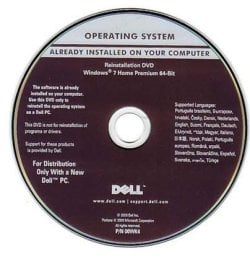
You had mentioned that you have some OEM supplied Disk. Does it look like this?


delloem.jpg

Then you do have the OEM Reinstall Disk. Even otherwise you can get it from DELL.

Good Luck.

 
Last edited:

My Computer

OS
Windows 7 Home Premium 32 bit
Cross winds. :) Hi Noel, I took quite sometime to put out that post and you beat me. Hope you do not mind the repeat.:)
 

My Computer

OS
Windows 7 Home Premium 32 bit
Thanks for the detailed replies! I will have a go tonight and post back.

I KNOW it must be software related. A year ago i replaced the HD with an SSD. I still had the old HD and so tried it last night, and lo and behold it worked and was fully activated. Very frustrating process with neither Dell or MS directly having a clue.
 

My Computer

OS
Windows 7 Home Premium
Cross winds. :) Hi Noel, I took quite sometime to put out that post and you beat me. Hope you do not mind the repeat.:)

It's one of my stock replies :)
Interestingly, your second Key for Dell didn't appear in my 'master' list of Keys - but when I checked, it does appear to be a valid one (according to MDL, anyhow), but it seems likely that it's limited to Alienware machines rather than Dell.

No problems about the 'repeat' - often, a second post will spot something the first didn't...... in this case it was the fact that the the OP had said their COA sticker was illegible (I was in the pub when I posted :) ).

If the Licensing store rebuild doesn't work - here's my standard response....

Your problem is that for some reason, the system is unable to properly read the SLIC table in the BIOS, which is required to be able to self-activate the OEM_SLP Key with which the computer came installed.
The normal solution is to change the Key to the one on your COA sticker - but you say that you are unable to read the Key there.

In such circumstances, the only things you can do are
1) recreate the Licensing Store - in case it's a minor software problem causing the misread
2) try updating the BIOS to the latest available Vista-compliant one, from the manufacturer's website
3) Contact the manufacturer direct, and see if they can provide assistance to correct the SLIC table
4) a reformat and reinstall using the manufacturer's recovery media
5) purchase a new license for Windows (or a new computer)
 

My Computer

Computer type
Laptop
Computer Manufacturer/Model Number
Asus K52F or Lenovo B51-80
OS
Win 7 x64 Home Premium (and x86 VirtualBox VM)/Win10
CPU
i3 370M/i7 6500U
Motherboard
Asus/Lenovo
Memory
8GB - finally :)/8GB
Graphics Card(s)
it's an i3, dude!/dual Intel&nVidia
Sound Card
onboard
Monitor(s) Displays
15.6" built-in
Screen Resolution
1366x768/1920x1080
Hard Drives
750GB Seagate internal
Sundry external drives attached to other computers on the local network
1TB SSD on the Lenovo
PSU
n/a
Internet Speed
as much as I can get - usually on a dongle/phone, so <1MB/s
Antivirus
MSE/Defender
Browser
IE11/12/Edge/Chrome/FF(if I must)
I tried all the above, same deal and error message. Here is the info below in case its changed !

There is a recovery partition, but I'm not convinced that would make any difference given I just did a fresh install? I will try and manually reinstall the recovery software and see if that works

I can't find the recovery dvd - I did have one for my other pc but its 64bit. I ran it but it would not pick up the recovery partition :(


Diagnostic Report (1.9.0019.0):
-----------------------------------------
WGA Data-->
Validation Status: Genuine
Validation Code: 0
Cached Validation Code: N/A, hr = 0xc004f012
Windows Product Key: *****-*****-QCPVQ-KHRB8-RMV82
Windows Product Key Hash: +Rj3N34NLM2JqoBO/OzgzTZXgbY=
Windows Product ID: 00359-OEM-8992687-00095
Windows Product ID Type: 2
Windows License Type: OEM SLP
Windows OS version: 6.1.7600.2.00010300.0.0.003
ID: {3AA79EAA-7164-48D5-9B77-2C6FE5271FF3}(1)
Is Admin: Yes
TestCab: 0x0
WGA Version: N/A, hr = 0x80070002
Signed By: N/A, hr = 0x80070002
Product Name: Windows 7 Home Premium
Architecture: 0x00000000
Build lab: 7600.win7_rtm.090713-1255
TTS Error:
Validation Diagnostic:
Resolution Status: N/A
WgaER Data-->
ThreatID(s): N/A, hr = 0x80070002
Version: N/A, hr = 0x80070002
WGA Notifications Data-->
Cached Result: N/A, hr = 0x80070002
File Exists: No
Version: N/A, hr = 0x80070002
WgaTray.exe Signed By: N/A, hr = 0x80070002
WgaLogon.dll Signed By: N/A, hr = 0x80070002
OGA Notifications Data-->
Cached Result: N/A, hr = 0x80070002
Version: N/A, hr = 0x80070002
OGAExec.exe Signed By: N/A, hr = 0x80070002
OGAAddin.dll Signed By: N/A, hr = 0x80070002
OGA Data-->
Office Status: 109 N/A
OGA Version: N/A, 0x80070002
Signed By: N/A, hr = 0x80070002
Office Diagnostics: 025D1FF3-364-80041010_025D1FF3-229-80041010_025D1FF3-230-1_025D1FF3-517-80040154_025D1FF3-237-80040154_025D1FF3-238-2_025D1FF3-244-80070002_025D1FF3-258-3
Browser Data-->
Proxy settings: N/A
User Agent: Mozilla/4.0 (compatible; MSIE 8.0; Win32)
Default Browser: C:\Program Files\Mozilla Firefox\firefox.exe
Download signed ActiveX controls: Prompt
Download unsigned ActiveX controls: Disabled
Run ActiveX controls and plug-ins: Allowed
Initialize and script ActiveX controls not marked as safe: Disabled
Allow scripting of Internet Explorer Webbrowser control: Disabled
Active scripting: Allowed
Script ActiveX controls marked as safe for scripting: Allowed
File Scan Data-->
File Mismatch: C:\Windows\system32\wat\watadminsvc.exe[hr = 0x80070002]
File Mismatch: C:\Windows\system32\wat\npwatweb.dll[hr = 0x80070002]
File Mismatch: C:\Windows\system32\wat\watux.exe[hr = 0x80070002]
File Mismatch: C:\Windows\system32\wat\watweb.dll[hr = 0x80070002]
Other data-->
Office Details: <GenuineResults><MachineData><UGUID>{3AA79EAA-7164-48D5-9B77-2C6FE5271FF3}</UGUID><Version>1.9.0019.0</Version><OS>6.1.7600.2.00010300.0.0.003</OS><Architecture>x32</Architecture><PKey>*****-*****-*****-*****-RMV82</PKey><PID>00359-OEM-8992687-00095</PID><PIDType>2</PIDType><SID>S-1-5-21-3540107279-4027842835-3267192508</SID><SYSTEM><Manufacturer>Dell Inc.</Manufacturer><Model>Vostro 1320</Model></SYSTEM><BIOS><Manufacturer>Dell Inc.</Manufacturer><Version>A08</Version><SMBIOSVersion major="2" minor="5"/><Date>20100305000000.000000+000</Date></BIOS><HWID>28B83607018400F8</HWID><UserLCID>0409</UserLCID><SystemLCID>0409</SystemLCID><TimeZone>Pacific Standard Time(GMT-08:00)</TimeZone><iJoin>0</iJoin><SBID><stat>3</stat><msppid></msppid><name></name><model></model></SBID><OEM><OEMID>DELL </OEMID><OEMTableID>CL09 </OEMTableID></OEM><GANotification/></MachineData><Software><Office><Result>109</Result><Products/><Applications/></Office></Software></GenuineResults>
Spsys.log Content: 0x80070002
Licensing Data-->
Software licensing service version: 6.1.7600.16385
Name: Windows(R) 7, HomePremium edition
Description: Windows Operating System - Windows(R) 7, OEM_SLP channel
Activation ID: d2c04e90-c3dd-4260-b0f3-f845f5d27d64
Application ID: 55c92734-d682-4d71-983e-d6ec3f16059f
Extended PID: 00359-00178-926-800095-02-1033-7600.0000-1582012
Installation ID: 001986214264903593520531635890901084921354854162375530
Processor Certificate URL: http://go.microsoft.com/fwlink/?LinkID=88338
Machine Certificate URL: http://go.microsoft.com/fwlink/?LinkID=88339
Use License URL: http://go.microsoft.com/fwlink/?LinkID=88341
Product Key Certificate URL: http://go.microsoft.com/fwlink/?LinkID=88340
Partial Product Key: RMV82
License Status: Initial grace period
Time remaining: 43080 minute(s) (29 day(s))
Remaining Windows rearm count: 3
Trusted time: 6/6/2012 11:47:38 PM
Windows Activation Technologies-->
HrOffline: N/A
HrOnline: N/A
HealthStatus: N/A
Event Time Stamp: N/A
WAT Activex: Not Registered - 0x80040154
WAT Admin Service: Not Registered - 0x80040154
HWID Data-->
HWID Hash Current: LgAAAAEAAgABAAEAAAABAAAAAgABAAEAJJT2ZDpDJqh6f/QbMF6sDur1PAVGyg==
OEM Activation 1.0 Data-->
N/A
OEM Activation 2.0 Data-->
BIOS valid for OA 2.0: yes
Windows marker version: 0x20001
OEMID and OEMTableID Consistent: yes
BIOS Information:
ACPI Table Name OEMID Value OEMTableID Value
APIC PTLTD APIC
FACP TOSCPL CRESTLNE
HPET INTEL CRESTLNE
BOOT PTLTD $SBFTBL$
MCFG INTEL CRESTLNE
OSFR TOSHIB A+2nd ID
SLIC DELL CL09
SSDT PmRef CpuPm
 

My Computer

OS
Windows 7 Home Premium

My Computer

Computer type
Laptop
Computer Manufacturer/Model Number
Asus K52F or Lenovo B51-80
OS
Win 7 x64 Home Premium (and x86 VirtualBox VM)/Win10
CPU
i3 370M/i7 6500U
Motherboard
Asus/Lenovo
Memory
8GB - finally :)/8GB
Graphics Card(s)
it's an i3, dude!/dual Intel&nVidia
Sound Card
onboard
Monitor(s) Displays
15.6" built-in
Screen Resolution
1366x768/1920x1080
Hard Drives
750GB Seagate internal
Sundry external drives attached to other computers on the local network
1TB SSD on the Lenovo
PSU
n/a
Internet Speed
as much as I can get - usually on a dongle/phone, so <1MB/s
Antivirus
MSE/Defender
Browser
IE11/12/Edge/Chrome/FF(if I must)
Thanks for the reply. I did that, here is the new log

Diagnostic Report (1.9.0027.0):
-----------------------------------------
Windows Validation Data-->

Validation Code: 0
Cached Online Validation Code: 0x0
Windows Product Key: *****-*****-QCPVQ-KHRB8-RMV82
Windows Product Key Hash: +Rj3N34NLM2JqoBO/OzgzTZXgbY=
Windows Product ID: 00359-OEM-8992687-00095
Windows Product ID Type: 2
Windows License Type: OEM SLP
Windows OS version: 6.1.7600.2.00010300.0.0.003
ID: {3AA79EAA-7164-48D5-9B77-2C6FE5271FF3}(3)
Is Admin: Yes
TestCab: 0x0
LegitcheckControl ActiveX: N/A, hr = 0x80070002
Signed By: N/A, hr = 0x80070002
Product Name: Windows 7 Home Premium
Architecture: 0x00000000
Build lab: 7600.win7_gdr.120401-1505
TTS Error:
Validation Diagnostic:
Resolution Status: N/A

Vista WgaER Data-->
ThreatID(s): N/A, hr = 0x80070002
Version: N/A, hr = 0x80070002

Windows XP Notifications Data-->
Cached Result: N/A, hr = 0x80070002
File Exists: No
Version: N/A, hr = 0x80070002
WgaTray.exe Signed By: N/A, hr = 0x80070002
WgaLogon.dll Signed By: N/A, hr = 0x80070002

OGA Notifications Data-->
Cached Result: N/A, hr = 0x80070002
Version: N/A, hr = 0x80070002
OGAExec.exe Signed By: N/A, hr = 0x80070002
OGAAddin.dll Signed By: N/A, hr = 0x80070002

OGA Data-->
Office Status: 101 Not Activated
Microsoft Office Ultimate 2007 - 101 Not Activated
OGA Version: N/A, 0x80070002
Signed By: N/A, hr = 0x80070002
Office Diagnostics: 025D1FF3-364-80041010_025D1FF3-229-80041010_025D1FF3-230-1_025D1FF3-517-80040154_025D1FF3-237-80040154_025D1FF3-238-2_025D1FF3-244-80070002_025D1FF3-258-3

Browser Data-->
Proxy settings: N/A
User Agent: Mozilla/4.0 (compatible; MSIE 8.0; Win32)
Default Browser: C:\Program Files\Mozilla Firefox\firefox.exe
Download signed ActiveX controls: Prompt
Download unsigned ActiveX controls: Disabled
Run ActiveX controls and plug-ins: Allowed
Initialize and script ActiveX controls not marked as safe: Disabled
Allow scripting of Internet Explorer Webbrowser control: Disabled
Active scripting: Allowed
Script ActiveX controls marked as safe for scripting: Allowed

File Scan Data-->

Other data-->
Office Details: <GenuineResults><MachineData><UGUID>{3AA79EAA-7164-48D5-9B77-2C6FE5271FF3}</UGUID><Version>1.9.0027.0</Version><OS>6.1.7600.2.00010300.0.0.003</OS><Architecture>x32</Architecture><PKey>*****-*****-*****-*****-RMV82</PKey><PID>00359-OEM-8992687-00095</PID><PIDType>2</PIDType><SID>S-1-5-21-3540107279-4027842835-3267192508</SID><SYSTEM><Manufacturer>Dell Inc.</Manufacturer><Model>Vostro 1320</Model></SYSTEM><BIOS><Manufacturer>Dell Inc.</Manufacturer><Version>A08</Version><SMBIOSVersion major="2" minor="5"/><Date>20100305000000.000000+000</Date></BIOS><HWID>28B83607018400F8</HWID><UserLCID>0409</UserLCID><SystemLCID>0409</SystemLCID><TimeZone>Pacific Standard Time(GMT-08:00)</TimeZone><iJoin>0</iJoin><SBID><stat>3</stat><msppid></msppid><name></name><model></model></SBID><OEM><OEMID>DELL </OEMID><OEMTableID>CL09 </OEMTableID></OEM><GANotification/></MachineData><Software><Office><Result>101</Result><Products><Product GUID="{91120000-002E-0000-0000-0000000FF1CE}"><LegitResult>101</LegitResult><Name>Microsoft Office Ultimate 2007</Name><Ver>12</Ver><Val>9C896277088F78</Val><Hash>6TyaCV86YO5EcYKwbPn69SQeBgI=</Hash><Pid>81608-956-4605337-65246</Pid><PidType>1</PidType></Product></Products><Applications><App Id="15" Version="12" Result="101"/><App Id="16" Version="12" Result="101"/><App Id="18" Version="12" Result="101"/><App Id="19" Version="12" Result="101"/><App Id="1A" Version="12" Result="101"/><App Id="1B" Version="12" Result="101"/><App Id="44" Version="12" Result="101"/><App Id="A1" Version="12" Result="101"/><App Id="BA" Version="12" Result="101"/></Applications></Office></Software></GenuineResults>

Spsys.log Content: 0x80070002

Licensing Data-->
Software licensing service version: 6.1.7600.16385

Name: Windows(R) 7, HomePremium edition
Description: Windows Operating System - Windows(R) 7, OEM_SLP channel
Activation ID: d2c04e90-c3dd-4260-b0f3-f845f5d27d64
Application ID: 55c92734-d682-4d71-983e-d6ec3f16059f
Extended PID: 00359-00178-926-800095-02-1033-7600.0000-1582012
Installation ID: 001986214264903593520531635890901084921354854162375530
Processor Certificate URL: http://go.microsoft.com/fwlink/?LinkID=88338
Machine Certificate URL: http://go.microsoft.com/fwlink/?LinkID=88339
Use License URL: http://go.microsoft.com/fwlink/?LinkID=88341
Product Key Certificate URL: http://go.microsoft.com/fwlink/?LinkID=88340
Partial Product Key: RMV82
License Status: Initial grace period
Time remaining: 41220 minute(s) (28 day(s))
Remaining Windows rearm count: 3
Trusted time: 6/8/2012 6:33:59 AM

Windows Activation Technologies-->
HrOffline: 0x00000000
HrOnline: 0x00000000
HealthStatus: 0x0000000000000000
Event Time Stamp: 6:7:2012 20:41
ActiveX: Registered, Version: 7.1.7600.16395
Admin Service: Registered, Version: 7.1.7600.16395
HealthStatus Bitmask Output:


HWID Data-->
HWID Hash Current: LgAAAAEAAgABAAEAAAABAAAAAgABAAEAJJT2ZDpDJqh6f/QbMF6sDur1PAVGyg==

OEM Activation 1.0 Data-->
N/A

OEM Activation 2.0 Data-->
BIOS valid for OA 2.0: yes
Windows marker version: 0x20001
OEMID and OEMTableID Consistent: yes
BIOS Information:
ACPI Table Name OEMID Value OEMTableID Value
APIC PTLTD APIC
FACP TOSCPL CRESTLNE
HPET INTEL CRESTLNE
BOOT PTLTD $SBFTBL$
MCFG INTEL CRESTLNE
OSFR TOSHIB A+2nd ID
SLIC DELL CL09
SSDT PmRef CpuPm
 

My Computer

OS
Windows 7 Home Premium

OK - the remaining problem is that the machine is trying to self-activate the OEM_SLP Key and failing - which may mean that the Licensing Store is corrupt.

Please first try recreating the Licensing Store.
Recreate the Licensing Store
1) Click Start button.
2) Type: CMD.exe into the 'Search programs and files' field
3) Right-Click on CMD.exe and select Run as Administrator
4) Type: net stop sppsvc (It may ask you if you are sure, select yes)
Note: the Software Protection service may not be running, this is ok.
5) Type: cd %windir%\ServiceProfiles\NetworkService\AppData\Roaming\Microsoft\SoftwareProtectionPlatform
6) Type: rename tokens.dat tokens.bar
7) Type: cd %windir%\system32
8) Type: net start sppsvc
9) Type: slui.exe
10) After a couple of seconds Windows Activation dialog will appear.
You may be asked to re-activate and/or re-enter your product key or Activation may occur automatically.

If you are asked to enter your Key, use the one from the COA sticker on the case

Reboot and Post back with a new MGADiag report
 
Last edited:

My Computer

Computer type
Laptop
Computer Manufacturer/Model Number
Asus K52F or Lenovo B51-80
OS
Win 7 x64 Home Premium (and x86 VirtualBox VM)/Win10
CPU
i3 370M/i7 6500U
Motherboard
Asus/Lenovo
Memory
8GB - finally :)/8GB
Graphics Card(s)
it's an i3, dude!/dual Intel&nVidia
Sound Card
onboard
Monitor(s) Displays
15.6" built-in
Screen Resolution
1366x768/1920x1080
Hard Drives
750GB Seagate internal
Sundry external drives attached to other computers on the local network
1TB SSD on the Lenovo
PSU
n/a
Internet Speed
as much as I can get - usually on a dongle/phone, so <1MB/s
Antivirus
MSE/Defender
Browser
IE11/12/Edge/Chrome/FF(if I must)
Sorry about that! - now I'll try again.....

Your problem is that for some reason, the system is unable to properly read the SLIC table in the BIOS, which is required to be able to self-activate the OEM_SLP Key with which the computer came installed.
The normal solution is to change the Key to the one on your COA sticker - but you say that you are unable to read the Key there.
In such circumstances, the only things you can do are
1) recreate the Licensing Store - in case it's a minor software problem causing the misread
2) try updating the BIOS to the latest available Vista-compliant one, from the manufacturer's website
3) Contact the manufacturer direct, and see if they can provide assistance to correct the SLIC table
4) a reformat and reinstall using the manufacturer's recovery media
5) purchase a new license for Windows (or a new computer)
 

My Computer

Computer type
Laptop
Computer Manufacturer/Model Number
Asus K52F or Lenovo B51-80
OS
Win 7 x64 Home Premium (and x86 VirtualBox VM)/Win10
CPU
i3 370M/i7 6500U
Motherboard
Asus/Lenovo
Memory
8GB - finally :)/8GB
Graphics Card(s)
it's an i3, dude!/dual Intel&nVidia
Sound Card
onboard
Monitor(s) Displays
15.6" built-in
Screen Resolution
1366x768/1920x1080
Hard Drives
750GB Seagate internal
Sundry external drives attached to other computers on the local network
1TB SSD on the Lenovo
PSU
n/a
Internet Speed
as much as I can get - usually on a dongle/phone, so <1MB/s
Antivirus
MSE/Defender
Browser
IE11/12/Edge/Chrome/FF(if I must)
Thanks for the responses, sorry for the delay in replying again. well the good news is the activation popups have stopped, bad news is its still not activated.

Dell had walked me though updating the BIOS to latest version, but still no luck. If they would JUST give me my product key that has been rubbed off that would likely solve the issue.

I have a pending call with Dell so i guess I will talk with them again and see if it gets anywhere. It was a 2 hour call a few weeks back, as we had to updated the BIOS three times!

i've also done a fresh install using their recovery disc and its back to the same issue.
 

My Computer

OS
Windows 7 Home Premium
Ouch!
Please post a new MGADiag report so we can see if anything has changed.
 

My Computer

Computer type
Laptop
Computer Manufacturer/Model Number
Asus K52F or Lenovo B51-80
OS
Win 7 x64 Home Premium (and x86 VirtualBox VM)/Win10
CPU
i3 370M/i7 6500U
Motherboard
Asus/Lenovo
Memory
8GB - finally :)/8GB
Graphics Card(s)
it's an i3, dude!/dual Intel&nVidia
Sound Card
onboard
Monitor(s) Displays
15.6" built-in
Screen Resolution
1366x768/1920x1080
Hard Drives
750GB Seagate internal
Sundry external drives attached to other computers on the local network
1TB SSD on the Lenovo
PSU
n/a
Internet Speed
as much as I can get - usually on a dongle/phone, so <1MB/s
Antivirus
MSE/Defender
Browser
IE11/12/Edge/Chrome/FF(if I must)
Thanks, here it is:

Diagnostic Report (1.9.0027.0):
-----------------------------------------
Windows Validation Data-->

Validation Code: 0
Cached Online Validation Code: 0x0
Windows Product Key: *****-*****-QCPVQ-KHRB8-RMV82
Windows Product Key Hash: +Rj3N34NLM2JqoBO/OzgzTZXgbY=
Windows Product ID: 00359-OEM-8992687-00095
Windows Product ID Type: 2
Windows License Type: OEM SLP
Windows OS version: 6.1.7601.2.00010300.1.0.003
ID: {3AA79EAA-7164-48D5-9B77-2C6FE5271FF3}(3)
Is Admin: Yes
TestCab: 0x0
LegitcheckControl ActiveX: N/A, hr = 0x80070002
Signed By: N/A, hr = 0x80070002
Product Name: Windows 7 Home Premium
Architecture: 0x00000000
Build lab: 7601.win7sp1_gdr.120330-1504
TTS Error:
Validation Diagnostic:
Resolution Status: N/A

Vista WgaER Data-->
ThreatID(s): N/A, hr = 0x80070002
Version: N/A, hr = 0x80070002

Windows XP Notifications Data-->
Cached Result: N/A, hr = 0x80070002
File Exists: No
Version: N/A, hr = 0x80070002
WgaTray.exe Signed By: N/A, hr = 0x80070002
WgaLogon.dll Signed By: N/A, hr = 0x80070002

OGA Notifications Data-->
Cached Result: N/A, hr = 0x80070002
Version: N/A, hr = 0x80070002
OGAExec.exe Signed By: N/A, hr = 0x80070002
OGAAddin.dll Signed By: N/A, hr = 0x80070002

OGA Data-->
Office Status: 100 Genuine
Microsoft Office Ultimate 2007 - 100 Genuine
OGA Version: N/A, 0x80070002
Signed By: N/A, hr = 0x80070002
Office Diagnostics: 025D1FF3-364-80041010_025D1FF3-229-80041010_025D1FF3-230-1_025D1FF3-517-80040154_025D1FF3-237-80040154_025D1FF3-238-2_025D1FF3-244-80070002_025D1FF3-258-3

Browser Data-->
Proxy settings: N/A
User Agent: Mozilla/4.0 (compatible; MSIE 8.0; Win32)
Default Browser: C:\Program Files\Mozilla Firefox\firefox.exe
Download signed ActiveX controls: Prompt
Download unsigned ActiveX controls: Disabled
Run ActiveX controls and plug-ins: Allowed
Initialize and script ActiveX controls not marked as safe: Disabled
Allow scripting of Internet Explorer Webbrowser control: Disabled
Active scripting: Allowed
Script ActiveX controls marked as safe for scripting: Allowed

File Scan Data-->

Other data-->
Office Details: <GenuineResults><MachineData><UGUID>{3AA79EAA-7164-48D5-9B77-2C6FE5271FF3}</UGUID><Version>1.9.0027.0</Version><OS>6.1.7601.2.00010300.1.0.003</OS><Architecture>x32</Architecture><PKey>*****-*****-*****-*****-RMV82</PKey><PID>00359-OEM-8992687-00095</PID><PIDType>2</PIDType><SID>S-1-5-21-3540107279-4027842835-3267192508</SID><SYSTEM><Manufacturer>Dell Inc.</Manufacturer><Model>Vostro 1320</Model></SYSTEM><BIOS><Manufacturer>Dell Inc.</Manufacturer><Version>A08</Version><SMBIOSVersion major="2" minor="5"/><Date>20100305000000.000000+000</Date></BIOS><HWID>285C3407018400F8</HWID><UserLCID>0409</UserLCID><SystemLCID>0409</SystemLCID><TimeZone>Pacific Standard Time(GMT-08:00)</TimeZone><iJoin>0</iJoin><SBID><stat>3</stat><msppid></msppid><name></name><model></model></SBID><OEM><OEMID>DELL </OEMID><OEMTableID>CL09 </OEMTableID></OEM><GANotification/></MachineData><Software><Office><Result>100</Result><Products><Product GUID="{91120000-002E-0000-0000-0000000FF1CE}"><LegitResult>100</LegitResult><Name>Microsoft Office Ultimate 2007</Name><Ver>12</Ver><Val>9C896277088F78</Val><Hash>6TyaCV86YO5EcYKwbPn69SQeBgI=</Hash><Pid>81608-956-4605337-65246</Pid><PidType>1</PidType></Product></Products><Applications><App Id="15" Version="12" Result="100"/><App Id="16" Version="12" Result="100"/><App Id="18" Version="12" Result="100"/><App Id="19" Version="12" Result="100"/><App Id="1A" Version="12" Result="100"/><App Id="1B" Version="12" Result="100"/><App Id="44" Version="12" Result="100"/><App Id="A1" Version="12" Result="100"/><App Id="BA" Version="12" Result="100"/></Applications></Office></Software></GenuineResults>

Spsys.log Content: 0x80070002

Licensing Data-->
Software licensing service version: 6.1.7601.17514

Name: Windows(R) 7, HomePremium edition
Description: Windows Operating System - Windows(R) 7, OEM_SLP channel
Activation ID: d2c04e90-c3dd-4260-b0f3-f845f5d27d64
Application ID: 55c92734-d682-4d71-983e-d6ec3f16059f
Extended PID: 00359-00178-926-800095-02-1033-7601.0000-1822012
Installation ID: 001986214264903593520531635890901084921354854162375530
Processor Certificate URL: http://go.microsoft.com/fwlink/?LinkID=88338
Machine Certificate URL: http://go.microsoft.com/fwlink/?LinkID=88339
Use License URL: http://go.microsoft.com/fwlink/?LinkID=88341
Product Key Certificate URL: http://go.microsoft.com/fwlink/?LinkID=88340
Partial Product Key: RMV82
License Status: Initial grace period
Time remaining: 35280 minute(s) (24 day(s))
Remaining Windows rearm count: 4
Trusted time: 6/30/2012 9:54:24 AM

Windows Activation Technologies-->
HrOffline: 0x00000000
HrOnline: 0x00000000
HealthStatus: 0x0000000000000000
Event Time Stamp: 6:7:2012 20:41
ActiveX: Registered, Version: 7.1.7600.16395
Admin Service: Registered, Version: 7.1.7600.16395
HealthStatus Bitmask Output:


HWID Data-->
HWID Hash Current: LgAAAAEAAgABAAEAAAABAAAAAgABAAEAJJT2ZDpDJqh6f/QbMF6sDur1PAVGyg==

OEM Activation 1.0 Data-->
N/A

OEM Activation 2.0 Data-->
BIOS valid for OA 2.0: yes
Windows marker version: 0x20001
OEMID and OEMTableID Consistent: yes
BIOS Information:
ACPI Table Name OEMID Value OEMTableID Value
APIC PTLTD APIC
FACP TOSCPL CRESTLNE
HPET INTEL CRESTLNE
BOOT PTLTD $SBFTBL$
MCFG INTEL CRESTLNE
OSFR TOSHIB A+2nd ID
SLIC DELL CL09
SSDT PmRef CpuPm
 

My Computer

OS
Windows 7 Home Premium
Their Recovery disk was obviously ineffective :(
The problem is still identical to your original one.
FWIW, Dell have no idea what the Key on your COA sticker is (as far as I know they are not allowed to keep such records, for security reasons).
You still have the same BIOS and SLIC table installed, and obviously the OS is the same as the original one as well.
I take it that you have an extended warranty with Dell?
Have they confirmed that they have replaced the SLIC table in the BIOS with the correct one? (the installed one is identical to the original, as far as I can tell)
Have they run what's known as a BIOS Scrubber? (don't ask what that is - I have to admit that I have no idea!)
Have they either replaced your Recovery disks, or confirmed that they are the correct ones?
To my mind, there are two choices for Dell - either issue you a new COA sticker and Key (but I'm not sure about the legality of that) or replace the motherboard (AND provide a new set of recovery disks!).

Having said that, what they will almost certainly do, is disavow all responsibility and tell you to buy a new license yourself. I wish I could be more optimistic, but I know Dell support to well to expect anything better.
 

My Computer

Computer type
Laptop
Computer Manufacturer/Model Number
Asus K52F or Lenovo B51-80
OS
Win 7 x64 Home Premium (and x86 VirtualBox VM)/Win10
CPU
i3 370M/i7 6500U
Motherboard
Asus/Lenovo
Memory
8GB - finally :)/8GB
Graphics Card(s)
it's an i3, dude!/dual Intel&nVidia
Sound Card
onboard
Monitor(s) Displays
15.6" built-in
Screen Resolution
1366x768/1920x1080
Hard Drives
750GB Seagate internal
Sundry external drives attached to other computers on the local network
1TB SSD on the Lenovo
PSU
n/a
Internet Speed
as much as I can get - usually on a dongle/phone, so <1MB/s
Antivirus
MSE/Defender
Browser
IE11/12/Edge/Chrome/FF(if I must)
Hello

i had the same error code, but i do have the sticker on my laptop any suggestions?

Diagnostic Report (1.9.0027.0):
-----------------------------------------
Windows Validation Data-->

Validation Code: 50
Cached Online Validation Code: 0x0
Windows Product Key: *****-*****-PWB9R-4K7W4-2BT4J
Windows Product Key Hash: jlJIE69lzaXsu5B+X11cktZP6u8=
Windows Product ID: 00359-OEM-8992687-00015
Windows Product ID Type: 2
Windows License Type: OEM SLP
Windows OS version: 6.1.7601.2.00010300.1.0.003
ID: {FE46D4BF-401A-4879-B80B-11F37908A696}(1)
Is Admin: Yes
TestCab: 0x0
LegitcheckControl ActiveX: N/A, hr = 0x80070002
Signed By: N/A, hr = 0x80070002
Product Name: Windows 7 Home Premium
Architecture: 0x00000009
Build lab: 7601.win7sp1_gdr.130318-1533
TTS Error:
Validation Diagnostic:
Resolution Status: N/A

Vista WgaER Data-->
ThreatID(s): N/A, hr = 0x80070002
Version: N/A, hr = 0x80070002

Windows XP Notifications Data-->
Cached Result: N/A, hr = 0x80070002
File Exists: No
Version: N/A, hr = 0x80070002
WgaTray.exe Signed By: N/A, hr = 0x80070002
WgaLogon.dll Signed By: N/A, hr = 0x80070002

OGA Notifications Data-->
Cached Result: N/A, hr = 0x80070002
Version: N/A, hr = 0x80070002
OGAExec.exe Signed By: N/A, hr = 0x80070002
OGAAddin.dll Signed By: N/A, hr = 0x80070002

OGA Data-->
Office Status: 109 N/A
OGA Version: N/A, 0x80070002
Signed By: N/A, hr = 0x80070002
Office Diagnostics: 025D1FF3-364-80041010_025D1FF3-229-80041010_025D1FF3-230-1_025D1FF3-517-80040154_025D1FF3-237-80040154_025D1FF3-238-2_025D1FF3-244-80070002_025D1FF3-258-3

Browser Data-->
Proxy settings: N/A
User Agent: Mozilla/4.0 (compatible; MSIE 8.0; Win32)
Default Browser: C:\Program Files (x86)\Mozilla Firefox\firefox.exe
Download signed ActiveX controls: Prompt
Download unsigned ActiveX controls: Disabled
Run ActiveX controls and plug-ins: Allowed
Initialize and script ActiveX controls not marked as safe: Disabled
Allow scripting of Internet Explorer Webbrowser control: Disabled
Active scripting: Allowed
Script ActiveX controls marked as safe for scripting: Allowed

File Scan Data-->

Other data-->
Office Details: <GenuineResults><MachineData><UGUID>{FE46D4BF-401A-4879-B80B-11F37908A696}</UGUID><Version>1.9.0027.0</Version><OS>6.1.7601.2.00010300.1.0.003</OS><Architecture>x64</Architecture><PKey>*****-*****-*****-*****-2BT4J</PKey><PID>00359-OEM-8992687-00015</PID><PIDType>2</PIDType><SID>S-1-5-21-639180829-218166002-3911503160</SID><SYSTEM><Manufacturer>SAMSUNG ELECTRONICS CO., LTD.</Manufacturer><Model>QX310/QX410/QX510/SF310/SF410/SF510</Model></SYSTEM><BIOS><Manufacturer>American Megatrends Inc.</Manufacturer><Version>05MX.M008.20110525.SCY</Version><SMBIOSVersion major="2" minor="6"/><Date>20110525000000.000000+000</Date></BIOS><HWID>369A3707018400FC</HWID><UserLCID>0409</UserLCID><SystemLCID>0409</SystemLCID><TimeZone>Mountain Standard Time(GMT-07:00)</TimeZone><iJoin>0</iJoin><SBID><stat>3</stat><msppid></msppid><name></name><model></model></SBID><OEM><OEMID>SECCSD</OEMID><OEMTableID>LH43STAR</OEMTableID></OEM><GANotification/></MachineData><Software><Office><Result>109</Result><Products/><Applications/></Office></Software></GenuineResults>

Spsys.log Content: 0x80070002

Licensing Data-->
C:\Windows\system32\slmgr.vbs(1131, 5) (null): 0xC004F012

Windows Activation Technologies-->
HrOffline: 0x00000000
HrOnline: 0x00000000
HealthStatus: 0x0000000000000000
Event Time Stamp: 5:15:2013 01:49
ActiveX: Registered, Version: 7.1.7600.16395
Admin Service: Registered, Version: 7.1.7600.16395
HealthStatus Bitmask Output:


HWID Data-->
HWID Hash Current: MgAAAAEAAQABAAIAAAADAAAAAgABAAEA6GGsCEpeCroGJ1quuBQ0HwTWlw3+GjTQXF0=

OEM Activation 1.0 Data-->
N/A

OEM Activation 2.0 Data-->
BIOS valid for OA 2.0: yes
Windows marker version: 0x20001
OEMID and OEMTableID Consistent: yes
BIOS Information:
ACPI Table Name OEMID Value OEMTableID Value
APIC SECCSD LH43STAR
FACP SECCSD LH43STAR
HPET SECCSD LH43STAR
MCFG SECCSD LH43STAR
SSDT PmRef CpuPm
SLIC SECCSD LH43STAR
SSDT PmRef CpuPm
 

My Computer

Computer type
PC/Desktop
Computer Manufacturer/Model Number
samsung
OS
windows 7 home premium 64bit
sorry what do you mean?
 

My Computer

Computer type
PC/Desktop
Computer Manufacturer/Model Number
samsung
OS
windows 7 home premium 64bit
elderthing

Try this

Open up an Elevated Command Prompt. Click on :orb: in
2nqbqes.png
type CMD . Right click on CMD under Programs (1) choose
mawket.jpg
. On the User Access Control window click on the Yes button . Command Prompt opens up to C:\Windows\System32>_

Type this command below inside the command prompt

net stop sppsvc
and press <ENTER> press Y for yes that you're sure you want to stop the Service

Then type

Type: cd %windir%\ServiceProfiles\NetworkService\AppData\Roaming\Microsoft\SoftwareProtectionPlatform

press [ENTER]

Then type in

rename tokens.dat tokens.old[DOS] press Enter Then type in [dos]cd %windir%\system32
press <Enter>

Next type

net start sppsvc
press <Enter>

Then type in

slui.exe
press [ENTER]

In a few moments you will see the Windows Activation window . You will either be asked to input the key or the activation will kick in automatically . Reboot the PC and rerun the MGADiag and upload the log afterwards .
 

My Computer

Computer Manufacturer/Model Number
Custom Built
OS
Windows 7 Ultimate 32-Bit & Windows 7 Ultimate 64-Bit
CPU
Intel Core i7 CPU 950 @ 3.07GHz
Motherboard
ASUS P6T DELUXE V2
Memory
OCZ 6GB (3 x 2GB) 240-Pin DDR3 SDRAM DDR3 1600 OCZ3X1600R2
Graphics Card(s)
ATI Radeon HD 5700 Series
Sound Card
OnBoard
Hard Drives
WD6400AACS-00M3B0 (640GB SATA )
PSU
CORSAIR 850w
Case
NZXT LEXA
Cooling
Intel Stock Heatsink Fan
Keyboard
Microsoft Wireless Laser Keyboard 7000
Mouse
Microsoft Wireless Laser Mouse 7000
Back
Top