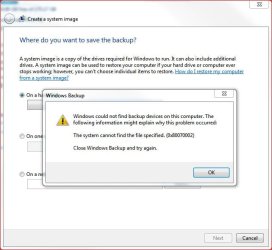
Win 7 Pro boot disk can NOT find images

trinaz

New member
Member
VIP
Local time
7:19 AM
Messages
477
Location
Phoenix
Strange new issue here...when I boot to to my Win 7 Pro 64bit installation DVD...none of my various system image backups are visible.

They are on 2 HDD's in my box (and a backup usb external drive)...in the past they were always listed...but now none of them are present in the choose image restore window...

Strangely...the only image available/listed is for another PC on the network on a shared usb external drive

Any ideas on why my saved images are suddenly absent from the Win DVD startup screens while attempting an image restore ?
 
Last edited:

My Computer My Computer

At a glance

Windows 7 Pro 64bit SP1AMD FX-6100 Six-Core Processor2ea Corsair-1333MHz-PC3-10666-240-pin-CMX4GX3...NVIDIA GeForce GT 630 - 1023MB (EVGA)
Computer type
PC/Desktop
Computer Manufacturer/Model Number
Self built
OS
Windows 7 Pro 64bit SP1
CPU
AMD FX-6100 Six-Core Processor
Motherboard
M5A78L-M LX PLUS
Memory
2ea Corsair-1333MHz-PC3-10666-240-pin-CMX4GX3M1A1333C9
Graphics Card(s)
NVIDIA GeForce GT 630 - 1023MB (EVGA)
Sound Card
OnBoard Via High Def Audio
Monitor(s) Displays
Samsung 204B main - ASUS VS228 secondary
Screen Resolution
1920x1080 main - 1920x1080 secondary
Hard Drives
Samsung SSD 840 128GB Win7 Pro 64bit - Western Digital WDC 465GB - Seagate 640GB Sata B/U - Maxtor 500GB Sata B/U - Maxtor 200GB Sata
PSU
Antec 650 watt
Cooling
Multiple case fans
Keyboard
MS USB dual Wireless Keyboard - IntelliType Pro
Mouse
MS USB dual Wireless Mouse - IntelliPoint
Internet Speed
Cox Cable
Antivirus
Bitdefender IS 2014
Browser
FireFox Primary - IE 11
Other Info
Hauppaguge Win TV HVR-1250 (Model 22xxx, Hybrid ATSC/QAM)
Samsung HD103SI USB 1TB Desktop Drive - Backup & Disk Image storage
One of the dangers of using windows system image gui.

If it loses track - a touch inconvenient.

Can you find them from the command prompt?

wbadmin get versions -backuptarget:h:

Obviously, replace h with the driveletter your images are on - that is the driveletter as seen from the recovery environment - not as seen from windows.
 

My Computers My Computers

  • At a glance

    7 X64i5 84002x8gb 3200mhz
    Computer type
    PC/Desktop
    OS
    7 X64
    CPU
    i5 8400
    Motherboard
    gigabyte b365m ds3h
    Memory
    2x8gb 3200mhz
    Hard Drives
    various
    PSU
    pure power 11 400w cm
    Case
    Coolermaster
    Cooling
    cryorig m9i
  • At a glance

    7x64g54008gb ddr4 2400
    Computer type
    PC/Desktop
    OS
    7x64
    CPU
    g5400
    Motherboard
    ga b365m ds3h
    Memory
    8gb ddr4 2400
    PSU
    xfx pro 450w
When you boot from the system repair DVD or install DVD external drive letters are temporarily assigned by the mini boot operating system. So what was on say K: when running windows may appear as L: from the boot disk.
This means you need to scout around a little. Choose the select an image option and refresh if needed. If it's a powered external HDD you can try turning it off then on and refresh the search.

To identify the letter of the attached drive partitions from the boot disk command prompt:
>diskpart
>list volume
>exit

you'll probably need the appropriate letter if using the wbadmin command.
 

My Computer My Computer

At a glance

Windows 7x64 Home Premium SP1Intel i7 2600kG.Skill Ripjaws (DDR3-1600) 2x4GBNvidia GeForce GTS 450; Intel HD Graphics 300...
Computer type
PC/Desktop
Computer Manufacturer/Model Number
Own build
OS
Windows 7x64 Home Premium SP1
CPU
Intel i7 2600k
Motherboard
ASUS P8Z68 Deluxe
Memory
G.Skill Ripjaws (DDR3-1600) 2x4GB
Graphics Card(s)
Nvidia GeForce GTS 450; Intel HD Graphics 3000(GT2+)
Monitor(s) Displays
Dell Ultrasharp IPS panel U2311H, Samsung SyncMaster P2350
Screen Resolution
1920x1080
Hard Drives
Samsung 850 Pro SSD 256GB, Samsung SSD 840 120GB, Seagates 1TB Barracuda ST31000528AS x2
PSU
Seasonic M12II 520W
Case
Lian Li Lancool PC-K60
Cooling
Case: 1x120mm, 3x140mm CPU: Hyper 212+
Keyboard
Logitech MK520 (wireless)
Mouse
Logitech MK520
Internet Speed
6-7 Mbps
Antivirus
Norton Security Premium, Malwarebytes on 2 (MSE on 3rd PC)
Browser
FireFox
Other Info
Audio: Logitech Z523 2.1
Are they in the root of the drive and named only WindowsImageBackup and nothing else?
 
Are they in the root of the drive and named only WindowsImageBackup and nothing else?
Yes all images are in the root directories of various drives and are named "Windows System Image" only. (image drives.jpg)

Ran:
To identify the letter of the attached drive partitions from the boot disk command prompt:
>diskpart
>list volume
>exit

and got the various assigned drives...different from OS system letters as stated. But none of the letters tried revealed any images...all said I think "error - no image found" ?

Directory prompt tho was X:\sources> Is this correct ?

Is - wbadmin get versions -backuptarget:h: correct - including only 3 spaces being used?

Is it possible to get a screen capture or copy from within the boot disk CMD command ?

The attached jpg(s) shows my system setup...all drives...files...and images accessible from within Windows ?

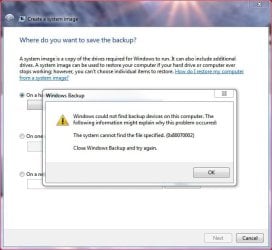
However...when I try to save/create a new image...the Image drive bu.jpg shows an error ?

Thanks....Tim
 

Attachments

  • system.jpg
    system.jpg
    125.3 KB · Views: 17
  • Image drive bu.jpg
    Image drive bu.jpg
    87.2 KB · Views: 18
  • image drives.jpg
    image drives.jpg
    49 KB · Views: 17

My Computer My Computer

At a glance

Windows 7 Pro 64bit SP1AMD FX-6100 Six-Core Processor2ea Corsair-1333MHz-PC3-10666-240-pin-CMX4GX3...NVIDIA GeForce GT 630 - 1023MB (EVGA)
Computer type
PC/Desktop
Computer Manufacturer/Model Number
Self built
OS
Windows 7 Pro 64bit SP1
CPU
AMD FX-6100 Six-Core Processor
Motherboard
M5A78L-M LX PLUS
Memory
2ea Corsair-1333MHz-PC3-10666-240-pin-CMX4GX3M1A1333C9
Graphics Card(s)
NVIDIA GeForce GT 630 - 1023MB (EVGA)
Sound Card
OnBoard Via High Def Audio
Monitor(s) Displays
Samsung 204B main - ASUS VS228 secondary
Screen Resolution
1920x1080 main - 1920x1080 secondary
Hard Drives
Samsung SSD 840 128GB Win7 Pro 64bit - Western Digital WDC 465GB - Seagate 640GB Sata B/U - Maxtor 500GB Sata B/U - Maxtor 200GB Sata
PSU
Antec 650 watt
Cooling
Multiple case fans
Keyboard
MS USB dual Wireless Keyboard - IntelliType Pro
Mouse
MS USB dual Wireless Mouse - IntelliPoint
Internet Speed
Cox Cable
Antivirus
Bitdefender IS 2014
Browser
FireFox Primary - IE 11
Other Info
Hauppaguge Win TV HVR-1250 (Model 22xxx, Hybrid ATSC/QAM)
Samsung HD103SI USB 1TB Desktop Drive - Backup & Disk Image storage
Same issue - new info - please help

I followed the suggestions but no progess...I noticed today that the issue has to do with my USB external hard drive...

When drive is attached via USB cable...I get the attached error with no backups listed ?

If I eject the drive via widows eject USB devices and re-click "Create a system image" I do not get the error and all my drives are accessable...except of course the external USB

If I plug the USB back in...then the same error in jpg attached pops up

Now this external USB drive has been my main backup drive for over a year and this issue has never arose before ?

Any ideas on why the USB is causing the error and how to fix it ?

Thanks...Tim
 

Attachments

  • image drives.jpg
    image drives.jpg
    49 KB · Views: 9
Last edited by a moderator:

My Computer My Computer

At a glance

Windows 7 Pro 64bit SP1AMD FX-6100 Six-Core Processor2ea Corsair-1333MHz-PC3-10666-240-pin-CMX4GX3...NVIDIA GeForce GT 630 - 1023MB (EVGA)
Computer type
PC/Desktop
Computer Manufacturer/Model Number
Self built
OS
Windows 7 Pro 64bit SP1
CPU
AMD FX-6100 Six-Core Processor
Motherboard
M5A78L-M LX PLUS
Memory
2ea Corsair-1333MHz-PC3-10666-240-pin-CMX4GX3M1A1333C9
Graphics Card(s)
NVIDIA GeForce GT 630 - 1023MB (EVGA)
Sound Card
OnBoard Via High Def Audio
Monitor(s) Displays
Samsung 204B main - ASUS VS228 secondary
Screen Resolution
1920x1080 main - 1920x1080 secondary
Hard Drives
Samsung SSD 840 128GB Win7 Pro 64bit - Western Digital WDC 465GB - Seagate 640GB Sata B/U - Maxtor 500GB Sata B/U - Maxtor 200GB Sata
PSU
Antec 650 watt
Cooling
Multiple case fans
Keyboard
MS USB dual Wireless Keyboard - IntelliType Pro
Mouse
MS USB dual Wireless Mouse - IntelliPoint
Internet Speed
Cox Cable
Antivirus
Bitdefender IS 2014
Browser
FireFox Primary - IE 11
Other Info
Hauppaguge Win TV HVR-1250 (Model 22xxx, Hybrid ATSC/QAM)
Samsung HD103SI USB 1TB Desktop Drive - Backup & Disk Image storage
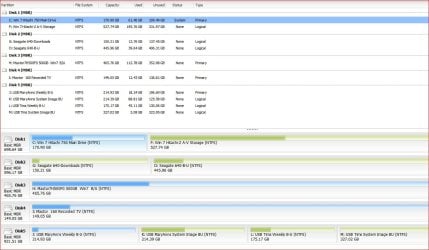
Will Backup detect and save successfully to another internal HD?

Try running Disk Check on the external.

I would also try moving the data off the external, reformat it NTFS Primary then see if it is detected.

I had to reinstall when these backup error messages started popping up with no found solutions after a virus infection.
 
Will Backup detect and save successfully to another internal HD?

Try running Disk Check on the external.

I would also try moving the data off the external, reformat it NTFS Primary then see if it is detected.

I had to reinstall when these backup error messages started popping up with no found solutions after a virus infection.

Sorry...above post was not as clear as it should have been....yes I can set Windows Backup/Restore to backup to any of the internal or external USB drives...no issues here

Also...I can also include a system image via normal Windows Backup and no problems...everything goes smoothly

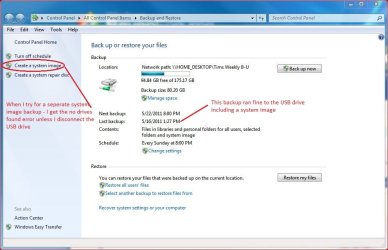
The issue I am having is saving a separate System Image apart from the Windows Backup settings as in attached jpg...if I try to save only an image then I get the "no drives found" error jpg IF the USB drive is attached

If I detach the USB drive...then I can save an image (see jpg) to whatever internal HDD I choose...but I can no longer save just an image to the USB drive as I have for more than a year now in order to protect my images/backups from attack by disconnecting the USB when not doing the weekly backup and/or a specific image backup.

Will try first the reformat NTFS - Primary and post back...

Tim
 

Attachments

  • backup.jpg
    backup.jpg
    71.6 KB · Views: 7

My Computer My Computer

At a glance

Windows 7 Pro 64bit SP1AMD FX-6100 Six-Core Processor2ea Corsair-1333MHz-PC3-10666-240-pin-CMX4GX3...NVIDIA GeForce GT 630 - 1023MB (EVGA)
Computer type
PC/Desktop
Computer Manufacturer/Model Number
Self built
OS
Windows 7 Pro 64bit SP1
CPU
AMD FX-6100 Six-Core Processor
Motherboard
M5A78L-M LX PLUS
Memory
2ea Corsair-1333MHz-PC3-10666-240-pin-CMX4GX3M1A1333C9
Graphics Card(s)
NVIDIA GeForce GT 630 - 1023MB (EVGA)
Sound Card
OnBoard Via High Def Audio
Monitor(s) Displays
Samsung 204B main - ASUS VS228 secondary
Screen Resolution
1920x1080 main - 1920x1080 secondary
Hard Drives
Samsung SSD 840 128GB Win7 Pro 64bit - Western Digital WDC 465GB - Seagate 640GB Sata B/U - Maxtor 500GB Sata B/U - Maxtor 200GB Sata
PSU
Antec 650 watt
Cooling
Multiple case fans
Keyboard
MS USB dual Wireless Keyboard - IntelliType Pro
Mouse
MS USB dual Wireless Mouse - IntelliPoint
Internet Speed
Cox Cable
Antivirus
Bitdefender IS 2014
Browser
FireFox Primary - IE 11
Other Info
Hauppaguge Win TV HVR-1250 (Model 22xxx, Hybrid ATSC/QAM)
Samsung HD103SI USB 1TB Desktop Drive - Backup & Disk Image storage
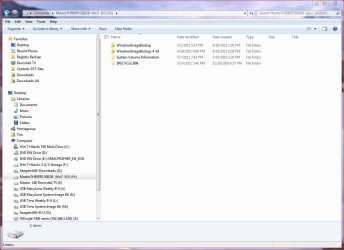
It would be interesting to see if the solo image would be rejected without the full backup onboard the External. Perhaps you can wait to copy it back until you try one.
 
Full backup with image is on a separate partition on the USB drive.

Have one partition set for weekly backup...and one for system image only periodic backup

Also have another PC sharing this USB with 2 additional partitions...one for weekly...and the other also for periodic image only backups.

Four partitions total on the USB...2 for this PC and 2 for another PC...
 

Attachments

  • drives.jpg
    drives.jpg
    24.2 KB · Views: 329

My Computer My Computer

At a glance

Windows 7 Pro 64bit SP1AMD FX-6100 Six-Core Processor2ea Corsair-1333MHz-PC3-10666-240-pin-CMX4GX3...NVIDIA GeForce GT 630 - 1023MB (EVGA)
Computer type
PC/Desktop
Computer Manufacturer/Model Number
Self built
OS
Windows 7 Pro 64bit SP1
CPU
AMD FX-6100 Six-Core Processor
Motherboard
M5A78L-M LX PLUS
Memory
2ea Corsair-1333MHz-PC3-10666-240-pin-CMX4GX3M1A1333C9
Graphics Card(s)
NVIDIA GeForce GT 630 - 1023MB (EVGA)
Sound Card
OnBoard Via High Def Audio
Monitor(s) Displays
Samsung 204B main - ASUS VS228 secondary
Screen Resolution
1920x1080 main - 1920x1080 secondary
Hard Drives
Samsung SSD 840 128GB Win7 Pro 64bit - Western Digital WDC 465GB - Seagate 640GB Sata B/U - Maxtor 500GB Sata B/U - Maxtor 200GB Sata
PSU
Antec 650 watt
Cooling
Multiple case fans
Keyboard
MS USB dual Wireless Keyboard - IntelliType Pro
Mouse
MS USB dual Wireless Mouse - IntelliPoint
Internet Speed
Cox Cable
Antivirus
Bitdefender IS 2014
Browser
FireFox Primary - IE 11
Other Info
Hauppaguge Win TV HVR-1250 (Model 22xxx, Hybrid ATSC/QAM)
Samsung HD103SI USB 1TB Desktop Drive - Backup & Disk Image storage
Full backup with image is on a separate partition on the USB drive.

This may be your problem. A second partition on an external drive may not be auto-scanned by the reimaging utility. I am basing this theory on the fact that it takes a separate boot manager to access an external's second partition to boot.
 
Full backup with image is on a separate partition on the USB drive.

This may be your problem. A second partition on an external drive may not be auto-scanned by the reimaging utility. I am basing this theory on the fact that it takes a separate boot manager to access an external's second partition to boot.


Sounds pretty resonable...but this arrangement has worked fine for over a year now with no issues. The only thing that has changed is that when I first couldn't find any images running the boot disk (my original post here)....I decided to install Acronis Home Image in case I could not get any images saved and/or could not "find" the saved images running the Windows boot/install disk.

After installing Acronis...the boot disk could find the images and...for a couple days...and I could save a separate image from the Backup/Restore in Control Panel ?

Will post back if I get this figured out...

Thanks for everyones help..!!....Tim
 

My Computer My Computer

At a glance

Windows 7 Pro 64bit SP1AMD FX-6100 Six-Core Processor2ea Corsair-1333MHz-PC3-10666-240-pin-CMX4GX3...NVIDIA GeForce GT 630 - 1023MB (EVGA)
Computer type
PC/Desktop
Computer Manufacturer/Model Number
Self built
OS
Windows 7 Pro 64bit SP1
CPU
AMD FX-6100 Six-Core Processor
Motherboard
M5A78L-M LX PLUS
Memory
2ea Corsair-1333MHz-PC3-10666-240-pin-CMX4GX3M1A1333C9
Graphics Card(s)
NVIDIA GeForce GT 630 - 1023MB (EVGA)
Sound Card
OnBoard Via High Def Audio
Monitor(s) Displays
Samsung 204B main - ASUS VS228 secondary
Screen Resolution
1920x1080 main - 1920x1080 secondary
Hard Drives
Samsung SSD 840 128GB Win7 Pro 64bit - Western Digital WDC 465GB - Seagate 640GB Sata B/U - Maxtor 500GB Sata B/U - Maxtor 200GB Sata
PSU
Antec 650 watt
Cooling
Multiple case fans
Keyboard
MS USB dual Wireless Keyboard - IntelliType Pro
Mouse
MS USB dual Wireless Mouse - IntelliPoint
Internet Speed
Cox Cable
Antivirus
Bitdefender IS 2014
Browser
FireFox Primary - IE 11
Other Info
Hauppaguge Win TV HVR-1250 (Model 22xxx, Hybrid ATSC/QAM)
Samsung HD103SI USB 1TB Desktop Drive - Backup & Disk Image storage
Full backup with image is on a separate partition on the USB drive.

This may be your problem. A second partition on an external drive may not be auto-scanned by the reimaging utility. I am basing this theory on the fact that it takes a separate boot manager to access an external's second partition to boot.
This is incorrect. All primary partitions are scanned for image recovery.

I am only aware that one partition at a time can be the scheduled backup partition. If you want another you use change setting.

The manual "Create a system image" can be done any time to any non (system,active,Boot) partition. All these images are available for reimaging.
 
Last edited:

My Computer My Computer

At a glance

Windows 7x64 Home Premium SP1Intel i7 2600kG.Skill Ripjaws (DDR3-1600) 2x4GBNvidia GeForce GTS 450; Intel HD Graphics 300...
Computer type
PC/Desktop
Computer Manufacturer/Model Number
Own build
OS
Windows 7x64 Home Premium SP1
CPU
Intel i7 2600k
Motherboard
ASUS P8Z68 Deluxe
Memory
G.Skill Ripjaws (DDR3-1600) 2x4GB
Graphics Card(s)
Nvidia GeForce GTS 450; Intel HD Graphics 3000(GT2+)
Monitor(s) Displays
Dell Ultrasharp IPS panel U2311H, Samsung SyncMaster P2350
Screen Resolution
1920x1080
Hard Drives
Samsung 850 Pro SSD 256GB, Samsung SSD 840 120GB, Seagates 1TB Barracuda ST31000528AS x2
PSU
Seasonic M12II 520W
Case
Lian Li Lancool PC-K60
Cooling
Case: 1x120mm, 3x140mm CPU: Hyper 212+
Keyboard
Logitech MK520 (wireless)
Mouse
Logitech MK520
Internet Speed
6-7 Mbps
Antivirus
Norton Security Premium, Malwarebytes on 2 (MSE on 3rd PC)
Browser
FireFox
Other Info
Audio: Logitech Z523 2.1
Thanks for all your efforts guys...

It appears this is a USB issue rather than Win Backup/Restore issue..or maybe combined ?

Repeatedly...if I connect the usb cable to the external drive...I get the error attached.

If I eject the USB drive...then I get all my HDD drives listed as backup devices (except of course the 4 USB partitions)

More confusing...once or twice all my drives showed up in Windows Backup/Restore .."Create a System Image" option...but I can not repeat this very often...

Mostly if the drive is attached...nothing shows up...if I eject the USB drive...all my HDD's appeqr...if I reconnect the USB drive and refresh and/or restart Backup/Restore...then no drives show up as in the jpg attached ?

If I backup to any of my USB drives...I'll have to bu first to the HDD...and then move to the USB

Weird thing is this just started to be an issue a week ago...previousuy all my drives showed up under "create a system image" ???

Thanks...Tim
 

Attachments

  • nodrives.jpg
    nodrives.jpg
    47.2 KB · Views: 4

My Computer My Computer

At a glance

Windows 7 Pro 64bit SP1AMD FX-6100 Six-Core Processor2ea Corsair-1333MHz-PC3-10666-240-pin-CMX4GX3...NVIDIA GeForce GT 630 - 1023MB (EVGA)
Computer type
PC/Desktop
Computer Manufacturer/Model Number
Self built
OS
Windows 7 Pro 64bit SP1
CPU
AMD FX-6100 Six-Core Processor
Motherboard
M5A78L-M LX PLUS
Memory
2ea Corsair-1333MHz-PC3-10666-240-pin-CMX4GX3M1A1333C9
Graphics Card(s)
NVIDIA GeForce GT 630 - 1023MB (EVGA)
Sound Card
OnBoard Via High Def Audio
Monitor(s) Displays
Samsung 204B main - ASUS VS228 secondary
Screen Resolution
1920x1080 main - 1920x1080 secondary
Hard Drives
Samsung SSD 840 128GB Win7 Pro 64bit - Western Digital WDC 465GB - Seagate 640GB Sata B/U - Maxtor 500GB Sata B/U - Maxtor 200GB Sata
PSU
Antec 650 watt
Cooling
Multiple case fans
Keyboard
MS USB dual Wireless Keyboard - IntelliType Pro
Mouse
MS USB dual Wireless Mouse - IntelliPoint
Internet Speed
Cox Cable
Antivirus
Bitdefender IS 2014
Browser
FireFox Primary - IE 11
Other Info
Hauppaguge Win TV HVR-1250 (Model 22xxx, Hybrid ATSC/QAM)
Samsung HD103SI USB 1TB Desktop Drive - Backup & Disk Image storage
mjf,

This is incorrect. All primary partitions are scanned for image recovery.

Logical drives too.


Trinaz,

Uninstall Acronis.

Reboot.
 

My Computers My Computers

  • At a glance

    7 X64i5 84002x8gb 3200mhz
    Computer type
    PC/Desktop
    OS
    7 X64
    CPU
    i5 8400
    Motherboard
    gigabyte b365m ds3h
    Memory
    2x8gb 3200mhz
    Hard Drives
    various
    PSU
    pure power 11 400w cm
    Case
    Coolermaster
    Cooling
    cryorig m9i
  • At a glance

    7x64g54008gb ddr4 2400
    Computer type
    PC/Desktop
    OS
    7x64
    CPU
    g5400
    Motherboard
    ga b365m ds3h
    Memory
    8gb ddr4 2400
    PSU
    xfx pro 450w
OK...was going to uninstall Acronis True Image Home 2011 anyway to see if that was indeed the issue..

But...after uninstall of Acronis...Windows Backup and Restore does not start....either thru control panel or any of the help file links....?

When clicking on Backup and Restore links...nothing happens...??

Is there an exe file somewhere I can try to click on directly...and if nothing works...how can I re-enable Windows 7 Backup and Restore functionality ??

Thanks
 

My Computer My Computer

At a glance

Windows 7 Pro 64bit SP1AMD FX-6100 Six-Core Processor2ea Corsair-1333MHz-PC3-10666-240-pin-CMX4GX3...NVIDIA GeForce GT 630 - 1023MB (EVGA)
Computer type
PC/Desktop
Computer Manufacturer/Model Number
Self built
OS
Windows 7 Pro 64bit SP1
CPU
AMD FX-6100 Six-Core Processor
Motherboard
M5A78L-M LX PLUS
Memory
2ea Corsair-1333MHz-PC3-10666-240-pin-CMX4GX3M1A1333C9
Graphics Card(s)
NVIDIA GeForce GT 630 - 1023MB (EVGA)
Sound Card
OnBoard Via High Def Audio
Monitor(s) Displays
Samsung 204B main - ASUS VS228 secondary
Screen Resolution
1920x1080 main - 1920x1080 secondary
Hard Drives
Samsung SSD 840 128GB Win7 Pro 64bit - Western Digital WDC 465GB - Seagate 640GB Sata B/U - Maxtor 500GB Sata B/U - Maxtor 200GB Sata
PSU
Antec 650 watt
Cooling
Multiple case fans
Keyboard
MS USB dual Wireless Keyboard - IntelliType Pro
Mouse
MS USB dual Wireless Mouse - IntelliPoint
Internet Speed
Cox Cable
Antivirus
Bitdefender IS 2014
Browser
FireFox Primary - IE 11
Other Info
Hauppaguge Win TV HVR-1250 (Model 22xxx, Hybrid ATSC/QAM)
Samsung HD103SI USB 1TB Desktop Drive - Backup & Disk Image storage
If you have Acronis True Image installed, using it's Tools you can convert a WIn7 backup image .vhd to an Acronis image .tib with much better flexibility to reimage it from the Acronis program or it's boot disk.
 
That is another known issue with Acronis.

I do know a fix - just have to remember it - it has been a day of trying to remember stuff.
 

My Computers My Computers

  • At a glance

    7 X64i5 84002x8gb 3200mhz
    Computer type
    PC/Desktop
    OS
    7 X64
    CPU
    i5 8400
    Motherboard
    gigabyte b365m ds3h
    Memory
    2x8gb 3200mhz
    Hard Drives
    various
    PSU
    pure power 11 400w cm
    Case
    Coolermaster
    Cooling
    cryorig m9i
  • At a glance

    7x64g54008gb ddr4 2400
    Computer type
    PC/Desktop
    OS
    7x64
    CPU
    g5400
    Motherboard
    ga b365m ds3h
    Memory
    8gb ddr4 2400
    PSU
    xfx pro 450w
Here is the fix View attachment WinSysImgRestore.zip

I just tried it - to find TrustedInstaller is the owner of that key. (At least it should be )

You will need to search for {B98A2BEA-7D42-4558-8BD1-832F41BAC6FD} in regedit.

Rt click the key>properties>security>advanced > make your username Owner, then give your username Full Control.

Merge the above .reg file.

Then go back to that key, untick your Full Control, go Advanced and make Trusted Installer owner again.

NB - when you go back to make trusted installer owner - it isn't listed.

Under Owner Tab, you have to click "Other Users or Groups", type in NT Service\TrustedInstaller then click Check Name, click OK and he will be listed so you can make him owner again.

Bit of a faff I'm afraid.
 

My Computers My Computers

  • At a glance

    7 X64i5 84002x8gb 3200mhz
    Computer type
    PC/Desktop
    OS
    7 X64
    CPU
    i5 8400
    Motherboard
    gigabyte b365m ds3h
    Memory
    2x8gb 3200mhz
    Hard Drives
    various
    PSU
    pure power 11 400w cm
    Case
    Coolermaster
    Cooling
    cryorig m9i
  • At a glance

    7x64g54008gb ddr4 2400
    Computer type
    PC/Desktop
    OS
    7x64
    CPU
    g5400
    Motherboard
    ga b365m ds3h
    Memory
    8gb ddr4 2400
    PSU
    xfx pro 450w
Back
Top