Win 7 Pro can't join SBS Server 2003 domain

Elaguila

New member
Local time
3:31 AM
Messages
9
My client has a small domain with SBS server 2003. The server connects to a router which connects to the DSL modem. On the router, dhcp is disabled. The server is a dns server and dhcp is running. All of the client PC's are windows XP and were able to join the domain with no issues. One of the client PC's had to be replaced. The replacement came with windows 7 pro x64 installed.
From the windows 7 PC I can see the other PC's on the network, can see the server, can access the shares on the server, and remote into the server. I can also ping the dns server. There are 2 ways to join the domain. The first one used a wizard on the windows 7 PC. When I go thru the wizard it tells me that there is no account on the domain controller for the PC. If I do it manually it tells me the dns couldn't find the controller. The dns server is the domain controller. I have also tried using a static IP like the XP machines have and got the same problems. I have also created the computer account on the server manually
The server has sp2 installed. I have looked on the net and found some different solutions like making changed to the local security policy but none of those have worked. I am stumped. Anybody know of a solution?
 

My Computer My Computer

OS
Windows 7 Pro x64
Welcome to Seven Forums,

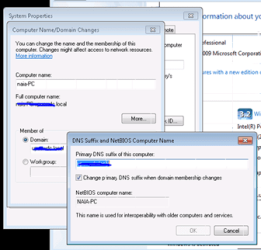
Please see attached file and make sure that in Computer Name/Domain Changes, then click on More...that you have the correct domain name under 'Primary DNS suffix of this computer' - for example company.local.

Try setting it up to Static IP again and verify that from the Windows 7 LAN setting the DNS is pointing to the Server's DNS which is a Private IP and not an external IP then change it back to DHCP. Try manually connecting to your domain again.

An update will be nice.
 

Attachments

  • Capture.PNG
    Capture.PNG
    17.7 KB · Views: 180
Last edited:

My Computer My Computer

Computer Manufacturer/Model Number
Lenovo Desktop/Samsung Laptop
OS
Win7 & Win8 64bit
CPU
Intel i5
Internet Speed
Charter-20 Mbps
Antivirus
Avast
Browser
FF, IE9 and Chrome
I tried going to a static ip and then back to the dhcp. I manually put in the ip address of the dns server which is the sbs 2003 server. The dns suffix is there. I still can't join the domain. When using the network id button and using the wizard it tells me there is no computer account in the domain for this computer. When using the Change button and doing it manually it tells me that the dns can't find the domain controller. Really frustrated to the point that I was going to try installing XP on this machine but it kept hanging and I don't think it is compatible with this hardware anyway.
 

My Computer My Computer

OS
Windows 7 Pro x64
is NETbios over tcp/ip enabled?
 

My Computer My Computer

Computer type
PC/Desktop
OS
Windows 7 Pro 64 bit SP1
CPU
Intel Core i7 950 Quad OC'ed to 3.2 GHZ
Motherboard
ASRock X58
Memory
12GB DDR 3
Graphics Card(s)
Radeon HD 5870 1GB
Sound Card
Onboard
Monitor(s) Displays
23" Acer HD
Screen Resolution
1920x1080
Hard Drives
128GB SSD
PSU
700W
Case
Coolermaster
Antivirus
Avast Free
Browser
Firefox
My client has a small domain with SBS server 2003. The server connects to a router which connects to the DSL modem. On the router, dhcp is disabled. The server is a dns server and dhcp is running. All of the client PC's are windows XP and were able to join the domain with no issues. One of the client PC's had to be replaced. The replacement came with windows 7 pro x64 installed.
From the windows 7 PC I can see the other PC's on the network, can see the server, can access the shares on the server, and remote into the server. I can also ping the dns server. There are 2 ways to join the domain. The first one used a wizard on the windows 7 PC. When I go thru the wizard it tells me that there is no account on the domain controller for the PC. If I do it manually it tells me the dns couldn't find the controller. The dns server is the domain controller. I have also tried using a static IP like the XP machines have and got the same problems. I have also created the computer account on the server manually
The server has sp2 installed. I have looked on the net and found some different solutions like making changed to the local security policy but none of those have worked. I am stumped. Anybody know of a solution?

This should allow to join from the Windows 7 PC. Disabling the 128 bit encryption is usually required.

Control Panel - Administrative Tools - Local Security Policy

Local Policies - Security Options


Network security: LAN Manager authentication level
0 Send LM & NTLM responses

Minimum session security for NTLM SSP
Disable Require 128-bit encryption

Here are all the different levels of NTLM security.
0) Send LM & NTLM responses
1) Send LM & NTLM - use NTLMv2 session security if negotiated
2) Send NTLM response only
3) Send NTLMv2 response only
4) Send NTLMv2 response only. Refuse LM
5) Send NTLMv2 response only. Refuse LM & NTLM

100280d1285450267-password-protected-network-share-lanman-server-adjustment.png

100281d1285450267-password-protected-network-share-require-128-bit-encryption-unchecked.png


I also heard that using the same DNS as the server may help.
 

My Computer My Computer

Computer type
PC/Desktop
Computer Manufacturer/Model Number
Home built
OS
Windows 7 Ult, Windows 8.1 Pro,
CPU
Q9650-4.275GHz, E8600 4.5GHz, E6750-3.8GHz
Motherboard
Evga 780i FTW
Memory
G.Skill PC2 9600 1200Mhz 5 5 5 15 2T
Graphics Card(s)
GTX480
Sound Card
Asus Xonar D2
Monitor(s) Displays
HannsG
Screen Resolution
1680X1050
Hard Drives
GSkill Phoenix Pro 120GB SSD
PSU
ThermalTake Toughpower 1000Watt modular
Case
ThermalTake XaserV
Cooling
Xigmatek S1283
Keyboard
Logitech G15
Mouse
Logitech G9
Internet Speed
T1
In addition....make sure that you have properly configured the DNS forwarders from your Server's DNS Manager.
Configure a DNS Server to Use Forwarders

Also, from my previous post, I didn't get an answer:
verify that from the Windows 7 LAN setting the DNS is pointing to the Server's DNS which is a Private IP and not an external IP

Please give us another update.
 

My Computer My Computer

Computer Manufacturer/Model Number
Lenovo Desktop/Samsung Laptop
OS
Win7 & Win8 64bit
CPU
Intel i5
Internet Speed
Charter-20 Mbps
Antivirus
Avast
Browser
FF, IE9 and Chrome
The 128 encryption is disabled. The checked the dhcp console on the server and it is giving the pc an ip address and I can ping the server from the pc. I am stumped at this point. I also noticed there is another thread with a similar issue.
 

My Computer My Computer

OS
Windows 7 Pro x64
The 128 encryption is disabled. The checked the dhcp console on the server and it is giving the pc an ip address and I can ping the server from the pc. I am stumped at this point. I also noticed there is another thread with a similar issue.

Lots of people with issues here, I'm not sure what the problem is but the adjustments I posted have helped many to fix this problem. The link below talks about the problem with a few other possible solutions.

[Solved] Windows 7 and Samba Issue - windows-7
 

My Computer My Computer

Computer type
PC/Desktop
Computer Manufacturer/Model Number
Home built
OS
Windows 7 Ult, Windows 8.1 Pro,
CPU
Q9650-4.275GHz, E8600 4.5GHz, E6750-3.8GHz
Motherboard
Evga 780i FTW
Memory
G.Skill PC2 9600 1200Mhz 5 5 5 15 2T
Graphics Card(s)
GTX480
Sound Card
Asus Xonar D2
Monitor(s) Displays
HannsG
Screen Resolution
1680X1050
Hard Drives
GSkill Phoenix Pro 120GB SSD
PSU
ThermalTake Toughpower 1000Watt modular
Case
ThermalTake XaserV
Cooling
Xigmatek S1283
Keyboard
Logitech G15
Mouse
Logitech G9
Internet Speed
T1
Thanks for the link. I will look thru that thread.
 

My Computer My Computer

OS
Windows 7 Pro x64
Something might have been overlooked - chev65 and I have both suggested to check your DNS's and DNS forwarders if they configured correctly from the server. They do play a big role on a domain network , improper configurations may result to networking issue. :D
 

My Computer My Computer

Computer Manufacturer/Model Number
Lenovo Desktop/Samsung Laptop
OS
Win7 & Win8 64bit
CPU
Intel i5
Internet Speed
Charter-20 Mbps
Antivirus
Avast
Browser
FF, IE9 and Chrome
The DNS and DNS forwarders are configured properly. I am going to install the 32bit version on one of the machines Thursday and see what happens then.
 

My Computer My Computer

OS
Windows 7 Pro x64
Back
Top