
Hello,
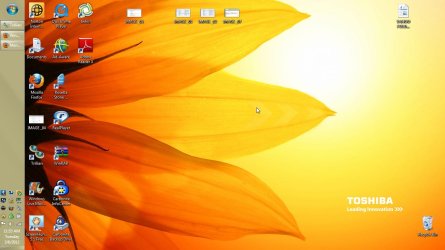
I am having a problem... I use Windows 7 pro, and I like my start menu bar to be at the top of the screen, because on a 15" laptop screen, I noticed that I dont have to scroll down as much and I can see more on my screen, when looking at webpages.
But here's the catch..
I have started to notice, I normally use classic theme, but I noticed that the top of the windows are going up under the taskbar ...
There is a fix for this? I have the LOCK TASKBAR turned on... but, programs like windows media player is called up from lets say a webpage, it opens up, UP UNDER the taskbar.. its very annoying.. I even tried hiding the taskbar, but that started acting up, I would mouse over it and it would pop out, but would get stuck and not hide itself again till I toggled the hide taskbar on/ off.
Right now I have the taskbar on the right side of the screen. and left turned on.
Any ideas of why the windows go up under the taskbar and is there a fix for this?
Thanks,
Christopher
I am having a problem... I use Windows 7 pro, and I like my start menu bar to be at the top of the screen, because on a 15" laptop screen, I noticed that I dont have to scroll down as much and I can see more on my screen, when looking at webpages.
But here's the catch..
I have started to notice, I normally use classic theme, but I noticed that the top of the windows are going up under the taskbar ...
There is a fix for this? I have the LOCK TASKBAR turned on... but, programs like windows media player is called up from lets say a webpage, it opens up, UP UNDER the taskbar.. its very annoying.. I even tried hiding the taskbar, but that started acting up, I would mouse over it and it would pop out, but would get stuck and not hide itself again till I toggled the hide taskbar on/ off.
Right now I have the taskbar on the right side of the screen. and left turned on.
Any ideas of why the windows go up under the taskbar and is there a fix for this?
Thanks,
Christopher
Attachments
My Computer
At a glance
Windows 7 Professional4 gigsON BOARD
- Computer Manufacturer/Model Number
- Toshiba
- OS
- Windows 7 Professional
- Memory
- 4 gigs
- Graphics Card(s)
- ON BOARD
- Sound Card
- ON BOARD
- Monitor(s) Displays
- 1
- Screen Resolution
- 1024 X 768
- Hard Drives
- 1 - 298.09
- Internet Speed
- 1 DOWN 10 UP


