Win 7 resize icon in List View

lauraq

New member
Member
Local time
6:20 AM
Messages
31
Hi
This is my first post so Hi to all :)
Sorry for my english terrible, i m from italy

The question, I have start to use Win 7 but i have a problem, the icon in explorer are too small. I want use the List Visualization but the icon are very small:cry:
There is a trick for have big icons? please
 

My Computer My Computer

OS
Win 7
Do you want to have bigger icons and still have the view in list form?
 

My Computer My Computer

Computer Manufacturer/Model Number
Hewlett Packard / Dv4-1120us
OS
Windows 7 Final
CPU
Intel Core 2 Duo @ 2.0Ghz
Memory
4GB DDR2 @ 800Mhz
Graphics Card(s)
Mobile Intel(R) 4 Series Express Chipset Family
Monitor(s) Displays
Generic PnP Monitor
Screen Resolution
1280 x 800
PSU
6-Cell Battery
Keyboard
Standard PS/2 Keyboard
Mouse
Synaptics PS/2 Port Touchpad
Internet Speed
Anywhere Between 11.0 and 48.0 Mbps
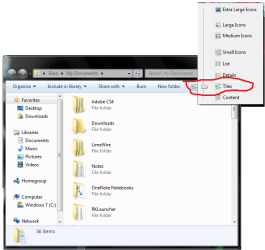
If you want to keep it in list view, click on the "change your view button" inside of a folder and click "tiles". This will maintain the list format, with bigger icons. Here's a picture:
Untitled.png
 

My Computer My Computer

Computer Manufacturer/Model Number
Hewlett Packard / Dv4-1120us
OS
Windows 7 Final
CPU
Intel Core 2 Duo @ 2.0Ghz
Memory
4GB DDR2 @ 800Mhz
Graphics Card(s)
Mobile Intel(R) 4 Series Express Chipset Family
Monitor(s) Displays
Generic PnP Monitor
Screen Resolution
1280 x 800
PSU
6-Cell Battery
Keyboard
Standard PS/2 Keyboard
Mouse
Synaptics PS/2 Port Touchpad
Internet Speed
Anywhere Between 11.0 and 48.0 Mbps
thank's but in this case the icons are to big. There is a string in the regedit for edit the dimension of the icons?
 

My Computer My Computer

OS
Win 7
up
I m looking for a trick for bigger the icons in List Visualization.
Thank's
 

My Computer My Computer

OS
Win 7
Back
Top