Win 7 - Slow Internet

Ryushi

New member
Local time
10:01 AM
Messages
3
System: Desktop
Processor: Intel(R) Core(TM) i7 CPU 950 @ 3.07GHz
Memory: 8190MB RAM
Hard Drive: 127 GB OCZ SATA II 2.5" SSD
Video Card: EVGA GeForce GTX 285 (Driver Version 8.15.11.8585)
Operating System: Windows 7 Ultimate 64-bit (6.1, Build 7100)
Motherboard: Gygabyte GA-EX58-UD3R-SLI
Power supply: Thermaltake 1000W
Wireless Card: Linksys Wireless-G PCI Adapter (Model No: WMP54G v4.1)

Problem:
Wireless Internet is going incredibly slow, also random latency spikes. Both my Laptop and Desktop are connecting to the same internet source, both via wireless. The desktop is experiencing very slow internet connection, while the laptop is showing much faster results.
Speed Test (Desktop - Wireless): http://www.speedtest.net/result/497573459.png
Speed Test (Laptop - Wireless): http://www.speedtest.net/result/497567074.png
Speed Test (Desktop - Wired): http://www.speedtest.net/result/498167366.png

Attempted Solutions:
No Change - Using drivers on the disk which came with the Wireless Adapter.
No Change - Updating to the latest drivers on the Linksys website. (Their latest drivers are from 2005 for this adapter...)
No Change - Running Troubleshooting.
 
Last edited:

My Computer

OS
Windows 7 Build 7100 64bit
CPU
Intel(R) Core(TM) i7 CPU 950 @ 3.07GHz
Motherboard
Gygabyte GA-EX58-UD3R-SLI
Graphics Card(s)
EVGA GeForce GTX 285
Screen Resolution
1680 x 1050
Hard Drives
127 GB OCZ SATA II 2.5" SSD
Have you tried rebooting the router? (switch off for 30secs) What router do you have?
 

My Computer

Computer type
PC/Desktop
Computer Manufacturer/Model Number
Self Build
OS
MS Windows 7 Professional 64-bit SP1
CPU
AMD FX(tm)-6100 Six-Core Processor Socket AM3+ (942)
Motherboard
ASUSTeK COMPUTER INC. SABERTOOTH 990FX (AM3r2)
Memory
8.00 GB Dual-Channel DDR3 @ 802MHz (11-11-11-36) 1.5Volts
Graphics Card(s)
NVIDIA GeForce GTX 560 Ti
Sound Card
Onboard Realtek HD
Monitor(s) Displays
shimian (1920x1080@60Hz)
Screen Resolution
1920*1080
Hard Drives
OCZ-AGIL ITY3 SATA Disk Device 120GB
PSU
Corsair TX 750
Case
Corsair
Cooling
WaterCooled
Keyboard
Microsoft Wired
Mouse
Logitech USB Optical TiltWheel Mouse
Internet Speed
Realtek PCIe GBE Family Controller 20MB*1MB
Antivirus
Avast
Browser
Firefox
Other Info
150GB Internal Hard Drive for Backing Up Important Files -
Hauppauge Nova-DT Dual DVB-T Tuner Device (+IR) -
USB PC Camera with Mic (SN9C105)
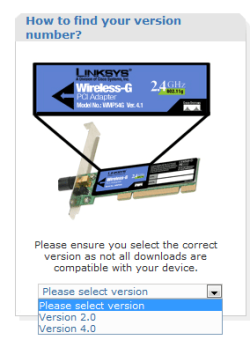
Hey, Linksys is asking me for version, FYI look at this screenshot for more info. Whats your version? I guess u gotta open up your computer case... Coz the two different versions have two different drivers....
 

Attachments

  • Version.PNG
    Version.PNG
    12.9 KB · Views: 153

My Computer

Computer Manufacturer/Model Number
Custom
OS
Windows 7 32-bit; no 64 coz its a P4 478
CPU
Pentium 4 3.00 GHZ HT Socket 478 :(
Motherboard
MSI PM8M-V
Memory
1 GB Kingston DDR-400
Graphics Card(s)
HIS X1650 PRO AGP :(
Sound Card
Intergrated Realtek AC'97
Monitor(s) Displays
17" CRT :(
Screen Resolution
Native: 1027*768 MAX: 1280*1024 :(
Hard Drives
80 GB Maxtor
500 GB Seagate (7200.11)(T.T its now RMA)
Have you tried rebooting the router? (switch off for 30secs) What router do you have?
No real change with rebooting the router.
I have a Netgear WGT624 v3: WGT624 - NETGEAR.com

Hey, Linksys is asking me for version, FYI look at this screenshot for more info. Whats your version? I guess u gotta open up your computer case... Coz the two different versions have two different drivers....
Sorry it was late last night when I posted this and forgot to add in the version number. Its v4.1
 

My Computer

OS
Windows 7 Build 7100 64bit
CPU
Intel(R) Core(TM) i7 CPU 950 @ 3.07GHz
Motherboard
Gygabyte GA-EX58-UD3R-SLI
Graphics Card(s)
EVGA GeForce GTX 285
Screen Resolution
1680 x 1050
Hard Drives
127 GB OCZ SATA II 2.5" SSD
System: Desktop
Processor: Intel(R) Core(TM) i7 CPU 950 @ 3.07GHz
Memory: 8190MB RAM
Hard Drive: 127 GB OCZ SATA II 2.5" SSD
Video Card: EVGA GeForce GTX 285 (Driver Version 8.15.11.8585)
Operating System: Windows 7 Ultimate 64-bit (6.1, Build 7100)
Motherboard: Gygabyte GA-EX58-UD3R-SLI
Power supply: Thermaltake 1000W
Wireless Card: Linksys Wireless-G PCI Adapter (Model No: WMP54G v4.1)

Problem:
Wireless Internet is going incredibly slow, also random latency spikes. Both my Laptop and Desktop are connecting to the same internet source, both via wireless. The desktop is experiencing very slow internet connection, while the laptop is showing much faster results.
Speed Test (Desktop): http://www.speedtest.net/result/497573459.png
Speed Test (Laptop): http://www.speedtest.net/result/497567074.png

Attempted Solutions:
No Change - Using drivers on the disk which came with the Wireless Adapter.
No Change - Updating to the latest drivers on the Linksys website. (Their latest drivers are from 2005 for this adapter...)
No Change - Running Troubleshooting.

First welcome to Sevenforums. Are both the destop and laptop running win 7? are they both on the same homegroup? Are they both getting dns/dhcp from the linksys or is the IP fixed?

Thanks for filling out your system specs and we just need some more info to be able to help. Someone here will have the answer.
Sorry I couldn't be more help so far

Ken
 

My Computer

Computer Manufacturer/Model Number
HP Pavillion dv-7 1005 Tx
OS
Win 8 Release candidate 8400
CPU
[email protected]
Memory
4 gigs
Graphics Card(s)
Nvidia 9600M
Sound Card
HD built-in
Monitor(s) Displays
17" Wxga
Screen Resolution
1440x900
Cooling
none
Internet Speed
45Mb down 5Mb up
Are both the destop and laptop running win 7?
Desktop - Win 7 64-bit Build 7100
Laptop - Win Vista 32-bit

Are they both on the same homegroup?
Win 7 says the Desktop is connected to a homegroup. However, I do not remember setting it to be connected to a homegroup. The Laptop is not connected to a homegroup to my knowledge.

Are they both getting dns/dhcp from the linksys or is the IP fixed?

I am not 100% sure how to check if they are both getting it from the linksys. However when looking at the Network Connection Details for both the Desktop and the Laptop it says "DHCP Enabled... Yes" for both of them. If anyone is willing to let me know how to find out this information I would be willing to get it.

Additional Details:
I plugged in a Wired cord to my desktop with Windows 7 as a temporary setup, the internet speeds increased by a lot. This leads me to believe that I either have a bad wireless card or there are problems with my cards compatibility with Win 7. Here is the speed test of my Desktop with Win7 and a wired connection: http://www.speedtest.net/result/498167366.png
 
Last edited:

My Computer

OS
Windows 7 Build 7100 64bit
CPU
Intel(R) Core(TM) i7 CPU 950 @ 3.07GHz
Motherboard
Gygabyte GA-EX58-UD3R-SLI
Graphics Card(s)
EVGA GeForce GTX 285
Screen Resolution
1680 x 1050
Hard Drives
127 GB OCZ SATA II 2.5" SSD
Thx for telling the version But the problem IS from Malaysia's Linksys.com is doesn't list version 4.1... I'll try the US site now...

UPDATE: ACCORDING to Vista's HCL + you wireless adapter search I get v4.1 compatible
http://www.microsoft.com/windows/compatibility/Search.aspx?type=Hardware&s=WMP54G
Clicked on the compatible 'V4.1'>Under 32-bit 'Compatible' for 64-bit "Unknown"

THEN, i went to: Linksys by Cisco - WMP54G Support
and got the Vista 32-bit driver (2007) XP driver (2005)... PROBLEM IS no 64-bit driver DAMN!!!!!!!!!!!!!!!!!!!

What I would connect up LAN cable (for internet access just for now)(YOU NOW MUST HAVE ONLINE ACCESS WITHOUT THE WIRELESS) then go to Device Manager>Expand 'Network Adapters'>Right Click on the 'Linksys ...">Uninstall>If you see the "delete driver option" Check that>then press OK.

Then right click 'Network Adapters'>Scan for hardware changes>Windows should now detect the 'Linksys PCI...'>Click on the 'Installing Device Driver Software'>Wait for it to complete>Now check if it works nicely

If it doesn't then install the latest Intel Chipset Driver 1st... Link: Confirm Download

Once done updating Intel Chipset Driver, now see whether there is a difference in speed... if not read the bottom part

UPDATE: A google search said a LOT of people have the same problem. i used the term 'Vista' instead of '7'>the i saw this guy (he claims to have v4.1) View he's post: http://www.frihost.com/forums/vt-103681.html
IF you want to try he's driver(download and extract it) then do this: Go to Device Manager>Expand 'Network Adapters'>Right Click on the 'Linksys ..." Update driver Software>Browse my computer manually...>Browse>the folder u extracted to has a Vista-x64 folder (SELECT THAT)>Next>Hope this works....
 
Last edited:

My Computer

Computer Manufacturer/Model Number
Custom
OS
Windows 7 32-bit; no 64 coz its a P4 478
CPU
Pentium 4 3.00 GHZ HT Socket 478 :(
Motherboard
MSI PM8M-V
Memory
1 GB Kingston DDR-400
Graphics Card(s)
HIS X1650 PRO AGP :(
Sound Card
Intergrated Realtek AC'97
Monitor(s) Displays
17" CRT :(
Screen Resolution
Native: 1027*768 MAX: 1280*1024 :(
Hard Drives
80 GB Maxtor
500 GB Seagate (7200.11)(T.T its now RMA)
You are not alone.

Win7, 64 bit, 4Gb RAM.

With a wired card I get 6.5Mbps
With a wireless card I get less than 0.5 Mbps.
With a wireless laptop in the same physical location, via the same router I get 6.5 Mbps.

I've tried three separate wireless network cards; TP-Link, Netgear and D-Link. The Netgear one has issues with more than 2Gb of RAM and won't install the drivers. The other two are both on the latest up to date drivers, and still refuse to give me higher than 0.5 Mbps.

I even disabled encryption on the router when someone mentioned that might work. It made no difference.

Anyone got any ideas???
 

My Computer

Computer Manufacturer/Model Number
None
OS
Windows 7 Home Premium 64 bit
CPU
Intel Core i7 CPU 860 @ 2.80 GHz
Motherboard
ASRock H55M-LE
Memory
4 GB
Graphics Card(s)
Nvidia GeForce GTX670
Sound Card
VIA High Definition Audio
Monitor(s) Displays
LG W2363D
Screen Resolution
1920 x 1080
Hard Drives
Hitachi HDS721010CLA332 ATA Device
PSU
Galaxy 850W
Case
Basic
Cooling
Aircooled
Keyboard
KeySonic
Mouse
Cyborg RAT-7
Internet Speed
30Mbps D, 2Mbps U
Additional - tried a USB wireless Adapter (Buffalo WLI-UC-GN). Speed varies, but is between 2 and 4 Mbps - so better than wireless PCI, but nowhere near the wired connection.

Win7 still needs work I fear...
 

My Computer

Computer Manufacturer/Model Number
None
OS
Windows 7 Home Premium 64 bit
CPU
Intel Core i7 CPU 860 @ 2.80 GHz
Motherboard
ASRock H55M-LE
Memory
4 GB
Graphics Card(s)
Nvidia GeForce GTX670
Sound Card
VIA High Definition Audio
Monitor(s) Displays
LG W2363D
Screen Resolution
1920 x 1080
Hard Drives
Hitachi HDS721010CLA332 ATA Device
PSU
Galaxy 850W
Case
Basic
Cooling
Aircooled
Keyboard
KeySonic
Mouse
Cyborg RAT-7
Internet Speed
30Mbps D, 2Mbps U
I got the same problem and struggled for many days. However, I found a simple solution today ...

- run cmd.exe
- type ipconfig /renew

this worked for me and hope it well work for you as well
 

My Computer

OS
Windows 7 Ultimate 32bit
I got the same problem and struggled for many days. However, I found a simple solution today ...

- run cmd.exe
- type ipconfig /renew

this worked for me and hope it well work for you as well

IPCONFIG /renew and flush are temp workarounds you will need to use them every time the problem happens. They show the problem to be dns related.

BTW the thread you posted to is months old, and I doubt anyone will be looking at it.

Just an FYI


Ken
 

My Computer

Computer Manufacturer/Model Number
HP Pavillion dv-7 1005 Tx
OS
Win 8 Release candidate 8400
CPU
[email protected]
Memory
4 gigs
Graphics Card(s)
Nvidia 9600M
Sound Card
HD built-in
Monitor(s) Displays
17" Wxga
Screen Resolution
1440x900
Cooling
none
Internet Speed
45Mb down 5Mb up
Back
Top