win 7 Ultimate problem No start due to a boched audio driver removal

Materene

New member
Local time
2:51 PM
Messages
5
Hi folks, I am having an issue that keeps snowballing and finally to the point of no repair accomplished. I have an older socket 775 system that has onboard audio the VIA which I do not use but had to try and trace a problem with my add on creative card .. At this point I cannot get the system to finish loading and I would like to know if it is possible to use my other system win 7 pro 32 also on the same machine to access the file or registry that might be stopping the normal start up of the win 7 Ultimate 64 bit. I can access the system files of that disk. Any information would be helpful so I don't have to lose everything on the disc.


Thank you in advance for any suggestions
 

My Computer My Computer

At a glance

win 7 pro 32 bitIntel celeron 3.204 gigsNVidia GT 440
Computer type
PC/Desktop
Computer Manufacturer/Model Number
MSI custom
OS
win 7 pro 32 bit
CPU
Intel celeron 3.20
Motherboard
MSI G41M-P28
Memory
4 gigs
Graphics Card(s)
NVidia GT 440
Hard Drives
primary c 1Tb
Antivirus
Malwarebytes Pro
Browser
Firefox
You can use dism++ to deal with drivers\updates for an offline system. View attachment Dism++10.1.1000.100.zip

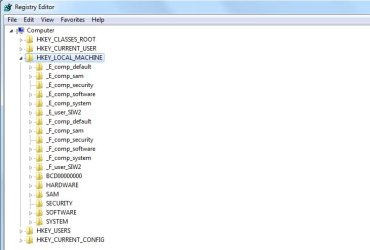
You can use standard regedit.exe to load offline hives. Regedit > click HKLM to highlight it > File >Load Hive.

Or you can run regeditpe ( works on regular windows not just pe ).View attachment RegeditPE1.2.zip

Run it and it will find offline hives and open standard regedit.exe like this:

regeditpe1.jpg

When you have finshed, just close regedit and the hives are unloaded.
 

My Computers My Computers

  • At a glance

    7 X64i5 84002x8gb 3200mhz
    Computer type
    PC/Desktop
    OS
    7 X64
    CPU
    i5 8400
    Motherboard
    gigabyte b365m ds3h
    Memory
    2x8gb 3200mhz
    Hard Drives
    various
    PSU
    pure power 11 400w cm
    Case
    Coolermaster
    Cooling
    cryorig m9i
  • At a glance

    7x64g54008gb ddr4 2400
    Computer type
    PC/Desktop
    OS
    7x64
    CPU
    g5400
    Motherboard
    ga b365m ds3h
    Memory
    8gb ddr4 2400
    PSU
    xfx pro 450w
When you use a dedicated sound card you should go into BIOS and turn off the onboard audio from the motherboard. This may help so that you don't have competing devices.
 

My Computer My Computer

At a glance

Windows 7 Ultimate x64
Computer type
PC/Desktop
OS
Windows 7 Ultimate x64
Back
Top