
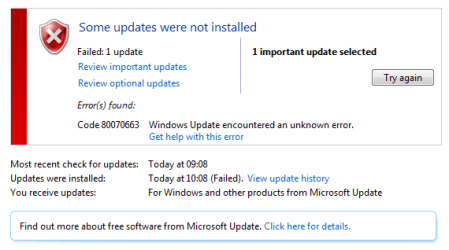
Win 7 update error 80070663 when installing update KB2596787

dxc0chappie

New member
Local time
12:01 PM
Messages
16
Hi Experts,

After MS Office 2007 update KB2596787 failed I found some HD problems with chkdsk. I believe there are some corrupted system files. I wonder if some kind soul could advise how to repair i.e. which specific files and where to get them from?

Logs/screenshots attached.

Many thanks.
 

Attachments
My Computer My Computer

Computer type
PC/Desktop
Computer Manufacturer/Model Number
Mesh ElitePro 760
OS
Windows 7 Professional x64
CPU
Intel i5 760
Memory
8GB
CheckSUR shows the following probems...
Code:
Summary:
Seconds executed: 1551
 Found 5 errors
  CSI Manifest Failed Catalog Check Total count: 2
  CSI Payload File Missing Total count: 1
  CBS MUM Corrupt Total count: 2

Unavailable repair files:
	winsxs\manifests\amd64_microsoft-windows-ie-versioninfo_31bf3856ad364e35_11.2.9600.17280_none_e1994bf149f1e0bc.manifest
	winsxs\manifests\amd64_ce04cba7a7e0e0a9e7af131a0166138e_b03f5f7f11d50a3a_6.1.7601.18523_none_8b14c35459e54735.manifest
	servicing\packages\WUClient-SelfUpdate-Core-TopLevel~31bf3856ad364e35~amd64~~7.6.7600.320.mum
	servicing\packages\WUClient-SelfUpdate-Core~31bf3856ad364e35~amd64~~7.6.7600.320.mum
	servicing\packages\WUClient-SelfUpdate-Core-TopLevel~31bf3856ad364e35~amd64~~7.6.7600.320.cat
	servicing\packages\WUClient-SelfUpdate-Core~31bf3856ad364e35~amd64~~7.6.7600.320.cat

There are also some problems in the SFC log - but we'll worry about those after we fix these.

I'll post a fix protocol later.
 

My Computer My Computer

Computer type
Laptop
Computer Manufacturer/Model Number
Asus K52F or Lenovo B51-80
OS
Win 7 x64 Home Premium (and x86 VirtualBox VM)/Win10
CPU
i3 370M/i7 6500U
Motherboard
Asus/Lenovo
Memory
8GB - finally :)/8GB
Graphics Card(s)
it's an i3, dude!/dual Intel&nVidia
Sound Card
onboard
Monitor(s) Displays
15.6" built-in
Screen Resolution
1366x768/1920x1080
Hard Drives
750GB Seagate internal
Sundry external drives attached to other computers on the local network
1TB SSD on the Lenovo
PSU
n/a
Internet Speed
as much as I can get - usually on a dongle/phone, so <1MB/s
Antivirus
MSE/Defender
Browser
IE11/12/Edge/Chrome/FF(if I must)
Using the wealth of info on this excellent forum I was able to repair the manifest/package corruptions, but now I have a different error in the CheckSUR.log which I am at a loss how to fix. Also still have problems in the SFC log... :-(
 

Attachments

My Computer My Computer

Computer type
PC/Desktop
Computer Manufacturer/Model Number
Mesh ElitePro 760
OS
Windows 7 Professional x64
CPU
Intel i5 760
Memory
8GB
:)

Yep - same state I'd have got you to...
Now we have to fix the 'ordinary' file problems found by SFC (and CheckSUR)
Code:
	Line 29657: 2015-09-15 15:51:54, Info                  CSI    00000365 [SR] Repairing 2 components
	Line 29658: 2015-09-15 15:51:54, Info                  CSI    00000366 [SR] Beginning Verify and Repair transaction
	Line 29661: 2015-09-15 15:51:54, Info                  CSI    00000368 [SR] Cannot repair member file [l:48{24}]"FirewallControlPanel.dll" of Networking-MPSSVC, Version = 6.1.7601.17514, pA = PROCESSOR_ARCHITECTURE_AMD64 (9), Culture neutral, VersionScope = 1 nonSxS, PublicKeyToken = {l:8 b:31bf3856ad364e35}, Type neutral, TypeName neutral, PublicKey neutral in the store, hash mismatch
	Line 29665: 2015-09-15 15:51:54, Info                  CSI    0000036a [SR] Cannot repair member file [l:46{23}]"System.ServiceModel.dll" of System.ServiceModel, Version = 6.1.7601.18532, pA = PROCESSOR_ARCHITECTURE_MSIL (8), Culture neutral, VersionScope neutral, PublicKeyToken = {l:8 b:b77a5c561934e089}, Type neutral, TypeName neutral, PublicKey neutral in the store, hash mismatch
Code:
Checking Component Store
(f)	CSI Payload File Missing	0x00000000	ieui.dll	wow64_microsoft-windows-ieframe_31bf3856ad364e35_8.0.7600.16913_none_e5f00a1472fbc30d

I'll post a fix protocol later.
 

My Computer My Computer

Computer type
Laptop
Computer Manufacturer/Model Number
Asus K52F or Lenovo B51-80
OS
Win 7 x64 Home Premium (and x86 VirtualBox VM)/Win10
CPU
i3 370M/i7 6500U
Motherboard
Asus/Lenovo
Memory
8GB - finally :)/8GB
Graphics Card(s)
it's an i3, dude!/dual Intel&nVidia
Sound Card
onboard
Monitor(s) Displays
15.6" built-in
Screen Resolution
1366x768/1920x1080
Hard Drives
750GB Seagate internal
Sundry external drives attached to other computers on the local network
1TB SSD on the Lenovo
PSU
n/a
Internet Speed
as much as I can get - usually on a dongle/phone, so <1MB/s
Antivirus
MSE/Defender
Browser
IE11/12/Edge/Chrome/FF(if I must)
I've uploaded a file - d0caa.zip - to my OneDrive at Noel's OneDrive
Please download and save it.

Right-click on the saved file and select Extract all...
Change the target to C:\ and click on Extract
Close all windows (it would be a good idea to print these instructions!)

Now reboot to the Repair Environment - as soon as the machine restarts, start tapping F8 - this should bring up the Advanced Boot Menu, at the top of which should be the option 'Repair my Computer'
Pick that
You'll have to log in with your username and password.

Pick the option to use a Command Prompt
At the prompt type
DIR C:\d0caa
hit the enter key - if you get a 'Not Found' error try
DIR D:\d0caa
or
DIR E:\d0caa

The drive letter in use when you find the folder will need to be substituted (for<drive>) into the following command...

XCOPY <drive>:\d0caa <drive>:\windows\winsxs /y /i /s /v /h

(e.g. XCOPY P:\wfire P:\windows\winsxs /y /i /s /v /h )

run the command (it should take almost no time) and when the prompt returns, type
EXIT
and hit the Enter key to exit Command Prompt - reboot to Normal Mode Windows.

Now run SFC /SCANNOW in an Elevated Command Prompt
then reboot and upload the new CBS.log file to your reply
 

My Computer My Computer

Computer type
Laptop
Computer Manufacturer/Model Number
Asus K52F or Lenovo B51-80
OS
Win 7 x64 Home Premium (and x86 VirtualBox VM)/Win10
CPU
i3 370M/i7 6500U
Motherboard
Asus/Lenovo
Memory
8GB - finally :)/8GB
Graphics Card(s)
it's an i3, dude!/dual Intel&nVidia
Sound Card
onboard
Monitor(s) Displays
15.6" built-in
Screen Resolution
1366x768/1920x1080
Hard Drives
750GB Seagate internal
Sundry external drives attached to other computers on the local network
1TB SSD on the Lenovo
PSU
n/a
Internet Speed
as much as I can get - usually on a dongle/phone, so <1MB/s
Antivirus
MSE/Defender
Browser
IE11/12/Edge/Chrome/FF(if I must)
Hi, I copied the files over, re-ran SFC and CheckSUR - logs attached. Looks like there's still some errors.
 

Attachments

My Computer My Computer

Computer type
PC/Desktop
Computer Manufacturer/Model Number
Mesh ElitePro 760
OS
Windows 7 Professional x64
CPU
Intel i5 760
Memory
8GB
Still 1 error in the SFC :(
Code:
2015-09-16 09:13:23, Info                  CSI    0000035b [SR] Repairing 1 components
2015-09-16 09:13:23, Info                  CSI    0000035c [SR] Beginning Verify and Repair transaction
2015-09-16 09:13:23, Info                  CSI    0000035e [SR] Cannot repair member file [l:46{23}]"System.ServiceModel.dll" of System.ServiceModel, Version = 6.1.7601.18532, pA = PROCESSOR_ARCHITECTURE_MSIL (8), Culture neutral, VersionScope neutral, PublicKeyToken = {l:8 b:b77a5c561934e089}, Type neutral, TypeName neutral, PublicKey neutral in the store, hash mismatch
2
I'm not sure why, at this point, as I'm pretty sure I uploaded the correct file.

Also, for some reason, CheckSUR is finding a mass of new errors...
Code:
Checking Component Store
(f)	CSI Missing Deployment Key	0x00000000	a6562cfa922..6d6096de0b7_31bf3856ad364e35_6.1.7601.18846_16108e677bb01de8	HKLM\Components\CanonicalData\Deployments	
(f)	CSI Missing Deployment Key	0x00000000	b238d78ab96..82cf8316b9e_31bf3856ad364e35_6.1.7601.18804_5385b5271435d4db	HKLM\Components\CanonicalData\Deployments	
(f)	CSI Missing Deployment Key	0x00000000	170aef91da5..bcd5a4992f7_31bf3856ad364e35_6.1.7601.18846_07b81509db0ef196	HKLM\Components\CanonicalData\Deployments	
(f)	CSI Missing Deployment Key	0x00000000	08820e22142..fc0a4cf716f_31bf3856ad364e35_6.1.7601.18846_21db2236a64375c9	HKLM\Components\CanonicalData\Deployments	
(f)	CSI Missing Deployment Key	0x00000000	f90a84c118a..f442269f912_31bf3856ad364e35_6.1.7601.18804_b965690873110d6b	HKLM\Components\CanonicalData\Deployments	
(f)	CSI Missing Deployment Key	0x00000000	b6953ce718e..9aa86774558_31bf3856ad364e35_6.1.7601.18846_b7417b0549aa5f1d	HKLM\Components\CanonicalData\Deployments	
(f)	CSI Missing Deployment Key	0x00000000	85ac31a8dd9..c93b7d3c6ce_31bf3856ad364e35_6.1.7601.18804_4e0050898b85214c	HKLM\Components\CanonicalData\Deployments	
(f)	CSI Missing Deployment Key	0x00000000	66b5879f4aa..95d056a9958_31bf3856ad364e35_6.1.7601.18804_a6f2c2c883114848	HKLM\Components\CanonicalData\Deployments

I'll have to see if I can work out why this happened.

Back later.
 

My Computer My Computer

Computer type
Laptop
Computer Manufacturer/Model Number
Asus K52F or Lenovo B51-80
OS
Win 7 x64 Home Premium (and x86 VirtualBox VM)/Win10
CPU
i3 370M/i7 6500U
Motherboard
Asus/Lenovo
Memory
8GB - finally :)/8GB
Graphics Card(s)
it's an i3, dude!/dual Intel&nVidia
Sound Card
onboard
Monitor(s) Displays
15.6" built-in
Screen Resolution
1366x768/1920x1080
Hard Drives
750GB Seagate internal
Sundry external drives attached to other computers on the local network
1TB SSD on the Lenovo
PSU
n/a
Internet Speed
as much as I can get - usually on a dongle/phone, so <1MB/s
Antivirus
MSE/Defender
Browser
IE11/12/Edge/Chrome/FF(if I must)
I need to have a look at your COMPONENTS registry hive

Please copy the C:\Windows\System32\config\COMPONENTS file (no extension) to your desktop and then compress it - upload the compressed file to your favoured fileshare site (preferably Dropbox or OneDrive) and post a link.
 

My Computer My Computer

Computer type
Laptop
Computer Manufacturer/Model Number
Asus K52F or Lenovo B51-80
OS
Win 7 x64 Home Premium (and x86 VirtualBox VM)/Win10
CPU
i3 370M/i7 6500U
Motherboard
Asus/Lenovo
Memory
8GB - finally :)/8GB
Graphics Card(s)
it's an i3, dude!/dual Intel&nVidia
Sound Card
onboard
Monitor(s) Displays
15.6" built-in
Screen Resolution
1366x768/1920x1080
Hard Drives
750GB Seagate internal
Sundry external drives attached to other computers on the local network
1TB SSD on the Lenovo
PSU
n/a
Internet Speed
as much as I can get - usually on a dongle/phone, so <1MB/s
Antivirus
MSE/Defender
Browser
IE11/12/Edge/Chrome/FF(if I must)
Last edited:

My Computer My Computer

Computer type
PC/Desktop
Computer Manufacturer/Model Number
Mesh ElitePro 760
OS
Windows 7 Professional x64
CPU
Intel i5 760
Memory
8GB
Back
Top