Solved win 7 usb install problem

QuiGon

New member
Member
Local time
12:01 AM
Messages
18
Hello all.

I'm helping one person to remote install windows 7 on her brand new ASUS X554L. She has other old laptop which i use to make bootable USB stick and prepare win7 setup over teamviewer..however everything she does on new comp she has to tell me or take picture and send so i can tell her what to do.
problem is laptop doesn't have DVD so we have to use USB. so far i have made USB using rufus (found tutorial somewhere on this forum for UEFI, and i have checked usual problems "secure boot disablet etc"..

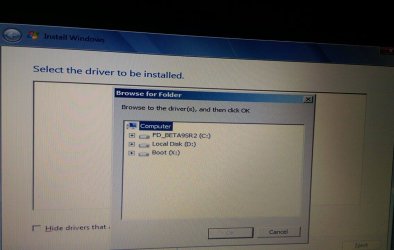
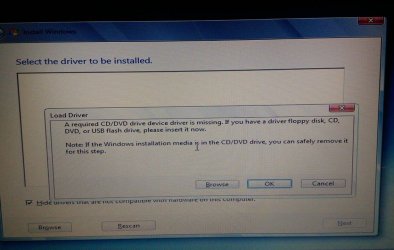
Laptop has freedos installed, but the problem is strange. When she places USB (with setup) in 2.0 PORT (i have made sure about it), it runs setup and after she clicks install it asks for CD/DVD drivers.

ok i get it..it's missing some drivers, even though i have found similar problems and tired to do solution what helped others...well at least as much as i could remotely...but bigest problem is i found drivers and i want to load them it doesn't show USB on list.

theese are screens.

how can it load windows setup from USB and when i want to browse it there is no USB on list..is it maybe locked cause it's using to boot..i should put another USB for driver? or is there any other fix?
 

Attachments
  • 12162095_10153708917599588_131204211_o.jpg
    12162095_10153708917599588_131204211_o.jpg
    92.5 KB · Views: 0
  • 12164622_10153709067854588_14049969_o.jpg
    12164622_10153709067854588_14049969_o.jpg
    74.5 KB · Views: 0

My Computer My Computer

At a glance

Windows 7 Ultimate x64Intel i5 3350PKingston HyperX DDR3 1600MHz 4GB (x2)Asus, GeForce GTX 560Ti, DCUII 1024MB
Computer type
PC/Desktop
OS
Windows 7 Ultimate x64
CPU
Intel i5 3350P
Motherboard
Asus P8H77-V
Memory
Kingston HyperX DDR3 1600MHz 4GB (x2)
Graphics Card(s)
Asus, GeForce GTX 560Ti, DCUII 1024MB
Hi,
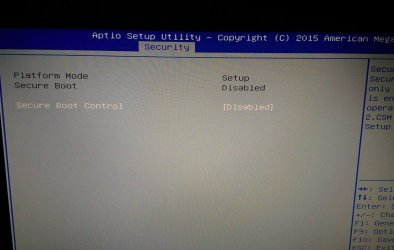
Hope you're not have not created the 2 system reserved partitions for a uefi only install ?
It's best to use windows uefi and legacy OPROM or even Other os
And make sure AHCI is enabled

Who knows it could just be the flash drive ?
We really need some bios pictures.
 

My Computer My Computer

At a glance

Win-7-Pro64bit 7-H-Prem-64biti7-5930K 2nd i9-9940x both water blocked VRM'...Trident-z 3200C14 2nd Trident-z 3600C16EVGA 1080ti ftw3 2nd Titan Xp both water blocked
Computer type
PC/Desktop
Computer Manufacturer/Model Number
Custom assembled by me :}
OS
Win-7-Pro64bit 7-H-Prem-64bit
CPU
i7-5930K 2nd i9-9940x both water blocked VRM's too
Motherboard
ASUS SABERTOOTH X99 2nd ASUS x299 Apex
Memory
Trident-z 3200C14 2nd Trident-z 3600C16
Graphics Card(s)
EVGA 1080ti ftw3 2nd Titan Xp both water blocked
Sound Card
Built-in Realtek
Monitor(s) Displays
1-AOC G2460PG 24"G-Sync 144Hz/ 2nd 1-ASUS VG248QE 24" 144Hz
Screen Resolution
1920 x 1080 144Hz
Hard Drives
2-Samsung M.2 Evo & Evo Plus
2-Samsung 850 EVO 500GB SSD's/ 3-2.5 W.D. Black 1tb-&3-1tb/3-3.5 WD Black 1tb hdd's
PSU
EVGA SuperNOVA 1000-P2 2nd 1200-P2
Case
2-Corsair Obsidian Series 450D Black ATX Mid Tower
Cooling
Custom water loops
Keyboard
Logitech G710+/ 2nd Logitech G910
Mouse
2-RedDragon M901 Perdition 16400 dpi Gaming mouse = wired
Internet Speed
Comcast Ping 19ms 89.31mbps download speed 6.12mbps upload
Antivirus
Malwarebytes Pro/ Superantispyware Pro
Browser
FireFox & Pale moon
Other Info
2nd ASUS X299 Apex/Intel i9-9940x with Custom water loop/7H-Prem-x64/Corsair 450D case/Ram Trident-z 3600C16 4x8gb / Samsung970Evo plus 500gb SSD/Dual ssd EZ swap evo/PSU EVGA SuperNova 1200w-P2 80+Platinum/GPU Titan Xp /8-ML-140 on push-pull on 2-280GTX rads
as far as USB goes i made it using "rufus" exactly how it was tutored here. actually i tried two different methods.

for hard disk, it has freedos installed on it. i don't know how many exactly partitions..should not affect this part right? i would tell her to delete all partitions in windows setup..unless i need to zero level it before windows, if that is the problem ...

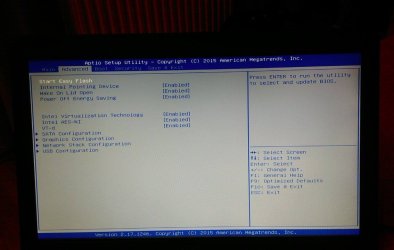
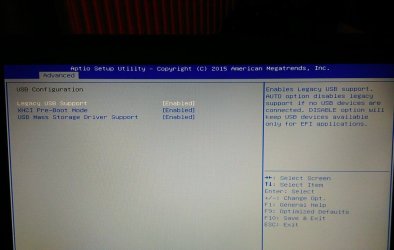
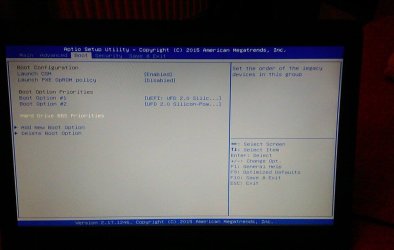
i can send you some bios pictures...

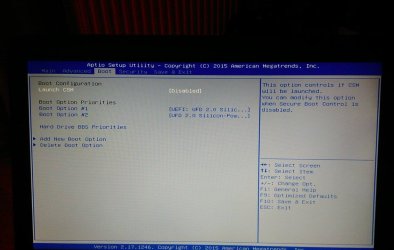
here is you might find usefull.. strange i can't find many options that usually are in bios.
 

Attachments

  • Advanced.jpg
    Advanced.jpg
    69.3 KB · Views: 0
  • Advanced-USB conf.jpg
    Advanced-USB conf.jpg
    73.3 KB · Views: 0
  • boot1.jpg
    boot1.jpg
    67.4 KB · Views: 0
  • boot2.jpg
    boot2.jpg
    76.9 KB · Views: 0
  • securty sbm.jpg
    securty sbm.jpg
    74 KB · Views: 0

My Computer My Computer

At a glance

Windows 7 Ultimate x64Intel i5 3350PKingston HyperX DDR3 1600MHz 4GB (x2)Asus, GeForce GTX 560Ti, DCUII 1024MB
Computer type
PC/Desktop
OS
Windows 7 Ultimate x64
CPU
Intel i5 3350P
Motherboard
Asus P8H77-V
Memory
Kingston HyperX DDR3 1600MHz 4GB (x2)
Graphics Card(s)
Asus, GeForce GTX 560Ti, DCUII 1024MB
Hi,
Toggle down to AXCI pre-boot mode and see what it says on the right column,

CSM should be enabled even if secure boot is disabled :/
Show the CSM options.
Also Launch PXE opron policy definition.
 

My Computer My Computer

At a glance

Win-7-Pro64bit 7-H-Prem-64biti7-5930K 2nd i9-9940x both water blocked VRM'...Trident-z 3200C14 2nd Trident-z 3600C16EVGA 1080ti ftw3 2nd Titan Xp both water blocked
Computer type
PC/Desktop
Computer Manufacturer/Model Number
Custom assembled by me :}
OS
Win-7-Pro64bit 7-H-Prem-64bit
CPU
i7-5930K 2nd i9-9940x both water blocked VRM's too
Motherboard
ASUS SABERTOOTH X99 2nd ASUS x299 Apex
Memory
Trident-z 3200C14 2nd Trident-z 3600C16
Graphics Card(s)
EVGA 1080ti ftw3 2nd Titan Xp both water blocked
Sound Card
Built-in Realtek
Monitor(s) Displays
1-AOC G2460PG 24"G-Sync 144Hz/ 2nd 1-ASUS VG248QE 24" 144Hz
Screen Resolution
1920 x 1080 144Hz
Hard Drives
2-Samsung M.2 Evo & Evo Plus
2-Samsung 850 EVO 500GB SSD's/ 3-2.5 W.D. Black 1tb-&3-1tb/3-3.5 WD Black 1tb hdd's
PSU
EVGA SuperNOVA 1000-P2 2nd 1200-P2
Case
2-Corsair Obsidian Series 450D Black ATX Mid Tower
Cooling
Custom water loops
Keyboard
Logitech G710+/ 2nd Logitech G910
Mouse
2-RedDragon M901 Perdition 16400 dpi Gaming mouse = wired
Internet Speed
Comcast Ping 19ms 89.31mbps download speed 6.12mbps upload
Antivirus
Malwarebytes Pro/ Superantispyware Pro
Browser
FireFox & Pale moon
Other Info
2nd ASUS X299 Apex/Intel i9-9940x with Custom water loop/7H-Prem-x64/Corsair 450D case/Ram Trident-z 3600C16 4x8gb / Samsung970Evo plus 500gb SSD/Dual ssd EZ swap evo/PSU EVGA SuperNova 1200w-P2 80+Platinum/GPU Titan Xp /8-ML-140 on push-pull on 2-280GTX rads
yeah, those two screenshots shows different options when CMS is enabled and disabled.

i have to enable CMS and Launch PXE, or it woon't boot from stick..
options there are enabled and disabled. no third!

i'll check AXCI and tell you what went with it!
 

My Computer My Computer

At a glance

Windows 7 Ultimate x64Intel i5 3350PKingston HyperX DDR3 1600MHz 4GB (x2)Asus, GeForce GTX 560Ti, DCUII 1024MB
Computer type
PC/Desktop
OS
Windows 7 Ultimate x64
CPU
Intel i5 3350P
Motherboard
Asus P8H77-V
Memory
Kingston HyperX DDR3 1600MHz 4GB (x2)
Graphics Card(s)
Asus, GeForce GTX 560Ti, DCUII 1024MB
It could very well be freedos
An easy nondestructive way to find out although you would need another hdd or ssd to try it is to remove the old hdd and install a new and install windows on it.
I would restore bios to default after replacing the hdd though and only disable Fast boot first.
 

My Computer My Computer

At a glance

Win-7-Pro64bit 7-H-Prem-64biti7-5930K 2nd i9-9940x both water blocked VRM'...Trident-z 3200C14 2nd Trident-z 3600C16EVGA 1080ti ftw3 2nd Titan Xp both water blocked
Computer type
PC/Desktop
Computer Manufacturer/Model Number
Custom assembled by me :}
OS
Win-7-Pro64bit 7-H-Prem-64bit
CPU
i7-5930K 2nd i9-9940x both water blocked VRM's too
Motherboard
ASUS SABERTOOTH X99 2nd ASUS x299 Apex
Memory
Trident-z 3200C14 2nd Trident-z 3600C16
Graphics Card(s)
EVGA 1080ti ftw3 2nd Titan Xp both water blocked
Sound Card
Built-in Realtek
Monitor(s) Displays
1-AOC G2460PG 24"G-Sync 144Hz/ 2nd 1-ASUS VG248QE 24" 144Hz
Screen Resolution
1920 x 1080 144Hz
Hard Drives
2-Samsung M.2 Evo & Evo Plus
2-Samsung 850 EVO 500GB SSD's/ 3-2.5 W.D. Black 1tb-&3-1tb/3-3.5 WD Black 1tb hdd's
PSU
EVGA SuperNOVA 1000-P2 2nd 1200-P2
Case
2-Corsair Obsidian Series 450D Black ATX Mid Tower
Cooling
Custom water loops
Keyboard
Logitech G710+/ 2nd Logitech G910
Mouse
2-RedDragon M901 Perdition 16400 dpi Gaming mouse = wired
Internet Speed
Comcast Ping 19ms 89.31mbps download speed 6.12mbps upload
Antivirus
Malwarebytes Pro/ Superantispyware Pro
Browser
FireFox & Pale moon
Other Info
2nd ASUS X299 Apex/Intel i9-9940x with Custom water loop/7H-Prem-x64/Corsair 450D case/Ram Trident-z 3600C16 4x8gb / Samsung970Evo plus 500gb SSD/Dual ssd EZ swap evo/PSU EVGA SuperNova 1200w-P2 80+Platinum/GPU Titan Xp /8-ML-140 on push-pull on 2-280GTX rads
think is i would probably be able to solve problem if i could have access to laptop :) this way ..
i can't really tell her to open laptop and pull out hdd :) i have many tools in order to get rid of freedos..

easily hirens boot cd would most likely do the trick too. so many tools. but i'm very limited in what i can tell her to do :)

anyway thanks for all your tips too..it really helps to have another mind to think with.i'll try with XHCI set to smart auto. there is no AHCI as much as i see..only Enable, Disable and Smart Auto for XHCI.

if you can think of something else,cool :)
 

My Computer My Computer

At a glance

Windows 7 Ultimate x64Intel i5 3350PKingston HyperX DDR3 1600MHz 4GB (x2)Asus, GeForce GTX 560Ti, DCUII 1024MB
Computer type
PC/Desktop
OS
Windows 7 Ultimate x64
CPU
Intel i5 3350P
Motherboard
Asus P8H77-V
Memory
Kingston HyperX DDR3 1600MHz 4GB (x2)
Graphics Card(s)
Asus, GeForce GTX 560Ti, DCUII 1024MB
oh cool..it went on after i chosed smart auto for XHCI! thank you a lot!
 

My Computer My Computer

At a glance

Windows 7 Ultimate x64Intel i5 3350PKingston HyperX DDR3 1600MHz 4GB (x2)Asus, GeForce GTX 560Ti, DCUII 1024MB
Computer type
PC/Desktop
OS
Windows 7 Ultimate x64
CPU
Intel i5 3350P
Motherboard
Asus P8H77-V
Memory
Kingston HyperX DDR3 1600MHz 4GB (x2)
Graphics Card(s)
Asus, GeForce GTX 560Ti, DCUII 1024MB
Hi,
Great deal thanks for hanging in there :thumbsup:
Cheers (d)
 

My Computer My Computer

At a glance

Win-7-Pro64bit 7-H-Prem-64biti7-5930K 2nd i9-9940x both water blocked VRM'...Trident-z 3200C14 2nd Trident-z 3600C16EVGA 1080ti ftw3 2nd Titan Xp both water blocked
Computer type
PC/Desktop
Computer Manufacturer/Model Number
Custom assembled by me :}
OS
Win-7-Pro64bit 7-H-Prem-64bit
CPU
i7-5930K 2nd i9-9940x both water blocked VRM's too
Motherboard
ASUS SABERTOOTH X99 2nd ASUS x299 Apex
Memory
Trident-z 3200C14 2nd Trident-z 3600C16
Graphics Card(s)
EVGA 1080ti ftw3 2nd Titan Xp both water blocked
Sound Card
Built-in Realtek
Monitor(s) Displays
1-AOC G2460PG 24"G-Sync 144Hz/ 2nd 1-ASUS VG248QE 24" 144Hz
Screen Resolution
1920 x 1080 144Hz
Hard Drives
2-Samsung M.2 Evo & Evo Plus
2-Samsung 850 EVO 500GB SSD's/ 3-2.5 W.D. Black 1tb-&3-1tb/3-3.5 WD Black 1tb hdd's
PSU
EVGA SuperNOVA 1000-P2 2nd 1200-P2
Case
2-Corsair Obsidian Series 450D Black ATX Mid Tower
Cooling
Custom water loops
Keyboard
Logitech G710+/ 2nd Logitech G910
Mouse
2-RedDragon M901 Perdition 16400 dpi Gaming mouse = wired
Internet Speed
Comcast Ping 19ms 89.31mbps download speed 6.12mbps upload
Antivirus
Malwarebytes Pro/ Superantispyware Pro
Browser
FireFox & Pale moon
Other Info
2nd ASUS X299 Apex/Intel i9-9940x with Custom water loop/7H-Prem-x64/Corsair 450D case/Ram Trident-z 3600C16 4x8gb / Samsung970Evo plus 500gb SSD/Dual ssd EZ swap evo/PSU EVGA SuperNova 1200w-P2 80+Platinum/GPU Titan Xp /8-ML-140 on push-pull on 2-280GTX rads
Back
Top