
Win 7/XP network: "You do not have access to the folder...."

CluelessInSeatl

New member
Local time
10:24 AM
Messages
23
Win 7/XP network: "You do not have access to the folder...."

I'm an old disabled guy scraping by on Social Security, so I rely on hand-me-down hardware and software donated to me by family, friends, acquaintances and total strangers.

Up until last year I relied on an old workhorse of a Micron Millennia PC running Windows 2K Pro. I had it hooked up on a wired Microsoft Windows Network to a motley collection of hand-me-down laptops and PCs, all running Windows XP. It took me some fiddling to get the Win2K and XP machines to play well together on the network, but once I got them to get along with each other the network behaved as if it were one single virtual machine with multiple drives and desktops.

Then last summer my cousin gave me an old PC running Windows 7 that his housemate had refurbished as a gift to me. His housemate is named Bob, so I named the "new" PC "Bob" on my network. The old Micron was starting to fail so I decided to press the "new" Win 7 PC into service to replace it.

It's been nearly a year since I received that PC and to this day I still can't get it working on my network. So I'm hoping to find here some clear and easy to follow instructions for allowing my XP computers to access files on the Win 7 machine and to save files to the Win 7 machine from my XP machines.

Here's an example of the kind of problem that drives me crazy: (I should let you know that due to a circulation disorder that prevents me from sitting up for more than a few minutes at a time I need to work in bed on a failing laptop running Win XP). So, I want to be able to save all my work from my XP laptop to the "new" PC which is running Windows 7. However when I try to save a file the laptop running XP, I get this error message:
"You do not have access to the folder '\\Bob\Desktop on Bob'. See your administrator for access to this folder."
But I am the administrator.

I've tried to look at the desktop folder properties on the Win 7 PC under Documents and Settings, but when I click on Documents and Settings I get an error message denying me access, even though I'm logged in as administrator.

I'm thinking of reformatting the hard drive on this PC and then installing Windows XP instead of Windows 7.

But before I do that I'm wondering if any of you here can help me figure out why I'm not able to save files from my XP laptop to the PC running Win 7.

And why I, logged in as administrator, am unable to access the Documents and Settings folder on the PC running Win 7.

Will in Seattle
a.k.a. "Clueless"
 
Last edited:

My Computer My Computer

At a glance

MS DOS 6.21, Win 2K, Win XP & Windows 7
Computer type
PC/Desktop
OS
MS DOS 6.21, Win 2K, Win XP & Windows 7
A few things that have changed from XP since Vista and later:

XP and earlier the default workgroup name was MSHOME. Vista and later it is WORKGROUP.
If you haven't done so already I would change the W7 workgroup name to match.

XP the Administrator account was really the admin account. On Vista and later the account you make during install is in the Administrators Group, but it is not the same as the true built in Administrator account. See tutorials section for how to enable and disable the true Admin account.

In XP user data was in Documents and Settings. Vista and later it is in C:\Users\username.

In Vista and later if you tell the wizard the network is a Public network, it thinks you are talking about a kiosk machine and locks everything down. So to share files and printers without passwords you must tell it the network is a private network.

Also Windows 7 is more finicky about file ownership permissions. I use Autohotkey which installs the user written scripts as a subfolder of Program Files. Windows 7 doesn't like programs writing inside their own folder under Program Files. So I've had to take ownership of the entire Program Files folder tree to avoid running everything as administrator.

If you post your settings for the categories listed then perhaps I and others can help you determine the cause of the file sharing hassles. It's a starting point at least. :)
 

My Computer My Computer

At a glance

Windows 7 32 bitAMD 5200+ dual core2 GBNVidia GeForce 6150SE 128 MB
Computer Manufacturer/Model Number
HP Media Center
OS
Windows 7 32 bit
CPU
AMD 5200+ dual core
Memory
2 GB
Graphics Card(s)
NVidia GeForce 6150SE 128 MB
Monitor(s) Displays
CRT
Screen Resolution
1280x1024
Hard Drives
500 GB Sata internal :

SIIG USB 3.0 docking stations w/WD Caviar Black 6 Gb/s drives
Keyboard
PS/2
Mouse
PS/2 Wheel Mouse
Other Info
SIIG USB 3.0 PCIexpress card.
Thanks a million, MilesAhead, for your speedy and thorough response!

I'll go through your checklist and see what I can figure out.

The good news is that I've always used the name "Workgroup" ever since I first started networking years ago, so we can cross that off the list of possible problems.

I just found the tutorial: "How to Change UAC Notification Settings in Windows 7" so it looks like I've got my first homework assignment. Thanks for pointing me to that.

I'll check back in here after I've studied the tutorial.

Thanks again!

Will in Seattle
a.k.a. "Clueless"
http://www.sevenforums.com/members/milesahead.html
 

My Computer My Computer

At a glance

MS DOS 6.21, Win 2K, Win XP & Windows 7
Computer type
PC/Desktop
OS
MS DOS 6.21, Win 2K, Win XP & Windows 7
Ok. Let us know what you find.
 

My Computer My Computer

At a glance

Windows 7 32 bitAMD 5200+ dual core2 GBNVidia GeForce 6150SE 128 MB
Computer Manufacturer/Model Number
HP Media Center
OS
Windows 7 32 bit
CPU
AMD 5200+ dual core
Memory
2 GB
Graphics Card(s)
NVidia GeForce 6150SE 128 MB
Monitor(s) Displays
CRT
Screen Resolution
1280x1024
Hard Drives
500 GB Sata internal :

SIIG USB 3.0 docking stations w/WD Caviar Black 6 Gb/s drives
Keyboard
PS/2
Mouse
PS/2 Wheel Mouse
Other Info
SIIG USB 3.0 PCIexpress card.
If you post your settings for the categories listed then perhaps I and others can help you determine the cause of the file sharing hassles. It's a starting point at least.

Hi again, MilesAhead!

I have to confess that I don't know how to find the "settings for the categories listed."

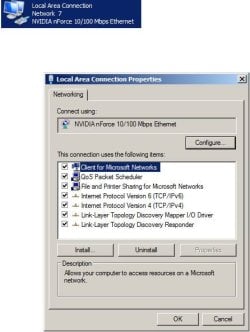
From the Start menu I clicked on Settings>Network Connections. I've tried to attach a jpg file of what I found. It doesn't seem to tell me much. (Please lt me know if there's a better way to post screenshots).

So, I'm afraid I'm going to need some guidance on how to find the settings we need to look at.

Will in Seattle
a.k.a. "Clueless"

P.S. Due to a circulation disorder I'm only able to sit up at my computer for a few minutes at a time. Add to that my worsening memory loss, and you can probably see how trying to troubleshoot this problem on my own seems to be beyond my capabilities.
 

Attachments

  • Windows7SettingsNetworkConnections_zpsbd90b273.jpg
    Windows7SettingsNetworkConnections_zpsbd90b273.jpg
    34.4 KB · Views: 33

My Computer My Computer

At a glance

MS DOS 6.21, Win 2K, Win XP & Windows 7
Computer type
PC/Desktop
OS
MS DOS 6.21, Win 2K, Win XP & Windows 7
Hi Clueless,

In addition.... can you please post (2) ipconfig/all output coming from your Win 7 and one from the Windows XP computers so that we can better assist you? Here's a guide for you to follow on how to run the ipconfig/all command from your 2 computers. You don't have to provide the rest of the preposting requirements.

An update will be nice. :D
 

My Computer My Computer

At a glance

Win7 & Win8 64bitIntel i5
Computer Manufacturer/Model Number
Lenovo Desktop/Samsung Laptop
OS
Win7 & Win8 64bit
CPU
Intel i5
Internet Speed
Charter-20 Mbps
Antivirus
Avast
Browser
FF, IE9 and Chrome
Hi Clueless,

In addition.... can you please post (2) ipconfig/all output coming from your Win 7 and one from the Windows XP computers so that we can better assist you? Here's a guide for you to follow on how to run the ipconfig/all command from your 2 computers. You don't have to provide the rest of the preposting requirements.

OK, 2xg, here ya go:

ipconfig from XP laptop:

Windows IP Configuration

Host Name . . . . . . . . . . . . : inspiron1100
Primary Dns Suffix . . . . . . . :
Node Type . . . . . . . . . . . . : Unknown
IP Routing Enabled. . . . . . . . : No
WINS Proxy Enabled. . . . . . . . : No
DNS Suffix Search List. . . . . . : hsd1.wa.comcast.net.

Ethernet adapter Local Area Connection:

Connection-specific DNS Suffix . : hsd1.wa.comcast.net.
Description . . . . . . . . . . . : Broadcom 440x 10/100 Integrated Controller
Physical Address. . . . . . . . . : 00-0D-56-37-FA-CA
Dhcp Enabled. . . . . . . . . . . : Yes
Autoconfiguration Enabled . . . . : Yes
IP Address. . . . . . . . . . . . : 10.0.0.4
Subnet Mask . . . . . . . . . . . : 255.255.255.0
Default Gateway . . . . . . . . . : 10.0.0.1
DHCP Server . . . . . . . . . . . : 10.0.0.1
DNS Servers . . . . . . . . . . . : 75.75.75.75

75.75.76.76

Lease Obtained. . . . . . . . . . : Tuesday, August 19, 2014 7:48:50 AM
Lease Expires . . . . . . . . . . : Tuesday, August 26, 2014 7:48:50 AM

ipconfig from Windows 7 PC:

Microsoft Windows [Version 6.1.7601]
Copyright (c) 2009 Microsoft Corporation. All rights reserved.

C:\Users\Carol Hobson>ipconfig /all

Windows IP Configuration

Host Name . . . . . . . . . . . . : BOB
Primary Dns Suffix . . . . . . . :
Node Type . . . . . . . . . . . . : Hybrid
IP Routing Enabled. . . . . . . . : No
WINS Proxy Enabled. . . . . . . . : No
DNS Suffix Search List. . . . . . : hsd1.wa.comcast.net.

Ethernet adapter Local Area Connection:

Connection-specific DNS Suffix . : hsd1.wa.comcast.net.
Description . . . . . . . . . . . : NVIDIA nForce 10/100 Mbps Ethernet
Physical Address. . . . . . . . . : 00-22-68-37-B4-98
DHCP Enabled. . . . . . . . . . . : Yes
Autoconfiguration Enabled . . . . : Yes
IPv6 Address. . . . . . . . . . . : 2601:8:b380:3f9:d69:b38a:c9fa:990a(Prefer
red)
Temporary IPv6 Address. . . . . . : 2601:8:b380:3f9:7465:2ef:1f82:b9c4(Prefer
red)
Link-local IPv6 Address . . . . . : fe80::d69:b38a:c9fa:990a%9(Preferred)
IPv4 Address. . . . . . . . . . . : 10.0.0.2(Preferred)
Subnet Mask . . . . . . . . . . . : 255.255.255.0
Lease Obtained. . . . . . . . . . : Tuesday, August 19, 2014 5:20:28 AM
Lease Expires . . . . . . . . . . : Tuesday, August 26, 2014 5:20:27 AM
Default Gateway . . . . . . . . . : fe80::ea3e:fcff:fe6a:3341%9
10.0.0.1
DHCP Server . . . . . . . . . . . : 10.0.0.1
DHCPv6 IAID . . . . . . . . . . . : 251666402
DHCPv6 Client DUID. . . . . . . . : 00-01-00-01-10-B4-9B-78-00-22-68-37-B4-98

DNS Servers . . . . . . . . . . . : 2001:558:feed::1
2001:558:feed::2
75.75.75.75
75.75.76.76
NetBIOS over Tcpip. . . . . . . . : Enabled

Tunnel adapter isatap.hsd1.wa.comcast.net.:

Media State . . . . . . . . . . . : Media disconnected
Connection-specific DNS Suffix . : hsd1.wa.comcast.net.
Description . . . . . . . . . . . : Microsoft ISATAP Adapter
Physical Address. . . . . . . . . : 00-00-00-00-00-00-00-E0
DHCP Enabled. . . . . . . . . . . : No
Autoconfiguration Enabled . . . . : Yes

Tunnel adapter Teredo Tunneling Pseudo-Interface:

Connection-specific DNS Suffix . :
Description . . . . . . . . . . . : Teredo Tunneling Pseudo-Interface
Physical Address. . . . . . . . . : 00-00-00-00-00-00-00-E0
DHCP Enabled. . . . . . . . . . . : No
Autoconfiguration Enabled . . . . : Yes
IPv6 Address. . . . . . . . . . . : 2001:0:9d38:6abd:467:3c3d:cd55:b7ea(Prefe
rred)
Link-local IPv6 Address . . . . . : fe80::467:3c3d:cd55:b7ea%11(Preferred)
Default Gateway . . . . . . . . . :
NetBIOS over Tcpip. . . . . . . . : Disabled


And, just for the sake of completeness, here are the answers to the Basic Requirements questionnaire:

1. Wired or wireless connection issue? WIRED

2. Internet Service Provider (ISP)? COMCAST

3. Type of Broadband connection: CABLE

4. Make and Model of Modem/Router Combo - ARRIS TG862G/CT

5. Anti-Virus Software installed on the problematic computer(s) -

AVAST! anti-virus

No firewall installed.
(Acquaintances have told me that my cable modem acts as a hardware firewall).


My Computer My Computer

At a glance

MS DOS 6.21, Win 2K, Win XP & Windows 7
Computer type
PC/Desktop
OS
MS DOS 6.21, Win 2K, Win XP & Windows 7
Here's an update on this networking problem:

Yesterday, working from bed on my laptop running XP, I was able to access an MS Word .doc file, stored on my PC running Windows 7. Working on the laptop I revised the file, but when I tried to save it back to the PC I got an error message asking me to make sure the disk wasn't full (The disk has gobs of free space).

So some of the time I'm able to access the files on the PC from my failing laptop, but the PC won't let me save them.

If I could just figure out how to get the PC to let me save my work back to the PC I would have a semi-functional network again.
 

My Computer My Computer

At a glance

MS DOS 6.21, Win 2K, Win XP & Windows 7
Computer type
PC/Desktop
OS
MS DOS 6.21, Win 2K, Win XP & Windows 7
Do you have huge files that you are constantly working on? Another option and less headache is using a cloud based solution. I use OneDrive by Microsoft.
 

My Computer My Computer

At a glance

Win7 & Win8 64bitIntel i5
Computer Manufacturer/Model Number
Lenovo Desktop/Samsung Laptop
OS
Win7 & Win8 64bit
CPU
Intel i5
Internet Speed
Charter-20 Mbps
Antivirus
Avast
Browser
FF, IE9 and Chrome
Do you have huge files that you are constantly working on?

No, just the opposite. The file I was working on was just for a little checklist that prints out onto a 3x5 index card.

My network used to consist of 5 or 6 hand-me-down PCs and laptops. The main PC was running Win 2K and the remainder of the computers were running XP. But the Win 2K PC started showing its age and began to fail, so my cousin gave me a used PC with Win 7 installed on it.

I copied all my files from the Win 2K machine running in safe-mode onto the Win 7 machine, and that's when my headaches began. Before adding the Win 7 machine to the network I was able to read and write files to and from the Win 2K PC, which I guess you would say I was using as my server, to the other machines on the network. But now my network is pretty much useless because my "new" main machine (the one running Win 7) keeps blocking my attempts to edit files that are stored on it.

Will in Seattle
a.k.a. "Clueless"
 

My Computer My Computer

At a glance

MS DOS 6.21, Win 2K, Win XP & Windows 7
Computer type
PC/Desktop
OS
MS DOS 6.21, Win 2K, Win XP & Windows 7
I've been pre-occupied, sorry for the late reply.

Create identical Account (same user Names and Passwords) on the problem computer and the computer where you're trying to access shared files.

or....I would try a free cloud based storage, less headache for you? :D
 

My Computer My Computer

At a glance

Win7 & Win8 64bitIntel i5
Computer Manufacturer/Model Number
Lenovo Desktop/Samsung Laptop
OS
Win7 & Win8 64bit
CPU
Intel i5
Internet Speed
Charter-20 Mbps
Antivirus
Avast
Browser
FF, IE9 and Chrome
Create identical Account (same user Names and Passwords) on the problem computer and the computer where you're trying to access shared files.

Thanks, 2xg,

Can you point me to instructions for finding the locations of the account names and passwords in Windows 7?

And, just to be on the safe side, where to find them in XP as well?

It seems like a good place to start would be to check to see what the user names are on all my computers.

And then to change them so that they are all the same.

Will in Seattle
a.k.a. "Clueless"

I know that on the problematic Windows 7 PC that was given to me, all of the files are stored under a woman's name who apparently was the previous owner of the computer.

I've never used passwords on my computers.

And I'm afraid I have trouble figuring out how user names work. I live alone and am the only person who ever uses my computers. So I'm baffled by all the user accounts that show up on my computers.

I'd like to eliminate as many of them as is possible, and only use a single user account.

But I'm getting way ahead of myself here. First things first:

My homework assignment is to try to find the user names and passwords on all my computers and update them so that they are all the same.
 

My Computer My Computer

At a glance

MS DOS 6.21, Win 2K, Win XP & Windows 7
Computer type
PC/Desktop
OS
MS DOS 6.21, Win 2K, Win XP & Windows 7
No worries... here's a tutorial for Windows 7 on how create a new User Account, make sure that you click on "My Computer is in a workgroup". You will need to have Admin permission to do this.

Here's one for XP.

Yeah, we'll assist you with your other concerns, first thing first.... ;)
 

My Computer My Computer

At a glance

Win7 & Win8 64bitIntel i5
Computer Manufacturer/Model Number
Lenovo Desktop/Samsung Laptop
OS
Win7 & Win8 64bit
CPU
Intel i5
Internet Speed
Charter-20 Mbps
Antivirus
Avast
Browser
FF, IE9 and Chrome
Thanks, 2xg!

I've been preoccupied too! Health, medication and eviction issues have kept me tied up for days and days.

Then when I tried to find your post it seemed to have disappeared. Only this morning did it dawn on me that your post was on Page 2 of the thread. I had just been scrolling down to the last message on Page 1. Duh!

Now, before I try to set up a new User Account on my Win 7 machine I want to try to avoid making any errors, so I have some questions:

1. The user name on the XP laptop that I want to network to is "Owner." I want to make sure that that name is not a name that Windows 7 has already set aside for its own use before I create an "Owner" account on the Win 7 PC.

2. As I mentioned before, the Win 7 PC is a hand-me-down that has the User Account of the previous owner (let's call her "Karen Dobson"). I've been using that account ever since the machine was given to me because that's the account that it boots to. I didn't even discover the name of that account until weeks after I started using the machine and started looking around trying to change some setting or other.

So, once I get my new "Owner" (or whatever) account set up, then will I want to copy or move all my files from "Karen Dobson" over to my new "Owner" account?

3. I"m assuming that I want to choose to make my new account an "Administrator," right?

4. Just as a reminder, the way my network works now is that from the XP laptop, I'm able to open files stored on the Win 7 PC, but then when I try to save the modified file back to the Win 7 machine, I get that frustrating "You do not have access to the folder...." error.
 
Last edited:

My Computer My Computer

At a glance

MS DOS 6.21, Win 2K, Win XP & Windows 7
Computer type
PC/Desktop
OS
MS DOS 6.21, Win 2K, Win XP & Windows 7
No worries....Personal life comes first, health is No. 1 priority. :)

This is fine, I'd suggest Owner-YourName instead of Owner.
1. The user name on the XP laptop that I want to network to is "Owner." I want to make sure that that name is not a name that Windows 7 has already set aside for its own use before I create an "Owner" account on the Win 7 PC.
You may leave this Account as is...
2. As I mentioned before, the Win 7 PC is a hand-me-down that has the User Account of the previous owner (let's call her "Karen Dobson"). I've been using that account ever since the machine was given to me because that's the account that it boots to. I didn't even discover the name of that account until weeks after I started using the machine and started looking around trying to change some setting or other.
Yes, you may...
So, once I get my new "Owner" (or whatever) account set up, then will I want to copy or move all my files from "Karen Dobson" over to my new "Owner" account?
Yes, it's always advisable to have at least (2) Administrator accounts just in case one account get's locked out or start giving trouble.
3. I"m assuming that I want to choose to make my new account an "Administrator," right?
Understood, also it might be worth it reading this Thread.
4. Just as a reminder, the way my network works now is that from the XP laptop, I'm able to open files stored on the Win 7 PC, but then when I try to save the modified file back to the Win 7 machine, I get that frustrating "You do not have access to the folder...." error.
 

My Computer My Computer

At a glance

Win7 & Win8 64bitIntel i5
Computer Manufacturer/Model Number
Lenovo Desktop/Samsung Laptop
OS
Win7 & Win8 64bit
CPU
Intel i5
Internet Speed
Charter-20 Mbps
Antivirus
Avast
Browser
FF, IE9 and Chrome
Back
Top