
Win installer & screen resolution after upgrade to 64bit

crgibson

New member
Member
VIP
Local time
6:03 PM
Messages
145
Location
Southern Oregon
I just upgraded to Win 7 64 bit from 32 bit. Have a few problems now.

#1 is trying to install Windows7-USB-DVD-tool so I am able to burn a copy of Win 7 64 bit w/SP1 to a DVD. I get the error shown in the image. I follow the path and the file is there. Now what?


#2 is every time I reboot, the screen resolution has changed to 256 color. I have to change it to True Color 32 bit (highest shown to change). How to fix?

Thanks for any help.
 

Attachments
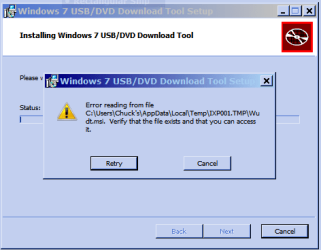
  • Win Installer.PNG
    Win Installer.PNG
    9.4 KB · Views: 6

My Computer My Computer

Computer type
PC/Desktop
Computer Manufacturer/Model Number
Custom
OS
Win 7 HP 64bit w/SP1
CPU
AMD Athlon 64 X2 5200+
Motherboard
Gigabyte Technology Co., Ltd. GA-MA770-UD3 (Socket M2)
Memory
6.0GB Dual-Channel DDR2 @ 387MHz (5-5-5-18)
Graphics Card(s)
Acer AL1906 @ 1280x1024 512MB GeForce 9500 GT (XFX Pine Grou
Sound Card
Realtek High Definition Audio
Monitor(s) Displays
Acer Generic PnP Monitor
Hard Drives
Crucial 128 gig M4 SSD
Seagate Backup 5T
Seagate GoFlex 2T
WDC WD1600JS-00NCB1 USB 1500 Gig
Seagate Backup 3T
Keyboard
Logitech HID-Compliant Keyboard
Mouse
PS/2 Compatible Mouse
Internet Speed
Cable broadband (up to 50Mbps)
Other Info
Nightly runs of Super AntiSpyware, CCleaner and Malware Anti-Malware and System Restore.
Did you do a Windows Update after the install to get the latest device drivers? That often helps.
 

My Computer My Computer

Computer type
PC/Desktop
Computer Manufacturer/Model Number
Lenovo IdeaCenter 450
OS
Windows 10 Pro X64
CPU
Intel Quad Core i7-4770 @ 3.4Ghz
Memory
16.0GB PC3-12800 DDR3 SDRAM 1600 MHz
Graphics Card(s)
Intel Integrated HD Graphics
Sound Card
Realtek HD Audio
Monitor(s) Displays
HP 22" LCD
Screen Resolution
1680 x 1050
Hard Drives
250GB Samsung EVO SATA-3 SSD
2TB Seagate ST2000DM001 SATA-2
1.5TB Seagate ST3150041AS SATA
Keyboard
Dell USB
Mouse
Lenovo USB
Internet Speed
Cable via Road Runner 3MB Upload, 30MB Download
Antivirus
Windows Defender, MBAM Pro, MBAE
Browser
Seamonkey
Other Info
UEFI/GPT
PLDS DVD-RW DH16AERSH
Thanks for your reply. Yes, I spend 2 days getting updates (well over 130), but I don't recall any drivers. Is there a way to check just for device drivers?

Thanks
 

My Computer My Computer

Computer type
PC/Desktop
Computer Manufacturer/Model Number
Custom
OS
Win 7 HP 64bit w/SP1
CPU
AMD Athlon 64 X2 5200+
Motherboard
Gigabyte Technology Co., Ltd. GA-MA770-UD3 (Socket M2)
Memory
6.0GB Dual-Channel DDR2 @ 387MHz (5-5-5-18)
Graphics Card(s)
Acer AL1906 @ 1280x1024 512MB GeForce 9500 GT (XFX Pine Grou
Sound Card
Realtek High Definition Audio
Monitor(s) Displays
Acer Generic PnP Monitor
Hard Drives
Crucial 128 gig M4 SSD
Seagate Backup 5T
Seagate GoFlex 2T
WDC WD1600JS-00NCB1 USB 1500 Gig
Seagate Backup 3T
Keyboard
Logitech HID-Compliant Keyboard
Mouse
PS/2 Compatible Mouse
Internet Speed
Cable broadband (up to 50Mbps)
Other Info
Nightly runs of Super AntiSpyware, CCleaner and Malware Anti-Malware and System Restore.
You can open Device Manager then right click on the video card under Display Adapters and select Update Driver Software. Chose "Search automatically for updated driver software".
 

My Computer My Computer

Computer type
PC/Desktop
Computer Manufacturer/Model Number
Lenovo IdeaCenter 450
OS
Windows 10 Pro X64
CPU
Intel Quad Core i7-4770 @ 3.4Ghz
Memory
16.0GB PC3-12800 DDR3 SDRAM 1600 MHz
Graphics Card(s)
Intel Integrated HD Graphics
Sound Card
Realtek HD Audio
Monitor(s) Displays
HP 22" LCD
Screen Resolution
1680 x 1050
Hard Drives
250GB Samsung EVO SATA-3 SSD
2TB Seagate ST2000DM001 SATA-2
1.5TB Seagate ST3150041AS SATA
Keyboard
Dell USB
Mouse
Lenovo USB
Internet Speed
Cable via Road Runner 3MB Upload, 30MB Download
Antivirus
Windows Defender, MBAM Pro, MBAE
Browser
Seamonkey
Other Info
UEFI/GPT
PLDS DVD-RW DH16AERSH
Ztruker - Thanks for your suggestion. I did the update for the display adapter and was "told" that I have the best driver available. Anything else I should look for?
 

My Computer My Computer

Computer type
PC/Desktop
Computer Manufacturer/Model Number
Custom
OS
Win 7 HP 64bit w/SP1
CPU
AMD Athlon 64 X2 5200+
Motherboard
Gigabyte Technology Co., Ltd. GA-MA770-UD3 (Socket M2)
Memory
6.0GB Dual-Channel DDR2 @ 387MHz (5-5-5-18)
Graphics Card(s)
Acer AL1906 @ 1280x1024 512MB GeForce 9500 GT (XFX Pine Grou
Sound Card
Realtek High Definition Audio
Monitor(s) Displays
Acer Generic PnP Monitor
Hard Drives
Crucial 128 gig M4 SSD
Seagate Backup 5T
Seagate GoFlex 2T
WDC WD1600JS-00NCB1 USB 1500 Gig
Seagate Backup 3T
Keyboard
Logitech HID-Compliant Keyboard
Mouse
PS/2 Compatible Mouse
Internet Speed
Cable broadband (up to 50Mbps)
Other Info
Nightly runs of Super AntiSpyware, CCleaner and Malware Anti-Malware and System Restore.
Thanks for your reply chrisdevic.

NVIDIA web site shows my driver as the the 64 bit version and was dated 2/19/12.

Since I just formatted and did a clean install last week I don't think I need to do it again. Will just have to "live with it" I guess.

Thanks
 

My Computer My Computer

Computer type
PC/Desktop
Computer Manufacturer/Model Number
Custom
OS
Win 7 HP 64bit w/SP1
CPU
AMD Athlon 64 X2 5200+
Motherboard
Gigabyte Technology Co., Ltd. GA-MA770-UD3 (Socket M2)
Memory
6.0GB Dual-Channel DDR2 @ 387MHz (5-5-5-18)
Graphics Card(s)
Acer AL1906 @ 1280x1024 512MB GeForce 9500 GT (XFX Pine Grou
Sound Card
Realtek High Definition Audio
Monitor(s) Displays
Acer Generic PnP Monitor
Hard Drives
Crucial 128 gig M4 SSD
Seagate Backup 5T
Seagate GoFlex 2T
WDC WD1600JS-00NCB1 USB 1500 Gig
Seagate Backup 3T
Keyboard
Logitech HID-Compliant Keyboard
Mouse
PS/2 Compatible Mouse
Internet Speed
Cable broadband (up to 50Mbps)
Other Info
Nightly runs of Super AntiSpyware, CCleaner and Malware Anti-Malware and System Restore.
What is the make and model number of your computer?
What is the model number of the nVidia video device?

Try uninstalling the video from Device Manager then reboot and let Win 7 rediscover it and reload the drive. Sometimes helps.

For the USB/DVD tool, try downloading and saving it to another location rirst, then run it from there. If that doesn't work then try installing ImgBurn to create a Win 7 X64 DVD (if it will install). Burn at the lowest speed available.
 

My Computer My Computer

Computer type
PC/Desktop
Computer Manufacturer/Model Number
Lenovo IdeaCenter 450
OS
Windows 10 Pro X64
CPU
Intel Quad Core i7-4770 @ 3.4Ghz
Memory
16.0GB PC3-12800 DDR3 SDRAM 1600 MHz
Graphics Card(s)
Intel Integrated HD Graphics
Sound Card
Realtek HD Audio
Monitor(s) Displays
HP 22" LCD
Screen Resolution
1680 x 1050
Hard Drives
250GB Samsung EVO SATA-3 SSD
2TB Seagate ST2000DM001 SATA-2
1.5TB Seagate ST3150041AS SATA
Keyboard
Dell USB
Mouse
Lenovo USB
Internet Speed
Cable via Road Runner 3MB Upload, 30MB Download
Antivirus
Windows Defender, MBAM Pro, MBAE
Browser
Seamonkey
Other Info
UEFI/GPT
PLDS DVD-RW DH16AERSH
Back
Top