
Hi,
I have a older Alienware Aurora PC which I always connected hard wired. Lately when start the PC the wireless icon comes up and says not connected and sits there for a minute or so, then the hardwired icon comes on.
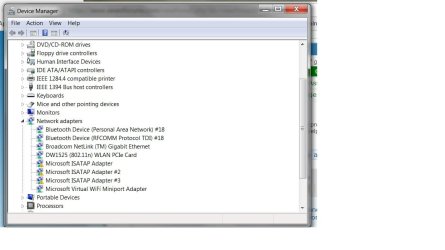
How do I turn this off? Device Manager>Network Adapters>Disable? If so which one?
I have a older Alienware Aurora PC which I always connected hard wired. Lately when start the PC the wireless icon comes up and says not connected and sits there for a minute or so, then the hardwired icon comes on.
How do I turn this off? Device Manager>Network Adapters>Disable? If so which one?
Attachments
My Computer
At a glance
Microsoft Windows 7 Professional 64-bitIntel(R) Core(TM) i7-4790 CPU @ 3.60GHz16.00 GB Hynix/Hyundai HMT451U6BFR8A-PBNVIDIA GeForce GT 720 1920 x 1080 x 32 bits (...
- Computer type
- PC/Desktop
- Computer Manufacturer/Model Number
- DELL XPS 8700 DESKTOP
- OS
- Microsoft Windows 7 Professional 64-bit
- CPU
- Intel(R) Core(TM) i7-4790 CPU @ 3.60GHz
- Motherboard
- Dell Inc.Base Board 0KWVT8
- Memory
- 16.00 GB Hynix/Hyundai HMT451U6BFR8A-PB
- Graphics Card(s)
- NVIDIA GeForce GT 720 1920 x 1080 x 32 bits (4294967296 colo
- Sound Card
- Broadcom Bluetooth Hands-free Audio
- Screen Resolution
- 1920 x 1080 x 32 bits (4294967296 colors) @ 60 Hz
- Hard Drives
- ST1000DM ST1000DM003-1ER1 SCSI Disk Device


