
Win7 64Bit Wont Boot. Restarts after balls morph into windows logo.

BloatWarez7

New member
Local time
3:56 PM
Messages
36
Hey Guys, I'm new here so apologies if i'm posting in the wrong forum ! BSOD doesn't seem appropriate for my issue. So I've got an issue booting my PC which I've been trying to resolve now for over two weeks. I believe its the Win 7 Drive Reassign Issue where your C drive becomes your E or F drive and I've been unsuccessful in resolving this issue but im not sure ! I also think it could be the GPU. I've gone through multiple different solutions I've found in online tutorials on how to resolve the issue but none have worked so far. I've used DISKPART to verify and make active the correct drive but it hasn't worked. I've also tried /bootfix etc and they haven't worked either. It doesn't seem to save the changes i make and when it restarts the c drive is no longer the boot drive so i go round in circles. I'm not 'currently' at my PC so cant be more precise but will take my laptop home to my PC in due course to problem solve this issue with you all. I hope you can help. I have Win 7 64 Bit, 4 Gb DDR2 RAM, Intel Q6600 CPU, Asus R9 270 GPU, Asus P5Q-E Motherboard which annoyingly hasn't got on-board VDA/DVI/HDMI so i cant test to see if its my GPU that's the problem !!!! I mention this as I can load into Windows repair fine ! which is low resolution but when booting into windows it resets as its about to change into the higher resolution used on the login screen ! Coincidence or not ? I don't manage to get to the login screen though. It just restarts. My GPU is 16x 2.0 PCI-E compliant and was working fine but ive no other PC to test it on nor another PCI-E GPU to test in my PC so :/ Yea its going to be an awkward one :/ Sorry. Hope you can help.
 

My Computer My Computer

At a glance

Win 7 64 BitIntel Q66004GbR9 270
Computer type
PC/Desktop
Computer Manufacturer/Model Number
Custom Build
OS
Win 7 64 Bit
CPU
Intel Q6600
Motherboard
Asus P5Q-E
Memory
4Gb
Graphics Card(s)
R9 270
Hard Drives
250 Gb Sata SSD
500Gb Sata SSD
xxx Gb HD
Hi BloatWarez7,

Welcome to SevenForums!

I believe its the Win 7 Drive Reassign Issue where your C drive becomes your E:\ or F:\ drive and I've been unsuccessful in resolving this issue but im not sure! I've used DISKPART to verify and make active the correct drive but it hasn't worked. I've also tried /bootfix etc and they haven't worked either. It doesn't seem to save the changes i make and when it restarts the C:\ drive is no longer the boot drive so i go round in circles.

When you get a chance [and if you can], please . . .

Disk Management

Post a screenshot of the Disk Management => Disk Management - Post a Screen Capture Image.
Pay special attention to Step 5.

You can also run this from an elevated cmd prompt. If you need further information on how to do this then please let us know.

I hope this helps!
 

My Computer My Computer

At a glance

Win 7 HP SP1 64-bit Vista HB SP2 32-bit Linux...Intel(R) Pentium(R) CPU P6200 @ 2.13GHz4.00 GBIntel(R) Graphics Media Accelerator HD
Computer type
Laptop
Computer Manufacturer/Model Number
Fujitsu LIFEBOOK
OS
Win 7 HP SP1 64-bit Vista HB SP2 32-bit Linux Mint 18.3
CPU
Intel(R) Pentium(R) CPU P6200 @ 2.13GHz
Motherboard
FUJITSU FJNBB06
Memory
4.00 GB
Graphics Card(s)
Intel(R) Graphics Media Accelerator HD
Sound Card
[1] Realtek High Definition Audio [2] Intel(R) Display Audio
Screen Resolution
1366 x 768 x 32 bits (4294967296 colors) @ 59 Hz
Hard Drives
TOSHIBA MK5076GSX
Antivirus
AVG FREE
Umm well i cant get into windows so unless i can launch a DOS version of DiskManagement then i'm guessing not ! What does the 'Elevated CMD Prompt' do and how do i use it ? I will take a photo of the DISKPART display if that's of help ?
 

My Computer My Computer

At a glance

Win 7 64 BitIntel Q66004GbR9 270
Computer type
PC/Desktop
Computer Manufacturer/Model Number
Custom Build
OS
Win 7 64 Bit
CPU
Intel Q6600
Motherboard
Asus P5Q-E
Memory
4Gb
Graphics Card(s)
R9 270
Hard Drives
250 Gb Sata SSD
500Gb Sata SSD
xxx Gb HD
Hi BloatWarez7,

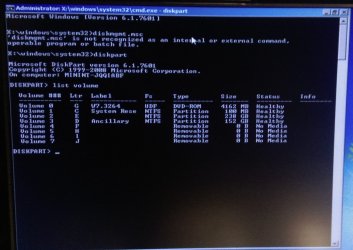
I will take a photo of the DISKPART display if that's of help?

Yes please.

Can you also do the following please . . .

[1] Restart the computer.
[2] Press F8 continuously as the computer starts to boot but before the Win 7 logo appears.
[3] Select Repair Your Computer at the Advanced Boot Options screen.
[4] Press Enter.
[5] Select Command Prompt.
[6] Type diskmgmt.msc.
[7] Press Enter.

I hope this helps!
 

My Computer My Computer

At a glance

Win 7 HP SP1 64-bit Vista HB SP2 32-bit Linux...Intel(R) Pentium(R) CPU P6200 @ 2.13GHz4.00 GBIntel(R) Graphics Media Accelerator HD
Computer type
Laptop
Computer Manufacturer/Model Number
Fujitsu LIFEBOOK
OS
Win 7 HP SP1 64-bit Vista HB SP2 32-bit Linux Mint 18.3
CPU
Intel(R) Pentium(R) CPU P6200 @ 2.13GHz
Motherboard
FUJITSU FJNBB06
Memory
4.00 GB
Graphics Card(s)
Intel(R) Graphics Media Accelerator HD
Sound Card
[1] Realtek High Definition Audio [2] Intel(R) Display Audio
Screen Resolution
1366 x 768 x 32 bits (4294967296 colors) @ 59 Hz
Hard Drives
TOSHIBA MK5076GSX
Antivirus
AVG FREE
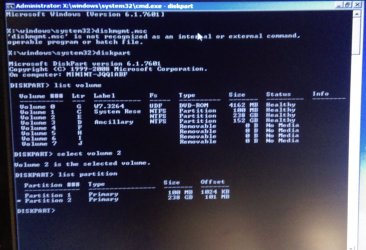
OK So this is what i get.
 

Attachments

  • IMAG0196.jpg
    IMAG0196.jpg
    397.8 KB · Views: 1
  • IMAG0197.jpg
    IMAG0197.jpg
    474.5 KB · Views: 1

My Computer My Computer

At a glance

Win 7 64 BitIntel Q66004GbR9 270
Computer type
PC/Desktop
Computer Manufacturer/Model Number
Custom Build
OS
Win 7 64 Bit
CPU
Intel Q6600
Motherboard
Asus P5Q-E
Memory
4Gb
Graphics Card(s)
R9 270
Hard Drives
250 Gb Sata SSD
500Gb Sata SSD
xxx Gb HD
Better boot media with explorer and extra tools:

17514x86.iso
17514x64v14.iso

The 64 bit version needs to be extracted to usb using rufus or similar. If it is burned to cd/dvd all the windows functions work - explorer, disk management, system recovery options, etc , - but you won't be able to use all the extra tools.
 

My Computers My Computers

  • At a glance

    7 X64i5 84002x8gb 3200mhz
    Computer type
    PC/Desktop
    OS
    7 X64
    CPU
    i5 8400
    Motherboard
    gigabyte b365m ds3h
    Memory
    2x8gb 3200mhz
    Hard Drives
    various
    PSU
    pure power 11 400w cm
    Case
    Coolermaster
    Cooling
    cryorig m9i
  • At a glance

    7x64g54008gb ddr4 2400
    Computer type
    PC/Desktop
    OS
    7x64
    CPU
    g5400
    Motherboard
    ga b365m ds3h
    Memory
    8gb ddr4 2400
    PSU
    xfx pro 450w
OK so i have downloaded Rufus, the 17514x64v14.iso and have a 8Gb USB stick. Not sure what to do now ! When i run Rufus i cant select the iso to use so im missing something. Am looking into it but pointers are appreciated rather than wade through readmes or utube tuts.
 

My Computer My Computer

At a glance

Win 7 64 BitIntel Q66004GbR9 270
Computer type
PC/Desktop
Computer Manufacturer/Model Number
Custom Build
OS
Win 7 64 Bit
CPU
Intel Q6600
Motherboard
Asus P5Q-E
Memory
4Gb
Graphics Card(s)
R9 270
Hard Drives
250 Gb Sata SSD
500Gb Sata SSD
xxx Gb HD
Hi BloatWarez7,

OK so i have downloaded Rufus, the 17514x64v14.iso and have a 8Gb USB stick. Not sure what to do now ! When i run Rufus i cant select the iso to use so im missing something. Am looking into it but pointers are appreciated rather than wade through readmes or utube tuts.

Does this help . . .

Win 7 32 bit to 64 bit install tutorial?

Or perhaps use this . . .

Usb7ice.zip

I hope this helps!
 

My Computer My Computer

At a glance

Win 7 HP SP1 64-bit Vista HB SP2 32-bit Linux...Intel(R) Pentium(R) CPU P6200 @ 2.13GHz4.00 GBIntel(R) Graphics Media Accelerator HD
Computer type
Laptop
Computer Manufacturer/Model Number
Fujitsu LIFEBOOK
OS
Win 7 HP SP1 64-bit Vista HB SP2 32-bit Linux Mint 18.3
CPU
Intel(R) Pentium(R) CPU P6200 @ 2.13GHz
Motherboard
FUJITSU FJNBB06
Memory
4.00 GB
Graphics Card(s)
Intel(R) Graphics Media Accelerator HD
Sound Card
[1] Realtek High Definition Audio [2] Intel(R) Display Audio
Screen Resolution
1366 x 768 x 32 bits (4294967296 colors) @ 59 Hz
Hard Drives
TOSHIBA MK5076GSX
Antivirus
AVG FREE
TRy usb7ice, it is simpler.
 

My Computers My Computers

  • At a glance

    7 X64i5 84002x8gb 3200mhz
    Computer type
    PC/Desktop
    OS
    7 X64
    CPU
    i5 8400
    Motherboard
    gigabyte b365m ds3h
    Memory
    2x8gb 3200mhz
    Hard Drives
    various
    PSU
    pure power 11 400w cm
    Case
    Coolermaster
    Cooling
    cryorig m9i
  • At a glance

    7x64g54008gb ddr4 2400
    Computer type
    PC/Desktop
    OS
    7x64
    CPU
    g5400
    Motherboard
    ga b365m ds3h
    Memory
    8gb ddr4 2400
    PSU
    xfx pro 450w
I don't think you have a UEFI BIOS so lets make the 17514x64 Legacy-MBR boot able.
Extract all files and folders from 17514x64v14.iso to a USB flash drive. (I suggest to use 7zip to extract all files and folders from the iso file to the USB flash disk).
Open a CMD window as administrator and type:
diskpart
list volume (take note of the volume number (n) of your USB flash disk)
select volume n (n is the volume number fond with list volume)
active
exit

Boot from the SIW2 tool.
 

My Computers My Computers

  • At a glance

    Windows 7 HP 64i5 6600K - 800MHz to 4200MHz4+4G GSkill DDR4 3000IG - Intel 530
    Computer type
    PC/Desktop
    Computer Manufacturer/Model Number
    custom build
    OS
    Windows 7 HP 64
    CPU
    i5 6600K - 800MHz to 4200MHz
    Motherboard
    GA-Z170-HD3P
    Memory
    4+4G GSkill DDR4 3000
    Graphics Card(s)
    IG - Intel 530
    Monitor(s) Displays
    Samsung 226BW
    Screen Resolution
    1680x1050
    Hard Drives
    (1) -1 SM951 – 128GB M.2 AHCI PCIe SSD drive for Windows 7 and Lubuntu
    (2) -1 WD SATA 3 - 1T for Data
    (3) -1 WD SATA 3 - 1T for backup
    PSU
    Thermaltake 450W TR2 gold
    Keyboard
    Old and good Chicony mechanical keyboard
    Mouse
    Logitech mX performance - 9 buttons (had to disable some)
    Internet Speed
    500Mb/s
    Browser
    Firefox 64
    Other Info
    TinyWall firewall
  • At a glance

    Windows 7 Proi7-4500U 800MHz to 3.0GHz(4+4)G DDR3 1600IG intel 4400 + NVIDIA GeForce GT 745M
    Computer type
    Laptop
    System Manufacturer/Model Number
    Asus Q550LF
    OS
    Windows 7 Pro
    CPU
    i7-4500U 800MHz to 3.0GHz
    Motherboard
    Asus Q550LF
    Memory
    (4+4)G DDR3 1600
    Graphics Card(s)
    IG intel 4400 + NVIDIA GeForce GT 745M
    Sound Card
    Realtek
    Monitor(s) Displays
    LG Display LP156WF4-SPH1
    Screen Resolution
    1920 x 1080
    Hard Drives
    BX500 120G SSD for Windows and programs +
    1T HDD for data
    Internet Speed
    500 Mb/s
    Browser
    Firefox
    Other Info
    TinyWall firewall

My Computer My Computer

At a glance

Windows 7 Ultimate x64Intel i5-6600K 3.50GHzCorsair DDR4 2x8GBMSI GeForce GTX1070 Gaming X
Computer type
PC/Desktop
Computer Manufacturer/Model Number
Custom build
OS
Windows 7 Ultimate x64
CPU
Intel i5-6600K 3.50GHz
Motherboard
Asus Pro Z170 Gaming
Memory
Corsair DDR4 2x8GB
Graphics Card(s)
MSI GeForce GTX1070 Gaming X
Sound Card
On board Realtek
Monitor(s) Displays
Dell SP2309W
Screen Resolution
1920x1080
Hard Drives
OS Samsung 850 EVO 500GB SATA III SSD
2x Hitachi Deskstar 1GB SATA data drives
1x Western Digital Caviar Black 1TB SATA data drive
PSU
Corsair HX650W
Case
CoolerMaster CM 690 III
Cooling
Coolermaster Hyper 212 EVO 1x200mm 1x140mm 2x120mm case fan
Keyboard
Logitech usb keyboard
Mouse
Logitech G500 $27 bargain :)
Internet Speed
ADSL2
Antivirus
Microsoft Security Essential, MalwareBytes
Browser
SRWare Iron, Internet Explorer
Other Info
Very happy with this buid.
I struggled a lot to find all compatible parts since I wanted an Intel 1151 based motherboard so to be able to install Windows 7.
I chose this case because it has amazing air flow, it's sturdy and looks good.
The case included 1x 200mm front and 1x 120mm back fans, I added 1x 200mm on the top and 1x120 bottom fans and modded the panels with black stockings for women s
I understand everything apart from boot from the swi2 tool ? How do i boot from a program ? Doesnt the computer boot from a device or drive ?
 

My Computer My Computer

At a glance

Win 7 64 BitIntel Q66004GbR9 270
Computer type
PC/Desktop
Computer Manufacturer/Model Number
Custom Build
OS
Win 7 64 Bit
CPU
Intel Q6600
Motherboard
Asus P5Q-E
Memory
4Gb
Graphics Card(s)
R9 270
Hard Drives
250 Gb Sata SSD
500Gb Sata SSD
xxx Gb HD
Need to see the screenshot, but maybe the usb stick is not good enough.

Err its Kingston or Chinese copy maybe but it seems to have plenty of space. Files are only 500 mb or thereabouts so should be plenty even if Chinese copy.
 

My Computer My Computer

At a glance

Win 7 64 BitIntel Q66004GbR9 270
Computer type
PC/Desktop
Computer Manufacturer/Model Number
Custom Build
OS
Win 7 64 Bit
CPU
Intel Q6600
Motherboard
Asus P5Q-E
Memory
4Gb
Graphics Card(s)
R9 270
Hard Drives
250 Gb Sata SSD
500Gb Sata SSD
xxx Gb HD
Hi BloatWarez7,

Better boot media with explorer and extra tools:

17514x86.iso
17514x64v14.iso

The 64 bit version needs to be extracted to usb using rufus or similar. If it is burned to cd/dvd all the windows functions work - explorer, disk management, system recovery options, etc , - but you won't be able to use all the extra tools.

You need to burn the above to the USB!

OR . . .

Or perhaps use this . . .Usb7ice.zip

I hope this helps!
 

My Computer My Computer

At a glance

Win 7 HP SP1 64-bit Vista HB SP2 32-bit Linux...Intel(R) Pentium(R) CPU P6200 @ 2.13GHz4.00 GBIntel(R) Graphics Media Accelerator HD
Computer type
Laptop
Computer Manufacturer/Model Number
Fujitsu LIFEBOOK
OS
Win 7 HP SP1 64-bit Vista HB SP2 32-bit Linux Mint 18.3
CPU
Intel(R) Pentium(R) CPU P6200 @ 2.13GHz
Motherboard
FUJITSU FJNBB06
Memory
4.00 GB
Graphics Card(s)
Intel(R) Graphics Media Accelerator HD
Sound Card
[1] Realtek High Definition Audio [2] Intel(R) Display Audio
Screen Resolution
1366 x 768 x 32 bits (4294967296 colors) @ 59 Hz
Hard Drives
TOSHIBA MK5076GSX
Antivirus
AVG FREE
I understand everything apart from boot from the swi2 tool ? How do i boot from a program ? Doesnt the computer boot from a device or drive ?
You need to plug the USB stick and start (or restart) the computer.
You also have to tell your computer to load from that USB device, some computers require you enter the BIOS while more recent ones let you choose soon after the motherboard (or computer) manufacturer logo shows up.
Usually you have to press a key from the keyboard which can be Esc or delete, Tab etc. etc. it depends on the computer.

Err its Kingston or Chinese copy maybe but it seems to have plenty of space. Files are only 500 mb or thereabouts so should be plenty even if Chinese copy.
If Rufus can't see the USB stick or it's blurred out, it means the stick is not good to be used as a "bootable "drive".
I suggest you buy a good one also now they are so cheap so you avoid any possible headache during a troubleshooting.
 

My Computer My Computer

At a glance

Windows 7 Ultimate x64Intel i5-6600K 3.50GHzCorsair DDR4 2x8GBMSI GeForce GTX1070 Gaming X
Computer type
PC/Desktop
Computer Manufacturer/Model Number
Custom build
OS
Windows 7 Ultimate x64
CPU
Intel i5-6600K 3.50GHz
Motherboard
Asus Pro Z170 Gaming
Memory
Corsair DDR4 2x8GB
Graphics Card(s)
MSI GeForce GTX1070 Gaming X
Sound Card
On board Realtek
Monitor(s) Displays
Dell SP2309W
Screen Resolution
1920x1080
Hard Drives
OS Samsung 850 EVO 500GB SATA III SSD
2x Hitachi Deskstar 1GB SATA data drives
1x Western Digital Caviar Black 1TB SATA data drive
PSU
Corsair HX650W
Case
CoolerMaster CM 690 III
Cooling
Coolermaster Hyper 212 EVO 1x200mm 1x140mm 2x120mm case fan
Keyboard
Logitech usb keyboard
Mouse
Logitech G500 $27 bargain :)
Internet Speed
ADSL2
Antivirus
Microsoft Security Essential, MalwareBytes
Browser
SRWare Iron, Internet Explorer
Other Info
Very happy with this buid.
I struggled a lot to find all compatible parts since I wanted an Intel 1151 based motherboard so to be able to install Windows 7.
I chose this case because it has amazing air flow, it's sturdy and looks good.
The case included 1x 200mm front and 1x 120mm back fans, I added 1x 200mm on the top and 1x120 bottom fans and modded the panels with black stockings for women s
Can someone tell me how to use rufus. The Kingstone usb is displayed and it seems good to go but i ghave little idea on the configuration of rufus :/
 

My Computer My Computer

At a glance

Win 7 64 BitIntel Q66004GbR9 270
Computer type
PC/Desktop
Computer Manufacturer/Model Number
Custom Build
OS
Win 7 64 Bit
CPU
Intel Q6600
Motherboard
Asus P5Q-E
Memory
4Gb
Graphics Card(s)
R9 270
Hard Drives
250 Gb Sata SSD
500Gb Sata SSD
xxx Gb HD

My Computers My Computers

  • At a glance

    7 X64i5 84002x8gb 3200mhz
    Computer type
    PC/Desktop
    OS
    7 X64
    CPU
    i5 8400
    Motherboard
    gigabyte b365m ds3h
    Memory
    2x8gb 3200mhz
    Hard Drives
    various
    PSU
    pure power 11 400w cm
    Case
    Coolermaster
    Cooling
    cryorig m9i
  • At a glance

    7x64g54008gb ddr4 2400
    Computer type
    PC/Desktop
    OS
    7x64
    CPU
    g5400
    Motherboard
    ga b365m ds3h
    Memory
    8gb ddr4 2400
    PSU
    xfx pro 450w
Can someone tell me how to use rufus. The Kingstone usb is displayed and it seems good to go but i ghave little idea on the configuration of rufus :/

Rufus
Look at their screenshot, the first option is your Kingston, then you load the image of the ISO file containing the image which is the operative system (or utilities) you want to load at Windows startup.
 

My Computer My Computer

At a glance

Windows 7 Ultimate x64Intel i5-6600K 3.50GHzCorsair DDR4 2x8GBMSI GeForce GTX1070 Gaming X
Computer type
PC/Desktop
Computer Manufacturer/Model Number
Custom build
OS
Windows 7 Ultimate x64
CPU
Intel i5-6600K 3.50GHz
Motherboard
Asus Pro Z170 Gaming
Memory
Corsair DDR4 2x8GB
Graphics Card(s)
MSI GeForce GTX1070 Gaming X
Sound Card
On board Realtek
Monitor(s) Displays
Dell SP2309W
Screen Resolution
1920x1080
Hard Drives
OS Samsung 850 EVO 500GB SATA III SSD
2x Hitachi Deskstar 1GB SATA data drives
1x Western Digital Caviar Black 1TB SATA data drive
PSU
Corsair HX650W
Case
CoolerMaster CM 690 III
Cooling
Coolermaster Hyper 212 EVO 1x200mm 1x140mm 2x120mm case fan
Keyboard
Logitech usb keyboard
Mouse
Logitech G500 $27 bargain :)
Internet Speed
ADSL2
Antivirus
Microsoft Security Essential, MalwareBytes
Browser
SRWare Iron, Internet Explorer
Other Info
Very happy with this buid.
I struggled a lot to find all compatible parts since I wanted an Intel 1151 based motherboard so to be able to install Windows 7.
I chose this case because it has amazing air flow, it's sturdy and looks good.
The case included 1x 200mm front and 1x 120mm back fans, I added 1x 200mm on the top and 1x120 bottom fans and modded the panels with black stockings for women s
OK Right guys ive managed to install the software on to the USB. It seems to work on my laptop at least and boots to a 'windows desktop' environment thats a little low res and has various 'icons' on the desktop to various applications. So Whats the first thing you would like me to do with these new applications ?

BTW Thanks for the help so far its much appreciated.

UPDATE: OK I've been back to the house and tried the USB stick in my Tower PC. It has numerous USB ports some on the front panel and some on the motherboard at the rear. I tried the ports on the front panel which i know work as i use these most often but they would not boot from the USB so i'm guessing they need firmware or drivers to work so i instead used a USB on the rear I/O panel of the motherboard and it failed also. I've gone into the BIOS and while there is no option to Boot from USB there is an option to boot from floppy which can stand in for a USB i believe. There is USB Configuration and it seems fine. It was set to auto but i also tried Enable but neither worked. :/ Sigh. I know you can boot from USB on this motherboard so why is it not working ? >:(
 
Last edited:

My Computer My Computer

At a glance

Win 7 64 BitIntel Q66004GbR9 270
Computer type
PC/Desktop
Computer Manufacturer/Model Number
Custom Build
OS
Win 7 64 Bit
CPU
Intel Q6600
Motherboard
Asus P5Q-E
Memory
4Gb
Graphics Card(s)
R9 270
Hard Drives
250 Gb Sata SSD
500Gb Sata SSD
xxx Gb HD
So Whats the first thing you would like me to do with these new applications?
I never tried that utility package so I don't know what programs are there, wait the answer from the people who suggested it.

I know you can boot from USB on this motherboard so why is it not working ? >:(
When you install Windows it installs standard USB drivers so if the motherboard USB slots work, it should work the one on the case too, keep reading.
I guess you have the paper manual and if not you can download it from here --> P5Q-E Manual | Motherboards | ASUS Global
There are 3 versions so for each there are different manuals, I checked the latest one.
In fact this motherboard sucks and generally ASUS because they always do things to confuse people like for example assigning the F8 key for the quick boot order (on some models) while this key is traditionally used for Windows to boot in SAFE mode.
I read somewhere they say this motherboard doesn't read USB devices bigger than 2GB so you might need to update the BIOS firmware.
You need to plug the USB stick then start the computer and go into the BIOS, you should be able to see the USB device there.
 

My Computer My Computer

At a glance

Windows 7 Ultimate x64Intel i5-6600K 3.50GHzCorsair DDR4 2x8GBMSI GeForce GTX1070 Gaming X
Computer type
PC/Desktop
Computer Manufacturer/Model Number
Custom build
OS
Windows 7 Ultimate x64
CPU
Intel i5-6600K 3.50GHz
Motherboard
Asus Pro Z170 Gaming
Memory
Corsair DDR4 2x8GB
Graphics Card(s)
MSI GeForce GTX1070 Gaming X
Sound Card
On board Realtek
Monitor(s) Displays
Dell SP2309W
Screen Resolution
1920x1080
Hard Drives
OS Samsung 850 EVO 500GB SATA III SSD
2x Hitachi Deskstar 1GB SATA data drives
1x Western Digital Caviar Black 1TB SATA data drive
PSU
Corsair HX650W
Case
CoolerMaster CM 690 III
Cooling
Coolermaster Hyper 212 EVO 1x200mm 1x140mm 2x120mm case fan
Keyboard
Logitech usb keyboard
Mouse
Logitech G500 $27 bargain :)
Internet Speed
ADSL2
Antivirus
Microsoft Security Essential, MalwareBytes
Browser
SRWare Iron, Internet Explorer
Other Info
Very happy with this buid.
I struggled a lot to find all compatible parts since I wanted an Intel 1151 based motherboard so to be able to install Windows 7.
I chose this case because it has amazing air flow, it's sturdy and looks good.
The case included 1x 200mm front and 1x 120mm back fans, I added 1x 200mm on the top and 1x120 bottom fans and modded the panels with black stockings for women s
Back
Top