Win7 Bluetooth Suite fails to install

DowsTheUser

New member
Local time
11:32 PM
Messages
4
Hello. New on this forums. I need some help with installing Windows 7 Bluetooth Suite. Managed to install generic bluetooth driver on my OS, yet any Bluetooth Suite driver installs fail. Whole issue is described below:

OS: Windows 7 Professional Service Pack 1 x64 with 163 official updates ever released up to 2020

Motherboard: ASUSTeK P8P67 PRO REV 3.1 (information from command prompt: wmic baseboard get product,Manufacturer)

Issue description: Any Bluetooth driver that attempts to install Bluetooth Win7 Suite (64) fails to do so. The install fails after Updating component registration followed by Copying new files, which then results in
Rolling back action:

Checked with following drivers:

Windows installer logs:

Tried:
  • Scanning with Avast Free Antivirus
  • Scanning with Malwarebytes Anti-Malware
  • Disabling Avast Free Antivirus real time protection for installation
  • Installing any pending updates in Windows Update (the updates failed too for some reason)
  • Disabling Windows Installer Rollback via Group Policy Editor
  • Installing different Bluetooth Suite (Qualcomm Atheros Bluetooth Suite)
  • Command prompt: sfc /scannow (windows resource protection did not find any integrity violations)
  • Formatting system drive, reinstalling Windows 7 Professional Service Pack 1 x64 by doing clean install. Old user files including libraries and downloads were restored to the computer (reinstalling of the system was done by local, trusted IT guy. system needed repairs anyway due to having malfunctioning drivers and something going on with drive which was now fixed)
  • Following this link: Case of the Windows Installer installation failure and AppCompat shim - Ask the Performance Team - Site Home - TechNet Blogs. The link was found on Adaware Forums. Tried since my Windows Installer log has a match for the following lines: PerformTypeLib failed with error code 11 and function code 0x8002801C.
 
Last edited:

My Computers My Computers

System One System Two

  • Computer type
    PC/Desktop
    OS
    Windows 7 Professional SP 1 x64
    Motherboard
    ASUSTeK P8P67 PRO REV 3.1
    Antivirus
    Avast Free Antivirus, Malwarebytes Anti-Malware
  • Computer type
    PC/Desktop
Hi

how odd, just been replying to another thread here about this

It will depend upon your (integrated) wifi/bluetooth adapter
W7 generically only supports BT upto V2, hence the legacy MS driver

Update your Wifi first then try the device suite

note
as your OS updates are failing we need to know why, 160+

- - - Updated - - -

humour me run this tool copy/paste the results
https://www.sevenforums.com/attachm...vation-issue-posting-instructions-mgadiag.exe
 
Last edited:

My Computer My Computer

Computer type
PC/Desktop
Computer Manufacturer/Model Number
medionl/Aspire 6930G/acer x55a
OS
W7 home premium 32bit/W7HP 64bit/w10 tp insider ring
CPU
E5300 dual core
Motherboard
medion MS7366
Memory
3gb
Graphics Card(s)
Nvidia Geforce 7100 Nforce 630i
Monitor(s) Displays
avixc
Internet Speed
n (isp resticted to 72)
Antivirus
mse/pands
Browser
palemoon
Other Info
Belkin Fd7050 n USB using Railink RT2870 drivers, more upto date
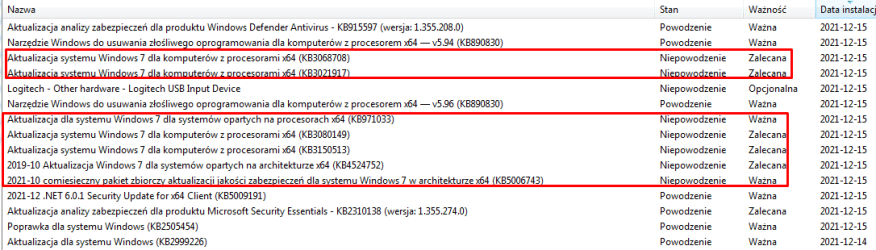
I am sure I have up-to-date Wifi. I will provide Windows Update log as soon as possible. To be honest it's only 5 important updates and 6 optional so I could as well manually check which ones are the issue. I made sure to find proper Bluetooth suite for my motherboard's integrated Bluetooth as well, following command prompt motherboard name, official ASUS support download site. not sure what else can I do other than provide logs or some kind of information. The following updates have failed installation as listed:
image.png
  • KB3068708
  • KB3021917
  • KB971033
  • KB3080149
  • KB3150513
  • KB4524752

Can you provide link to the other topic you mentioned? Maybe it could be relevant, I dunno. Either way I am bad at computer stuff like this, so not sure if I will handle doing this for myself.

- - - Updated - - -

Diagnostic Report (1.9.0027.0):-----------------------------------------Windows Validation Data-->Validation Code: 0Cached Online Validation Code: N/A, hr = 0xc004f012Windows Product Key: *****-*****-BPG2B-M8PGM-2VJT6Windows Product Key Hash: OeejY3u+10Nt+HEMwFJDj/3Lc4c=Windows Product ID: 00371-OEM-9320167-10407Windows Product ID Type: 8Windows License Type: COA SLPWindows OS version: 6.1.7601.2.00010100.1.0.048ID: {7EA76FE4-A483-4F18-A3F3-11629524D68C}(1)Is Admin: YesTestCab: 0x0LegitcheckControl ActiveX: N/A, hr = 0x80070002Signed By: N/A, hr = 0x80070002Product Name: Windows 7 ProfessionalArchitecture: 0x00000009Build lab: 7601.win7sp1_ldr_escrow.200610-1907TTS Error: Validation Diagnostic: Resolution Status: N/AVista WgaER Data-->ThreatID(s): N/A, hr = 0x80070002Version: N/A, hr = 0x80070002Windows XP Notifications Data-->Cached Result: N/A, hr = 0x80070002File Exists: NoVersion: N/A, hr = 0x80070002WgaTray.exe Signed By: N/A, hr = 0x80070002WgaLogon.dll Signed By: N/A, hr = 0x80070002OGA Notifications Data-->Cached Result: N/A, hr = 0x80070002Version: N/A, hr = 0x80070002OGAExec.exe Signed By: N/A, hr = 0x80070002OGAAddin.dll Signed By: N/A, hr = 0x80070002OGA Data-->Office Status: 109 N/AOGA Version: N/A, 0x80070002Signed By: N/A, hr = 0x80070002Office Diagnostics: 025D1FF3-364-80041010_025D1FF3-229-80041010_025D1FF3-230-1_025D1FF3-517-80040154_025D1FF3-237-80040154_025D1FF3-238-2_025D1FF3-244-80070002_025D1FF3-258-3Browser Data-->Proxy settings: N/AUser Agent: Mozilla/4.0 (compatible; MSIE 8.0; Win32)Default Browser: C:\Program Files\Google\Chrome\Application\chrome.exeDownload signed ActiveX controls: PromptDownload unsigned ActiveX controls: DisabledRun ActiveX controls and plug-ins: AllowedInitialize and script ActiveX controls not marked as safe: DisabledAllow scripting of Internet Explorer Webbrowser control: DisabledActive scripting: AllowedScript ActiveX controls marked as safe for scripting: AllowedFile Scan Data-->File Mismatch: C:\Windows\system32\wat\watadminsvc.exe[Hr = 0x80070003]File Mismatch: C:\Windows\system32\wat\npwatweb.dll[Hr = 0x80070003]File Mismatch: C:\Windows\system32\wat\watux.exe[Hr = 0x80070003]File Mismatch: C:\Windows\system32\wat\watweb.dll[Hr = 0x80070003]Other data-->Office Details: <GenuineResults><MachineData><UGUID>{7EA76FE4-A483-4F18-A3F3-11629524D68C}</UGUID><Version>1.9.0027.0</Version><OS>6.1.7601.2.00010100.1.0.048</OS><Architecture>x64</Architecture><PKey>*****-*****-*****-*****-2VJT6</PKey><PID>00371-OEM-9320167-10407</PID><PIDType>8</PIDType><SID>S-1-5-21-2958749143-2409048869-2077694250</SID><SYSTEM><Manufacturer>System manufacturer</Manufacturer><Model>System Product Name</Model></SYSTEM><BIOS><Manufacturer>American Megatrends Inc.</Manufacturer><Version>3602</Version><SMBIOSVersion major="2" minor="6"/><Date>20121101000000.000000+000</Date></BIOS><HWID>8B463407018400FE</HWID><UserLCID>0415</UserLCID><SystemLCID>0415</SystemLCID><TimeZone>Środkowoeuropejski czas stand.(GMT+01:00)</TimeZone><iJoin>0</iJoin><SBID><stat>3</stat><msppid></msppid><name></name><model></model></SBID><OEM/><GANotification/></MachineData><Software><Office><Result>109</Result><Products/><Applications/></Office></Software></GenuineResults> Spsys.log Content: 0x80070002Licensing Data-->Wersja usługi licencjonowania oprogramowania: 6.1.7601.24555Nazwa: Windows(R) 7, Professional editionOpis: Windows Operating System - Windows(R) 7, OEM_COA_SLP channelIdentyfikator aktywacji: da22eadd-46dc-4056-a287-f5041c852470Identyfikator aplikacji: 55c92734-d682-4d71-983e-d6ec3f16059fRozszerzony identyfikator PID: 00371-00186-201-610407-02-1045-7601.0000-3482021Identyfikator instalacji: 003040391931674886811635056206126336600696498885910143Adres URL certyfikatu procesora: Bing URL certyfikatu komputera: Bing URL licencji użytkowania: Bing URL certyfikatu klucza produktu: Bing klucz produktu: 2VJT6Stan licencji: licencjonowanoLicznik pozostałych operacji przywrócenia pierwotnego stanu licencjonowania systemu Windows: 3Godzina zaufana: 2021-12-15 19:28:23Windows Activation Technologies-->HrOffline: 0x00000000HrOnline: N/AHealthStatus: 0x0000000000000000Event Time Stamp: N/AActiveX: Not Registered - 0x80040154Admin Service: Not Registered - 0x80040154HealthStatus Bitmask Output:HWID Data-->HWID Hash Current: PAAAAAEABAABAAEAAQACAAAABQABAAEAHKJSm954fOl4GayLGl2ysXYwDqcIP8xFL3T8N8y9SNOAfi5zOEM Activation 1.0 Data-->N/AOEM Activation 2.0 Data-->BIOS valid for OA 2.0: yes, but no SLIC tableWindows marker version: N/AOEMID and OEMTableID Consistent: N/ABIOS Information: ACPI Table Name OEMID Value OEMTableID Value APIC ALASKA A M I FACP ALASKA A M I HPET ALASKA A M I MCFG ALASKA A M I SSDT SataRe SataTabl SSDT SataRe SataTabl SSDT SataRe SataTabl DMAR INTEL SNB BGRT ALASKA A M I

- - - Updated - - -

It wasn't me installing and activating Windows, eventually doing something with drivers but an IT guy who just said he got my PC fixed. I don't know why and if he didn't provide better detailed repair information. He just said he got an genuine Windows key and mentioned having installed most of important updates Win7 has ever received, hence the number of them.
 
Last edited:

My Computers My Computers

System One System Two

  • Computer type
    PC/Desktop
    OS
    Windows 7 Professional SP 1 x64
    Motherboard
    ASUSTeK P8P67 PRO REV 3.1
    Antivirus
    Avast Free Antivirus, Malwarebytes Anti-Malware
  • Computer type
    PC/Desktop
hi
here's the link, his is due to the fact that drivers are only for w10/11
Having issues with a Bluetooth speaker that will not show "Connect"

Please check for the latest BIOS for your motherboard, yours is dated 2012 v3602

now as for your trusted IT guy,
Do you still have your original installation media and the product code that goes with it, or an old system image

in approx 4 weeks your system will turn NON Genuine....
the mgadiag is reporting the following problems
Online Validation Code: N/A, hr = 0xc004f012
File Scan Data-->File Mismatch: C:\Windows\system32\wat\watadminsvc.exe[Hr = 0x80070003]File Mismatch: C:\Windows\system32\wat\npwatweb.dll[Hr = 0x80070003]File Mismatch: C:\Windows\system32\wat\watux.exe[Hr = 0x80070003]File Mismatch: C:\Windows\system32\wat\watweb.dll[Hr = 0x80070003]File Mismatch
URL certyfikatu procesora: Bing
URL certyfikatu komputera:Bing
URL licencji użytkowania:Bing
URL certyfikatu klucza produktu:Bing
Windows Activation Technologies-->
HrOffline: 0x00000000
HrOnline:N/A
HealthStatus: 0x0000000000000000
Event Time Stamp: N/A
ActiveX: Not Registered - 0x80040154
Admin Service: Not Registered - 0x80040154
BIOS valid for OA 2.0: yes, but no SLIC table

Its reporting the above because you have a Retail motherboard trying to use an OEM COA product key, which requires a SLIC table
Your non OEM board requires a Retail or System builder product key
Allthough the system is showing as genuine, validation is a 2 part process your first part is licenced, but its not registered

This means you will only be recieving certain updates, some of which might be required for you to install BT device drivers
 

My Computer My Computer

Computer type
PC/Desktop
Computer Manufacturer/Model Number
medionl/Aspire 6930G/acer x55a
OS
W7 home premium 32bit/W7HP 64bit/w10 tp insider ring
CPU
E5300 dual core
Motherboard
medion MS7366
Memory
3gb
Graphics Card(s)
Nvidia Geforce 7100 Nforce 630i
Monitor(s) Displays
avixc
Internet Speed
n (isp resticted to 72)
Antivirus
mse/pands
Browser
palemoon
Other Info
Belkin Fd7050 n USB using Railink RT2870 drivers, more upto date
How can I finish registration you are talking about to avoid my system going non genuine? Also is there something in MSI installer log pointing to source of issue? for my original code/installation media, no I don't have it anymore sadly, it was lost - so we can't really count on anything like that. Any help is greatly appreciated, these things barely mean anything to me as in I barely understand it for SLIC table or OEM COA key thing.

- - - Updated - - -

downloading all updates Windows Update listed for me as failed manually from catalog.update.microsoft.com. I will retry installing Bluetooth Suite after installing as many of these important updates as possible and report results here. Should I still provide Windows Update log? I am not sure anymore.

- - - Updated - - -

Installed all updates except for update that's responsible for displaying EOL notification (KB4524752), Microsoft Edge update (KB5001027). Two other updates seem to fail and cause main issue of Windows Update reversing changes:
Trying to reinstall Bluetooth Suite still fails
 
Last edited:

My Computers My Computers

System One System Two

  • Computer type
    PC/Desktop
    OS
    Windows 7 Professional SP 1 x64
    Motherboard
    ASUSTeK P8P67 PRO REV 3.1
    Antivirus
    Avast Free Antivirus, Malwarebytes Anti-Malware
  • Computer type
    PC/Desktop
Its not worth messing about simple get a new BT device cheap as chips and support BT 5 lot more speed and range BT 2 a lot of modern stuff wont connect
 

My Computer My Computer

Computer type
PC/Desktop
OS
win 8 32 bit
I would do that but it's not the point of this thread. I already have Bluetooth built-in on motherboard which I want to use. It used to work before entire system had to be reinstalled and works now with Generic Bluetooth Adapter driver from Microsoft but I just want to install proper driver.
 

My Computers My Computers

System One System Two

  • Computer type
    PC/Desktop
    OS
    Windows 7 Professional SP 1 x64
    Motherboard
    ASUSTeK P8P67 PRO REV 3.1
    Antivirus
    Avast Free Antivirus, Malwarebytes Anti-Malware
  • Computer type
    PC/Desktop
Back
Top