
win7 boot manager

umairarif

New member
Member
Local time
5:54 AM
Messages
78
hello
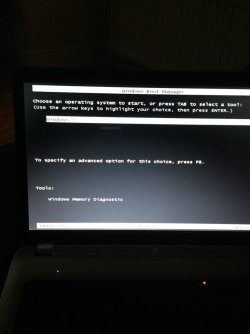
i turned of my laptop last time very fine and now its showing the win boot manager screen but key board is not working, i will post a pic of the screen and would appreciate any assistance ImageUploadedByTapatalk1414441340.361973.jpg
 

My Computer My Computer

At a glance

windows 7 home premium 64 bitintel quad core i7 2630qm 2ghz8 gb ddr3AMD Radeon HD 6490M
Computer Manufacturer/Model Number
hp dv 7t 6154ae
OS
windows 7 home premium 64 bit
CPU
intel quad core i7 2630qm 2ghz
Motherboard
hp
Memory
8 gb ddr3
Graphics Card(s)
AMD Radeon HD 6490M
Monitor(s) Displays
17'' led
Hard Drives
samsung 840 250gb ssd
toshiba 500gb 5400rpm hdd
Internet Speed
fiber optic 40mb
any ideas?
 

My Computer My Computer

At a glance

windows 7 home premium 64 bitintel quad core i7 2630qm 2ghz8 gb ddr3AMD Radeon HD 6490M
Computer Manufacturer/Model Number
hp dv 7t 6154ae
OS
windows 7 home premium 64 bit
CPU
intel quad core i7 2630qm 2ghz
Motherboard
hp
Memory
8 gb ddr3
Graphics Card(s)
AMD Radeon HD 6490M
Monitor(s) Displays
17'' led
Hard Drives
samsung 840 250gb ssd
toshiba 500gb 5400rpm hdd
Internet Speed
fiber optic 40mb
Do you actually have more than one operating system on your computer? (besides Windows?)
Does the keyboard work on the BIOS screen?
Are you using a USB keyboard or a PS/2 keyboard?
Do you have your Windows 7 installation DVD?
 

My Computer My Computer

At a glance

Windows 7 Ultimate 64 biti7 3.07 Ghz Quad core12 Gigs Triple-channel Ram, PC10666 DDR32 ATI 5870's in Crossfire mode
Computer type
PC/Desktop
Computer Manufacturer/Model Number
Custom Build
OS
Windows 7 Ultimate 64 bit
CPU
i7 3.07 Ghz Quad core
Motherboard
Asus P6T Deluxe V2
Memory
12 Gigs Triple-channel Ram, PC10666 DDR3
Graphics Card(s)
2 ATI 5870's in Crossfire mode
Hard Drives
2 Internal SATA
2 External USB
Antivirus
Spybot Search and Destroy and Microsoft Security Essentials
Browser
Firefox + NoScript + AdBlock Plus + Ghostery
i only have win7.
key board did not work on bios screen too
not using a usb or ps/2 keybord
dont have win 7 installation dvd.
i tried many time turn of and on and pressing different combinations on keyboard but nothing helped. then I turned it off. again about an hour later tried again and it booted as normal luckily. but for future, how can i disable this boot manager thing?
cheers
 

My Computer My Computer

At a glance

windows 7 home premium 64 bitintel quad core i7 2630qm 2ghz8 gb ddr3AMD Radeon HD 6490M
Computer Manufacturer/Model Number
hp dv 7t 6154ae
OS
windows 7 home premium 64 bit
CPU
intel quad core i7 2630qm 2ghz
Motherboard
hp
Memory
8 gb ddr3
Graphics Card(s)
AMD Radeon HD 6490M
Monitor(s) Displays
17'' led
Hard Drives
samsung 840 250gb ssd
toshiba 500gb 5400rpm hdd
Internet Speed
fiber optic 40mb
If you have only 1 boot entry ... The entry is select automatically and you don't see it. Unless you press F8 on boot.
 

My Computer My Computer

At a glance

Microsoft Windows 7 Home Premium 64-bits 7601...Intel(R) Core(TM) i3 CPU M 370 @ 2.40GHz4,00 GBATI Mobility Radeon HD 5400 Series
Computer type
Laptop
Computer Manufacturer/Model Number
ACER ASPIRE 5742G
OS
Microsoft Windows 7 Home Premium 64-bits 7601 Multiprocessor Free Service Pack 1
CPU
Intel(R) Core(TM) i3 CPU M 370 @ 2.40GHz
Motherboard
Acer Aspire 5742G
Memory
4,00 GB
Graphics Card(s)
ATI Mobility Radeon HD 5400 Series
Sound Card
(1) AMD High Definition Audio Device (2) Realtek High Defi
Screen Resolution
1366 x 768 x 32 bits (4294967296 colors) @ 60 Hz
Hard Drives
WDC WD5000BEVT-22ZAT0
yes i have only win 7, and this boot manager screen just came out of no where, i dint press f8 to go into setup. so is there a way to stop this happening again?
 

My Computer My Computer

At a glance

windows 7 home premium 64 bitintel quad core i7 2630qm 2ghz8 gb ddr3AMD Radeon HD 6490M
Computer Manufacturer/Model Number
hp dv 7t 6154ae
OS
windows 7 home premium 64 bit
CPU
intel quad core i7 2630qm 2ghz
Motherboard
hp
Memory
8 gb ddr3
Graphics Card(s)
AMD Radeon HD 6490M
Monitor(s) Displays
17'' led
Hard Drives
samsung 840 250gb ssd
toshiba 500gb 5400rpm hdd
Internet Speed
fiber optic 40mb
Your windows 7 DVD should have some repair tools on it. One of those tools will fix your boot sector, so you don't get the boot menu screen. This link will show you how: How to Fix Windows 7 When It Fails to Boot
 

My Computer My Computer

At a glance

Windows 7 Ultimate 64 biti7 3.07 Ghz Quad core12 Gigs Triple-channel Ram, PC10666 DDR32 ATI 5870's in Crossfire mode
Computer type
PC/Desktop
Computer Manufacturer/Model Number
Custom Build
OS
Windows 7 Ultimate 64 bit
CPU
i7 3.07 Ghz Quad core
Motherboard
Asus P6T Deluxe V2
Memory
12 Gigs Triple-channel Ram, PC10666 DDR3
Graphics Card(s)
2 ATI 5870's in Crossfire mode
Hard Drives
2 Internal SATA
2 External USB
Antivirus
Spybot Search and Destroy and Microsoft Security Essentials
Browser
Firefox + NoScript + AdBlock Plus + Ghostery
hi
as i said it booted up fine last night but now today when I turned it on nothing is coming up. now the screen is black, got power and wifi light lit up on keyboard. turned of and on few times and once the caps lock key light started blinking but black screen
 

My Computer My Computer

At a glance

windows 7 home premium 64 bitintel quad core i7 2630qm 2ghz8 gb ddr3AMD Radeon HD 6490M
Computer Manufacturer/Model Number
hp dv 7t 6154ae
OS
windows 7 home premium 64 bit
CPU
intel quad core i7 2630qm 2ghz
Motherboard
hp
Memory
8 gb ddr3
Graphics Card(s)
AMD Radeon HD 6490M
Monitor(s) Displays
17'' led
Hard Drives
samsung 840 250gb ssd
toshiba 500gb 5400rpm hdd
Internet Speed
fiber optic 40mb
well guys it's completely dead now, not even turning on, charging lead is in and charging light is lit up but laptop is not turning on at all. will take it to repair in morning
 

My Computer My Computer

At a glance

windows 7 home premium 64 bitintel quad core i7 2630qm 2ghz8 gb ddr3AMD Radeon HD 6490M
Computer Manufacturer/Model Number
hp dv 7t 6154ae
OS
windows 7 home premium 64 bit
CPU
intel quad core i7 2630qm 2ghz
Motherboard
hp
Memory
8 gb ddr3
Graphics Card(s)
AMD Radeon HD 6490M
Monitor(s) Displays
17'' led
Hard Drives
samsung 840 250gb ssd
toshiba 500gb 5400rpm hdd
Internet Speed
fiber optic 40mb
Try removing battery and power cord, holding power button to drain residual power, then plug back in cord to see if it will start. If not add the battery to try again.
 
ok this worked its turning on back now but screen is still black and i dont hear the windows booting sound so i think its stuck on booting screen may be. but of course cant see any thing. btw its hp dv7.
 

My Computer My Computer

At a glance

windows 7 home premium 64 bitintel quad core i7 2630qm 2ghz8 gb ddr3AMD Radeon HD 6490M
Computer Manufacturer/Model Number
hp dv 7t 6154ae
OS
windows 7 home premium 64 bit
CPU
intel quad core i7 2630qm 2ghz
Motherboard
hp
Memory
8 gb ddr3
Graphics Card(s)
AMD Radeon HD 6490M
Monitor(s) Displays
17'' led
Hard Drives
samsung 840 250gb ssd
toshiba 500gb 5400rpm hdd
Internet Speed
fiber optic 40mb
If you get no signal at all to the monitor but you hear the fans running then the problem can be the mobo, display adapter or monitor. Try plugging in an external monitor to see if anything shows up. If so then this points to the monitor which sometimes comes unplugged or needs to be replaced. You can disassemble it following a video available online for your model, to check the connection by monitor cable. However this involves some risk so you may want to take it to a shop.
 
yes I connected it to external monitor via hdmi and it works fine, the screen on laptop is lit up but its so light and hardly readable.
 

My Computer My Computer

At a glance

windows 7 home premium 64 bitintel quad core i7 2630qm 2ghz8 gb ddr3AMD Radeon HD 6490M
Computer Manufacturer/Model Number
hp dv 7t 6154ae
OS
windows 7 home premium 64 bit
CPU
intel quad core i7 2630qm 2ghz
Motherboard
hp
Memory
8 gb ddr3
Graphics Card(s)
AMD Radeon HD 6490M
Monitor(s) Displays
17'' led
Hard Drives
samsung 840 250gb ssd
toshiba 500gb 5400rpm hdd
Internet Speed
fiber optic 40mb
No, I did not intentionally intrude on the thread. I wanted to ask a question. I am legally disable and the computer configuration was forced on me. This is my second Asus G75VX and I purchased a Samsung Chronos i7 before that. I returned two computers back to BestBuy before I kept this one because of the same configuration. There is actually no operating system installed on the hard drive on my notebook. All the operating systems are installed on network volumes.
 

My Computer My Computer

At a glance

Windows 7 Home Premium 64biti78GB3GB Nvidia Geforce GTX 670
Computer type
Laptop
Computer Manufacturer/Model Number
Asus
OS
Windows 7 Home Premium 64bit
CPU
i7
Memory
8GB
Graphics Card(s)
3GB Nvidia Geforce GTX 670
Monitor(s) Displays
HD
Screen Resolution
1080
Hard Drives
1TB
Cooling
dual fans
Browser
Windows Explorer
Other Info
3D ready, Some of the devices are no specified. They are virtual.
you should open a new thread mate
 

My Computer My Computer

At a glance

windows 7 home premium 64 bitintel quad core i7 2630qm 2ghz8 gb ddr3AMD Radeon HD 6490M
Computer Manufacturer/Model Number
hp dv 7t 6154ae
OS
windows 7 home premium 64 bit
CPU
intel quad core i7 2630qm 2ghz
Motherboard
hp
Memory
8 gb ddr3
Graphics Card(s)
AMD Radeon HD 6490M
Monitor(s) Displays
17'' led
Hard Drives
samsung 840 250gb ssd
toshiba 500gb 5400rpm hdd
Internet Speed
fiber optic 40mb
yes I connected it to external monitor via hdmi and it works fine, the screen on laptop is lit up but its so light and hardly readable.

Can you adjust the brightness using the F (Function) key which shows an Up arrow and little Sun icon or which otherwise indicates it is to adjust brightness?

If not browse to Control Panel>Power options using monitor, adjust screen brightness under your Power plan selected, which should ideally be Balanced, with sleep also set at 30 and Hibernate ideally at 60.
 
I thought this thread was about Windows Boot Manager? My notebook uses Windows Boot Manager.
 

My Computer My Computer

At a glance

Windows 7 Home Premium 64biti78GB3GB Nvidia Geforce GTX 670
Computer type
Laptop
Computer Manufacturer/Model Number
Asus
OS
Windows 7 Home Premium 64bit
CPU
i7
Memory
8GB
Graphics Card(s)
3GB Nvidia Geforce GTX 670
Monitor(s) Displays
HD
Screen Resolution
1080
Hard Drives
1TB
Cooling
dual fans
Browser
Windows Explorer
Other Info
3D ready, Some of the devices are no specified. They are virtual.
yes I connected it to external monitor via hdmi and it works fine, the screen on laptop is lit up but its so light and hardly readable.

Can you adjust the brightness using the F (Function) key which shows an Up arrow and little Sun icon or which otherwise indicates it is to adjust brightness?

If not browse to Control Panel>Power options using monitor, adjust screen brightness under your Power plan selected, which should ideally be Balanced, with sleep also set at 30 and Hibernate ideally at 60.


yes adjusted brightness and it was already fine but still nothing in screen. took to repair shop and was told can be faulty screen or display cable. and it was too much for me to get repaired. so thought i would buy parts and do it myself. what do u guys think screen or cable? because screen is around £50 and cable us £7. but cable is tough job i know i have seen vids on YouTube and i can do it i am sure. so should i buy cable first and see if that's faulty? OR they both are fine something else might be wrong? whats you opinion?
cheers
 

My Computer My Computer

At a glance

windows 7 home premium 64 bitintel quad core i7 2630qm 2ghz8 gb ddr3AMD Radeon HD 6490M
Computer Manufacturer/Model Number
hp dv 7t 6154ae
OS
windows 7 home premium 64 bit
CPU
intel quad core i7 2630qm 2ghz
Motherboard
hp
Memory
8 gb ddr3
Graphics Card(s)
AMD Radeon HD 6490M
Monitor(s) Displays
17'' led
Hard Drives
samsung 840 250gb ssd
toshiba 500gb 5400rpm hdd
Internet Speed
fiber optic 40mb
What I've seen most often for the issue is loose cable plug needing reattaching.

I already explained this on post 12 so I guess you missed it. Good luck.
 
Back
Top