Win7 cannot recognised my FAT32 harddisk?

Monkichi912

New member
Local time
3:31 AM
Messages
3
Dear sir,

I've just got a new computer and the OS is Win7 professional 64but version.
And I got 2 old hard disk and both of them are SATA, Western Digital, 250GB harddisk.
Now, I would like to backup my data to my new computer, however, when I connect them, one of them can be recognised under Win7 and not for another one.
I wonder if it is because one of them is in NTFS format(can be recognised) and the other one is in FAT32 version ( cannot be recognised in BIOS and Window7 Niether)

Do you have any suggestion on how to get back my data for the FAT32 harddisk, this hard disk involved WinXP and some important data and the driver with letter C:\
. Any info I can provided for your convience.

Worry customer
Monkichi
 

My Computer

OS
Window 7 professional 64bit
w7 should have no problem with FAT32. But the fact that your BIOS doesn't see it suggests a connection problem or a problem with the drive itself.

You could try going back into the BIOS to make sure the port you have it connected to is actually enabled, or see what other options are available there. Or you could try powering down and swapping cables to see if it's a problem with either the data cable, power cable, or the motherboard port itself.

You mention that the drive has important data on it and has a drive letter of C:. When/if you finally do get it up and running on the w7 machine you should see it but with a newly assigned drive letter.
 

My Computer

OS
Windows 7 Ultimate x64
Thank you for your reply.

As I have 2 harddisk, the other one with NTFS format can read it in the same computer without any problem except the speed is a bit slow. Then, I use the same power cable and data cable connected in the same port on the MB, the FAT32 harddisk still cannot read. This proved that this is not the cable problem or the mainboard problem. Besides, I can heard that the motor on the FAT32 is running just cannot recognise. Would you please suggest whatever I can do now ?
 

My Computer

OS
Window 7 professional 64bit
You're welcome. And welcome to the forum! :)

That points directly to the hard drive itself then. If the BIOS cannot see it Windows likely won't be able to either (or any OS for that matter - at least on that machine).

Some BIOS's have a separate screen for doing diagnostics on hard drives. You might try checking for that.

Hearing/feeling the motor spinning is a good sign, but that alone doesn't mean it's all working right.

You can try WD's diagnosics app. Probably best is to burn a cd with this:

WD Support / Downloads / SATA & SAS / WD RE2

If you can't burn you can download the Windows version:

WD Support / Downloads / SATA & SAS / WD RE2

Don't worry that the product page doesn't match your model, they use the same app for most of their models.

Do you have another machine that you can connect it to?

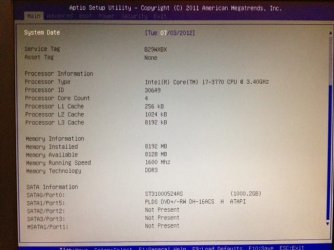
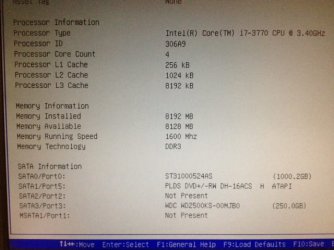
Can you take a picture of the BIOS screen where the drive should appear, and then upload that as a screenshot?

Let us know the computer model number (or motherboard).
 

My Computer

OS
Windows 7 Ultimate x64
Thank you again F5!

I've followed your instruction and tried the WD's diagnosics app Windows version. The result is the same! The software cannot detect my FAT 32 hard drive by that software.

Because I don't have another computer/machine to test my hard drive, so, I've try another method to access my hard drive which is a SATA --> USB devices with a case. The result is the FAT32 hard drive cannot be read neither, but it can read my NTFS hard disk.

And very unluckily, I cannot hear the motor spinning no matter I connected the FAT32 by SATA directly or through USB interface. Is that really mean my hard disk is no longer function and going to DEAD? :cry::cry::cry:

I've take a screen shot for BIOS including the info you want to get however, I don't have any main board information. What I can tell is my computer is a Brand new Dell computer with i7 ivy bridge CPU and 64Bit Window7 and the model number is VOSTRO 470.
 

Attachments

  • 1.jpg
    1.jpg
    36.4 KB · Views: 32
  • 2.jpg
    2.jpg
    36.5 KB · Views: 21

My Computer

OS
Window 7 professional 64bit
Windows 7 can read FAT and FAT 32 drives, I plug FAT formatted USB thumb drives in all the time. Also the drive format has no bearing on whether the BIOS can see a drive or not. A blank unformatted drive will be detected in BIOS providing it is in working order. If the BIOS cannot detect the drive it means that either the drive is defective, or the power cable or data cable is defective, or the motherboard controller is defective. In this case it sounds like the drive is defective.
 

My Computer

Computer type
PC/Desktop
Computer Manufacturer/Model Number
Home Built
OS
Windows 10 Education 64 bit
CPU
AMD Phenom II X4 980 Black Edition Deneb 3.7GHz
Motherboard
Asus M4N68T-M V2 µATX Motherboard
Memory
8GB 4GBx2 Kingston PC10600 DDR3 1333 Memory
Graphics Card(s)
Zotac NVIDIA Geforce GT640 2 Gig DDR3 PCIe
Sound Card
VIA VT1708s High Definition Audio 8-channel Onboard
Monitor(s) Displays
22" LG E2242 1080p and 2 19" I-INC AG191D
Screen Resolution
1280x1024 - 1920x1080 - 1280x1024
Hard Drives
Crucial M100 256 GB SSD and 500 GB WD Blue SATA
PSU
Thermaltake TR 620
Case
Power Up Black ATX Mid-Tower Case
Cooling
Stock heatsink and fan
Keyboard
Logitech Wireless K350 Wave
Mouse
Logitech Wireless M570 Trackman Wheel
Internet Speed
80 Mbps Down 30 Mbps Up
Antivirus
Windows Defender
Browser
Internet Explorer 11
Other Info
HP DVD1040e Lightscribe - External USB2
Doesn't look or sound good. What's under the Advanced menu item in your BIOS? Any hard disk stuff?
 

My Computer

OS
Windows 7 Ultimate x64
Back
Top