Win7 Half Blind - Can't see VM as Resource

Geekster2

New member
Local time
11:07 PM
Messages
10
Location
Southern Calif, USA
Windows 7 Ultimate is not showing VM's as a location from which to add User's to the Windows 7 Security list.
How can you grant file rights to user accounts on the XP-Mode Virtual Machine if you can't list the XP-Mode VM?

I've enabled FileSharing at the root of C: on the XP-Mode VM.
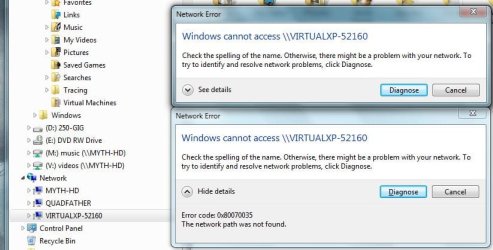
Windows 7 Obviously sees the XP-Mode VM. (See first attached.)

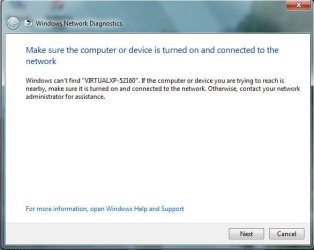
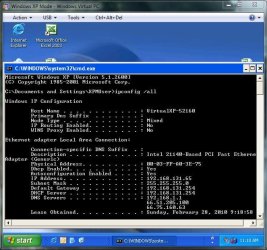
But when I try to access the VM's share, Windows 7 suddenly clams up and can't see anything on the VM!!!??? (see second and third attached).

It's Like Windows 7 is half-blind!

You can plainly see that XP-Mode is running. Why can't I connect to the VM's share?
I also can't grant rights to Windows 7 drives to any users on the XP-Mode VM... Why?
(See last attachment.) :mad:
 

Attachments

  • CantShareFilesFromXP-Mode.JPG
    CantShareFilesFromXP-Mode.JPG
    60.7 KB · Views: 15
  • Win7-HalfwayBlind01.JPG
    Win7-HalfwayBlind01.JPG
    33.6 KB · Views: 12
  • Win7-HalfwayBlind02.JPG
    Win7-HalfwayBlind02.JPG
    76.4 KB · Views: 14
  • Cant-Select-Users-On-VM-To-Grant-Rights-To.JPG
    Cant-Select-Users-On-VM-To-Grant-Rights-To.JPG
    122.6 KB · Views: 24
Last edited:

My Computer My Computer

At a glance

Windows 7 Ultimate 64 and Ubuntu 9.10Core2 Quad core4 GBGeForce 9500GT
Computer Manufacturer/Model Number
Self built
OS
Windows 7 Ultimate 64 and Ubuntu 9.10
CPU
Core2 Quad core
Motherboard
Asus P5N-EM HDMI board
Memory
4 GB
Graphics Card(s)
GeForce 9500GT
Sound Card
onboard
Monitor(s) Displays
Envision 21
Hard Drives
Western Digital 1 TB.
PSU
350 watt
Case
dont know.
Cooling
2 case fans
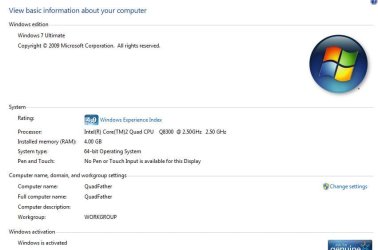
Hi there, which windows 7 version are you using? I have never heard of "Ultra" version. Did you mean Ultimate?

Or could you please type winver in run command and post a screenshot?

Like this:
winver.PNG
 

My Computer My Computer

At a glance

Windows® 8 Pro (64-bit)Intel® Core™ i5 Processor 2467M (1.60GHz, 3MB...6GB DDR3 System Memory at 1,333MHz (on BD 4GB...AMD Radeon™ HD7550M 1GB DDR3 (Ext. Graphic)
Computer Manufacturer/Model Number
Samsung NP530U4B-S02IN
OS
Windows® 8 Pro (64-bit)
CPU
Intel® Core™ i5 Processor 2467M (1.60GHz, 3MB L3 Cache)
Motherboard
Samsung Electronics
Memory
6GB DDR3 System Memory at 1,333MHz (on BD 4GB + 2GB x 1)
Graphics Card(s)
AMD Radeon™ HD7550M 1GB DDR3 (Ext. Graphic)
Sound Card
Realtek High Definition Audio
Monitor(s) Displays
35.56cm (14.0) SuperBright 300nit HD LED Display
Screen Resolution
1366x768
Hard Drives
1TB S-ATA II Hard Drive (5400RPM) with ExpressCache 16GB SSD
Internet Speed
sucks
Antivirus
Microsoft Security Essentials
Browser
Google Chrome (Sync enabled)
sorry. I meant Ultimate. I guess I was typing too fast.
:eek:

Wow, your credentials are impressive: Gold Member, Seven Guru?

Tell me, there MUST be a way to do what I'm trying to do eh?

I'm only trying to do this because Outlook loses connection to the Windows 7 Ultimate C: drive so often that it's driving me nuts! It only seems to do this with Outlook. When using Windows Explorer (I still like to call it "File Explorer") I have no issues. So I'm out to solve that issue by trying to grant rights to the XP-Mode user to the C: drive on Win7. Is it doable?
Thanks,
Vic
 

My Computer My Computer

At a glance

Windows 7 Ultimate 64 and Ubuntu 9.10Core2 Quad core4 GBGeForce 9500GT
Computer Manufacturer/Model Number
Self built
OS
Windows 7 Ultimate 64 and Ubuntu 9.10
CPU
Core2 Quad core
Motherboard
Asus P5N-EM HDMI board
Memory
4 GB
Graphics Card(s)
GeForce 9500GT
Sound Card
onboard
Monitor(s) Displays
Envision 21
Hard Drives
Western Digital 1 TB.
PSU
350 watt
Case
dont know.
Cooling
2 case fans
Please Geekster don't understand me wrong, but that's not really true. You have told about your Win7 Ultra in at least a couple of threads and several posts, and you tell in your system specs your OS is Win7 Ultra. I do not believe it is this one word, Ultimate, you misspell every time when you clearly can type English quite well, better than me.

I think I could help you, but before I'll do that I need to be sure your Windows is valid and legal. I don't want to have anything to do with issues related to illegal Windows versions, nor want I help members using illegal versions of Windows or any other OS / application. Only references I can find in Internet are pointing in the direction that Ultra is an illegal Windows 7 version, available in torrent and P2P networks.

Please provide a screenshot showing which version of Windows you are using, and that it is activated. I believe we can then help you to connect your XPM and host.

I know I'm going to get some negative feedback because of this post, I can just hope you could understand my point of view.

Kari
 

My Computer My Computer

At a glance

Windows 10 Pro x64 EN-GB1.6 GHz Intel Core i7-720QM Processor6 GBATI Mobility Radeon HD 5850 Graphics
Computer type
Laptop
Computer Manufacturer/Model Number
HP ENVY 17-1150eg
OS
Windows 10 Pro x64 EN-GB
CPU
1.6 GHz Intel Core i7-720QM Processor
Memory
6 GB
Graphics Card(s)
ATI Mobility Radeon HD 5850 Graphics
Sound Card
Beats sound system with integrated subwoofer
Monitor(s) Displays
17" laptop display, 22" LED and 32" Full HD TV through HDMI
Screen Resolution
1600*900 (1), 1920*1080 (2&3)
Hard Drives
Internal: 2 x 500 GB SATA Hard Disk Drive 7200 rpm
External: 2TB for backups, 3TB USB3 network drive for media
Cooling
As Envy runs a bit warm, I have it on a Cooler Master pad
Keyboard
Logitech diNovo Media Desktop Laser (bluetooth)
Mouse
Logitech Performance Mouse MX
Internet Speed
50/10 Mbps VDSL
Antivirus
Windows Defender 4.3.9431.0
Browser
Maxthon 3.5.2., IE11
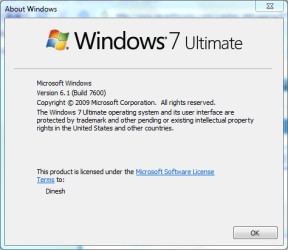
Kari: Well, you certainly won't get any negative feedback from me. I completely understand. What a coincidence I'd use a word that's associated with a pirated version. Here's my winver output. see attached.

If there is anything else you need to feel comfortable of my activated status, please advise. I hope YOU feel comfortable that I'm not publishing my product key here on the forum.
 

Attachments

  • WinVer output.JPG
    WinVer output.JPG
    47.6 KB · Views: 14
  • WindowsProofOfActivation.JPG
    WindowsProofOfActivation.JPG
    40.1 KB · Views: 20

My Computer My Computer

At a glance

Windows 7 Ultimate 64 and Ubuntu 9.10Core2 Quad core4 GBGeForce 9500GT
Computer Manufacturer/Model Number
Self built
OS
Windows 7 Ultimate 64 and Ubuntu 9.10
CPU
Core2 Quad core
Motherboard
Asus P5N-EM HDMI board
Memory
4 GB
Graphics Card(s)
GeForce 9500GT
Sound Card
onboard
Monitor(s) Displays
Envision 21
Hard Drives
Western Digital 1 TB.
PSU
350 watt
Case
dont know.
Cooling
2 case fans
Thanks, Geekster.

OK, let's look your issue. Could you confirm these two details:

1) In XP Mode settings, you have chosen your host's NIC to be used in XP Mode? In my case, my host machine has a Realtec NIC so I choose that to be used with also in XP Mode:

XPM_NIC.png

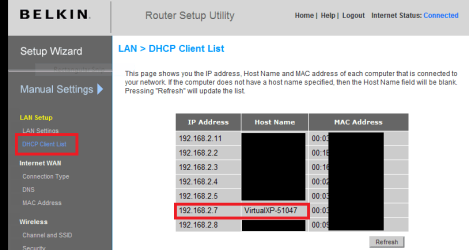
2) Your router can see the XP Mode in DHCP list. In my Belkin router it looks like this:

DHCP_list.png

Check these first, then we know what to do next.

Kari
 

My Computer My Computer

At a glance

Windows 10 Pro x64 EN-GB1.6 GHz Intel Core i7-720QM Processor6 GBATI Mobility Radeon HD 5850 Graphics
Computer type
Laptop
Computer Manufacturer/Model Number
HP ENVY 17-1150eg
OS
Windows 10 Pro x64 EN-GB
CPU
1.6 GHz Intel Core i7-720QM Processor
Memory
6 GB
Graphics Card(s)
ATI Mobility Radeon HD 5850 Graphics
Sound Card
Beats sound system with integrated subwoofer
Monitor(s) Displays
17" laptop display, 22" LED and 32" Full HD TV through HDMI
Screen Resolution
1600*900 (1), 1920*1080 (2&3)
Hard Drives
Internal: 2 x 500 GB SATA Hard Disk Drive 7200 rpm
External: 2TB for backups, 3TB USB3 network drive for media
Cooling
As Envy runs a bit warm, I have it on a Cooler Master pad
Keyboard
Logitech diNovo Media Desktop Laser (bluetooth)
Mouse
Logitech Performance Mouse MX
Internet Speed
50/10 Mbps VDSL
Antivirus
Windows Defender 4.3.9431.0
Browser
Maxthon 3.5.2., IE11
Kari: Thanks for the info. I'm at work right now. Just starting my day. I think we're just a "few" timezones apart. ;)

I left everything default when I set up the VM stuff. But I'll take a look at it when i get home (in about 9 hours from now).

One thing I can say is the NIC is functioning. I know this because in XP-Mode, the web browser works fine.

I did notice I can't ping the VM from Windows 7. Windows 7 has an ip of 192.168.1.5 while the VM assigned itself 192.168.131.65 as you can see from the IPCONFIG attachment at the top of this thread.

I'm assuming some kind of DHCP server is built into the XP-Mode vm. correct?
Do you think it would hose the VM if I manually set the IP to one on my network?

I was thinking of trying that.
 

My Computer My Computer

At a glance

Windows 7 Ultimate 64 and Ubuntu 9.10Core2 Quad core4 GBGeForce 9500GT
Computer Manufacturer/Model Number
Self built
OS
Windows 7 Ultimate 64 and Ubuntu 9.10
CPU
Core2 Quad core
Motherboard
Asus P5N-EM HDMI board
Memory
4 GB
Graphics Card(s)
GeForce 9500GT
Sound Card
onboard
Monitor(s) Displays
Envision 21
Hard Drives
Western Digital 1 TB.
PSU
350 watt
Case
dont know.
Cooling
2 case fans
I think your issue could be easily solved when you change the XP Mode NIC to that of your host. Let's see.

Kari
 

My Computer My Computer

At a glance

Windows 10 Pro x64 EN-GB1.6 GHz Intel Core i7-720QM Processor6 GBATI Mobility Radeon HD 5850 Graphics
Computer type
Laptop
Computer Manufacturer/Model Number
HP ENVY 17-1150eg
OS
Windows 10 Pro x64 EN-GB
CPU
1.6 GHz Intel Core i7-720QM Processor
Memory
6 GB
Graphics Card(s)
ATI Mobility Radeon HD 5850 Graphics
Sound Card
Beats sound system with integrated subwoofer
Monitor(s) Displays
17" laptop display, 22" LED and 32" Full HD TV through HDMI
Screen Resolution
1600*900 (1), 1920*1080 (2&3)
Hard Drives
Internal: 2 x 500 GB SATA Hard Disk Drive 7200 rpm
External: 2TB for backups, 3TB USB3 network drive for media
Cooling
As Envy runs a bit warm, I have it on a Cooler Master pad
Keyboard
Logitech diNovo Media Desktop Laser (bluetooth)
Mouse
Logitech Performance Mouse MX
Internet Speed
50/10 Mbps VDSL
Antivirus
Windows Defender 4.3.9431.0
Browser
Maxthon 3.5.2., IE11
Hi Kari. I'm home from work now, and as you suspected, the XP-Mode's VM settings weren't using the "real" NIC. It was set to "Shared Networking", which must be why the IP address was so strange. You've got to wonder why Microsoft made that setting the default.

I set it to the real NIC, which is "nVidia nForce 10/100/1000 Ethernet"

Immediately the VM picked up the ip of 192.168.1.101, which the DHCP server in my router supplied.

Ok, so now from the VM, I could ping my Windows 7 session.
Ping 192.168.1.5 got a return.

So I minimize the VM and open a cmd shell in the Windows 7 session and ping the VM at "ping 192.168.1.101" and it fails to return.

Ok, so I check for a firewall inside the VM, and turn it OFF.

Now I can ping both ways.

Sounds hopeful, right? Well I still can't access the VM's shares when I click on the VM's machine name in File Explorer's Network section, or see the machine name in Security settings "Location" button. Everything here is just like the problems described in my pictures.
:cry:
However, since we can ping both ways, I'd say Windows is only 1/4 blind now.
So there's progress at least.
.
.
.
 

My Computer My Computer

At a glance

Windows 7 Ultimate 64 and Ubuntu 9.10Core2 Quad core4 GBGeForce 9500GT
Computer Manufacturer/Model Number
Self built
OS
Windows 7 Ultimate 64 and Ubuntu 9.10
CPU
Core2 Quad core
Motherboard
Asus P5N-EM HDMI board
Memory
4 GB
Graphics Card(s)
GeForce 9500GT
Sound Card
onboard
Monitor(s) Displays
Envision 21
Hard Drives
Western Digital 1 TB.
PSU
350 watt
Case
dont know.
Cooling
2 case fans
Back
Top