Win7 Hard Freezing randomly, no BSOD

mrtbahgs

New member
Local time
5:04 PM
Messages
9
***EDIT: Jump to post 13 for an updated continuation***

I'm in a tough situation since my fathers computer which I built about 5.5 years ago is having issues but he lives 6 hours away so I cant easily troubleshoot it and he is only capable of so much. I'm ideally trying to narrow down the potential issues and help decide if I should just work on a complete rebuild (and know what can be reused) or give him additional simple things to try and fix it for now.

Going from memory, the computer consists of:
MoBo: MSI K9N2 SLI Platinum
CPU: AMD Athlon 64x2 3000+
Cooler: ASUS Silent Knight II
GPU: NVidia GTX (750 or 750 Ti?) - Put in 1 year ago
Ram: 4Gb Kingston HyperX (DRR2?) -2x2Gb
PSU: Rocketfish (700W?) - Original failed, got for free from a friend
HDD: 1TB 7200RPM (Samsung?) - Used to be the secondary drive for storage until my Velociraptor 10K
RPM died so that's when I put Win7 on the 1TB and only have that drive used.

It originally had 32bit XP, but about 4 months ago I put Win7 Pro 32Bit on since XP is no longer supported.
So it has a rather new clean install with minimal programs.

Basically all of a sudden the computer went from working fine to freezing randomly anywhere from 2 to 15 minutes after starting. Its always been a hard freeze with no BSOD or error messages, cant have the Num-Lock light change or anything. It is not limited to any certain programs running before it freezes.

-I was able to get him to run an Avast scan in safe mode and it found nothing.
-We tried the Win7 Memory Diagnostic and it sounds like it made 2 successful passes with no errors, but when it went to reboot and show the final results again, the computer froze at the windows logo (the only time i believe it has frozen without logging in) and we never tried it again to see if it matters.
-He opened one side of the case and blew out any basic dust inside and the fans, but didn't reseat any components or get a full cleaning.
-It doesn't seem to matter if in safe mode or normal, it still freezes randomly. (Nothing open, checking email, surfing the web, etc)
-All drivers should be up to date or within a few months other than the BIOS is probably near original.
-Win7 updates should have all been installed up to date.
-We were able to get a system restore to go through from about 2 weeks prior to be sure it was a time things worked fine. (It took 2-3 attempts before it sucessfully did the restore.)

I'm looking for help in narrowing down potential ways to fix it, as well as confidence that certain components wouldn't be an issue currently in case i want to reuse them.

1) Should we rerun the Win7 Memory Diagnostic until it goes perfectly and shows the final results?
2) Is there any chance components weren't able to use Win7 and failed in that short time? (I assumed if they weren't compatible it just wouldn't have worked on Win7 from day 1)
3) Should i try and run Malwarebytes (MBAM) in safe mode? (Again its a pretty fresh install and minimally used so I dont see that being a problem.)
4) Is there any chance the Hard Drive is bad or needs a disk check? (That's a component I'd like to know is safe to reuse if I do a rebuild.)
5) Is there any way to see if its a heat issue? I'm not sure if the board has any temperature sensors. Should we run things while the case open for more air flow?
6) Anything point to the GPU being an issue? (Another component I'd like to reuse if doing a fresh build)
7) Is the memory diagnostic enough to clear the RAM as being ok or could it still be an issue and needs to be tried with 1 stick at a time or different sockets etc?
8) Any drivers to force check for updates or could the BIOS and Win7 not have worked well together?
9) Could it be an inconsistent power issue or anything with the PSU? (Another component I'd reuse if its for sure safe.)
10) What else to check/try/scan/etc or what additional info do you need?

Thanks in advance.
 
Last edited:

My Computer My Computer

At a glance

Win7 Prof 32bitAMD Athlon 64x2 3000+4GB Kingston HyperX (DDR2?)Nvidia GTX (750 Ti?)
Computer type
PC/Desktop
Computer Manufacturer/Model Number
Custom
OS
Win7 Prof 32bit
CPU
AMD Athlon 64x2 3000+
Motherboard
MSI K9N2 SLI Platinum
Memory
4GB Kingston HyperX (DDR2?)
Graphics Card(s)
Nvidia GTX (750 Ti?)
Hard Drives
1TB 7200RPM (Samsung?)
Antivirus
Avast Free
Browser
Firefox
Sounds like a heat problem to me. Install Speedfan and monitor the temps, see if they got high when the freeze occurs.

Have your dad shutdown the computer and remove the power plug. Open the case and clean it out with a soft brush and a can of compressed air. Check the vents in the power supply, inside and out and all fans to make sure they turn freely and are not clogged with dirt and dust.

With the side of the case off, plug in the power cord and power up the computer and see if the fans are turning: power supply, CPU, case, video card.

If temps are high, may have to remove the CPU heatsink and clean then reapply a good thermal paste, ditto if there is a plug in video card (PCI/PCI-E/AGP).
 

My Computer My Computer

At a glance

Windows 10 Pro X64Intel Quad Core i7-4770 @ 3.4Ghz16.0GB PC3-12800 DDR3 SDRAM 1600 MHzIntel Integrated HD Graphics
Computer type
PC/Desktop
Computer Manufacturer/Model Number
Lenovo IdeaCenter 450
OS
Windows 10 Pro X64
CPU
Intel Quad Core i7-4770 @ 3.4Ghz
Memory
16.0GB PC3-12800 DDR3 SDRAM 1600 MHz
Graphics Card(s)
Intel Integrated HD Graphics
Sound Card
Realtek HD Audio
Monitor(s) Displays
HP 22" LCD
Screen Resolution
1680 x 1050
Hard Drives
250GB Samsung EVO SATA-3 SSD
2TB Seagate ST2000DM001 SATA-2
1.5TB Seagate ST3150041AS SATA
Keyboard
Dell USB
Mouse
Lenovo USB
Internet Speed
Cable via Road Runner 3MB Upload, 30MB Download
Antivirus
Windows Defender, MBAM Pro, MBAE
Browser
Seamonkey
Other Info
UEFI/GPT
PLDS DVD-RW DH16AERSH
I will have him try the temperature monitoring tonight, im pretty sure he did a thorough blow out of all fans but will revisit that as well. It sounds like he did try to run the system with the side door open to allow a little more airflow and didnt really get a different result. So in my opinion the only possible heat related issue would be like you mentioned with the heatsink. Is it common for the thermal paste to dry up or go bad over time if nothing was ever changed or the parts seperated?

Is anyone able to comment briefly on a few of my initial questions regarding if things like the HDD, GPU, etc are most likely not an issue and safe to both rule out as well as reuse if I go with a new build?

Other than heat, what are the next most likely issues? I still have a feeling its memory related and curious if the memory diagnostic would include a way to test if the socket itself went bad or could cause this? I think i recall having an issue a long time ago where i ended up putting the 2 RAM sticks in the secondary slot configuration (3&4 instead of 1&2) because it seemed to have lock ups or something and troubleshooting lead me to the ram sockets back then. Maybe the board now has 3 or all 4 sockets failing?
 

My Computer My Computer

At a glance

Win7 Prof 32bitAMD Athlon 64x2 3000+4GB Kingston HyperX (DDR2?)Nvidia GTX (750 Ti?)
Computer type
PC/Desktop
Computer Manufacturer/Model Number
Custom
OS
Win7 Prof 32bit
CPU
AMD Athlon 64x2 3000+
Motherboard
MSI K9N2 SLI Platinum
Memory
4GB Kingston HyperX (DDR2?)
Graphics Card(s)
Nvidia GTX (750 Ti?)
Hard Drives
1TB 7200RPM (Samsung?)
Antivirus
Avast Free
Browser
Firefox
You questions of what can it be. Well it can be any or some of the things you mentioned.
Windows 7 built in memory test is not very good in my opinion.
Because you have stated that you had memory problems before
I suggest using this tutorial using MemTest86+.

http://www.sevenforums.com/tutorials/105647-ram-test-memtest86.html


Normally when memory goes bad it will give a BSOD but no always.

Watching temps closely as Ztruker has posted is very important. You must be sure their is no over heating problem. Over heating will kill a computer.
Yes the compound on the cpu can break down over time. 5 years is a long time for compound. I never let mine go over a year but I'm paranoid.

A Rocketfish (700W?) power supply was questionable when it was new.

It's very difficult troubleshooting a computer problem over the internet and very difficult when their is a 3 way troubleshoot project.
We shall try.

Most of the things you are in question of when going bad will cause a BSOD in most cases except the power supply.

If you are having BSOD problems we do have some very good people that work with BSOD problems.
 

My Computer My Computer

At a glance

Windows 10 Pro. 64/ version 1709 Windows 7 Pr...Intel i7-6800K @ 4.3Corsair Platinum 16 gig @2400EVGA GTX 1070 OC
Computer type
PC/Desktop
Computer Manufacturer/Model Number
Home made Desktop
OS
Windows 10 Pro. 64/ version 1709 Windows 7 Pro/64
CPU
Intel i7-6800K @ 4.3
Motherboard
ASUS X-99 Deluxe II
Memory
Corsair Platinum 16 gig @2400
Graphics Card(s)
EVGA GTX 1070 OC
Monitor(s) Displays
Asus 27" LED LCD/VE278Q
Screen Resolution
1920-1080 or 1280-720 HDMI
Hard Drives
INTEL SSD 730-240 Gb Sata 3.0/
PSU
EVGA Platium 1200W
Case
Phanteks Luxe Tempered Glass 8 fans/ one radiator
Cooling
XSPC/ Water Cooled CPU
Keyboard
Das 4 Professional
Mouse
Logitech M705/MX Anywhere 2-S
Internet Speed
100 mbits
Antivirus
Microsoft Security Essentials/ Malwarebytes Premium 3.0/ SAS
Browser
I.E. 11 default/Firefox/ ISP Time Warner Cable/Spectrum
Other Info
LG BluRay Burner/
Sound system-KLipsch-THX/
Icy Dock ssd Hot Swap bays.
Thanks for the reply, I do know that so far there has never been a BSOD issue, not sure if that makes it easier or harder to troubleshoot, but at least its limited to one problem of a full system freeze.

If it is a heat related shut down would that be logged in the event viewer or whatever its called?
Or perhaps its worth checking regardless of the issue.

I agree on the PSU, i'd never buy one of those myself, but it was free and worked perfect from day one a few years ago so I never cared to replace it for him. If you are suggesting there is a chance it could be the PSU that is causing the issue, I will consider a replacement if I go with the rebuild option.

I will look into memtest86, i've heard of it plenty of times, but never used it myself so I will have to read up enough to be able to explain it to my father over the phone if we get to running it.

As far the original Speedfan suggestion, that will have to wait until tomorrow and I will report back on it then.

Lastly in regards to thermal paste degradation over time is that something you suggest I replace on my personal PC if I haven't changed it since built almost 2 years ago? (I7-3770k with an H100 on a Sabertooth Z77 MoBo if it matters)
 

My Computer My Computer

At a glance

Win7 Prof 32bitAMD Athlon 64x2 3000+4GB Kingston HyperX (DDR2?)Nvidia GTX (750 Ti?)
Computer type
PC/Desktop
Computer Manufacturer/Model Number
Custom
OS
Win7 Prof 32bit
CPU
AMD Athlon 64x2 3000+
Motherboard
MSI K9N2 SLI Platinum
Memory
4GB Kingston HyperX (DDR2?)
Graphics Card(s)
Nvidia GTX (750 Ti?)
Hard Drives
1TB 7200RPM (Samsung?)
Antivirus
Avast Free
Browser
Firefox
I really don't know if their is any place you can find the longevity of any thermal past.
I just change it to make sure and it's easy to do and it's cheap.

Here is a good site to take a look at.

Arctic Silver, Inc. - Intel® Application Methods
 

My Computer My Computer

At a glance

Windows 10 Pro. 64/ version 1709 Windows 7 Pr...Intel i7-6800K @ 4.3Corsair Platinum 16 gig @2400EVGA GTX 1070 OC
Computer type
PC/Desktop
Computer Manufacturer/Model Number
Home made Desktop
OS
Windows 10 Pro. 64/ version 1709 Windows 7 Pro/64
CPU
Intel i7-6800K @ 4.3
Motherboard
ASUS X-99 Deluxe II
Memory
Corsair Platinum 16 gig @2400
Graphics Card(s)
EVGA GTX 1070 OC
Monitor(s) Displays
Asus 27" LED LCD/VE278Q
Screen Resolution
1920-1080 or 1280-720 HDMI
Hard Drives
INTEL SSD 730-240 Gb Sata 3.0/
PSU
EVGA Platium 1200W
Case
Phanteks Luxe Tempered Glass 8 fans/ one radiator
Cooling
XSPC/ Water Cooled CPU
Keyboard
Das 4 Professional
Mouse
Logitech M705/MX Anywhere 2-S
Internet Speed
100 mbits
Antivirus
Microsoft Security Essentials/ Malwarebytes Premium 3.0/ SAS
Browser
I.E. 11 default/Firefox/ ISP Time Warner Cable/Spectrum
Other Info
LG BluRay Burner/
Sound system-KLipsch-THX/
Icy Dock ssd Hot Swap bays.
Haven't been able to update yet as it looks like he is having a hard time with it booting at all lately, possibly messed up the OS since I think it froze during one of those "don't turn off your PC" shutdowns while installing a few updates.

I'm going to see if he can try 1 stick of RAM at a time and possibly it on long enough to test the CPU temperature.

Or perhaps the PSU is indeed failing.

I've started to look into fresh build options and am trying to decide what I want to run. Possibly do a complete AM1 build or find a low budget i3 or similar build to keep it on an ATX size board to use in that case, but that was mostly relying on the fact I wouldn't need a PSU so it'd be good to see if its working alright.
 

My Computer My Computer

At a glance

Win7 Prof 32bitAMD Athlon 64x2 3000+4GB Kingston HyperX (DDR2?)Nvidia GTX (750 Ti?)
Computer type
PC/Desktop
Computer Manufacturer/Model Number
Custom
OS
Win7 Prof 32bit
CPU
AMD Athlon 64x2 3000+
Motherboard
MSI K9N2 SLI Platinum
Memory
4GB Kingston HyperX (DDR2?)
Graphics Card(s)
Nvidia GTX (750 Ti?)
Hard Drives
1TB 7200RPM (Samsung?)
Antivirus
Avast Free
Browser
Firefox
Let us know what you decide to do.
Because you are not at the computer it would be very difficult to explain through a 3 way how to use the Windows 7 DVD and do repairs.
Are you with the computer at this time or are you still 6 hours away?
 

My Computer My Computer

At a glance

Windows 10 Pro. 64/ version 1709 Windows 7 Pr...Intel i7-6800K @ 4.3Corsair Platinum 16 gig @2400EVGA GTX 1070 OC
Computer type
PC/Desktop
Computer Manufacturer/Model Number
Home made Desktop
OS
Windows 10 Pro. 64/ version 1709 Windows 7 Pro/64
CPU
Intel i7-6800K @ 4.3
Motherboard
ASUS X-99 Deluxe II
Memory
Corsair Platinum 16 gig @2400
Graphics Card(s)
EVGA GTX 1070 OC
Monitor(s) Displays
Asus 27" LED LCD/VE278Q
Screen Resolution
1920-1080 or 1280-720 HDMI
Hard Drives
INTEL SSD 730-240 Gb Sata 3.0/
PSU
EVGA Platium 1200W
Case
Phanteks Luxe Tempered Glass 8 fans/ one radiator
Cooling
XSPC/ Water Cooled CPU
Keyboard
Das 4 Professional
Mouse
Logitech M705/MX Anywhere 2-S
Internet Speed
100 mbits
Antivirus
Microsoft Security Essentials/ Malwarebytes Premium 3.0/ SAS
Browser
I.E. 11 default/Firefox/ ISP Time Warner Cable/Spectrum
Other Info
LG BluRay Burner/
Sound system-KLipsch-THX/
Icy Dock ssd Hot Swap bays.
Yes I am still 6 hours away, we planned to meet up in late august anyway so I'm thinking I'll just try a few more things to see if we can get that one going for short spurts every now and then to check email, but then ill have a rebuild planned for when we meet up. I've done windows repair a few times with XP just never Win7 so if a repair is needed then Im sure I can figure it out from an online guide so I can see the screen shots and explain to him. Hopefully he can get it started for a few minutes to at least know it isn't an OS issue and still somewhere in the hardware. Then ill just decide what all I want to attempt to reuse vs. just buying new to be sure. A good example would be the PSU, for $40 on sale I can probably find a good enough one that is plenty of power for a basic build.
 

My Computer My Computer

At a glance

Win7 Prof 32bitAMD Athlon 64x2 3000+4GB Kingston HyperX (DDR2?)Nvidia GTX (750 Ti?)
Computer type
PC/Desktop
Computer Manufacturer/Model Number
Custom
OS
Win7 Prof 32bit
CPU
AMD Athlon 64x2 3000+
Motherboard
MSI K9N2 SLI Platinum
Memory
4GB Kingston HyperX (DDR2?)
Graphics Card(s)
Nvidia GTX (750 Ti?)
Hard Drives
1TB 7200RPM (Samsung?)
Antivirus
Avast Free
Browser
Firefox
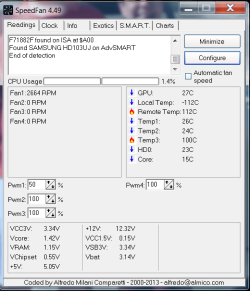
Alright it looks like he was able to get the PC to run for about 15 minutes this time which is one of the longer runs since the issue. He did take out one stick of RAM which may or may not have made a difference as he didnt try multiple setups with them.

He was also able to get speedfan installed and running and I am unsure which sensor is for what, but obviously 2 of them are pretty high, maybe one or both are general case temp? Is core the cpu, because that seems pretty low. Basically just seeing if we can rule out the CPU as overheating or not.
 

Attachments

  • speedfan.png
    speedfan.png
    19 KB · Views: 21

My Computer My Computer

At a glance

Win7 Prof 32bitAMD Athlon 64x2 3000+4GB Kingston HyperX (DDR2?)Nvidia GTX (750 Ti?)
Computer type
PC/Desktop
Computer Manufacturer/Model Number
Custom
OS
Win7 Prof 32bit
CPU
AMD Athlon 64x2 3000+
Motherboard
MSI K9N2 SLI Platinum
Memory
4GB Kingston HyperX (DDR2?)
Graphics Card(s)
Nvidia GTX (750 Ti?)
Hard Drives
1TB 7200RPM (Samsung?)
Antivirus
Avast Free
Browser
Firefox
I'm also not sure what those temps are coming from. None of them look correct.

Could he try HWMonitor or Real Temp.

With good readings we could at least know if their is a temp problem. Always a good place to start.

Looking at the forms Tutorials at the top of every page is always a good place for information.
 

My Computer My Computer

At a glance

Windows 10 Pro. 64/ version 1709 Windows 7 Pr...Intel i7-6800K @ 4.3Corsair Platinum 16 gig @2400EVGA GTX 1070 OC
Computer type
PC/Desktop
Computer Manufacturer/Model Number
Home made Desktop
OS
Windows 10 Pro. 64/ version 1709 Windows 7 Pro/64
CPU
Intel i7-6800K @ 4.3
Motherboard
ASUS X-99 Deluxe II
Memory
Corsair Platinum 16 gig @2400
Graphics Card(s)
EVGA GTX 1070 OC
Monitor(s) Displays
Asus 27" LED LCD/VE278Q
Screen Resolution
1920-1080 or 1280-720 HDMI
Hard Drives
INTEL SSD 730-240 Gb Sata 3.0/
PSU
EVGA Platium 1200W
Case
Phanteks Luxe Tempered Glass 8 fans/ one radiator
Cooling
XSPC/ Water Cooled CPU
Keyboard
Das 4 Professional
Mouse
Logitech M705/MX Anywhere 2-S
Internet Speed
100 mbits
Antivirus
Microsoft Security Essentials/ Malwarebytes Premium 3.0/ SAS
Browser
I.E. 11 default/Firefox/ ISP Time Warner Cable/Spectrum
Other Info
LG BluRay Burner/
Sound system-KLipsch-THX/
Icy Dock ssd Hot Swap bays.
Alright its probably pretty much done for, at least with long distance troubleshooting. He will try a few other minor things, but at this point i'm just going to build a system from scratch.

I was able to get him to go into the bios and read that the CPU temp was 33C and system temp was like 24C so those are basically perfect, but obviously when on minimal load, not sure if thats enough of a sign to say it wont be crazy high heat once loaded.

Then he booted into windows and installed Core Temp (real temp is Intel only i believe), but it froze right as he was about to open the program. I told him to try again later and see if it can run it, otherwise just forget it and I'll have a new PC built in a month.

Thanks for your help thus far.
 

My Computer My Computer

At a glance

Win7 Prof 32bitAMD Athlon 64x2 3000+4GB Kingston HyperX (DDR2?)Nvidia GTX (750 Ti?)
Computer type
PC/Desktop
Computer Manufacturer/Model Number
Custom
OS
Win7 Prof 32bit
CPU
AMD Athlon 64x2 3000+
Motherboard
MSI K9N2 SLI Platinum
Memory
4GB Kingston HyperX (DDR2?)
Graphics Card(s)
Nvidia GTX (750 Ti?)
Hard Drives
1TB 7200RPM (Samsung?)
Antivirus
Avast Free
Browser
Firefox
Wanted to continue with this since I now have the PC in my possession and was able to start some testing.

I removed the GPU and put it into the new computer since I was pretty confident it was fine being only a year old. Everything seemed to work just fine on the new PC with the old GPU and I went ahead with a Heaven benchmark to be sure it passed a minor stress test.

Back to the "broken" PC, all i did was remove that GPU and then went into a Memtest86 test (not 86+, just 86). I let it run for 3 full passes which all said fine and stopped it. It took over 3 hours to complete, is that normal? I mean is more memory and at faster clocks supposed to be slower to complete a pass? I ask because I once did the same test on an old 333MHz DDR laptop and it finished 3 passes in half the time. This is DDR2 and I forget the speed.

After the memtest86 passed, I booted to Windows and everything ran alright for the most part, just a bit slower most likely due to now being on old integrated graphics. I did not experience any freezing or crashing for many hours and then I shut it down on my own.

This leads me to think the PSU is what was causing the issues. Is it possible the majority of the PSU works fine, but when the GPU tried to pull more power upon load it had an odd voltage and caused the PC to always freeze up? I dont own a PSU tester or multimeter so if others agree the PSU is a likely problem, then I will try and see if a local shop will test it for free... assuming the testers can catch the majority of the problems.

Is there a chance the memory is still an issue and I should let it run for longer or more passes than I did to see if there are problems with the RAM? How long or many passes?

The only other thing I think could be bad at this point if not the RAM or PSU would be the motherboard socket being faulty and since the GPU was removed I guess it would be that socket? Or perhaps a memory socket, but it is fine for now upon reseating of the sticks?

Please advise on any additional tests I should perform since I feel like i should find some component to actually be bad and not just have it all work fine for me.
 

My Computer My Computer

At a glance

Win7 Prof 32bitAMD Athlon 64x2 3000+4GB Kingston HyperX (DDR2?)Nvidia GTX (750 Ti?)
Computer type
PC/Desktop
Computer Manufacturer/Model Number
Custom
OS
Win7 Prof 32bit
CPU
AMD Athlon 64x2 3000+
Motherboard
MSI K9N2 SLI Platinum
Memory
4GB Kingston HyperX (DDR2?)
Graphics Card(s)
Nvidia GTX (750 Ti?)
Hard Drives
1TB 7200RPM (Samsung?)
Antivirus
Avast Free
Browser
Firefox
Bump for advice
 

My Computer My Computer

At a glance

Win7 Prof 32bitAMD Athlon 64x2 3000+4GB Kingston HyperX (DDR2?)Nvidia GTX (750 Ti?)
Computer type
PC/Desktop
Computer Manufacturer/Model Number
Custom
OS
Win7 Prof 32bit
CPU
AMD Athlon 64x2 3000+
Motherboard
MSI K9N2 SLI Platinum
Memory
4GB Kingston HyperX (DDR2?)
Graphics Card(s)
Nvidia GTX (750 Ti?)
Hard Drives
1TB 7200RPM (Samsung?)
Antivirus
Avast Free
Browser
Firefox
I don't have any advice, because I am in the same boat as you. We have 2 different machines, with the exception of I also have a NVidia GTX 750 Ti. Maybe that's a clue.
 

My Computer My Computer

At a glance

Windows 7 64 bit Ultimate
Computer type
PC/Desktop
OS
Windows 7 64 bit Ultimate
Back
Top