
Solved Win7 Multi Boot Problem

Pete491

New member
Local time
1:18 PM
Messages
10
Guys,
I have a multi-boot set up (both Win7) on one of my PC's. My original OS was getting buggy from all of the install and de-installs over fours years. It was a great idea. It worked great. It's like getting a new PC. Takes half the time to boot.
After a while I was getting tired of selecting which system I wanted so I went in to msconfig, boot selection, and removed the old system thinking I could just add it back in if I wanted.
Now I need to boot in to the old OS again so I went back into msconfig and see there is no way to add it back. I went into BIOS and changed the disk priority and rebooted.
Still went to the new OS.

Any ideas as to how I could get my original system to boot?

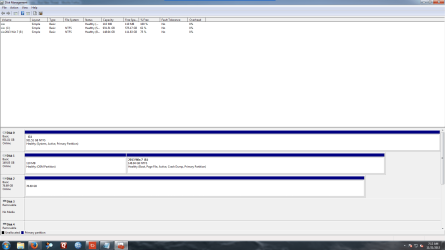
See attached image of Disk Manaager.

Thanks!!
 

Attachments
  • Disc Mgr.png
    Disc Mgr.png
    45.7 KB · Views: 16

My Computer

OS
win 7 64
Try using BCDedit or Easy BCD to add it back.
 

My Computer

Computer type
PC/Desktop
Computer Manufacturer/Model Number
Custom
OS
Dual Boot: Windows 8.1 & Server 2012r2 VMs: Kali Linux, Backbox, Matriux, Windows 8.1
CPU
A10 7700 Kavari SteamRoller
Motherboard
ASUS A88XM-PLUS (FM2+ )
Memory
8GB DDR3 SDRAM PC3-8500
Graphics Card(s)
1024MB ATI AMD Radeon R7 Graphics
Sound Card
Realtek High Definition Audio
Monitor(s) Displays
Samsung
Hard Drives
SSD Crucial 120gb
WD VelociRaptor 1tb
PSU
Rosewill Gaming 650w
Case
Rosewill Galaxy 2
Internet Speed
55/12
Antivirus
Malwarebytes, MSE, SAS
Browser
FireFox, Chrome
To add win7 from C to the bootmenu:

Code:
bcdboot  C:\windows
 
Last edited:

My Computer

Computer type
Laptop
Computer Manufacturer/Model Number
ACER ASPIRE 5742G
OS
Microsoft Windows 7 Home Premium 64-bits 7601 Multiprocessor Free Service Pack 1
CPU
Intel(R) Core(TM) i3 CPU M 370 @ 2.40GHz
Motherboard
Acer Aspire 5742G
Memory
4,00 GB
Graphics Card(s)
ATI Mobility Radeon HD 5400 Series
Sound Card
(1) AMD High Definition Audio Device (2) Realtek High Defi
Screen Resolution
1366 x 768 x 32 bits (4294967296 colors) @ 60 Hz
Hard Drives
WDC WD5000BEVT-22ZAT0
No, I don't want the boot manager and menu on E: Not sure how that happened. It was on C: before I started all this madness. Will "BCDBoot E:" put the Manager and menu back on C: and make C: bootable again?

Thanks for the help.

Pete
 

My Computer

OS
win 7 64
C and E are just driver letters. They are defined by the current running OS. You are running new win7 OS now, so that's called C now. The old win7 is called E. See your screenshot.

1-boot in the new win7 (as you do now)
2-do #3 from within elevated command prompt http://www.sevenforums.com/tutorials/783-elevated-command-prompt.html

Successfull? System has old win7 as boot entry again?
 

My Computer

Computer type
Laptop
Computer Manufacturer/Model Number
ACER ASPIRE 5742G
OS
Microsoft Windows 7 Home Premium 64-bits 7601 Multiprocessor Free Service Pack 1
CPU
Intel(R) Core(TM) i3 CPU M 370 @ 2.40GHz
Motherboard
Acer Aspire 5742G
Memory
4,00 GB
Graphics Card(s)
ATI Mobility Radeon HD 5400 Series
Sound Card
(1) AMD High Definition Audio Device (2) Realtek High Defi
Screen Resolution
1366 x 768 x 32 bits (4294967296 colors) @ 60 Hz
Hard Drives
WDC WD5000BEVT-22ZAT0
Thanks for doing the leg work Kaktussoft, I didn't have time this morning to give detailed information for the OP.
 

My Computer

Computer type
PC/Desktop
Computer Manufacturer/Model Number
Custom
OS
Dual Boot: Windows 8.1 & Server 2012r2 VMs: Kali Linux, Backbox, Matriux, Windows 8.1
CPU
A10 7700 Kavari SteamRoller
Motherboard
ASUS A88XM-PLUS (FM2+ )
Memory
8GB DDR3 SDRAM PC3-8500
Graphics Card(s)
1024MB ATI AMD Radeon R7 Graphics
Sound Card
Realtek High Definition Audio
Monitor(s) Displays
Samsung
Hard Drives
SSD Crucial 120gb
WD VelociRaptor 1tb
PSU
Rosewill Gaming 650w
Case
Rosewill Galaxy 2
Internet Speed
55/12
Antivirus
Malwarebytes, MSE, SAS
Browser
FireFox, Chrome
Before I start this I have one question.. Kaktussoft's reply " C and E are just driver letters. They are defined by the current running OS. You are running new Windows 7 OS now, so that's called C now. The old Windows 7 is called E. See your screenshot." Is wrong. The new OS is on E not C. Does this change anything?

Thanks for the help!
 

My Computer

OS
win 7 64

My Computer

Computer type
Laptop
Computer Manufacturer/Model Number
ACER ASPIRE 5742G
OS
Microsoft Windows 7 Home Premium 64-bits 7601 Multiprocessor Free Service Pack 1
CPU
Intel(R) Core(TM) i3 CPU M 370 @ 2.40GHz
Motherboard
Acer Aspire 5742G
Memory
4,00 GB
Graphics Card(s)
ATI Mobility Radeon HD 5400 Series
Sound Card
(1) AMD High Definition Audio Device (2) Realtek High Defi
Screen Resolution
1366 x 768 x 32 bits (4294967296 colors) @ 60 Hz
Hard Drives
WDC WD5000BEVT-22ZAT0
Do #3 from within elevated command prompt Elevated Command Prompt

Successfull? Reboot... do you see boot menu with the two win7 options?
To rename the description of the current booted OS. (do it in elevated command prompt):

Code:
bcdedit  /set  {current}  description  "Win7 new"
 

My Computer

Computer type
Laptop
Computer Manufacturer/Model Number
ACER ASPIRE 5742G
OS
Microsoft Windows 7 Home Premium 64-bits 7601 Multiprocessor Free Service Pack 1
CPU
Intel(R) Core(TM) i3 CPU M 370 @ 2.40GHz
Motherboard
Acer Aspire 5742G
Memory
4,00 GB
Graphics Card(s)
ATI Mobility Radeon HD 5400 Series
Sound Card
(1) AMD High Definition Audio Device (2) Realtek High Defi
Screen Resolution
1366 x 768 x 32 bits (4294967296 colors) @ 60 Hz
Hard Drives
WDC WD5000BEVT-22ZAT0
One more question. Should #3 be "bcd boot E:\windows" since the boot menu is now on E not C?
 

My Computer

OS
win 7 64
One more question. Should #3 be "bcd boot E:\windows" since the boot menu is now on E not C?
Bootmenu and bootmanager are on C. See disk management screenshot. You are currently running win7 OS from E.

You have to add win7 on C to the bootmenu. So do #3 from elevated command prompt.
 

My Computer

Computer type
Laptop
Computer Manufacturer/Model Number
ACER ASPIRE 5742G
OS
Microsoft Windows 7 Home Premium 64-bits 7601 Multiprocessor Free Service Pack 1
CPU
Intel(R) Core(TM) i3 CPU M 370 @ 2.40GHz
Motherboard
Acer Aspire 5742G
Memory
4,00 GB
Graphics Card(s)
ATI Mobility Radeon HD 5400 Series
Sound Card
(1) AMD High Definition Audio Device (2) Realtek High Defi
Screen Resolution
1366 x 768 x 32 bits (4294967296 colors) @ 60 Hz
Hard Drives
WDC WD5000BEVT-22ZAT0
Guys,

All is good.

Thanks!!!
Glad you solved it. You only did #3 ? Can you easily see which bootmenu choice is OLD and NEW?
 

My Computer

Computer type
Laptop
Computer Manufacturer/Model Number
ACER ASPIRE 5742G
OS
Microsoft Windows 7 Home Premium 64-bits 7601 Multiprocessor Free Service Pack 1
CPU
Intel(R) Core(TM) i3 CPU M 370 @ 2.40GHz
Motherboard
Acer Aspire 5742G
Memory
4,00 GB
Graphics Card(s)
ATI Mobility Radeon HD 5400 Series
Sound Card
(1) AMD High Definition Audio Device (2) Realtek High Defi
Screen Resolution
1366 x 768 x 32 bits (4294967296 colors) @ 60 Hz
Hard Drives
WDC WD5000BEVT-22ZAT0
EasyBCD

I took a look at EasyBCD at your suggestion, downloaded, installed, added the other OS, rebooted and everything is perfect.

Thanks!!!!!
 

My Computer

OS
win 7 64
I have to say that EasyBCD is a great program. I was able to solve my problem in about 2 minutes. All I need to do was add the other OS, change the name, save, reboot and that was it. I could then select the OS I wanted when booting.

VERY easy to use.
 

My Computer

OS
win 7 64
I have to say that EasyBCD is a great program. I was able to solve my problem in about 2 minutes. All I need to do was add the other OS, change the name, save, reboot and that was it. I could then select the OS I wanted when booting.

VERY easy to use.

Glad it worked out for you.

You can go ahead and mark this as solved so other people can easily find solutions to similar problems. To do that just go to the top right area in or near Thread tools (forgot exactly where since I don't make too many threads ;) ).
 

My Computer

Computer type
PC/Desktop
Computer Manufacturer/Model Number
Custom
OS
Dual Boot: Windows 8.1 & Server 2012r2 VMs: Kali Linux, Backbox, Matriux, Windows 8.1
CPU
A10 7700 Kavari SteamRoller
Motherboard
ASUS A88XM-PLUS (FM2+ )
Memory
8GB DDR3 SDRAM PC3-8500
Graphics Card(s)
1024MB ATI AMD Radeon R7 Graphics
Sound Card
Realtek High Definition Audio
Monitor(s) Displays
Samsung
Hard Drives
SSD Crucial 120gb
WD VelociRaptor 1tb
PSU
Rosewill Gaming 650w
Case
Rosewill Galaxy 2
Internet Speed
55/12
Antivirus
Malwarebytes, MSE, SAS
Browser
FireFox, Chrome
It actually does same as bcdboot command (sort of). But did you test??? Is "resume from hibernation" working? Is "repair your computer" working in advanced boot options?
 

My Computer

Computer type
Laptop
Computer Manufacturer/Model Number
ACER ASPIRE 5742G
OS
Microsoft Windows 7 Home Premium 64-bits 7601 Multiprocessor Free Service Pack 1
CPU
Intel(R) Core(TM) i3 CPU M 370 @ 2.40GHz
Motherboard
Acer Aspire 5742G
Memory
4,00 GB
Graphics Card(s)
ATI Mobility Radeon HD 5400 Series
Sound Card
(1) AMD High Definition Audio Device (2) Realtek High Defi
Screen Resolution
1366 x 768 x 32 bits (4294967296 colors) @ 60 Hz
Hard Drives
WDC WD5000BEVT-22ZAT0
Resume and repair works!

I'll mark it as solved.
 

My Computer

OS
win 7 64
Back
Top