
You are using an out of date browser. It may not display this or other websites correctly.
You should upgrade or use an alternative browser.
You should upgrade or use an alternative browser.
Win7 not in standby
- Thread starter heula
- Start date
Are you running any programs? Windows is prevented from going to sleep while certain programs are running. Some recent installed program could be running in the background, you'll need to check task manager.
My Computer
- Computer Manufacturer/Model Number
- Compaq Desktop
- OS
- Windows 7 Ultimate x64
- CPU
- AMD Sempron Dual Core
- Memory
- 3GB
- Graphics Card(s)
- NVIDIA GeForce 6150SE nForce 430
- Screen Resolution
- 1024x768
- Hard Drives
- 150GB Sata

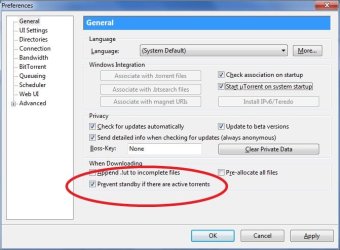
Can you manually put it in sleep mode with by assigning a hardware button in the power control panel? If it sleeps that way without error then Orbital Shark is on the money -- you've got something running likely something like uTorrent:
My Computer
- Computer type
- Laptop
- Computer Manufacturer/Model Number
- Apple
- OS
- El Capitan / Windows 10
- CPU
- i7-4980HQ
- Memory
- 16GB
- Graphics Card(s)
- Iris 5200
No one with this problem?
I have setup a second machine with RC1 build 7100 and also this machine refuses to go to sleep mode after a period of time.
This second machine has no other software installed that is not needed for Media Center.
I have setup a second machine with RC1 build 7100 and also this machine refuses to go to sleep mode after a period of time.
This second machine has no other software installed that is not needed for Media Center.
My Computer
- OS
- Windows 7 beta
Jonmor68
New member
I had the same problem with Vista, had to do it manually.
I've had mixed success with W7, sometimes yes, often no. When I put it to sleep manually, it will come back to life on it's own, sometimes almost immediatly.
Could it be Microsoft running something? I guess I can always shut it down, but if it's M$, no doubt they will start it up again.
I've had mixed success with W7, sometimes yes, often no. When I put it to sleep manually, it will come back to life on it's own, sometimes almost immediatly.
Could it be Microsoft running something? I guess I can always shut it down, but if it's M$, no doubt they will start it up again.
My Computer
- OS
- Vista Home Premium & Windows 7
I have had the same problem in Windows 7. The way to fix it is to go to your network card properties (NVidia in my case) and make sure that Wake on pattern match is disabled under advanced tab and under power management tab checked the box Only allow a magic packet to wake the computer.
Let me know if this work for you.
Let me know if this work for you.
My Computer
- OS
- Win7 RC1
This settings were already there. It's not the machine wakes up right after putting it manually in standby. It won't go to standby automaticly.I have had the same problem in Windows 7. The way to fix it is to go to your network card properties (NVidia in my case) and make sure that Wake on pattern match is disabled under advanced tab and under power management tab checked the box Only allow a magic packet to wake the computer.
Let me know if this work for you.
My Computer
- OS
- Windows 7 beta
i have the revers problem....
after win7 is idle for 30min it's shoot down monitor ....and i can't wake him up .....
i have mouse and keyboard on USB port ....
and nvidia chipset on graphic board
i must restart the system to get back control on it ..sad...
so, there is a solution for this ...or i disable sleep mode for eternity ..sad..
after win7 is idle for 30min it's shoot down monitor ....and i can't wake him up .....
i have mouse and keyboard on USB port ....
and nvidia chipset on graphic board
i must restart the system to get back control on it ..sad...
so, there is a solution for this ...or i disable sleep mode for eternity ..sad..
My Computer
- Computer Manufacturer/Model Number
- my precious
- OS
- Windows 7 Ultimate 64bit
- CPU
- Intel Core2 Duo E8400 3.00GHz Wolfdale Box
- Motherboard
- MSI P35 NEO2-FR
- Memory
- A-DATA 2 GB DDR2 800+
- Graphics Card(s)
- Gigabyte GeForce 8800GT Zalman 512MB DDR3 256-bit
- Hard Drives
- Seagate 320 GB BARRACUDA SATA-II 7200.10

- Local time
- 12:55 PM
- Messages
- 488
My little brother had the same issue and it was because he'd done and upgrade. The problem didn't exist when he did a clean install.
My friend had a similar problem as well and it was due to his keyboard and mouse, you might try a different keyboard and mouse and see if the problem disappears. If so, you will know it's your keyboard and mouse.
My friend had a similar problem as well and it was due to his keyboard and mouse, you might try a different keyboard and mouse and see if the problem disappears. If so, you will know it's your keyboard and mouse.
My Computer
- Computer Manufacturer/Model Number
- fakeasdf (c)
- OS
- Win 7 Pro x64 x 3, Win 7 Pro x86, Ubuntu 9.04
- CPU
- 2 x C2D [email protected] Ghz, C2D [email protected] ghz, P4 @ 3.0 ghz,
- Motherboard
- GIGABYTE GA-EP35-DS3P LGA 775 Intel P35 ATX Dynamic Energy S
- Memory
- 2x8 GB Corsair, 4GB Kingston, 2GB GSkill
- Graphics Card(s)
- ATI Radeon 4670 1 GB DDR3, 2600 Pro, 2400 Pro, Intel 965
- Sound Card
- I don't care... Connected using Optical on Media Center
- Monitor(s) Displays
- Panasonic Viera 50" Plasma, 2x 19"
- Screen Resolution
- 1080P, 1280x1024's
- Hard Drives
- 4 Terabytes
- Case
- Antec P182 Gun Metal Black
- Internet Speed
- 20 Mbit U/D
i just make a clean install of RC1
the keyboard it's from dell
and mouse from benq
the keyboard it's from dell
and mouse from benq
My Computer
- Computer Manufacturer/Model Number
- my precious
- OS
- Windows 7 Ultimate 64bit
- CPU
- Intel Core2 Duo E8400 3.00GHz Wolfdale Box
- Motherboard
- MSI P35 NEO2-FR
- Memory
- A-DATA 2 GB DDR2 800+
- Graphics Card(s)
- Gigabyte GeForce 8800GT Zalman 512MB DDR3 256-bit
- Hard Drives
- Seagate 320 GB BARRACUDA SATA-II 7200.10
I thought a power failure in my absence. Windows would not wake up after sleep sleep. I press the power button. Here I got the windows screen telling it is locked (what's that?).Prompt to enter password or switch user. I forgot i disabled password for kids ease of use. As I click password box to enter password. Hey Blue screen comes. Windows restarted. Here the famous windows message"Windows recovered from a serious problem". I disabled sleep mode pour de bon.
My Computer
- Computer Manufacturer/Model Number
- 1.Custom PC 2.Acer laptop
- OS
- 1.Windows7 32bit 2. Win7 64 bit
- CPU
- INTEL Core 2 Quad Q6600 2.4Ghz
- Motherboard
- GIGABYTE GA-EP45-DS3R
- Memory
- RAM=2X2GB DDR2 667MHz kingston
- Graphics Card(s)
- GIGABYTE Nvidia GEFORCE 9500GT 512MB (Twin DVI)
- Sound Card
- Realtek on Board + M-Audio delta 1010
- Monitor(s) Displays
- ViewSonic VA2226w
- Screen Resolution
- 1680x1050
- Hard Drives
- Hitachi 160 GB
Seagate 500 GB
- Keyboard
- Logitech
- Mouse
- Logitech
- Internet Speed
- 2048 MB
- Other Info
- Technisat Skystar 2 DVB PCI driver 4.5.1
in my case ...is not mouse or keyboard...because i still use sleep function for monitor....and when i hit keyboard or mouse move my monitor it's wake up ...
i think it's win7 bug with sleep function ! ...sad..
i think it's win7 bug with sleep function ! ...sad..
My Computer
- Computer Manufacturer/Model Number
- my precious
- OS
- Windows 7 Ultimate 64bit
- CPU
- Intel Core2 Duo E8400 3.00GHz Wolfdale Box
- Motherboard
- MSI P35 NEO2-FR
- Memory
- A-DATA 2 GB DDR2 800+
- Graphics Card(s)
- Gigabyte GeForce 8800GT Zalman 512MB DDR3 256-bit
- Hard Drives
- Seagate 320 GB BARRACUDA SATA-II 7200.10
They'll have time to correct it
My Computer
- Computer Manufacturer/Model Number
- 1.Custom PC 2.Acer laptop
- OS
- 1.Windows7 32bit 2. Win7 64 bit
- CPU
- INTEL Core 2 Quad Q6600 2.4Ghz
- Motherboard
- GIGABYTE GA-EP45-DS3R
- Memory
- RAM=2X2GB DDR2 667MHz kingston
- Graphics Card(s)
- GIGABYTE Nvidia GEFORCE 9500GT 512MB (Twin DVI)
- Sound Card
- Realtek on Board + M-Audio delta 1010
- Monitor(s) Displays
- ViewSonic VA2226w
- Screen Resolution
- 1680x1050
- Hard Drives
- Hitachi 160 GB
Seagate 500 GB
- Keyboard
- Logitech
- Mouse
- Logitech
- Internet Speed
- 2048 MB
- Other Info
- Technisat Skystar 2 DVB PCI driver 4.5.1
Can you manually put it in sleep mode with by assigning a hardware button in the power control panel? If it sleeps that way without error then Orbital Shark is on the money -- you've got something running likely something like uTorrent:
View attachment 8700
Man, I've been trying to figure out what has been keeping me from entering standby for hours.
This post helped me 100x. Stupid uTorrent.
Thanks a ton!!
Washy
My Computer
- OS
- Windows 7 RTM 64Bit
Similar threads

- Replies
- 3
- Views
- 3K

- Replies
- 4
- Views
- 2K