
Win7 not opening programs/Apps.

redrooster01

New member
Member
VIP
Local time
5:19 AM
Messages
129
Plus Win7 Home Premium 64bit cant find to run scanregw.exe and some other commands either? Im completly at a loss on where to go from here? I cant restore to an earlier time because its only going back a few days to when I still had the problem. I ran Gridinsoft antimalware with a registry thingo built into it and my computer got worse from then on. Id like to able to fix it rather than doing a clean install again. P.S. I can run sfc/scannow no worrys, although it hasnt found anything wrong. I ran a free trial of MalwarBytes but that didnt find anything. Can someone steer me in the right direction please.
 

My Computer

Computer type
PC/Desktop
Computer Manufacturer/Model Number
HP P6-2203a
OS
Win 7 64 bit home premium
CPU
A8550
Motherboard
Gigabyte
Memory
8GB
Graphics Card(s)
HD7450
Sound Card
intergrated and Muse USB external DAC
Monitor(s) Displays
LG 22 inch Flatron W2242P
Screen Resolution
1960 x 1020
Hard Drives
C: Drive,1TB Hitachi. Backup Drive: 1TB Western Digital.
Mouse
Targus remote.
Internet Speed
Optical fibre.12mb download and 1mb upload
Antivirus
Microsoft Essentials.
Browser
Firefox 58.0.2
Other Info
Speccy,CCcleaner,Ultra-Defragmenter,Filehippo,ThunderBird.

My Computer

Computer type
PC/Desktop
Computer Manufacturer/Model Number
Home made Desktop
OS
Windows 10 Pro. 64/ version 1709 Windows 7 Pro/64
CPU
Intel i7-6800K @ 4.3
Motherboard
ASUS X-99 Deluxe II
Memory
Corsair Platinum 16 gig @2400
Graphics Card(s)
EVGA GTX 1070 OC
Monitor(s) Displays
Asus 27" LED LCD/VE278Q
Screen Resolution
1920-1080 or 1280-720 HDMI
Hard Drives
INTEL SSD 730-240 Gb Sata 3.0/
PSU
EVGA Platium 1200W
Case
Phanteks Luxe Tempered Glass 8 fans/ one radiator
Cooling
XSPC/ Water Cooled CPU
Keyboard
Das 4 Professional
Mouse
Logitech M705/MX Anywhere 2-S
Internet Speed
100 mbits
Antivirus
Microsoft Security Essentials/ Malwarebytes Premium 3.0/ SAS
Browser
I.E. 11 default/Firefox/ ISP Time Warner Cable/Spectrum
Other Info
LG BluRay Burner/
Sound system-KLipsch-THX/
Icy Dock ssd Hot Swap bays.
Thats strange because I read on a microsoft article that scanregw.exe is comparitive to scanreg/fix command? Im glad I dont have that on my system but Im still hoplessly confused on what to do to fix this. Thanks for pointing that out for me.
 

My Computer

Computer type
PC/Desktop
Computer Manufacturer/Model Number
HP P6-2203a
OS
Win 7 64 bit home premium
CPU
A8550
Motherboard
Gigabyte
Memory
8GB
Graphics Card(s)
HD7450
Sound Card
intergrated and Muse USB external DAC
Monitor(s) Displays
LG 22 inch Flatron W2242P
Screen Resolution
1960 x 1020
Hard Drives
C: Drive,1TB Hitachi. Backup Drive: 1TB Western Digital.
Mouse
Targus remote.
Internet Speed
Optical fibre.12mb download and 1mb upload
Antivirus
Microsoft Essentials.
Browser
Firefox 58.0.2
Other Info
Speccy,CCcleaner,Ultra-Defragmenter,Filehippo,ThunderBird.

My Computer

Computer type
Laptop
Computer Manufacturer/Model Number
ASUS
OS
Microsoft Windows 7 Home Premium 64-bit 7601 Multiprocessor Free Service Pack 1
CPU
AMD C-60 APU with Radeon(tm) HD Graphics
Motherboard
ASUSTeK COMPUTER INC. X501U
Memory
4.00 GB
Graphics Card(s)
AMD Radeon HD 6290 Graphics
Sound Card
(1) AMD High Definition Audio Device (2) Realtek High Defi
Screen Resolution
1366 x 768 x 32 bits (4294967296 colors) @ 60 Hz
Hard Drives
Hitachi HTS545050A7E380 SATA Disk Device
Antivirus
Comodo CIS & FW, SecureAplus App Whitelisting, Threatfire
Browser
Cyberfox 64bit, Opera 64bit, Airfox
Other Info
Spy-The-Spy, HitmanPro.Alert, Norton Connect Safe, MJRegWatcher, BitDefender TrafficLight, Voodoo Shield, Zemana AntiMalware
scanreg - was used on older versions of windows but not windows 7.

Try .exe file association fix here:
I tried restoring/merging the file types tiff, jpeg, jpg then restarted the computer but it only worked once on the odd picture then stopped working again? I clicked on some jpeg photos for example and only 1 out of 4 photos would open, then it stopped working completly.
 

My Computer

Computer type
PC/Desktop
Computer Manufacturer/Model Number
HP P6-2203a
OS
Win 7 64 bit home premium
CPU
A8550
Motherboard
Gigabyte
Memory
8GB
Graphics Card(s)
HD7450
Sound Card
intergrated and Muse USB external DAC
Monitor(s) Displays
LG 22 inch Flatron W2242P
Screen Resolution
1960 x 1020
Hard Drives
C: Drive,1TB Hitachi. Backup Drive: 1TB Western Digital.
Mouse
Targus remote.
Internet Speed
Optical fibre.12mb download and 1mb upload
Antivirus
Microsoft Essentials.
Browser
Firefox 58.0.2
Other Info
Speccy,CCcleaner,Ultra-Defragmenter,Filehippo,ThunderBird.
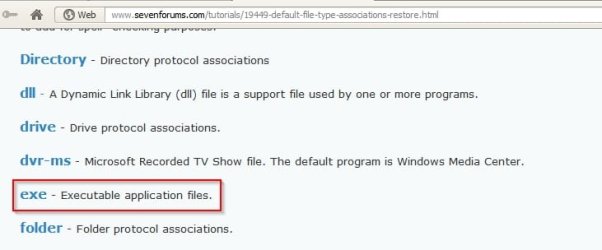
I tried restoring/merging the file types tiff, jpeg, jpg then restarted the computer but it only worked once on the odd picture then stopped working again? I clicked on some jpeg photos for example and only 1 out of 4 photos would open, then it stopped working completly.


Default File Type Associations - Restore.jpg

Why are you messing about with fixes for file associations other file types?

What is your default photo viewer? (The name of the program you use to view images)
 

My Computer

Computer type
Laptop
Computer Manufacturer/Model Number
ASUS
OS
Microsoft Windows 7 Home Premium 64-bit 7601 Multiprocessor Free Service Pack 1
CPU
AMD C-60 APU with Radeon(tm) HD Graphics
Motherboard
ASUSTeK COMPUTER INC. X501U
Memory
4.00 GB
Graphics Card(s)
AMD Radeon HD 6290 Graphics
Sound Card
(1) AMD High Definition Audio Device (2) Realtek High Defi
Screen Resolution
1366 x 768 x 32 bits (4294967296 colors) @ 60 Hz
Hard Drives
Hitachi HTS545050A7E380 SATA Disk Device
Antivirus
Comodo CIS & FW, SecureAplus App Whitelisting, Threatfire
Browser
Cyberfox 64bit, Opera 64bit, Airfox
Other Info
Spy-The-Spy, HitmanPro.Alert, Norton Connect Safe, MJRegWatcher, BitDefender TrafficLight, Voodoo Shield, Zemana AntiMalware
My default photo veiwer is windows photo veiwer. I was following the instructions in the Tutorial to merge the files that were not working. I merged the exe file but that didnt fix it either? I tried to run Google earth but it closed down with a little box saying windows is looking for a solution. I was finding it hard to open Firefox browser yesterday but its OK today so far.
 

My Computer

Computer type
PC/Desktop
Computer Manufacturer/Model Number
HP P6-2203a
OS
Win 7 64 bit home premium
CPU
A8550
Motherboard
Gigabyte
Memory
8GB
Graphics Card(s)
HD7450
Sound Card
intergrated and Muse USB external DAC
Monitor(s) Displays
LG 22 inch Flatron W2242P
Screen Resolution
1960 x 1020
Hard Drives
C: Drive,1TB Hitachi. Backup Drive: 1TB Western Digital.
Mouse
Targus remote.
Internet Speed
Optical fibre.12mb download and 1mb upload
Antivirus
Microsoft Essentials.
Browser
Firefox 58.0.2
Other Info
Speccy,CCcleaner,Ultra-Defragmenter,Filehippo,ThunderBird.
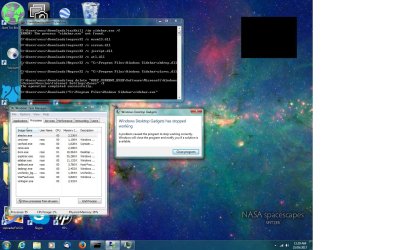
My default photo veiwer is windows photo veiwer. I was following the instructions in the Tutorial to merge the files that were not working. I merged the exe file but that didnt fix it either? I tried to run Google earth but it closed down with a little box saying windows is looking for a solution. I was finding it hard to open Firefox browser yesterday but its OK today so far.

Title of this thread: Win7 not opening programs/Apps.

What problems are you having with image files exactly? You click on an image file and what happens then? Any error message? Do you see dllhost.exe running in task manager when you try to open an image?

RE: Firefox. What do you mean by "finding it hard to open" ?

Next time check task manager to see if it is running even if there is no visible firefox window.

When did this start happening and did you install or update any software just before the problem startedor the day before the problem started?
 

My Computer

Computer type
Laptop
Computer Manufacturer/Model Number
ASUS
OS
Microsoft Windows 7 Home Premium 64-bit 7601 Multiprocessor Free Service Pack 1
CPU
AMD C-60 APU with Radeon(tm) HD Graphics
Motherboard
ASUSTeK COMPUTER INC. X501U
Memory
4.00 GB
Graphics Card(s)
AMD Radeon HD 6290 Graphics
Sound Card
(1) AMD High Definition Audio Device (2) Realtek High Defi
Screen Resolution
1366 x 768 x 32 bits (4294967296 colors) @ 60 Hz
Hard Drives
Hitachi HTS545050A7E380 SATA Disk Device
Antivirus
Comodo CIS & FW, SecureAplus App Whitelisting, Threatfire
Browser
Cyberfox 64bit, Opera 64bit, Airfox
Other Info
Spy-The-Spy, HitmanPro.Alert, Norton Connect Safe, MJRegWatcher, BitDefender TrafficLight, Voodoo Shield, Zemana AntiMalware
I tried to run Google Earth. An error message comes up in a little square box saying a problem has caused the program to stop working correctly, Windows will close the program and notify you if a solution is available. I checked Task Manager and Google Earth is running but another entry on Task Manager says Initializing not responding.I kept trying to start Google Earth and now it works, well it started two times in a row? Hmmm I had just downloaded and installed the Windows Malicious malware remover? So I tried G-Force standalone, its a visual program that creates patterns to music. It resulted in the little square error box appearing and the Task Manager saying its not responding! Ah Ha! I just got a runtime error pop up that says 216 at 00405C72.
 
Last edited:

My Computer

Computer type
PC/Desktop
Computer Manufacturer/Model Number
HP P6-2203a
OS
Win 7 64 bit home premium
CPU
A8550
Motherboard
Gigabyte
Memory
8GB
Graphics Card(s)
HD7450
Sound Card
intergrated and Muse USB external DAC
Monitor(s) Displays
LG 22 inch Flatron W2242P
Screen Resolution
1960 x 1020
Hard Drives
C: Drive,1TB Hitachi. Backup Drive: 1TB Western Digital.
Mouse
Targus remote.
Internet Speed
Optical fibre.12mb download and 1mb upload
Antivirus
Microsoft Essentials.
Browser
Firefox 58.0.2
Other Info
Speccy,CCcleaner,Ultra-Defragmenter,Filehippo,ThunderBird.
Just guessing here: Try running a full disk check later once you have finished using your machine. It will take some time. Command is chkdsk /r /f including spaces.

Uninstall any software that you don't actually use. Check for updates for everything else.

If problems persist try a clean boot:


How to Troubleshoot a Problem by Performing a Clean Startup in Windows 7


It's a bit long winded though.
 
Last edited:

My Computer

Computer type
Laptop
Computer Manufacturer/Model Number
ASUS
OS
Microsoft Windows 7 Home Premium 64-bit 7601 Multiprocessor Free Service Pack 1
CPU
AMD C-60 APU with Radeon(tm) HD Graphics
Motherboard
ASUSTeK COMPUTER INC. X501U
Memory
4.00 GB
Graphics Card(s)
AMD Radeon HD 6290 Graphics
Sound Card
(1) AMD High Definition Audio Device (2) Realtek High Defi
Screen Resolution
1366 x 768 x 32 bits (4294967296 colors) @ 60 Hz
Hard Drives
Hitachi HTS545050A7E380 SATA Disk Device
Antivirus
Comodo CIS & FW, SecureAplus App Whitelisting, Threatfire
Browser
Cyberfox 64bit, Opera 64bit, Airfox
Other Info
Spy-The-Spy, HitmanPro.Alert, Norton Connect Safe, MJRegWatcher, BitDefender TrafficLight, Voodoo Shield, Zemana AntiMalware
I did the clean boot but the problem was still there after disabling all the non microsoft services. I did the check disk too but after waiting for ages for it to finish I walked away for a minute and when I came back it had finished and I cant find a log for it anywhere? Although it hadnt found anything right up to near the end. I should mention that Ive un-installed the AMD Catalyst drivers just in case that was causing the problem, I dont use my computer for games so I thought it would be OK to get rid of it?
 

My Computer

Computer type
PC/Desktop
Computer Manufacturer/Model Number
HP P6-2203a
OS
Win 7 64 bit home premium
CPU
A8550
Motherboard
Gigabyte
Memory
8GB
Graphics Card(s)
HD7450
Sound Card
intergrated and Muse USB external DAC
Monitor(s) Displays
LG 22 inch Flatron W2242P
Screen Resolution
1960 x 1020
Hard Drives
C: Drive,1TB Hitachi. Backup Drive: 1TB Western Digital.
Mouse
Targus remote.
Internet Speed
Optical fibre.12mb download and 1mb upload
Antivirus
Microsoft Essentials.
Browser
Firefox 58.0.2
Other Info
Speccy,CCcleaner,Ultra-Defragmenter,Filehippo,ThunderBird.

My Computer

Computer type
Laptop
Computer Manufacturer/Model Number
ASUS
OS
Microsoft Windows 7 Home Premium 64-bit 7601 Multiprocessor Free Service Pack 1
CPU
AMD C-60 APU with Radeon(tm) HD Graphics
Motherboard
ASUSTeK COMPUTER INC. X501U
Memory
4.00 GB
Graphics Card(s)
AMD Radeon HD 6290 Graphics
Sound Card
(1) AMD High Definition Audio Device (2) Realtek High Defi
Screen Resolution
1366 x 768 x 32 bits (4294967296 colors) @ 60 Hz
Hard Drives
Hitachi HTS545050A7E380 SATA Disk Device
Antivirus
Comodo CIS & FW, SecureAplus App Whitelisting, Threatfire
Browser
Cyberfox 64bit, Opera 64bit, Airfox
Other Info
Spy-The-Spy, HitmanPro.Alert, Norton Connect Safe, MJRegWatcher, BitDefender TrafficLight, Voodoo Shield, Zemana AntiMalware
Disk check logs don't tend to show anything useful but if you want to look:

How to Read the Event Viewer Log for Check Disk (chkdsk) in Vista, Windows 7, and Windows 8

When the problem happens try taking screenshots of memory usage and CPU usage by processes in Task Manager sorted by highest usage at top in both cases and post the results.
The G-Force Standalone visual program has started working now, except it wont open to the maximum size because the maximizer in the top right corner of the page between save to taskbar or exit is greyed out? I took a screenshot of the task manager processes after resetting windows gadget. Windows gadget was running in taskmanagers applications but it doesnt look like its running in processes?
 

Attachments

  • Win7 Troubleshooting.jpg
    Win7 Troubleshooting.jpg
    216.9 KB · Views: 7

My Computer

Computer type
PC/Desktop
Computer Manufacturer/Model Number
HP P6-2203a
OS
Win 7 64 bit home premium
CPU
A8550
Motherboard
Gigabyte
Memory
8GB
Graphics Card(s)
HD7450
Sound Card
intergrated and Muse USB external DAC
Monitor(s) Displays
LG 22 inch Flatron W2242P
Screen Resolution
1960 x 1020
Hard Drives
C: Drive,1TB Hitachi. Backup Drive: 1TB Western Digital.
Mouse
Targus remote.
Internet Speed
Optical fibre.12mb download and 1mb upload
Antivirus
Microsoft Essentials.
Browser
Firefox 58.0.2
Other Info
Speccy,CCcleaner,Ultra-Defragmenter,Filehippo,ThunderBird.
Well everything is working for the time being except for my desktop gadget, I have to go to control and click the desktop gadget Icon to get it working each time I log on. My pictures wont open in Windows photo viewer so I changed it to Windows live photo viewer, it works OK there but there is still something wrong in the system to be acting strange like this? Any ideas or suggestions I could try fix this once and for all? Im starting to think it might be a virus, Ive run MalwareBytes though, could it have missed something?
 

My Computer

Computer type
PC/Desktop
Computer Manufacturer/Model Number
HP P6-2203a
OS
Win 7 64 bit home premium
CPU
A8550
Motherboard
Gigabyte
Memory
8GB
Graphics Card(s)
HD7450
Sound Card
intergrated and Muse USB external DAC
Monitor(s) Displays
LG 22 inch Flatron W2242P
Screen Resolution
1960 x 1020
Hard Drives
C: Drive,1TB Hitachi. Backup Drive: 1TB Western Digital.
Mouse
Targus remote.
Internet Speed
Optical fibre.12mb download and 1mb upload
Antivirus
Microsoft Essentials.
Browser
Firefox 58.0.2
Other Info
Speccy,CCcleaner,Ultra-Defragmenter,Filehippo,ThunderBird.
You need someone who knows about gadgets to help. I keep windows gadgets disabled.
 

My Computer

Computer type
Laptop
Computer Manufacturer/Model Number
ASUS
OS
Microsoft Windows 7 Home Premium 64-bit 7601 Multiprocessor Free Service Pack 1
CPU
AMD C-60 APU with Radeon(tm) HD Graphics
Motherboard
ASUSTeK COMPUTER INC. X501U
Memory
4.00 GB
Graphics Card(s)
AMD Radeon HD 6290 Graphics
Sound Card
(1) AMD High Definition Audio Device (2) Realtek High Defi
Screen Resolution
1366 x 768 x 32 bits (4294967296 colors) @ 60 Hz
Hard Drives
Hitachi HTS545050A7E380 SATA Disk Device
Antivirus
Comodo CIS & FW, SecureAplus App Whitelisting, Threatfire
Browser
Cyberfox 64bit, Opera 64bit, Airfox
Other Info
Spy-The-Spy, HitmanPro.Alert, Norton Connect Safe, MJRegWatcher, BitDefender TrafficLight, Voodoo Shield, Zemana AntiMalware

My Computer

Computer type
PC/Desktop
Computer Manufacturer/Model Number
Home made Desktop
OS
Windows 10 Pro. 64/ version 1709 Windows 7 Pro/64
CPU
Intel i7-6800K @ 4.3
Motherboard
ASUS X-99 Deluxe II
Memory
Corsair Platinum 16 gig @2400
Graphics Card(s)
EVGA GTX 1070 OC
Monitor(s) Displays
Asus 27" LED LCD/VE278Q
Screen Resolution
1920-1080 or 1280-720 HDMI
Hard Drives
INTEL SSD 730-240 Gb Sata 3.0/
PSU
EVGA Platium 1200W
Case
Phanteks Luxe Tempered Glass 8 fans/ one radiator
Cooling
XSPC/ Water Cooled CPU
Keyboard
Das 4 Professional
Mouse
Logitech M705/MX Anywhere 2-S
Internet Speed
100 mbits
Antivirus
Microsoft Security Essentials/ Malwarebytes Premium 3.0/ SAS
Browser
I.E. 11 default/Firefox/ ISP Time Warner Cable/Spectrum
Other Info
LG BluRay Burner/
Sound system-KLipsch-THX/
Icy Dock ssd Hot Swap bays.
Back
Top