
Win7 Open Save Dialogs open to currently activated folder

win123

New member
Local time
10:09 PM
Messages
20
Hi

Win7 Ultimate

I hope I can explain this clearly.

When I go to an Open or Save dialog box in any application and I click on any folder any where in Windows outside of the application, the Save as... or Open dialog for that application switches to that folder, which is great feature because it quickly enables me to change the location in those dialogs. It's not currently working.

My question is, where is the setting the enables or disables that functionality.

Thank you for any help
 

My Computer My Computer

Computer Manufacturer/Model Number
Reyniers Audio
OS
Windows 7 Ultimate x64
CPU
2x Intel Xeon E5450 (8 x 3.0GHz Cores)
Motherboard
Tyan S5396
Memory
16 GB
Graphics Card(s)
XFX GeForce 7200GS
Sound Card
Fireface 800
Monitor(s) Displays
Samsung 22"
Hard Drives
System 250GB
Drive 2 (2 TB)
Drive 3 )2 Tb)
Hi

Win7 Ultimate

I hope I can explain this clearly.

When I go to an Open or Save dialog box in any application and I click on any folder any where in Windows outside of the application, the Save as... or Open dialog for that application switches to that folder, which is great feature because it quickly enables me to change the location in those dialogs. It's not currently working.

My question is, where is the setting the enables or disables that functionality.

Thank you for any help

What do you mean it is not Working. Do you mean when you right click on a file or folder, you are not seeing the Open or Save As option?
 

My Computer My Computer

Computer type
PC/Desktop
Computer Manufacturer/Model Number
Custom Build
OS
Windows 7 Home Premium 32-Bit - Build 7600 SP1
CPU
Intel Core i3-2120 3.30Ghz
Motherboard
Asus P8Z68-V LX Intel Z68 Socket H2 ATX
Memory
Kingston 4 GB DDR3 1333 mhz
Graphics Card(s)
AMD Radeon HD6670
Sound Card
Sound Blaster Audigy SE 24-Bit
Monitor(s) Displays
Asus VE228
Screen Resolution
1440 X 900
Hard Drives
OCZ Vertex 3 120 GB Sata 3 SSD ==
Kingston SH103/S3 120 G Hyper X 120 GB SSD ==
Western Digital 500 GB Caviar Green 7200 RPM ==
PSU
Corsair CX600M == 600 Watt
Case
NZXT Apollo - Silver with Clear Side Panel
Cooling
Three 120 mm Fans
Keyboard
Microsoft Natural 4000
Mouse
Microsoft Custom Optical 3000
Internet Speed
AT&T Fiber Optic Wireless Network
Antivirus
Microsoft Security Essentials
Browser
Chrome
Other Info
120 mm Blue LED Fan -- Three Blue LED Lazer Light Sticks
As an example, if I want to save a document in MS Word, I go to File > Save As. The save as dialog displays the desktop. but I want to save the Word Doc to a folder in an external drive. I noticed that if I move my mouse out of the save as dialog box double click a shortcut to a folder on the external drive where I want to save the file, (and the shortcut is located on a toolbar on the taskbar), the Save as location will change to that folder. I noticed this functionality a short time after using Window 7. I never noticed this functionality in Win XP.

I used this functionality to be able to quickly change the save as location so I can save to any folder in any external drive. I made a lot of shortcuts to various folder on various drives and I always clicked the shortcut to the folder I want to save to whenever I save a file.

Now this functionality is not working. When I click on the folder shortcut, the Save as location does not change. I am trying to find thje setting that enables this functionality because I like it.

Thank you for your response.
 

My Computer My Computer

Computer Manufacturer/Model Number
Reyniers Audio
OS
Windows 7 Ultimate x64
CPU
2x Intel Xeon E5450 (8 x 3.0GHz Cores)
Motherboard
Tyan S5396
Memory
16 GB
Graphics Card(s)
XFX GeForce 7200GS
Sound Card
Fireface 800
Monitor(s) Displays
Samsung 22"
Hard Drives
System 250GB
Drive 2 (2 TB)
Drive 3 )2 Tb)
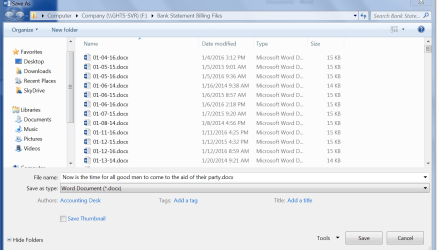
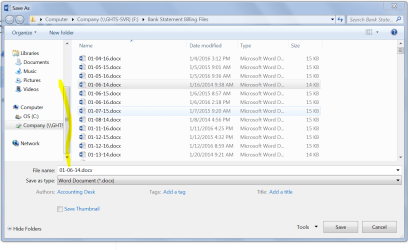
I don't understand why you need to leave the dialog box. You can do everything there. Just move the bar on the left down and it shows all of the drives on your PC. == The PC I am on now only has a C: drive but if you had a E, F, and G it would show under the C:
 

Attachments

  • Capture.PNG
    Capture.PNG
    63.6 KB · Views: 2
  • Capture2.PNG
    Capture2.PNG
    69.7 KB · Views: 1

My Computer My Computer

Computer type
PC/Desktop
Computer Manufacturer/Model Number
Custom Build
OS
Windows 7 Home Premium 32-Bit - Build 7600 SP1
CPU
Intel Core i3-2120 3.30Ghz
Motherboard
Asus P8Z68-V LX Intel Z68 Socket H2 ATX
Memory
Kingston 4 GB DDR3 1333 mhz
Graphics Card(s)
AMD Radeon HD6670
Sound Card
Sound Blaster Audigy SE 24-Bit
Monitor(s) Displays
Asus VE228
Screen Resolution
1440 X 900
Hard Drives
OCZ Vertex 3 120 GB Sata 3 SSD ==
Kingston SH103/S3 120 G Hyper X 120 GB SSD ==
Western Digital 500 GB Caviar Green 7200 RPM ==
PSU
Corsair CX600M == 600 Watt
Case
NZXT Apollo - Silver with Clear Side Panel
Cooling
Three 120 mm Fans
Keyboard
Microsoft Natural 4000
Mouse
Microsoft Custom Optical 3000
Internet Speed
AT&T Fiber Optic Wireless Network
Antivirus
Microsoft Security Essentials
Browser
Chrome
Other Info
120 mm Blue LED Fan -- Three Blue LED Lazer Light Sticks
The reason I would leave the save as dialog box is that it is much faster to simply perform one click on a shortcut and the Save as location would jump to that folder.

If I use the Save as dialog to navigate to the Drive and folder I would would have to perform multiple clicks.
 

My Computer My Computer

Computer Manufacturer/Model Number
Reyniers Audio
OS
Windows 7 Ultimate x64
CPU
2x Intel Xeon E5450 (8 x 3.0GHz Cores)
Motherboard
Tyan S5396
Memory
16 GB
Graphics Card(s)
XFX GeForce 7200GS
Sound Card
Fireface 800
Monitor(s) Displays
Samsung 22"
Hard Drives
System 250GB
Drive 2 (2 TB)
Drive 3 )2 Tb)
The reason I would leave the save as dialog box is that it is much faster to simply perform one click on a shortcut and the Save as location would jump to that folder.

If I use the Save as dialog to navigate to the Drive and folder I would would have to perform multiple clicks.

I am not quite sure how you are doing your procedure. I have never tried to do it that way and possibly Win 7 does not support leaving the Dialog Window. I just started to give it a try, but it is too cumbersome that way and I did not finish the test. All I know to tell you is change your method of doing it to using the Dialog Box. Good Luck
 

My Computer My Computer

Computer type
PC/Desktop
Computer Manufacturer/Model Number
Custom Build
OS
Windows 7 Home Premium 32-Bit - Build 7600 SP1
CPU
Intel Core i3-2120 3.30Ghz
Motherboard
Asus P8Z68-V LX Intel Z68 Socket H2 ATX
Memory
Kingston 4 GB DDR3 1333 mhz
Graphics Card(s)
AMD Radeon HD6670
Sound Card
Sound Blaster Audigy SE 24-Bit
Monitor(s) Displays
Asus VE228
Screen Resolution
1440 X 900
Hard Drives
OCZ Vertex 3 120 GB Sata 3 SSD ==
Kingston SH103/S3 120 G Hyper X 120 GB SSD ==
Western Digital 500 GB Caviar Green 7200 RPM ==
PSU
Corsair CX600M == 600 Watt
Case
NZXT Apollo - Silver with Clear Side Panel
Cooling
Three 120 mm Fans
Keyboard
Microsoft Natural 4000
Mouse
Microsoft Custom Optical 3000
Internet Speed
AT&T Fiber Optic Wireless Network
Antivirus
Microsoft Security Essentials
Browser
Chrome
Other Info
120 mm Blue LED Fan -- Three Blue LED Lazer Light Sticks
Thanks for thinking about this. Once, a few years ago a noticed this functionality. I'm am not sure if it came from Window 7 or from some utility I installed but I liked the way it worked because it quickly allowed me to change the Save as location. I can do it another way by putting my main shortcuts to folders on the desktop and in Favorites and use them to navigate through the Save as dialog.

Thank You
 

My Computer My Computer

Computer Manufacturer/Model Number
Reyniers Audio
OS
Windows 7 Ultimate x64
CPU
2x Intel Xeon E5450 (8 x 3.0GHz Cores)
Motherboard
Tyan S5396
Memory
16 GB
Graphics Card(s)
XFX GeForce 7200GS
Sound Card
Fireface 800
Monitor(s) Displays
Samsung 22"
Hard Drives
System 250GB
Drive 2 (2 TB)
Drive 3 )2 Tb)
Back
Top