Win7 Orb changer corrupted my explorer

cupid

New member
Local time
2:13 PM
Messages
7
Hi everyone,
This is my first thread on the website so if it has a bad title or its in wrong location then i'm sorry :p

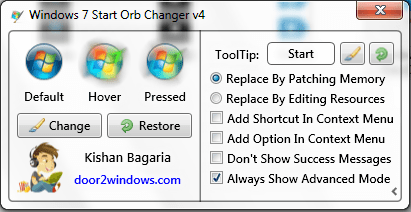
Ok so, I was bored with the default orb and decided to change it. I downloaded this app called "Windows 7 Start Orb Changer" (screenshot included)
And i was stupid enough not to create a restore point

First problem I encountered was that the new orb was not permanent and will go back to default any time,
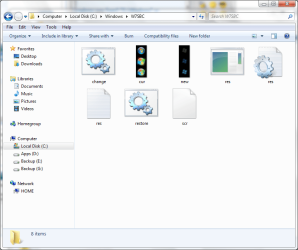
I opened "C:\Windows\W7SOC" to see what all files did it put there (and of course i didnt understood what was going on there)

I then opened "C:\Windows\W7SBC" and mistakenly opened "change.bat" :banghead:
and it somehow managed to delete or corrupt my explorer, I ran explorer in "C:\Windows\W7SOC" and copied it to c:/windows (where there were explorer.backup files --- which were't working) and system 32

Now my PC is working but i really want to know what just happened to my computer few mins ago,
also is there anyway to completely go back to stage before i changed my orb without using sys restore --- you know, my deleting useless files n stuff.

And if it was change.bat which did all this, why is there even a file like that !!!!

I am including screenshots of the "C:\Windows\W7SOC" + "C:\Windows\W7SBC" + orb changer

Please tell me what all can i delete
And also, where exactly does the OS call explorer.exe from? "C:\Windows" or "C:\Windows\system32" ??

Thank you Guys for reading all this :)
I really appreciate it !!!!!

PS: I also tried restore option in Orb changer but no success :(
 

Attachments

  • Orb Changer.png
    Orb Changer.png
    25.1 KB · Views: 51
  • W7SBC.png
    W7SBC.png
    50.6 KB · Views: 39
  • W7SOC.png
    W7SOC.png
    56.9 KB · Views: 31

My Computer My Computer

OS
Windows 7 Ultimate x64
How to restore explorer.exe

Try deleting W7SOC and replacing explorer.exe with the fresh one I will send you:

Download Take Ownership, Right Click on explorer.exe from C://Windows and Take Ownership (Right Click - Take Ownership) of it.

Unextract explorer.exe from the .zip to your desktop or a location you can easily find.

View attachment explorer.zip

Open Task Manager (CTRL+Shift+ESC/Ctrl+Alt+Delete, or Right Click on Start Menu and select Start Task Manager), click the Processes Tab and end explorer.exe, click the Applications Tab and click New Task and select Browse. Locate the extracted explorer.exe and Right Click it and copy it. Go to C://Windows, delete explorer.exe and any backups of it etc, and paste the fresh one in.

Now in the File name box type in "explorer.exe" to relaunch Explorer.

OR...

Delete W7SOC, and run SFC SCANNOW
 
Last edited:

My Computer My Computer

Computer type
PC/Desktop
Computer Manufacturer/Model Number
Novatech iRush Pro
OS
Windows 7 Ultimate SP1 - 64 Bit
CPU
Intel Core i5 2500k
Motherboard
Foxconn H67M-S/H67M-V/H67
Memory
2x4GB DDR3 1333Hz
Graphics Card(s)
Ati Radeon 6770
Sound Card
None
Monitor(s) Displays
Samsung S22B150
Screen Resolution
1920x1080
Hard Drives
2x500GB
PSU
500W
Cooling
Fan
Keyboard
HP KU0316
Mouse
Wireless Logitech M185
Internet Speed
20MB/s
Antivirus
Avast Free
Browser
Google Chrome
Other Info
Logitech M185 Mouse
KU-M316 Keyboard

My Computer My Computer

Computer type
PC/Desktop
Computer Manufacturer/Model Number
Self Assembled
OS
Microsoft Windows 10 Pro Insider Preview 64-bit
CPU
Intel(R) Core(TM) i3-4130 CPU @ 3.40GHz
Motherboard
Gigabyte Technology Co., Ltd. B85M-D3H
Memory
Corsair Vengence 4GB x2 (8.00GB Dual-Channel DDR3 @ 798MHz)
Graphics Card(s)
2047MB GeForce GTS 450 (ZOTAC International)
Sound Card
Onboard (Realtek High Definition Audio)
Monitor(s) Displays
LG Flatron E2040T
Screen Resolution
1600x900
Hard Drives
Western Digital 1 TB
Seagate 500 GB
PSU
Corsair VS550
Case
Cooler Master K380
Cooling
Cooler Master Seidon 120V Plus
Keyboard
Logitech MK260r
Mouse
Logitech MK260r
Internet Speed
PMPL Broadband
Antivirus
Windows Defender + MBAM
Browser
Firefox
Other Info
Dell Studio 15" Laptop
Hi,
I have windows 7 SP1 and start orb changer version 4 was bugs and did not work properly on my system, I use the 2.6 version which works perfectly well.
 

My Computer My Computer

OS
Windows Seven Familiale Premium 64
CPU
i5 520
Memory
4Gb
Graphics Card(s)
ATI Radeon HD 5650
Screen Resolution
1920x1080
Download Take Ownership, Right Click on explorer.exe from C://Windows and Take Ownership (Right Click - Take Ownership) of it.
[/color]

Delete W7SOC, and run SFC SCANNOW

Do what infinite said .... run http://www.sevenforums.com/tutorials/1538-sfc-scannow-command-system-file-checker.html ... all the explorer corruptions will be reverted to default.

If it anyhow troubles .... there is another option http://www.sevenforums.com/tutorials/139810-sfc-scannow-run-command-prompt-boot.html .

Hi Infinite,Arc
Thank you for your replies.

Your registry file didn't work but as i pasted the explorer file in c:/system so i has full control of it and thus i replaced it with the one you sent,

Everything is working fine now ... except that some programs are missing icons now ...

I ran sfc scan few moments ago and it said it got some corrupted files but was unable to fix them and it added details in a CBS.log file ...

also, is there supposed to be an explorer.exe in sys32 folder?

------

By

OR...
Delete W7SOC, and run SFC SCANNOW

did you mean do nothing you wrote above and just delete W7SOC and run sfc?
can i do same for W7SBC?
 

My Computer My Computer

OS
Windows 7 Ultimate x64
Hi Cupid (nice name, I like the story of Cupid and Psyche greatly !) , You first run the SFC scannow command, and report back if the explorer is in the normal condition or not.

If not, we have to thing somehow otherwise.
 

My Computer My Computer

Computer type
PC/Desktop
Computer Manufacturer/Model Number
Self Assembled
OS
Microsoft Windows 10 Pro Insider Preview 64-bit
CPU
Intel(R) Core(TM) i3-4130 CPU @ 3.40GHz
Motherboard
Gigabyte Technology Co., Ltd. B85M-D3H
Memory
Corsair Vengence 4GB x2 (8.00GB Dual-Channel DDR3 @ 798MHz)
Graphics Card(s)
2047MB GeForce GTS 450 (ZOTAC International)
Sound Card
Onboard (Realtek High Definition Audio)
Monitor(s) Displays
LG Flatron E2040T
Screen Resolution
1600x900
Hard Drives
Western Digital 1 TB
Seagate 500 GB
PSU
Corsair VS550
Case
Cooler Master K380
Cooling
Cooler Master Seidon 120V Plus
Keyboard
Logitech MK260r
Mouse
Logitech MK260r
Internet Speed
PMPL Broadband
Antivirus
Windows Defender + MBAM
Browser
Firefox
Other Info
Dell Studio 15" Laptop
Hi Cupid (nice name, I like the story of Cupid and Psyche greatly !)
:geek: :D


You first run the SFC scannow command, and report back if the explorer is in the normal condition or not.

If not, we have to thing somehow otherwise.

When my explorer first crashed (the time when i opened change.bat), i ran explorer in W7SOC and then copied it to c:\windows
Since then it has been working fine ... but i don't know if i did right thing or not.
____________________________________

And, i did ran sfc but it did nothing but giving message that
"Windows Resource Protection found corrupt files but was unable to fix some of them.
Details are included in the CBS.Log windir\Logs\CBS\CBS.log."

____________________________________

Also, later i tried deleting W7SOC and running sfc again and it again gave same message,
"Windows Resource Protection found corrupt files but was unable to fix some of them.
Details are included in the CBS.Log windir\Logs\CBS\CBS.log."


BTW does sfc ever work? Every time i ran it, all it did was verification and then same message above ...

PS: I have removed W7SOC & W7SBC from c:\windows.
Do i need to put them back? Are they really needed, i rebooted my pc and it still is behaving normal !! :p

PS: I just read your signature, so you are Indian !!!
I am Indian too !!!! !!!!!!!!!!!!!!!!!!!!!!!!
 

My Computer My Computer

OS
Windows 7 Ultimate x64
Cupid, SFC usually works without a fail, if windows system protection is now somehow disabled. Sometimes some misapplication of patches corrupt it.

As you said, you did it right. Changing explorer.exe is a nice step that you have taken. It rightly replaced the corrupted explorer file, and made your system running.

Why there is file like change.bat, that is the part of the developer (Kishan) , but I am happily using the first ever version he made, and it works for me flawlessly, after years, too.

There is nothing to worry about a few corruptions which are not fixed, as your system is running now. But if you want to fix everything there, you are to perform a http://www.sevenforums.com/tutorials/3413-repair-install.html .

I never put the files like W7SBC in windows . Put them somewhere else, and place a shortcut of it on the dock on my desktop :)
 

My Computer My Computer

Computer type
PC/Desktop
Computer Manufacturer/Model Number
Self Assembled
OS
Microsoft Windows 10 Pro Insider Preview 64-bit
CPU
Intel(R) Core(TM) i3-4130 CPU @ 3.40GHz
Motherboard
Gigabyte Technology Co., Ltd. B85M-D3H
Memory
Corsair Vengence 4GB x2 (8.00GB Dual-Channel DDR3 @ 798MHz)
Graphics Card(s)
2047MB GeForce GTS 450 (ZOTAC International)
Sound Card
Onboard (Realtek High Definition Audio)
Monitor(s) Displays
LG Flatron E2040T
Screen Resolution
1600x900
Hard Drives
Western Digital 1 TB
Seagate 500 GB
PSU
Corsair VS550
Case
Cooler Master K380
Cooling
Cooler Master Seidon 120V Plus
Keyboard
Logitech MK260r
Mouse
Logitech MK260r
Internet Speed
PMPL Broadband
Antivirus
Windows Defender + MBAM
Browser
Firefox
Other Info
Dell Studio 15" Laptop
Back
Top