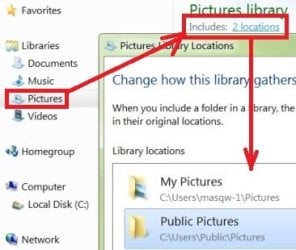
Solved Win7 Personalisation Folders Not Showing.

Denv12

New member
Local time
2:25 PM
Messages
22
Location
Adelaide Australia
Today I went to change my screen picture via personalisation. I usually change the photo every few weeks.
When I tried to get to the "Pictures Library" which contain all my pictures folders it showed up as "This Folder is empty". It usually shows all my folders so I can go through them to get to any specific folder to change a photo.

I dont know why its happened.I tried to do a system restore but that didnt do it.
It usually works when I do this by right click screen,click on personalize,click on desktop background,click on drop down menu for picture location,then Pictures Library.

Is there are reset I need to do?

Thanks.
 

Attachments
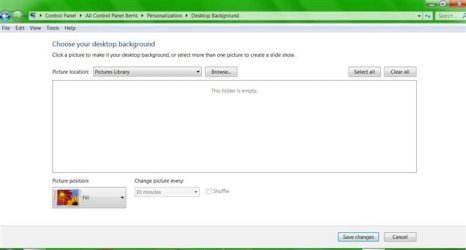
  • Snap 2017-06-09 at 05.20.35 (674 x 362).jpg
    Snap 2017-06-09 at 05.20.35 (674 x 362).jpg
    17.6 KB · Views: 37

My Computer My Computer

OS
windows 7 home premium x 64
picture library

Hi Denv12, Here are some tips that may help.

Right click on libraries

Click on restore defaults

Set the slide show to see if photos are there

Then go to control panel

appearance and personalization

change desktop background

click on browse

click on libraries and expand

click on my pictures and then click ok

click on select to check all pictures :D
 

My Computer My Computer

Computer type
PC/Desktop
Computer Manufacturer/Model Number
ASUS A85XM-A custom build
OS
Windows 10 Pro 64 bit
CPU
AMD A4-5300 APU with Radeon(tm) HD Graphics
Motherboard
ASUSTeK COMPUTER INC. A85XM-A
Memory
8.00 GB
Graphics Card(s)
AMD Radeon HD 7480D
Sound Card
(1) High Definition Audio Device (2) Realtek High Definiti
Monitor(s) Displays
HP W2072a 20 inch Led Backlit Monitor
Screen Resolution
1600 x 900 x 32 bits (4294967296 colors) @ 60 Hz
Hard Drives
TOSHIBA DT01ACA100 SATA Disk Device
Keyboard
Acer
Mouse
Acer
Internet Speed
varies
Antivirus
Windows Defender Antivirus
Browser
Waterfox, Edge
Thanks ethel. I appreciate your help.I followed your instructions.

After all that it didnt get everything back. When I change the desktop background the Pictures Library is still missing as per my screen photo. When I click on My Pictures it only brings up 14 photos,all the other folders and photos arent there.

It shows these in the drop down menu:
Windows Desktop Photos
Pictures Library
Top Rated Photos
Solid Colors
(one of my folders)Photos
My Pictures
Personalization
 

My Computer My Computer

OS
windows 7 home premium x 64
photo files

Hello again Denv12, Here is another one that may help. Go to

control panel

type in folder options

click on the view tab

scroll down and check unhide hidden files and folders

uncheck hide extensions for known types of files :D
 

My Computer My Computer

Computer type
PC/Desktop
Computer Manufacturer/Model Number
ASUS A85XM-A custom build
OS
Windows 10 Pro 64 bit
CPU
AMD A4-5300 APU with Radeon(tm) HD Graphics
Motherboard
ASUSTeK COMPUTER INC. A85XM-A
Memory
8.00 GB
Graphics Card(s)
AMD Radeon HD 7480D
Sound Card
(1) High Definition Audio Device (2) Realtek High Definiti
Monitor(s) Displays
HP W2072a 20 inch Led Backlit Monitor
Screen Resolution
1600 x 900 x 32 bits (4294967296 colors) @ 60 Hz
Hard Drives
TOSHIBA DT01ACA100 SATA Disk Device
Keyboard
Acer
Mouse
Acer
Internet Speed
varies
Antivirus
Windows Defender Antivirus
Browser
Waterfox, Edge
windows 7 personalisation

Hello again Denv12. If you have done the above to show hidden files, I should have mentioned before that

after you do this go to

Start orb

Click on Computer

Local Disk

Users and open

Open your User file/ not default or public and see if your remaining photos are there. :D
 

My Computer My Computer

Computer type
PC/Desktop
Computer Manufacturer/Model Number
ASUS A85XM-A custom build
OS
Windows 10 Pro 64 bit
CPU
AMD A4-5300 APU with Radeon(tm) HD Graphics
Motherboard
ASUSTeK COMPUTER INC. A85XM-A
Memory
8.00 GB
Graphics Card(s)
AMD Radeon HD 7480D
Sound Card
(1) High Definition Audio Device (2) Realtek High Definiti
Monitor(s) Displays
HP W2072a 20 inch Led Backlit Monitor
Screen Resolution
1600 x 900 x 32 bits (4294967296 colors) @ 60 Hz
Hard Drives
TOSHIBA DT01ACA100 SATA Disk Device
Keyboard
Acer
Mouse
Acer
Internet Speed
varies
Antivirus
Windows Defender Antivirus
Browser
Waterfox, Edge
Hello again Denv12. If you have done the above to show hidden files, I should have mentioned before that

after you do this go to

Start orb

Click on Computer

Local Disk

Users and open

Open your User file/ not default or public and see if your remaining photos are there. :D

I just did both.The previous reply advice didnt change anything. The advice here,I did find all my photos there as well as they are still in windows explorer too.I'm at a loss to explain why it wont work.It was working at least 4 days ago. I did a system restore first before I first posted.That didnt help. I've been trying to find tutorials for this.Doesnt seem to be any.
Thank you for your help.
 
Last edited:

My Computer My Computer

OS
windows 7 home premium x 64
backgrounds and personalisation

Hello Denv12, If you now have all your photos the only other thing I can think of to try is right clicking

on your picture files, and click restore previous versions, and see if there is a version before this happened. :D
 

My Computer My Computer

Computer type
PC/Desktop
Computer Manufacturer/Model Number
ASUS A85XM-A custom build
OS
Windows 10 Pro 64 bit
CPU
AMD A4-5300 APU with Radeon(tm) HD Graphics
Motherboard
ASUSTeK COMPUTER INC. A85XM-A
Memory
8.00 GB
Graphics Card(s)
AMD Radeon HD 7480D
Sound Card
(1) High Definition Audio Device (2) Realtek High Definiti
Monitor(s) Displays
HP W2072a 20 inch Led Backlit Monitor
Screen Resolution
1600 x 900 x 32 bits (4294967296 colors) @ 60 Hz
Hard Drives
TOSHIBA DT01ACA100 SATA Disk Device
Keyboard
Acer
Mouse
Acer
Internet Speed
varies
Antivirus
Windows Defender Antivirus
Browser
Waterfox, Edge
backgrounds and personalisation

Hi denv12, I have remembered a couple of other things to try. Control Panel, Ease of Access, Optimize

visual display, ensure that remove background images is unchecked. Another one some people have tried

with your problem is right clicking on a photo, and set it as desktop background, and then they looked

under Appearance and Personalization and their photos were there. :D
 

My Computer My Computer

Computer type
PC/Desktop
Computer Manufacturer/Model Number
ASUS A85XM-A custom build
OS
Windows 10 Pro 64 bit
CPU
AMD A4-5300 APU with Radeon(tm) HD Graphics
Motherboard
ASUSTeK COMPUTER INC. A85XM-A
Memory
8.00 GB
Graphics Card(s)
AMD Radeon HD 7480D
Sound Card
(1) High Definition Audio Device (2) Realtek High Definiti
Monitor(s) Displays
HP W2072a 20 inch Led Backlit Monitor
Screen Resolution
1600 x 900 x 32 bits (4294967296 colors) @ 60 Hz
Hard Drives
TOSHIBA DT01ACA100 SATA Disk Device
Keyboard
Acer
Mouse
Acer
Internet Speed
varies
Antivirus
Windows Defender Antivirus
Browser
Waterfox, Edge
Hi ethel.
Thanks again for all your help. I've gone through every possible thing to resolve it.Its still showing up as per the photo above.

Denv12.
 

My Computer My Computer

OS
windows 7 home premium x 64
Hello Denver mate try these if you haven't already

[FONT=Arial, sans-serif]http://www.sevenforums.com/tutorials/1538-sfc-scannow-command-system-file-checker.html[/FONT]

[FONT=Arial, sans-serif]http://www.sevenforums.com/tutorials/433-disk-check.html< if necessary include the /f switch and if this does not makeany improvement then just run this switch instead /r in the commandline as per Option2 [/FONT]

[FONT=Arial, sans-serif]Runthese in safe mode and the sfc often best run for two to three runs –you can leave out the /r switch in ckdsk if you feel it not necessary[/FONT]


[FONT=Arial, sans-serif]ifno fix then these [/FONT]


[FONT=Arial, sans-serif]http://www.superantispyware.com/[/FONT]

[FONT=Arial, sans-serif]http://www.malwarebytes.org/products/malwarebytes_free/[/FONT]

[FONT=Arial, sans-serif]http://www.bleepingcomputer.com/download/adwcleaner/[/FONT]

[FONT=Arial, sans-serif]ADWdownload from bleeping computer delete any rubbish found with themalware scans[/FONT]

[FONT=Arial, sans-serif](NBIf you are running Kaspersky as the main AV then it might needdisabling it when trying ADW because it does not like it at times)[/FONT]
 

My Computer My Computer

Computer type
PC/Desktop
Computer Manufacturer/Model Number
Own build (new) Desk1 / Asus ROG Win 7 / Desk2 1st build
OS
Desk1 7 Home Prem / Desk2 10 Pro / Main lap Asus ROG 10 Pro 2 laptop Toshiba 7 Pro Asus P2520 7 & 10
CPU
Desk1 i5 3750K / Laptop i7 GTX 860M / Desk2 i5 2500
Motherboard
Desk1 Asus P877-V / Desk2 Gigabyte H67 UD3H / Laptop ?
Memory
Desk1 8GB (1866) / Desk2 16GB (1333) / Laptop 8Gb DDR3
Graphics Card(s)
Desk 1& 2NVidia GTX 650 & Laptops on board Intel
Sound Card
Desk 1 & 2 -XONAR DG Realtek High Def audio Laptop
Monitor(s) Displays
Desk 1 Benq HD 2450 / Desk2 Philips 24" / Laptop 17.5"
Screen Resolution
1920x1080 D1 & D2 & Laptop 1
Hard Drives
Desk1 Samsung 120GB 830 SSD
Asus ROG 256GB 850 Pro SSD
Desk2 Samsung 840 256 SSD
Toshiba 120GB EVO
PSU
Desk 1 Corsair HX 1050/ Laptop ? / Desk 2 Corsair HX 650
Case
Desk 1 Cooler HAF XM ? Toshiba laptop / Desk2 Coolermaster
Cooling
Fans on all Desk1 -2 Desk2 - all Coolermasters 5 Laptop ?
Keyboard
Desk 1 MS Sidewinder X6 Desk 2 MS Sidewinder X 4
Mouse
Desk 1&2 - Gigabyte MS 900 gamer - laptop - Logitec wireless
Internet Speed
ADSL2+
Other Info
One other Desktop (tester) and spare Toshba laptop both with SSD's
Running Kaspersky 2016 ISS on all machines config'd identically
Logitec audio stereo systems on each machine (x3)
Canon MG5250MFC
Router/modem TP-Link running WPA2SK
Hi,
Click Start and click on your user name listed near the top of the list,
Open the folder on the main menu to where your images are at
Post a full screen screen shot like you did with in the original question.

But yes drill down through C/ users/ your user name/ and where exactly the images are located when you Browse for the images if you need too in personalization.
 

My Computer My Computer

Computer type
PC/Desktop
Computer Manufacturer/Model Number
Custom assembled by me :}
OS
Win-7-Pro64bit 7-H-Prem-64bit
CPU
i7-5930K 2nd i9-9940x both water blocked VRM's too
Motherboard
ASUS SABERTOOTH X99 2nd ASUS x299 Apex
Memory
Trident-z 3200C14 2nd Trident-z 3600C16
Graphics Card(s)
EVGA 1080ti ftw3 2nd Titan Xp both water blocked
Sound Card
Built-in Realtek
Monitor(s) Displays
1-AOC G2460PG 24"G-Sync 144Hz/ 2nd 1-ASUS VG248QE 24" 144Hz
Screen Resolution
1920 x 1080 144Hz
Hard Drives
2-Samsung M.2 Evo & Evo Plus
2-Samsung 850 EVO 500GB SSD's/ 3-2.5 W.D. Black 1tb-&3-1tb/3-3.5 WD Black 1tb hdd's
PSU
EVGA SuperNOVA 1000-P2 2nd 1200-P2
Case
2-Corsair Obsidian Series 450D Black ATX Mid Tower
Cooling
Custom water loops
Keyboard
Logitech G710+/ 2nd Logitech G910
Mouse
2-RedDragon M901 Perdition 16400 dpi Gaming mouse = wired
Internet Speed
Comcast Ping 19ms 89.31mbps download speed 6.12mbps upload
Antivirus
Malwarebytes Pro/ Superantispyware Pro
Browser
FireFox & Pale moon
Other Info
2nd ASUS X299 Apex/Intel i9-9940x with Custom water loop/7H-Prem-x64/Corsair 450D case/Ram Trident-z 3600C16 4x8gb / Samsung970Evo plus 500gb SSD/Dual ssd EZ swap evo/PSU EVGA SuperNova 1200w-P2 80+Platinum/GPU Titan Xp /8-ML-140 on push-pull on 2-280GTX rads
Another way that works for me is Everything search.

voidtools


This little program will find just about any thing. Once found just right tick on it and select Open path.

Jack
 

My Computer My Computer

Computer type
PC/Desktop
Computer Manufacturer/Model Number
Home made Desktop
OS
Windows 10 Pro. 64/ version 1709 Windows 7 Pro/64
CPU
Intel i7-6800K @ 4.3
Motherboard
ASUS X-99 Deluxe II
Memory
Corsair Platinum 16 gig @2400
Graphics Card(s)
EVGA GTX 1070 OC
Monitor(s) Displays
Asus 27" LED LCD/VE278Q
Screen Resolution
1920-1080 or 1280-720 HDMI
Hard Drives
INTEL SSD 730-240 Gb Sata 3.0/
PSU
EVGA Platium 1200W
Case
Phanteks Luxe Tempered Glass 8 fans/ one radiator
Cooling
XSPC/ Water Cooled CPU
Keyboard
Das 4 Professional
Mouse
Logitech M705/MX Anywhere 2-S
Internet Speed
100 mbits
Antivirus
Microsoft Security Essentials/ Malwarebytes Premium 3.0/ SAS
Browser
I.E. 11 default/Firefox/ ISP Time Warner Cable/Spectrum
Other Info
LG BluRay Burner/
Sound system-KLipsch-THX/
Icy Dock ssd Hot Swap bays.
Hello Denver mate try these if you haven't already

[FONT=Arial, sans-serif]https://www.sevenforums.com/tutorials/1538-sfc-scannow-command-system-file-checker.html[/FONT]

[FONT=Arial, sans-serif]https://www.sevenforums.com/tutorials/433-disk-check.html< if necessary include the /f switch and if this does not makeany improvement then just run this switch instead /r in the commandline as per Option2 [/FONT]

[FONT=Arial, sans-serif]Runthese in safe mode and the sfc often best run for two to three runs –you can leave out the /r switch in ckdsk if you feel it not necessary

Got the scan running right now.Just started.
[/FONT]
 

My Computer My Computer

OS
windows 7 home premium x 64
Hi,
Click Start and click on your user name listed near the top of the list,
Open the folder on the main menu to where your images are at
Post a full screen screen shot like you did with in the original question.

But yes drill down through C/ users/ your user name/ and where exactly the images are located when you Browse for the images if you need too in personalization.

I can change the photo but it wont bring up the entire photo folders like it orginally did.
 

My Computer My Computer

OS
windows 7 home premium x 64

My Computer My Computer

Computer type
PC/Desktop
Computer Manufacturer/Model Number
Custom assembled by me :}
OS
Win-7-Pro64bit 7-H-Prem-64bit
CPU
i7-5930K 2nd i9-9940x both water blocked VRM's too
Motherboard
ASUS SABERTOOTH X99 2nd ASUS x299 Apex
Memory
Trident-z 3200C14 2nd Trident-z 3600C16
Graphics Card(s)
EVGA 1080ti ftw3 2nd Titan Xp both water blocked
Sound Card
Built-in Realtek
Monitor(s) Displays
1-AOC G2460PG 24"G-Sync 144Hz/ 2nd 1-ASUS VG248QE 24" 144Hz
Screen Resolution
1920 x 1080 144Hz
Hard Drives
2-Samsung M.2 Evo & Evo Plus
2-Samsung 850 EVO 500GB SSD's/ 3-2.5 W.D. Black 1tb-&3-1tb/3-3.5 WD Black 1tb hdd's
PSU
EVGA SuperNOVA 1000-P2 2nd 1200-P2
Case
2-Corsair Obsidian Series 450D Black ATX Mid Tower
Cooling
Custom water loops
Keyboard
Logitech G710+/ 2nd Logitech G910
Mouse
2-RedDragon M901 Perdition 16400 dpi Gaming mouse = wired
Internet Speed
Comcast Ping 19ms 89.31mbps download speed 6.12mbps upload
Antivirus
Malwarebytes Pro/ Superantispyware Pro
Browser
FireFox & Pale moon
Other Info
2nd ASUS X299 Apex/Intel i9-9940x with Custom water loop/7H-Prem-x64/Corsair 450D case/Ram Trident-z 3600C16 4x8gb / Samsung970Evo plus 500gb SSD/Dual ssd EZ swap evo/PSU EVGA SuperNova 1200w-P2 80+Platinum/GPU Titan Xp /8-ML-140 on push-pull on 2-280GTX rads
Thanks for the suggestion.

My photos are there. When I go into personalize I have to go to desktop background,drop down menu to click on pictures library...where folder is empty.Click on browse,go to libraries,pictures,my pictures then to any photo folder.I can choose a photo that way. If I click on public folder it shows sample pictures.I went back one step and tried my pictures folder and am able to change photo.I'm happy with that.

Thank you to everyone for youe help.Greatly appreciated.Of all problems I needed help,it had to be this one.
 

My Computer My Computer

OS
windows 7 home premium x 64
Back
Top