Solved Win7 pro startup error "Boot MGR missing"/"Operating System Not Found

mikhail7

New member
Local time
3:27 PM
Messages
8
Win7 pro startup error "Boot MGR missing"/"Operating System Not Found

I just upgraded from Vista Home Premium to Win7 professional x64 hoping to fix the above mentioned problem. After a complete re-install Im getting the same errors.

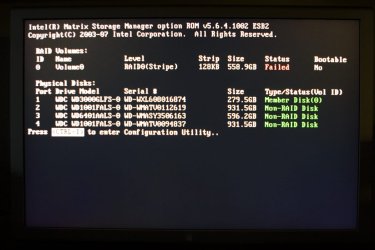
Im not sure of the proper terminology here, but during startup the computer does a scan of all hardware and "Volume 0" has a "failed" message.

The odd thing is that sometimes after a few restarts and pointless boot menu visits the computer starts up fine.

I tried windows repair feature by booting from the disk, but when I get to the window where i select the operating system to repair, its empty. Drive C, where the operating system is, is not showing.

I have a feeling that the hard drive itself has gone bad and is very unstable. Please let me know if I'm missing something or we just need to get a new HD.

Thank you
 

My Computer

OS
Windows 7 Professional x64
What type of hdd do you have. For example if you have a Seagate drive, there is software you can run to do a diagonostic on the hdd before the operating system boots.
This would be a good idea, especially if you were having same issues when Vista Home Premium was installed first.

Do you have more than one hdd installed. If yes, make sure in BIOS settings, the proper drive is selected for First Boot. And better yet make sure its the only drive attached when booting.
 

My Computer

Computer type
PC/Desktop
Computer Manufacturer/Model Number
Evga X58
OS
Windows 7 Ultimate x64
CPU
Core i7 950 - 3.06 GHz
Motherboard
EVGA X58 SLI
Memory
Corsair XMS3 Dominator CMP12GX3M3A1600C9 12GB
Graphics Card(s)
eVGA GTX 550 TI-FPB 1GB
Sound Card
High Definition Audio
Monitor(s) Displays
ASUS VH242H 24 LCD
Screen Resolution
1920 X 1080
Hard Drives
2x - Seagate 1000GB Hard Drive SATA 3Gb/s 32MB Cache
Seagate 750GB Barracuda 7200.12 SATA II w/ 32MB Cache
WDC WD2500AAJB-00J3A0 ATA Device
PSU
OCZ ZX Series 1250W PSU
Case
ANTEC NINE HUNDRED TWO
Cooling
Zalman Reserator 3 MAX Dual CPU Cooler
Keyboard
Logitech
Mouse
Logitech
Other Info
2 x- HL-DT-ST DVDRAM GH24NS50 ATA Device

My Computer

OS
ME/XP/Vista/Win7

Can you please explain: How does an OEM Manufacturer's PC differ from any other pc in regards to the Recovery Partition? Should not all PCs have a Recovery Partition?

If a HD reformat has been performed, does that lead to the conclusion that if a recovery partition did exist it is now gone.
 

My Computer

Computer Manufacturer/Model Number
Polywell
OS
Windows 7x32 Home Premium & XP SP3 x86
CPU
Athlon 64FX
Motherboard
ASUS M2N32SLI Delux
Memory
Corsair CM2X1024-8500C5
Graphics Card(s)
GeForce 7950X2 (Dual)
Monitor(s) Displays
ViewSonic A90f+ (Two)
Screen Resolution
1280x1024
Hard Drives
WD1500ADFD-00NLR1 (Originally Raid5)

Changed to three individual drives after HD crashed. May return to RAID5 if I locate a suitable HD.
PSU
TurboColl 1KW
Case
Polywell
Cooling
Cool'n'Quiet (Questionable Operation)
Keyboard
Logitech
Mouse
Logitech
Internet Speed
1GHertz (I think)
Other Info
Sony CD-RW CRX320EE

HP DVD Writer 1140d (may need to replace??)
Can you please explain: How does an OEM Manufacturer's PC differ from any other pc in regards to the Recovery Partition? Should not all PCs have a Recovery Partition?

OEM manufacturer's PC is Dell, HP/Compaq, Toshiba, Acer. Who need to support a way of reinstalling a OS without reinstall DVD's.
When you buy a PC like this, you need to make Recovery disks or use the Recovery Partition.

How to use Toshiba Recovery.
How to use the Toshiba HDD Recovery Utility
 

My Computer

OS
ME/XP/Vista/Win7
thanks for the replies.

I have 5 HDs in the computer and they are all WD FALS series.

Also its a custom built computer with:

Intel Xeon E5410 2.33ghz
32gb RAM
NVIDIA 9800gt GeForce
Supermicro MB (dont remember the exact model.)

any suggestions?

Thanks
 

My Computer

OS
Windows 7 Professional x64
Did you remove all drives but the system drive when you upgraded/reinstalled?
 

My Computer

Computer Manufacturer/Model Number
Dell XPS 15 L502x
OS
Windows 7 Ultimate x64 SP1
CPU
Core i7-2670QM
Memory
8GB DDR3 PC3-10600
Graphics Card(s)
Intel HD Graphics 3000 + GeForce GT 540M
Screen Resolution
1920x1080
Hard Drives
1TB 5400RPM Seagate

Can you please explain: How does an OEM Manufacturer's PC differ from any other pc in regards to the Recovery Partition? Should not all PCs have a Recovery Partition?

If a HD reformat has been performed, does that lead to the conclusion that if a recovery partition did exist it is now gone.

No, all pcs do not have a recovery partition. It may, it may not. If bought from a store like Bestbuy it most likely will. If bought from say Tigerdirect it might not. If you install windows yourself most people wouldn`t even think of making a recovery partition.
 

My Computer

Computer Manufacturer/Model Number
Myself
OS
Windows 7 Ultimate 64Bit
CPU
C2D E8200
Motherboard
XFX 750i
Memory
8GB PNY PC2-6400
Graphics Card(s)
BFG 9600GT x 2
Sound Card
Stock XFX Optical
Monitor(s) Displays
Gateway 22" HD Display
Hard Drives
C: 1 TB G: 500 GB H: 500 GB
PSU
Ultra LSP 550 Pro Lifetime Series
Case
Xion2
Cooling
ThermalTake

My Computer

OS
Windows 7 Professional x64
I did not. How does that make a difference?


The Windows 7 boot files may not be on same HD Drive as the OS.

I did not know that was possible. Is that normal? Or unplugging hardrives is the only way to prevent it

Thanks

Yes it is possible. I have had it happen a few times when having all my hdd's attached. Same goes with Linux..
Always best to only have the hdd attached that your installing on for less error to happen.
 

My Computer

Computer type
PC/Desktop
Computer Manufacturer/Model Number
Evga X58
OS
Windows 7 Ultimate x64
CPU
Core i7 950 - 3.06 GHz
Motherboard
EVGA X58 SLI
Memory
Corsair XMS3 Dominator CMP12GX3M3A1600C9 12GB
Graphics Card(s)
eVGA GTX 550 TI-FPB 1GB
Sound Card
High Definition Audio
Monitor(s) Displays
ASUS VH242H 24 LCD
Screen Resolution
1920 X 1080
Hard Drives
2x - Seagate 1000GB Hard Drive SATA 3Gb/s 32MB Cache
Seagate 750GB Barracuda 7200.12 SATA II w/ 32MB Cache
WDC WD2500AAJB-00J3A0 ATA Device
PSU
OCZ ZX Series 1250W PSU
Case
ANTEC NINE HUNDRED TWO
Cooling
Zalman Reserator 3 MAX Dual CPU Cooler
Keyboard
Logitech
Mouse
Logitech
Other Info
2 x- HL-DT-ST DVDRAM GH24NS50 ATA Device
Please post back a screenshot of your maximized Disk Mgmt drive map with listings showing all columns, using the Snipping Tool in Start menu. Tell us what is on each partition.

What is the exact sequence during booting of the PC?
 
Please post back a screenshot of your maximized Disk Mgmt drive map with listings showing all columns, using the Snipping Tool in Start menu. Tell us what is on each partition.

What is the exact sequence during booting of the PC?

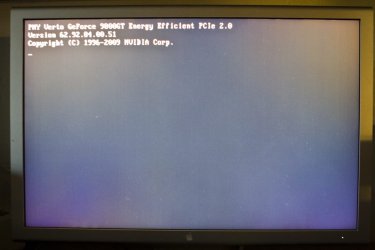
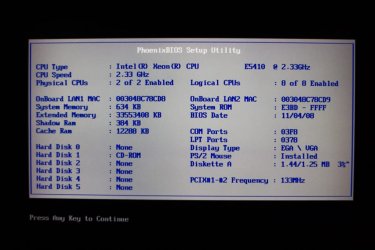
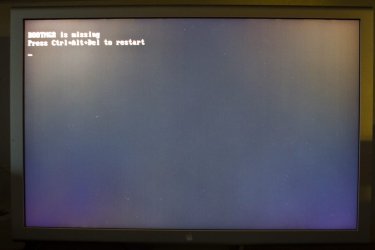
Here is the Disk Map and some photos of a typical "Opening Sequence". (nevermind the Mac Display, we used to have a mac)
Again, when I go into the BIOS set up, do not change anything and exit w/ saving sometimes computer starts up.

Please let me know if these images show anything out of the norm.

Thank you
 

Attachments

  • DiskMap.PNG
    DiskMap.PNG
    23.5 KB · Views: 20
  • 1.jpg
    1.jpg
    62.4 KB · Views: 12
  • 2.jpg
    2.jpg
    56.1 KB · Views: 5
  • 3.jpg
    3.jpg
    62.6 KB · Views: 7
  • 4.jpg
    4.jpg
    85 KB · Views: 13
  • 5.jpg
    5.jpg
    82.4 KB · Views: 12
  • 6.jpg
    6.jpg
    46.2 KB · Views: 11
  • 7.jpg
    7.jpg
    47.7 KB · Views: 9

My Computer

OS
Windows 7 Professional x64
also, after lookin over the images i just realized, I had a RAID partition setup in the previous system and i did not go through that during the upgrade to Windows 7.

Could that be the culprit?
 

My Computer

OS
Windows 7 Professional x64
Is there any reason why you are running RAID 0 on your primary drive? If you don't want that, make sure to disable RAID in your bios, then shut down, disconnect all drives except the primary, and reinstall Windows.
 

My Computer

Computer Manufacturer/Model Number
Dell XPS 15 L502x
OS
Windows 7 Ultimate x64 SP1
CPU
Core i7-2670QM
Memory
8GB DDR3 PC3-10600
Graphics Card(s)
Intel HD Graphics 3000 + GeForce GT 540M
Screen Resolution
1920x1080
Hard Drives
1TB 5400RPM Seagate
Don't mess with RAID and Win7 if not for a very good reason as it can be a can of worms.

As suggested unplug all HD's except target and clean install Win7 adapting the steps given in the Perfect Reinstall link in my signature box below.

Feel free to ask back any questions.

You'll want to make sure any non-OS drives are not marked Active as this can pose problems later.
 
hey guys,

Thanks for all the replies and yes disabling raid did help but at the same time created another problem.

The motherboard, Supermicro X7DWA-N, by default only supports 4 hard drives but is says it can support up to 6. We have 5 hard drives, that's why we had RAID enabled before.

I guess the the only way out is to properly set up RAID, or somehow get the motherboard to support 6 hard drives.

btw, the computer was set up by someone else, thats why I'm a bit foreign the set up.

Thank you
 

My Computer

OS
Windows 7 Professional x64
Get a SATA pcie card, or connect the other drive externally via eSata.
 

My Computer

Computer Manufacturer/Model Number
Dell XPS 15 L502x
OS
Windows 7 Ultimate x64 SP1
CPU
Core i7-2670QM
Memory
8GB DDR3 PC3-10600
Graphics Card(s)
Intel HD Graphics 3000 + GeForce GT 540M
Screen Resolution
1920x1080
Hard Drives
1TB 5400RPM Seagate
Thanks for all the replies and suggestions everyone.

It turned out that one of the HDs that were configured as a part of the RAID went bad. I took out the bad HD and everything is working fine now.

Thanks again.
 

My Computer

OS
Windows 7 Professional x64
Back
Top