Solved Win7 problem after format and recover (lost disk space) urgent!!!!

foo123

New member
Local time
6:07 PM
Messages
6
i have win7 home edition 32bit given with my pc installed.
after a while i installed ubuntu 10.10 dual/boot and allocated 20GB as a partition to it.
dual boot worked fine i could use both os without problem
at some time i had some virus problems in win 7 and decided to format disk and reinstall.
i have no win7 installation disk but a win7 recovery disk given with the pc in order to use in these situations.
when i used the recovery cd before reinstalling windows i formatted disk (using the recovery cd to do it).
the rest of the install worked all right. however the problem is that now the 20GB of hard disk space allocated to ubuntu are lost. windows recognizes only the rest space and does not show any other partition. i also used easeus partition magic tool but got the same result.
what do i have to do to be able to use all disk space.
do full HD format with some option? and how?
 

My Computer My Computer

At a glance

windows 7 home premium 32bit
OS
windows 7 home premium 32bit
Right click on your My computer icon on the desktop > Manage . It will open the computer management window. Maximize the window, click on "Disk management" in the left hand side pane, and post a snipshot ot the resulting windoe , for a better understanding of the present situation .

http://www.sevenforums.com/tutorials/9733-screenshots-files-upload-post-seven-forums.html

Ubuntu uses a different format structure for the disks and partitions , so usually the ubuntu partitions are not generally shown in windows. But it is visible in the disk management window, without any drive letter assigned to it .

EDIT : If you want to access the linux partition from within windows, you may try this program : http://www.techiequest.com/diskinternals-linux-reader-get-access-to-linux-files-from-windows/
 

My Computer My Computer

At a glance

Microsoft Windows 10 Pro Insider Preview 64-bitIntel(R) Core(TM) i3-4130 CPU @ 3.40GHzCorsair Vengence 4GB x2 (8.00GB Dual-Channel ...2047MB GeForce GTS 450 (ZOTAC International)
Computer type
PC/Desktop
Computer Manufacturer/Model Number
Self Assembled
OS
Microsoft Windows 10 Pro Insider Preview 64-bit
CPU
Intel(R) Core(TM) i3-4130 CPU @ 3.40GHz
Motherboard
Gigabyte Technology Co., Ltd. B85M-D3H
Memory
Corsair Vengence 4GB x2 (8.00GB Dual-Channel DDR3 @ 798MHz)
Graphics Card(s)
2047MB GeForce GTS 450 (ZOTAC International)
Sound Card
Onboard (Realtek High Definition Audio)
Monitor(s) Displays
LG Flatron E2040T
Screen Resolution
1600x900
Hard Drives
Western Digital 1 TB
Seagate 500 GB
PSU
Corsair VS550
Case
Cooler Master K380
Cooling
Cooler Master Seidon 120V Plus
Keyboard
Logitech MK260r
Mouse
Logitech MK260r
Internet Speed
PMPL Broadband
Antivirus
Windows Defender + MBAM
Browser
Firefox
Other Info
Dell Studio 15" Laptop
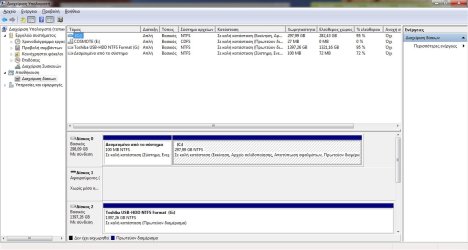
Disk Management Screen shot

Here is the My Computer/disk management screen shot. Sorry in Greek only.
Note that E: and G: are USB sticks not partitions. Only C: and the boot.

EDIT: I know Linux uses Ext2/3 type filesystem. But the partition should be visible. I even tried
partition programs that read several formats. to no avail..

Thanx for ur reply..
 

Attachments

  • disk-screen.jpg
    disk-screen.jpg
    99.9 KB · Views: 103

My Computer My Computer

At a glance

windows 7 home premium 32bit
OS
windows 7 home premium 32bit
What is the mystery? You formatted the HD which wiped out everything including your Ubuntu 20gb, as should be expected. Even if you hadn´t formatted it as you say, running the Recovery Disks would have likely wiped out your Linux partition if you didn´t carefully select another option.

In the future use Disk Mgmt to shrink Win7 to make install space for Linux, although I would use a separate HD if possible if you plan to use GRUB which can corrupt Win7 beyond repair.

For operations which Disk Mgmt cannot do use free Partition Wizard bootable CD, not Partition Magic which will ruin Win7.
 
  • Like
Reactions: Arc
Check in Device Manager, that the drivers are installed for Disk 1.
 

My Computer My Computer

At a glance

ME/XP/Vista/Win7
OS
ME/XP/Vista/Win7
20gb ubuntu

The format should as the word says format the whole disk
and after all available space should be ready for any filesystem you like

if the partition is erased where is the space to recover it. Since it erased it it was at
least somehow visible to win7 why is it not now after format??

Anyway i think the format i did was only quick and maybe with full format on whole disk regardless of partitions should bring the space back. The problem is how to do it
without taking the HD off the computer and into other computer??

Thanx.
 

My Computer My Computer

At a glance

windows 7 home premium 32bit
OS
windows 7 home premium 32bit
Mate foo123, I guess the hard disk drive under discussion is a 320 GB one, right ? Such a drive provides 298 GB storage space, that is the size of your Disk0 . So no space is lost , no more space is recoverable . For a better study, read http://www.sevenforums.com/general-discussion/142635-where-all-my-gigs.html#post1224668 .

As the unavailable capacity is similar to the other partition that you made, it makes you think that you are losing storage space; but it is not the fact. You are using your full storage.
 

My Computer My Computer

At a glance

Microsoft Windows 10 Pro Insider Preview 64-bitIntel(R) Core(TM) i3-4130 CPU @ 3.40GHzCorsair Vengence 4GB x2 (8.00GB Dual-Channel ...2047MB GeForce GTS 450 (ZOTAC International)
Computer type
PC/Desktop
Computer Manufacturer/Model Number
Self Assembled
OS
Microsoft Windows 10 Pro Insider Preview 64-bit
CPU
Intel(R) Core(TM) i3-4130 CPU @ 3.40GHz
Motherboard
Gigabyte Technology Co., Ltd. B85M-D3H
Memory
Corsair Vengence 4GB x2 (8.00GB Dual-Channel DDR3 @ 798MHz)
Graphics Card(s)
2047MB GeForce GTS 450 (ZOTAC International)
Sound Card
Onboard (Realtek High Definition Audio)
Monitor(s) Displays
LG Flatron E2040T
Screen Resolution
1600x900
Hard Drives
Western Digital 1 TB
Seagate 500 GB
PSU
Corsair VS550
Case
Cooler Master K380
Cooling
Cooler Master Seidon 120V Plus
Keyboard
Logitech MK260r
Mouse
Logitech MK260r
Internet Speed
PMPL Broadband
Antivirus
Windows Defender + MBAM
Browser
Firefox
Other Info
Dell Studio 15" Laptop
you are so right

i think u r correct. i figured that it might be the address space and/or the
1000 1024 BYTE discrepancy. However i wasnt sure enough.

Thanx a million..

Sorry for your time..

Until next time..
 

My Computer My Computer

At a glance

windows 7 home premium 32bit
OS
windows 7 home premium 32bit
i think u r correct. i figured that it might be the address space and/or the
1000 1024 BYTE discrepancy. However i wasnt sure enough.

Thanx a million..

Sorry for your time..

Until next time..
You are welcome, mate !
 

My Computer My Computer

At a glance

Microsoft Windows 10 Pro Insider Preview 64-bitIntel(R) Core(TM) i3-4130 CPU @ 3.40GHzCorsair Vengence 4GB x2 (8.00GB Dual-Channel ...2047MB GeForce GTS 450 (ZOTAC International)
Computer type
PC/Desktop
Computer Manufacturer/Model Number
Self Assembled
OS
Microsoft Windows 10 Pro Insider Preview 64-bit
CPU
Intel(R) Core(TM) i3-4130 CPU @ 3.40GHz
Motherboard
Gigabyte Technology Co., Ltd. B85M-D3H
Memory
Corsair Vengence 4GB x2 (8.00GB Dual-Channel DDR3 @ 798MHz)
Graphics Card(s)
2047MB GeForce GTS 450 (ZOTAC International)
Sound Card
Onboard (Realtek High Definition Audio)
Monitor(s) Displays
LG Flatron E2040T
Screen Resolution
1600x900
Hard Drives
Western Digital 1 TB
Seagate 500 GB
PSU
Corsair VS550
Case
Cooler Master K380
Cooling
Cooler Master Seidon 120V Plus
Keyboard
Logitech MK260r
Mouse
Logitech MK260r
Internet Speed
PMPL Broadband
Antivirus
Windows Defender + MBAM
Browser
Firefox
Other Info
Dell Studio 15" Laptop
Back
Top