Solved Win7 SP1 Update not installing - mismatched Mail file. 0x80004005

DukeS

New member
Local time
12:15 PM
Messages
37
After days of chasing this, I'm, baffled and would appreciate assistance.
I have been unable to install SP1 since it came out, and finally committed to solving the issue. Fail occurs at 80+% completion with the error 0x80004005.

CBS.log Error line says:
Attempted to uninstall a version of a non-driver component that is not installed, version: 0X600011db04001, component: x86_microsoft-windows-mail-core-dll_31bf3856ad364e35_6.1.7600.16385_none_585517a9869db81d, owner: Microsoft-Windows-Client-Features-Package~31bf3856ad364e35~amd64~~6.1.7600.16385.Microsoft-Windows-Client-Features-Update [HRESULT = 0x80004005 - E_FAIL]
Failed to mergecomponent [HRESULT = 0x80004005 - E_FAIL]

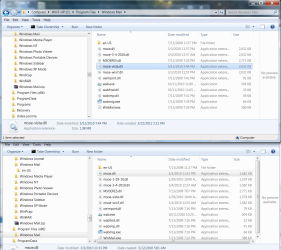
The installer seems to get stuck dealing with the Windows Mail msoe.dll. Two years ago I had followed the manual steps posted in this forum to restore Windows Mail in place of Windows Live Mail. Once the issue was identified as Mail-related, I restored the original msoe.dll files in the two Windows Mail folders. (see attached screencap.) I then switched to/uninstalled/reinstalled Live Mail (which works) to try to get SP1 to find the files it is expecting to find.

Most recent steps taken:

- Rebooting with non-microsoft startups and services disabled, including AV.
- Ran the System Update Readiness Tool. Hotfix for Windows (KB947821) No issues reported.
- Ran the Fix-It to Automatically diagnose and fix common problems with Windows Update.
- Ran the Fix-It to increase filter drivers limit from 8 to 14
- Ran SFC /SCANNOW from an elevated CMD prompt.
- Attempted to install the Service Pack from the x64 full download.
- Repaired Windows Live Mail (issued discovered and reported fixed.)
- Uninstalled Windows Live Mail (Live Essentials)
- Reinstalled Windows Live Mail (Live Essentials - Mail module only which opened successfully)
- Repeated the System Update Readiness Tool. Hotfix for Windows (KB947821) No issues reported.
- Uninstalled Windows Live Mail
- Attempted installs from full download in safe mode.

Throughout - rebooted and reattempted the SP1 install between each step - always with the same result (same error 4005 and CBS log entry above).

Is there a registry update I can make that would make SP1 skip over trying to uninstall the already uninstalled Mail software?
Full CBS log attached.
All ideas appreciated!
 

Attachments
  • screencap.png
    screencap.png
    121.4 KB · Views: 33

My Computer My Computer

At a glance

Windows 7 Pro x644GbNVidia
Computer Manufacturer/Model Number
HP 8710w Mobile Workstation
OS
Windows 7 Pro x64
Memory
4Gb
Graphics Card(s)
NVidia
I can see no signs of the SFC scan in the CBS log - please run another one and post a new log file
 

My Computer My Computer

At a glance

Win 7 x64 Home Premium (and x86 VirtualBox VM...i3 370M/i7 6500U8GB - finally :)/8GBit's an i3, dude!/dual Intel&nVidia
Computer type
Laptop
Computer Manufacturer/Model Number
Asus K52F or Lenovo B51-80
OS
Win 7 x64 Home Premium (and x86 VirtualBox VM)/Win10
CPU
i3 370M/i7 6500U
Motherboard
Asus/Lenovo
Memory
8GB - finally :)/8GB
Graphics Card(s)
it's an i3, dude!/dual Intel&nVidia
Sound Card
onboard
Monitor(s) Displays
15.6" built-in
Screen Resolution
1366x768/1920x1080
Hard Drives
750GB Seagate internal
Sundry external drives attached to other computers on the local network
1TB SSD on the Lenovo
PSU
n/a
Internet Speed
as much as I can get - usually on a dongle/phone, so <1MB/s
Antivirus
MSE/Defender
Browser
IE11/12/Edge/Chrome/FF(if I must)
Log of SFC

Here is the log from the scan.
 

My Computer My Computer

At a glance

Windows 7 Pro x644GbNVidia
Computer Manufacturer/Model Number
HP 8710w Mobile Workstation
OS
Windows 7 Pro x64
Memory
4Gb
Graphics Card(s)
NVidia
There's no apparent errors in the log at all :) (apart from the usual ones)

I suspect the issue lies with permissions - did you set the permissions properly for the files you replaced?
Did you reset the Owner to TrustedInstaller?
 

My Computer My Computer

At a glance

Win 7 x64 Home Premium (and x86 VirtualBox VM...i3 370M/i7 6500U8GB - finally :)/8GBit's an i3, dude!/dual Intel&nVidia
Computer type
Laptop
Computer Manufacturer/Model Number
Asus K52F or Lenovo B51-80
OS
Win 7 x64 Home Premium (and x86 VirtualBox VM)/Win10
CPU
i3 370M/i7 6500U
Motherboard
Asus/Lenovo
Memory
8GB - finally :)/8GB
Graphics Card(s)
it's an i3, dude!/dual Intel&nVidia
Sound Card
onboard
Monitor(s) Displays
15.6" built-in
Screen Resolution
1366x768/1920x1080
Hard Drives
750GB Seagate internal
Sundry external drives attached to other computers on the local network
1TB SSD on the Lenovo
PSU
n/a
Internet Speed
as much as I can get - usually on a dongle/phone, so <1MB/s
Antivirus
MSE/Defender
Browser
IE11/12/Edge/Chrome/FF(if I must)
A year+ ago, I did use "take ownership" (from within my admin account) so permissions may be an issue. I'll give that a shot.

Examining the msoe.dll (both instances) it is showing all permissions checked including Full Control but excluding Special Permissions for Trusted Installer and Administrators, and Read, Read & Execute for SYSTEM and Users. File version 6.1.7600.16543 Owner is set to my (Admin) account instead of the Administrator's role.

I have changed the ownership to Administrators, confirmed Full Control, and am retrying.
 

My Computer My Computer

At a glance

Windows 7 Pro x644GbNVidia
Computer Manufacturer/Model Number
HP 8710w Mobile Workstation
OS
Windows 7 Pro x64
Memory
4Gb
Graphics Card(s)
NVidia
No Joy.
I see from the error that SP1 is expecting to find file version 6.1.7600.16385 which does not match any version that is retained in the folder. The Win7 version is 6.1.7600.16543. (The Vista version is 6.0.6002.18197.)
Any ideas about how to either obtain the file it wants to find or should I try to update the registry to match the version numbers? (While this may seem an obvious step, I'm not familiar with the subtleties of the registry and afraid of doing more harm than good, so coaching is appreciated.)
 

My Computer My Computer

At a glance

Windows 7 Pro x644GbNVidia
Computer Manufacturer/Model Number
HP 8710w Mobile Workstation
OS
Windows 7 Pro x64
Memory
4Gb
Graphics Card(s)
NVidia
You should have copies of the v16385 file in your WinSxS folder -
C:\Windows\winsxs\amd64_microsoft-windows-mail-core-dll_31bf3856ad364e35_6.1.7600.16385_none_b473b32d3efb2953
and
C:\Windows\winsxs\x86_microsoft-windows-mail-core-dll_31bf3856ad364e35_6.1.7600.16385_none_585517a9869db81d

you'll need to copy them to the appropriate folders and set the permissions and Owner.
 

My Computer My Computer

At a glance

Win 7 x64 Home Premium (and x86 VirtualBox VM...i3 370M/i7 6500U8GB - finally :)/8GBit's an i3, dude!/dual Intel&nVidia
Computer type
Laptop
Computer Manufacturer/Model Number
Asus K52F or Lenovo B51-80
OS
Win 7 x64 Home Premium (and x86 VirtualBox VM)/Win10
CPU
i3 370M/i7 6500U
Motherboard
Asus/Lenovo
Memory
8GB - finally :)/8GB
Graphics Card(s)
it's an i3, dude!/dual Intel&nVidia
Sound Card
onboard
Monitor(s) Displays
15.6" built-in
Screen Resolution
1366x768/1920x1080
Hard Drives
750GB Seagate internal
Sundry external drives attached to other computers on the local network
1TB SSD on the Lenovo
PSU
n/a
Internet Speed
as much as I can get - usually on a dongle/phone, so <1MB/s
Antivirus
MSE/Defender
Browser
IE11/12/Edge/Chrome/FF(if I must)
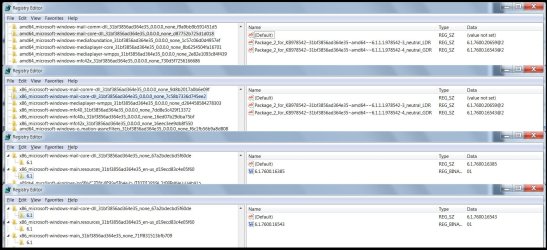
Before your latest note arrived, I looked at a few registry keys and they match the files that are installed so it seems SP1 is hard coded to seek version 16385. See screencaps.

Files located and copied, tried the update, but no joy!

Latest log attached -
Only difference, Owner = Administrators
There were no specific permissions for TrustedInstaller - is there a way to add that?
Permissions for Administrators were Full Control.
No changes were necessary, these were the default permissions form the winsxs folder.

Ideas?
 

Attachments

  • RegeditCaps.jpg
    RegeditCaps.jpg
    217.5 KB · Views: 23

My Computer My Computer

At a glance

Windows 7 Pro x644GbNVidia
Computer Manufacturer/Model Number
HP 8710w Mobile Workstation
OS
Windows 7 Pro x64
Memory
4Gb
Graphics Card(s)
NVidia
The error message suggests the file is "not installed" despite the registry entry. Is there a process to "install" it?
 

My Computer My Computer

At a glance

Windows 7 Pro x644GbNVidia
Computer Manufacturer/Model Number
HP 8710w Mobile Workstation
OS
Windows 7 Pro x64
Memory
4Gb
Graphics Card(s)
NVidia
try registering it from an admin command prompt.

c:\windows\system32\regsvr32.exe "c:\program files\microsoft\windows mail\msoe.dll"

To change the owner
Use Windows Explorer
navigate to teh file, and right-click on it - select Properties.
click on the Security tab
Click on the Edit button
Click the Add button
in the box, type NT SERVICE\TrustedInstaller
click on Check names -
the name should change to being TrustedInstaller
Click OK once
now give TrustedInstaller Full permissions
Click Apply and OK (once only)
Clcik on the Advanced button
Click on the Owner tab
Click on teh Edit button
Click on teh Other Users button
in the box, type NT SERVICE\TrustedInstaller
click on Check names -
the name should change to being TrustedInstaller
Click OK once
Highlight TrustedInstaller in the listing, and click Apply and OK
OK out.
reboot
 
Last edited:

My Computer My Computer

At a glance

Win 7 x64 Home Premium (and x86 VirtualBox VM...i3 370M/i7 6500U8GB - finally :)/8GBit's an i3, dude!/dual Intel&nVidia
Computer type
Laptop
Computer Manufacturer/Model Number
Asus K52F or Lenovo B51-80
OS
Win 7 x64 Home Premium (and x86 VirtualBox VM)/Win10
CPU
i3 370M/i7 6500U
Motherboard
Asus/Lenovo
Memory
8GB - finally :)/8GB
Graphics Card(s)
it's an i3, dude!/dual Intel&nVidia
Sound Card
onboard
Monitor(s) Displays
15.6" built-in
Screen Resolution
1366x768/1920x1080
Hard Drives
750GB Seagate internal
Sundry external drives attached to other computers on the local network
1TB SSD on the Lenovo
PSU
n/a
Internet Speed
as much as I can get - usually on a dongle/phone, so <1MB/s
Antivirus
MSE/Defender
Browser
IE11/12/Edge/Chrome/FF(if I must)
I appreciate your perseverance.

Adding TrustedInstaller worked as described - Has Full Control and Ownership

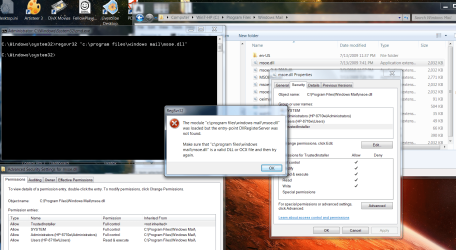
I am getting the following error from regsrv32 in elevated CMD - See screencap.
 

Attachments

  • RegsvrErrorCap2.png
    RegsvrErrorCap2.png
    218 KB · Views: 24
Last edited:

My Computer My Computer

At a glance

Windows 7 Pro x644GbNVidia
Computer Manufacturer/Model Number
HP 8710w Mobile Workstation
OS
Windows 7 Pro x64
Memory
4Gb
Graphics Card(s)
NVidia
must admit I half-expected that.
SP1 still failing?
...with the same error?
 

My Computer My Computer

At a glance

Win 7 x64 Home Premium (and x86 VirtualBox VM...i3 370M/i7 6500U8GB - finally :)/8GBit's an i3, dude!/dual Intel&nVidia
Computer type
Laptop
Computer Manufacturer/Model Number
Asus K52F or Lenovo B51-80
OS
Win 7 x64 Home Premium (and x86 VirtualBox VM)/Win10
CPU
i3 370M/i7 6500U
Motherboard
Asus/Lenovo
Memory
8GB - finally :)/8GB
Graphics Card(s)
it's an i3, dude!/dual Intel&nVidia
Sound Card
onboard
Monitor(s) Displays
15.6" built-in
Screen Resolution
1366x768/1920x1080
Hard Drives
750GB Seagate internal
Sundry external drives attached to other computers on the local network
1TB SSD on the Lenovo
PSU
n/a
Internet Speed
as much as I can get - usually on a dongle/phone, so <1MB/s
Antivirus
MSE/Defender
Browser
IE11/12/Edge/Chrome/FF(if I must)

My Computer My Computer

At a glance

Windows 10 Pro. 64/ version 1709 Windows 7 Pr...Intel i7-6800K @ 4.3Corsair Platinum 16 gig @2400EVGA GTX 1070 OC
Computer type
PC/Desktop
Computer Manufacturer/Model Number
Home made Desktop
OS
Windows 10 Pro. 64/ version 1709 Windows 7 Pro/64
CPU
Intel i7-6800K @ 4.3
Motherboard
ASUS X-99 Deluxe II
Memory
Corsair Platinum 16 gig @2400
Graphics Card(s)
EVGA GTX 1070 OC
Monitor(s) Displays
Asus 27" LED LCD/VE278Q
Screen Resolution
1920-1080 or 1280-720 HDMI
Hard Drives
INTEL SSD 730-240 Gb Sata 3.0/
PSU
EVGA Platium 1200W
Case
Phanteks Luxe Tempered Glass 8 fans/ one radiator
Cooling
XSPC/ Water Cooled CPU
Keyboard
Das 4 Professional
Mouse
Logitech M705/MX Anywhere 2-S
Internet Speed
100 mbits
Antivirus
Microsoft Security Essentials/ Malwarebytes Premium 3.0/ SAS
Browser
I.E. 11 default/Firefox/ ISP Time Warner Cable/Spectrum
Other Info
LG BluRay Burner/
Sound system-KLipsch-THX/
Icy Dock ssd Hot Swap bays.
@NoelDP - Same error.

@Layback Bear - "With my one cell brain head ache I have I don't understand why you mail service should stop SP-1 from downloading and installing"
Couldn't agree more, and also why being unable to uninstall something that isn't installed or used anymore should block the process. Persevering ... Will follow your steps and post back shortly. Thanks
 

My Computer My Computer

At a glance

Windows 7 Pro x644GbNVidia
Computer Manufacturer/Model Number
HP 8710w Mobile Workstation
OS
Windows 7 Pro x64
Memory
4Gb
Graphics Card(s)
NVidia
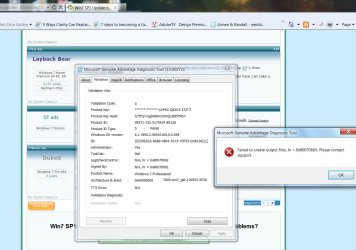
Well, MGADiag ran fine, but clicking the Copy button introduced a new error code into the mix. Until now, I have never had an issue with copying and pasting.
Researching the code now.

I'm not familiar with the outcome codes on this screenprint. Does it tell us anything?

The Filescan is still running.
 

Attachments

  • MGA-CopyError.jpg
    MGA-CopyError.jpg
    123.6 KB · Views: 11

My Computer My Computer

At a glance

Windows 7 Pro x644GbNVidia
Computer Manufacturer/Model Number
HP 8710w Mobile Workstation
OS
Windows 7 Pro x64
Memory
4Gb
Graphics Card(s)
NVidia
Don't worry about the error - that simply means that it was unable to save the backup files it creates.

Here's my usual instructions post for the MGADiag report....
To properly analyse and solve problems with Activation and Validation, we need to see a full copy of the report produced by the MGADiag tool
(download and save to desktop - http://go.microsoft.com/fwlink/?linkid=52012 )
Once saved, run the tool.
Click on the Continue button, which will produce the report.
To copy the report to your response, click on the Copy button in the tool (ignore any error messages at this point), and then paste (using either r-click/Paste, or Ctrl+V ) into your response.
(please enclose the report in 'CODE'using the options in the response - this makes the threadeasier to read)

Please also state the Version and Edition of Windows quoted on your COA sticker (if you have one) on the case of your machine (or inside the battery compartment), but do NOT quote the Key on the sticker!
http://www.microsoft.com/en-us/howtotell/Hardware.aspx
 

My Computer My Computer

At a glance

Win 7 x64 Home Premium (and x86 VirtualBox VM...i3 370M/i7 6500U8GB - finally :)/8GBit's an i3, dude!/dual Intel&nVidia
Computer type
Laptop
Computer Manufacturer/Model Number
Asus K52F or Lenovo B51-80
OS
Win 7 x64 Home Premium (and x86 VirtualBox VM)/Win10
CPU
i3 370M/i7 6500U
Motherboard
Asus/Lenovo
Memory
8GB - finally :)/8GB
Graphics Card(s)
it's an i3, dude!/dual Intel&nVidia
Sound Card
onboard
Monitor(s) Displays
15.6" built-in
Screen Resolution
1366x768/1920x1080
Hard Drives
750GB Seagate internal
Sundry external drives attached to other computers on the local network
1TB SSD on the Lenovo
PSU
n/a
Internet Speed
as much as I can get - usually on a dongle/phone, so <1MB/s
Antivirus
MSE/Defender
Browser
IE11/12/Edge/Chrome/FF(if I must)
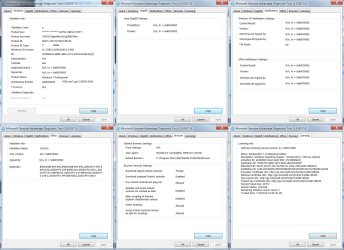
Before seeing your note, I went ahead and screencapped. Will follow the instructions now. The other file scan is still in progress (large drive). This HP machine had an OEM Vista installed that was upgraded to Win 7 x64 Pro using an upgrade CD that came in a retail box. Sticker is not on the machine (still on the box) - yell if I need to locate it. No issues authenticating it. Is there a reason to be investigating whether it is genuine? Along the way, there was an upgrade to the hard drive which required re-authenticating. That too was uneventful.

Code:
Diagnostic Report (1.9.0027.0):
-----------------------------------------
Windows Validation Data-->
Validation Code: 0
Cached Online Validation Code: 0x0
Windows Product Key: *****-*****-GXP4G-Q82G3-372T7
Windows Product Key Hash: G7hYI/+GgbxhBm3xYnjE3Bt5YNo=
Windows Product ID: 00371-152-5175424-85126
Windows Product ID Type: 5
Windows License Type: Retail
Windows OS version: 6.1.7600.2.00010100.0.0.048
ID: {E52DE63A-B6B9-4B03-A1CF-45F351248136}(3)
Is Admin: Yes
TestCab: 0x0
LegitcheckControl ActiveX: N/A, hr = 0x80070002
Signed By: N/A, hr = 0x80070002
Product Name: Windows 7 Professional
Architecture: 0x00000009
Build lab: 7600.win7_gdr.120503-2030
TTS Error: 
Validation Diagnostic: 
Resolution Status: N/A
Vista WgaER Data-->
ThreatID(s): N/A, hr = 0x80070002
Version: N/A, hr = 0x80070002
Windows XP Notifications Data-->
Cached Result: N/A, hr = 0x80070002
File Exists: No
Version: N/A, hr = 0x80070002
WgaTray.exe Signed By: N/A, hr = 0x80070002
WgaLogon.dll Signed By: N/A, hr = 0x80070002
OGA Notifications Data-->
Cached Result: N/A, hr = 0x80070002
Version: N/A, hr = 0x80070002
OGAExec.exe Signed By: N/A, hr = 0x80070002
OGAAddin.dll Signed By: N/A, hr = 0x80070002
OGA Data-->
Office Status: 109 N/A
OGA Version: N/A, 0x80070002
Signed By: N/A, hr = 0x80070002
Office Diagnostics: B4D0AA8B-604-645_B4D0AA8B-604-645_025D1FF3-364-80041010_025D1FF3-229-80041010_025D1FF3-230-1_025D1FF3-517-80040154_025D1FF3-237-80040154_025D1FF3-238-2_025D1FF3-244-80070002_025D1FF3-258-3
Browser Data-->
Proxy settings: N/A
User Agent: Mozilla/4.0 (compatible; MSIE 8.0; Win32)
Default Browser: C:\Program Files (x86)\Mozilla Firefox\firefox.exe
Download signed ActiveX controls: Prompt
Download unsigned ActiveX controls: Disabled
Run ActiveX controls and plug-ins: Allowed
Initialize and script ActiveX controls not marked as safe: Disabled
Allow scripting of Internet Explorer Webbrowser control: Disabled
Active scripting: Allowed
Script ActiveX controls marked as safe for scripting: Allowed
File Scan Data-->
Other data-->
Office Details: <GenuineResults><MachineData><UGUID>{E52DE63A-B6B9-4B03-A1CF-45F351248136}</UGUID><Version>1.9.0027.0</Version><OS>6.1.7600.2.00010100.0.0.048</OS><Architecture>x64</Architecture><PKey>*****-*****-*****-*****-372T7</PKey><PID>00371-152-5175424-85126</PID><PIDType>5</PIDType><SID>S-1-5-21-623914171-3884202912-3106111320</SID><SYSTEM><Manufacturer>Hewlett-Packard</Manufacturer><Model>HP Compaq 8710w </Model></SYSTEM><BIOS><Manufacturer>Hewlett-Packard</Manufacturer><Version>68MAD Ver. F.0C</Version><SMBIOSVersion major="2" minor="4"/><Date>20080414000000.000000+000</Date></BIOS><HWID>E5BA3607018400FA</HWID><UserLCID>0409</UserLCID><SystemLCID>0409</SystemLCID><TimeZone>Mountain Standard Time(GMT-07:00)</TimeZone><iJoin>0</iJoin><SBID><stat>3</stat><msppid></msppid><name></name><model></model></SBID><OEM><OEMID>HPQOEM</OEMID><OEMTableID>SLIC-MPC</OEMTableID></OEM><GANotification/></MachineData><Software><Office><Result>109</Result><Products/><Applications/></Office></Software></GenuineResults>  
Spsys.log Content: 0x80070002
Licensing Data-->
Software licensing service version: 6.1.7600.16385
Name: Windows(R) 7, Professional edition
Description: Windows Operating System - Windows(R) 7, RETAIL channel
Activation ID: e838d943-63ed-4a0b-9fb1-47152908acc9
Application ID: 55c92734-d682-4d71-983e-d6ec3f16059f
Extended PID: 00371-00170-152-517542-01-1033-7600.0000-0892010
Installation ID: 016610322360415592783983057944302501542712490483121834
Processor Certificate URL: [URL]http://go.microsoft.com/fwlink/?LinkID=88338[/URL]
Machine Certificate URL: [URL]http://go.microsoft.com/fwlink/?LinkID=88339[/URL]
Use License URL: [URL]http://go.microsoft.com/fwlink/?LinkID=88341[/URL]
Product Key Certificate URL: [URL]http://go.microsoft.com/fwlink/?LinkID=88340[/URL]
Partial Product Key: 372T7
License Status: Licensed
Remaining Windows rearm count: 2
Trusted time: 7/10/2012 11:13:40 AM
Windows Activation Technologies-->
HrOffline: 0x00000000
HrOnline: N/A
HealthStatus: 0x0000000000000000
Event Time Stamp: N/A
ActiveX: Registered, Version: 7.1.7600.16395
Admin Service: Registered, Version: 7.1.7600.16395
HealthStatus Bitmask Output:

HWID Data-->
HWID Hash Current: QgAAAAIACAABAAEAAgABAAAAAwABAAEA6GEmR7ZVTjQqbtJtJA2ubkaDKG+2sfoOeCMk+sSW3og+az2CykG4hSqF
OEM Activation 1.0 Data-->
N/A
OEM Activation 2.0 Data-->
BIOS valid for OA 2.0: yes
Windows marker version: 0x0
OEMID and OEMTableID Consistent: yes
BIOS Information: 
  ACPI Table Name OEMID Value OEMTableID Value
  APIC   HP      30C3    
  FACP   HP      30C3    
  HPET   HP      30C3    
  MCFG   HP      30C3    
  SLIC   HPQOEM  SLIC-MPC
  TCPA   HP      30C3    
  ASF!   HP      CHIMAYU 
  SSDT   HP      HPQSAT
  SSDT   HP      HPQSAT
  SSDT   HP      HPQSAT
  SSDT   HP      HPQSAT
  SSDT   HP      HPQSAT
 

Attachments

  • MGADiagCaps.jpg
    MGADiagCaps.jpg
    257.8 KB · Views: 4
Last edited:

My Computer My Computer

At a glance

Windows 7 Pro x644GbNVidia
Computer Manufacturer/Model Number
HP 8710w Mobile Workstation
OS
Windows 7 Pro x64
Memory
4Gb
Graphics Card(s)
NVidia
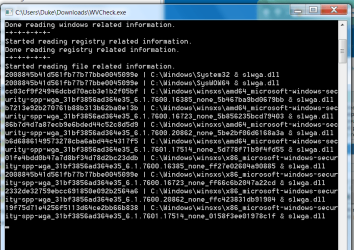
The file scan is still running, but there are 8 instances listed on the CMD widow of what I presume are potential issues with a file named slwga.dll. Any thoughts?
 

Attachments

  • slwgaCap.png
    slwgaCap.png
    32.4 KB · Views: 2

My Computer My Computer

At a glance

Windows 7 Pro x644GbNVidia
Computer Manufacturer/Model Number
HP 8710w Mobile Workstation
OS
Windows 7 Pro x64
Memory
4Gb
Graphics Card(s)
NVidia
Here is the WVCheck result ..
I should note that drive E is an alternative boot partition containing the original Vista installation from prior to the upgrade to Win 7. It was created as a backup to the upgrade and now is only used to access archived documents.

Below, I am seeing that some files were not found - do I need to reinstall them?

Code:
Windows Validation Check
Version: 1.9.12.5
Log Created On: 1055_10-07-2012
-----------------------
Windows Information
-----------------------
Windows Version: Windows 7 
Windows Mode: Normal
Systemroot Path: C:\Windows
WVCheck's Auto Update Check
-----------------------
WVCheck could not read the Auto-Update Option.
-----------------------
Last Success Time for Update Detection: 2012-07-10 09:17:00
Last Success Time for Update Download: 2012-07-10 02:31:14
Last Success Time for Update Installation: 2012-07-10 02:46:20
 
WVCheck's Registry Check Check
-----------------------
Antiwpa: Not Found
-----------------------
Chew7Hale: Not Found
-----------------------
 
WVCheck's File Dump
-----------------------
C:\Windows\System32\slwga.dll
Size: 14336 bytes
Creation; 2/11/2011 18:29:57
Modification; 20/12/2010 22:38:16
MD5; 2008845b41d561fb77b77bbe0045099e
Matched: slwga.dll
-----------------------
C:\Windows\SysWOW64\slwga.dll
Size: 14336 bytes
Creation; 2/11/2011 18:29:57
Modification; 20/12/2010 22:38:16
MD5; 2008845b41d561fb77b77bbe0045099e
Matched: slwga.dll
-----------------------
C:\Windows\winsxs\amd64_microsoft-windows-security-spp-wga_31bf3856ad364e35_6.1.7600.16385_none_5b467ba9bd0679bb\slwga.dll
Size: 14848 bytes
Creation; 13/7/2009 17:52:11
Modification; 13/7/2009 19:41:54
MD5; cc03cf9f24946dcbd70acb3e1b2f05bf
Matched: slwga.dll
-----------------------
C:\Windows\winsxs\amd64_microsoft-windows-security-spp-wga_31bf3856ad364e35_6.1.7600.16723_none_5b856235bcd79403\slwga.dll
Size: 15360 bytes
Creation; 2/11/2011 18:29:57
Modification; 20/12/2010 23:15:31
MD5; b7213e92b270761b88b313b62ba0e13b
Matched: slwga.dll
-----------------------
C:\Windows\winsxs\amd64_microsoft-windows-security-spp-wga_31bf3856ad364e35_6.1.7600.20862_none_5be2bf06d6168a3a\slwga.dll
Size: 15360 bytes
Creation; 2/11/2011 18:29:57
Modification; 20/12/2010 23:9:5
MD5; 86b7d4d7a87ecb9e6bded44c52c8d5d9
Matched: slwga.dll
-----------------------
C:\Windows\winsxs\amd64_microsoft-windows-security-spp-wga_31bf3856ad364e35_6.1.7601.17514_none_5d778f71b9f4fd55\slwga.dll
Size: 15360 bytes
Creation; 2/11/2011 22:16:37
Modification; 20/11/2010 6:27:26
MD5; b6d6886149573278cba6abd44c4317f5
Matched: slwga.dll
-----------------------
C:\Windows\winsxs\x86_microsoft-windows-security-spp-wga_31bf3856ad364e35_6.1.7600.16385_none_ff27e02604a90885\slwga.dll
Size: 13824 bytes
Creation; 13/7/2009 17:36:22
Modification; 13/7/2009 19:16:15
MD5; 01fe4bdd0b47a7d8bf34d78d2bc23ddb
Matched: slwga.dll
-----------------------
C:\Windows\winsxs\x86_microsoft-windows-security-spp-wga_31bf3856ad364e35_6.1.7600.16723_none_ff66c6b2047a22cd\slwga.dll
Size: 14336 bytes
Creation; 2/11/2011 18:29:57
Modification; 20/12/2010 22:38:16
MD5; 2008845b41d561fb77b77bbe0045099e
Matched: slwga.dll
-----------------------
C:\Windows\winsxs\x86_microsoft-windows-security-spp-wga_31bf3856ad364e35_6.1.7600.20862_none_ffc423831db91904\slwga.dll
Size: 14336 bytes
Creation; 2/11/2011 18:29:57
Modification; 20/12/2010 22:29:6
MD5; 2332de32759ebcc691850e092b2564a6
Matched: slwga.dll
-----------------------
C:\Windows\winsxs\x86_microsoft-windows-security-spp-wga_31bf3856ad364e35_6.1.7601.17514_none_0158f3ee01978c1f\slwga.dll
Size: 14336 bytes
Creation; 2/11/2011 22:16:27
Modification; 20/11/2010 5:21:24
MD5; 19f75d71e4256f5113d64ce2bb66b838
Matched: slwga.dll
-----------------------
E:\Windows\System32\slwga.dll
Size: 14336 bytes
Creation; 31/5/2008 9:16:0
Modification; 19/1/2008 1:4:5
MD5; 6b5dc9711fd15a0e944a4f17366e2300
Matched: slwga.dll
-----------------------
E:\Windows\SysWOW64\slwga.dll
Size: 12288 bytes
Creation; 11/8/2009 17:21:11
Modification; 11/4/2009 0:28:24
MD5; da887f28054d78ee8637bebb924a2db5
Matched: slwga.dll
-----------------------
E:\Windows\winsxs\amd64_microsoft-windows-security-licensing-wga_31bf3856ad364e35_6.0.6000.16386_none_a82f436fb51d18f9\slwga.dll
Size: 14336 bytes
Creation; 2/11/2006 3:26:29
Modification; 2/11/2006 5:19:9
MD5; 986d9df7d8f6bb8ae1a8382069502b48
Matched: slwga.dll
-----------------------
E:\Windows\winsxs\amd64_microsoft-windows-security-licensing-wga_31bf3856ad364e35_6.0.6001.18000_none_aa66056bb20829cd\slwga.dll
Size: 14336 bytes
Creation; 31/5/2008 9:16:0
Modification; 19/1/2008 1:4:5
MD5; 6b5dc9711fd15a0e944a4f17366e2300
Matched: slwga.dll
-----------------------
E:\Windows\winsxs\amd64_microsoft-windows-security-licensing-wga_31bf3856ad364e35_6.0.6002.18005_none_ac517e77af29f519\slwga.dll
Size: 14336 bytes
Creation; 31/5/2008 9:16:0
Modification; 19/1/2008 1:4:5
MD5; 6b5dc9711fd15a0e944a4f17366e2300
Matched: slwga.dll
-----------------------
E:\Windows\winsxs\x86_microsoft-windows-security-licensing-wga_31bf3856ad364e35_6.0.6000.16386_none_4c10a7ebfcbfa7c3\slwga.dll
Size: 12288 bytes
Creation; 2/11/2006 6:21:0
Modification; 2/11/2006 3:46:13
MD5; b39f1844ad6c656f64acd32caee72caa
Matched: slwga.dll
-----------------------
E:\Windows\winsxs\x86_microsoft-windows-security-licensing-wga_31bf3856ad364e35_6.0.6001.18000_none_4e4769e7f9aab897\slwga.dll
Size: 12288 bytes
Creation; 31/5/2008 9:20:47
Modification; 19/1/2008 0:36:30
MD5; 7269a928bc18dafbddcffb96b6e987f1
Matched: slwga.dll
-----------------------
E:\Windows\winsxs\x86_microsoft-windows-security-licensing-wga_31bf3856ad364e35_6.0.6002.18005_none_5032e2f3f6cc83e3\slwga.dll
Size: 12288 bytes
Creation; 11/8/2009 17:21:11
Modification; 11/4/2009 0:28:24
MD5; da887f28054d78ee8637bebb924a2db5
Matched: slwga.dll
-----------------------
 
WVCheck's Dir Dump
-----------------------
WVCheck found no known bad directories.
 
WVCheck's Missing File Check
-----------------------
WVCheck found no missing Windows files.
 
WVCheck's HOSTS File Check
-----------------------
WVCheck found no bad lines in the hosts file.
 
WVCheck's MD5 Check
EXPERIMENTAL!!
-----------------------
user32.dll - e8b0ffc209e504cb7e79fc24e6c085f0
 
-------- End of File, program close at 1138_10-07-2012 --------
 
Last edited by a moderator:

My Computer My Computer

At a glance

Windows 7 Pro x644GbNVidia
Computer Manufacturer/Model Number
HP 8710w Mobile Workstation
OS
Windows 7 Pro x64
Memory
4Gb
Graphics Card(s)
NVidia
The WVCheck is over to the Bear :)
There's nothing wrong with the MGADiag report that I can see - sometimes it can give pointers to problems relating with updates, as well as its primary function of indicating genuineness.
As you say, it's indicating genuine and activated, although it apparently hasn't ever been validated? (not essential!)
 

My Computer My Computer

At a glance

Win 7 x64 Home Premium (and x86 VirtualBox VM...i3 370M/i7 6500U8GB - finally :)/8GBit's an i3, dude!/dual Intel&nVidia
Computer type
Laptop
Computer Manufacturer/Model Number
Asus K52F or Lenovo B51-80
OS
Win 7 x64 Home Premium (and x86 VirtualBox VM)/Win10
CPU
i3 370M/i7 6500U
Motherboard
Asus/Lenovo
Memory
8GB - finally :)/8GB
Graphics Card(s)
it's an i3, dude!/dual Intel&nVidia
Sound Card
onboard
Monitor(s) Displays
15.6" built-in
Screen Resolution
1366x768/1920x1080
Hard Drives
750GB Seagate internal
Sundry external drives attached to other computers on the local network
1TB SSD on the Lenovo
PSU
n/a
Internet Speed
as much as I can get - usually on a dongle/phone, so <1MB/s
Antivirus
MSE/Defender
Browser
IE11/12/Edge/Chrome/FF(if I must)
Back
Top