Solved Win7 SP1 Update not installing - mismatched Mail file. 0x80004005

Am I reading correctly that the system32 version of the slwga.dll is not the latest x64 version contained in winsxs, it looks like the original x86 version. Should I copy over with the latest version or is this an update that the failing SP1 has downloaded but not yet applied?
 

My Computer My Computer

At a glance

Windows 7 Pro x644GbNVidia
Computer Manufacturer/Model Number
HP 8710w Mobile Workstation
OS
Windows 7 Pro x64
Memory
4Gb
Graphics Card(s)
NVidia
@ NoelDP - I googled and found the Windows Validation page and ran it. No issues reported.

Good to learn from these tests that my W7 installation is not showing corruption and potantial issues are being eliminated. In doing so, it seems we have wandered away from the initial issue and error message.

Any further thoughts on how to either "reinstall" so that SP1 can uninstall or, in the alternative, convince SP1 that the feature it wants to uninstall is already uninstalled? I would think there is a registry entry that is driving all this attention toward an obsolete mail system. Does this trigger any ideas?


Further update - Running the Fix-It MicrosoftFixit.wu.LB.132265375617751032.4.1 repeatedly, an error is always identified and reported as fixed so it makes me wonder whether the fix is sticking. Unfortunately there is scant reporting or log detail to identify the issue. Per the Fix-It's manual method, I renamed the SoftwareDistribution folder to see if a fresh scan might uncover an unapplied update required by SP1. Unfortunately, no joy! Some security updates were successfully applied, but SP1 errored out again - same error & issue.
 
Last edited:

My Computer My Computer

At a glance

Windows 7 Pro x644GbNVidia
Computer Manufacturer/Model Number
HP 8710w Mobile Workstation
OS
Windows 7 Pro x64
Memory
4Gb
Graphics Card(s)
NVidia

My Computer My Computer

At a glance

Win 7 x64 Home Premium (and x86 VirtualBox VM...i3 370M/i7 6500U8GB - finally :)/8GBit's an i3, dude!/dual Intel&nVidia
Computer type
Laptop
Computer Manufacturer/Model Number
Asus K52F or Lenovo B51-80
OS
Win 7 x64 Home Premium (and x86 VirtualBox VM)/Win10
CPU
i3 370M/i7 6500U
Motherboard
Asus/Lenovo
Memory
8GB - finally :)/8GB
Graphics Card(s)
it's an i3, dude!/dual Intel&nVidia
Sound Card
onboard
Monitor(s) Displays
15.6" built-in
Screen Resolution
1366x768/1920x1080
Hard Drives
750GB Seagate internal
Sundry external drives attached to other computers on the local network
1TB SSD on the Lenovo
PSU
n/a
Internet Speed
as much as I can get - usually on a dongle/phone, so <1MB/s
Antivirus
MSE/Defender
Browser
IE11/12/Edge/Chrome/FF(if I must)
Latest CheckSUR log says:

Code:
=================================
Checking System Update Readiness.
Binary Version 6.1.7601.21645
Package Version 15.0
2012-07-10 15:47

Checking Windows Servicing Packages

Checking Package Manifests and Catalogs

Checking Package Watchlist

Checking Component Watchlist

Checking Packages

Checking Component Store

Summary:
Seconds executed: 1631
 No errors detected
(w)    Unable to open Event Log    0x000006B5    Application        OpenEventLog failed: 0x000006B5 - The interface is unknown.
.
(w)    Unable to open Event Log    0x000006B5    System        OpenEventLog failed: 0x000006B5 - The interface is unknown.
.
In view of the Event log issue, ran SC QC EVENTLOG and got:
Code:
C:\Windows\system32>SC QC EVENTLOG
[SC] QueryServiceConfig SUCCESS

SERVICE_NAME: EVENTLOG
        TYPE               : 20  WIN32_SHARE_PROCESS
        START_TYPE         : 2   AUTO_START
        ERROR_CONTROL      : 1   NORMAL
        BINARY_PATH_NAME   : C:\Windows\System32\svchost.exe -k LocalServiceNetworkRestricted
        LOAD_ORDER_GROUP   : Event Log
        TAG                : 0
        DISPLAY_NAME       : Windows Event Log
        DEPENDENCIES       :
        SERVICE_START_NAME : NT AUTHORITY\LocalService
The CBS log, attached, has a whole lot of "Failed to open package". Is this because I renamed the SoftwareDistribution folder?

While I was in the CBS folder, I noticed that I had saved a log file from the last time I tried to solve this issue. This Log is also attached. What caught my attention was near the end:

Code:
POQ 128 starts:
 
POQ 128 ends.
2011-11-03 12:22:42, Info                  CSI    00000304 [SR] Verify complete
2011-11-03 12:22:42, Info                  CSI    00000305 [SR] Repairing 1 components
2011-11-03 12:22:42, Info                  CSI    00000306 [SR] Beginning Verify and Repair transaction
2011-11-03 12:22:43, Info                  CSI    00000307 Hashes for file member \??\C:\Program Files\Windows Mail\msoe.dll do not match actual file [l:16{8}]"msoe.dll" :
  Found: {l:32 b:PZ9ks7Qp7NKxY6VvxmvhatJtz7c3N66FbCpPp1MLRxI=} Expected: {l:32 b:ejT8LNy4JLgkGRQ8Ycnx3nQzJL6Dd5w/1NrqDQGHQRw=}
2011-11-03 12:22:43, Info                  CSI    00000308 [SR] Repairing corrupted file [ml:520{260},l:66{33}]"\??\C:\Program Files\Windows Mail"\[l:16{8}]"msoe.dll" from store
2011-11-03 12:22:43, Info                  CSI    00000309 Repair results created:
POQ 129 starts:
     0: Move File: Source = [l:192{96}]"\SystemRoot\WinSxS\Temp\PendingRenames\3f54e693559acc014839000060140806._0000000000000000.cdf-ms", Destination = [l:104{52}]"\SystemRoot\WinSxS\FileMaps\_0000000000000000.cdf-ms"
    1: Move File: Source = [l:218{109}]"\SystemRoot\WinSxS\Temp\PendingRenames\a0b5e893559acc014939000060140806.program_files_ffd0cbfc813cc4f1.cdf-ms", Destination = [l:130{65}]"\SystemRoot\WinSxS\FileMaps\program_files_ffd0cbfc813cc4f1.cdf-ms"
    2: Move File: Source = [l:244{122}]"\SystemRoot\WinSxS\Temp\PendingRenames\0017eb93559acc014a39000060140806.program_files_windows_mail_e07902f329fe05e9.cdf-ms", Destination = [l:156{78}]"\SystemRoot\WinSxS\FileMaps\program_files_windows_mail_e07902f329fe05e9.cdf-ms"
    3: Hard Link File: Source = [l:238{119}]"\SystemRoot\WinSxS\amd64_microsoft-windows-mail-core-dll_31bf3856ad364e35_6.1.7600.16543_none_b49cf6153edc812f\msoe.dll", Destination = [l:84{42}]"\??\C:\Program Files\Windows Mail\msoe.dll"

POQ 129 ends.
2011-11-03 12:22:43, Info                  CSI    0000030a [SR] Repair complete
2011-11-03 12:22:43, Info                  CSI    0000030b [SR] Committing transaction
2011-11-03 12:22:43, Info                  CSI    0000030c Creating NT transaction (seq 2), objectname [6]"(null)"
2011-11-03 12:22:43, Info                  CSI    0000030d Created NT transaction (seq 2) result 0x00000000, handle @0x1ac4
2011-11-03 12:22:43, Info                  CSI    0000030e@2011/11/3:18:22:43.301 CSI perf trace:
CSIPERF:TXCOMMIT;31680
2011-11-03 12:22:43, Info                  CSI    0000030f [SR] Verify and Repair Transaction completed. All files and registry keys listed in this transaction  have been successfully repaired

Perhaps this repair explains how the msoe.dll file got either matched or from SP1's perspective mismatched in the first place. If I recall correctly, the file at that time was the Vista msoe.dll and the repair killed the Vista-version Windows Mail that had been running up until then.
 

My Computer My Computer

At a glance

Windows 7 Pro x644GbNVidia
Computer Manufacturer/Model Number
HP 8710w Mobile Workstation
OS
Windows 7 Pro x64
Memory
4Gb
Graphics Card(s)
NVidia
I'm back with no head ache but no smarter. Validation code zero (0) means the operating system has not been validated by Microsoft and needs to be validated.
 

My Computer My Computer

At a glance

Windows 10 Pro. 64/ version 1709 Windows 7 Pr...Intel i7-6800K @ 4.3Corsair Platinum 16 gig @2400EVGA GTX 1070 OC
Computer type
PC/Desktop
Computer Manufacturer/Model Number
Home made Desktop
OS
Windows 10 Pro. 64/ version 1709 Windows 7 Pro/64
CPU
Intel i7-6800K @ 4.3
Motherboard
ASUS X-99 Deluxe II
Memory
Corsair Platinum 16 gig @2400
Graphics Card(s)
EVGA GTX 1070 OC
Monitor(s) Displays
Asus 27" LED LCD/VE278Q
Screen Resolution
1920-1080 or 1280-720 HDMI
Hard Drives
INTEL SSD 730-240 Gb Sata 3.0/
PSU
EVGA Platium 1200W
Case
Phanteks Luxe Tempered Glass 8 fans/ one radiator
Cooling
XSPC/ Water Cooled CPU
Keyboard
Das 4 Professional
Mouse
Logitech M705/MX Anywhere 2-S
Internet Speed
100 mbits
Antivirus
Microsoft Security Essentials/ Malwarebytes Premium 3.0/ SAS
Browser
I.E. 11 default/Firefox/ ISP Time Warner Cable/Spectrum
Other Info
LG BluRay Burner/
Sound system-KLipsch-THX/
Icy Dock ssd Hot Swap bays.
Hi Bear -

I went to the validation page earlier when Noel pointed this out and ran the validator. No issues reported. No change in SP1. But results don't seem to stick anywhere.

Other ideas? Especially with that repair log entry for the suspect file? Would it have left droppings behind?
 
Last edited:

My Computer My Computer

At a glance

Windows 7 Pro x644GbNVidia
Computer Manufacturer/Model Number
HP 8710w Mobile Workstation
OS
Windows 7 Pro x64
Memory
4Gb
Graphics Card(s)
NVidia
Hey Noel - I couldn't find which pub you were hiding in so I bought you (or one of your kin) a virtual beer. I just can't tell you guys apart! And, so many welsh brands, I didn't know which you would like. At least this one says it's beer!

Anyway, hope you enjoy it while coming up the next idea to try.

Duke
 

Attachments

  • NoelDP.jpg
    NoelDP.jpg
    100.3 KB · Views: 1

My Computer My Computer

At a glance

Windows 7 Pro x644GbNVidia
Computer Manufacturer/Model Number
HP 8710w Mobile Workstation
OS
Windows 7 Pro x64
Memory
4Gb
Graphics Card(s)
NVidia
I'm back with no head ache but no smarter. Validation code zero (0) means the operating system has not been validated by Microsoft and needs to be validated.

No it doesn't :)
In an MGADiag report, 0x0 implies 'no error'.

In fact the clue comes later - where the line
LegitcheckControl ActiveX: N/A, hr = 0x80070002
appears - the AcitveX control hasn't been installed (or has been removed)
 

My Computer My Computer

At a glance

Win 7 x64 Home Premium (and x86 VirtualBox VM...i3 370M/i7 6500U8GB - finally :)/8GBit's an i3, dude!/dual Intel&nVidia
Computer type
Laptop
Computer Manufacturer/Model Number
Asus K52F or Lenovo B51-80
OS
Win 7 x64 Home Premium (and x86 VirtualBox VM)/Win10
CPU
i3 370M/i7 6500U
Motherboard
Asus/Lenovo
Memory
8GB - finally :)/8GB
Graphics Card(s)
it's an i3, dude!/dual Intel&nVidia
Sound Card
onboard
Monitor(s) Displays
15.6" built-in
Screen Resolution
1366x768/1920x1080
Hard Drives
750GB Seagate internal
Sundry external drives attached to other computers on the local network
1TB SSD on the Lenovo
PSU
n/a
Internet Speed
as much as I can get - usually on a dongle/phone, so <1MB/s
Antivirus
MSE/Defender
Browser
IE11/12/Edge/Chrome/FF(if I must)
Hey Noel - I couldn't find which pub you were hiding in so I bought you (or one of your kin) a virtual beer. I just can't tell you guys apart! And, so many welsh brands, I didn't know which you would like. At least this one says it's beer!

Anyway, hope you enjoy it while coming up the next idea to try.

Duke
My pub....
www.royaloakgreenfield.co.uk
It's right next to what used to be the town brewery.
 

My Computer My Computer

At a glance

Win 7 x64 Home Premium (and x86 VirtualBox VM...i3 370M/i7 6500U8GB - finally :)/8GBit's an i3, dude!/dual Intel&nVidia
Computer type
Laptop
Computer Manufacturer/Model Number
Asus K52F or Lenovo B51-80
OS
Win 7 x64 Home Premium (and x86 VirtualBox VM)/Win10
CPU
i3 370M/i7 6500U
Motherboard
Asus/Lenovo
Memory
8GB - finally :)/8GB
Graphics Card(s)
it's an i3, dude!/dual Intel&nVidia
Sound Card
onboard
Monitor(s) Displays
15.6" built-in
Screen Resolution
1366x768/1920x1080
Hard Drives
750GB Seagate internal
Sundry external drives attached to other computers on the local network
1TB SSD on the Lenovo
PSU
n/a
Internet Speed
as much as I can get - usually on a dongle/phone, so <1MB/s
Antivirus
MSE/Defender
Browser
IE11/12/Edge/Chrome/FF(if I must)
There are a couple of causes for concern in the new CBS log....
Failed to unload the COMPONENTS hive. [HRESULT = 0x80070005 - E_ACCESSDENIED]
is the one that catches my eye.
Problem is I have no real idea what it means :)

What happens if you open Event Viewer??
 

My Computer My Computer

At a glance

Win 7 x64 Home Premium (and x86 VirtualBox VM...i3 370M/i7 6500U8GB - finally :)/8GBit's an i3, dude!/dual Intel&nVidia
Computer type
Laptop
Computer Manufacturer/Model Number
Asus K52F or Lenovo B51-80
OS
Win 7 x64 Home Premium (and x86 VirtualBox VM)/Win10
CPU
i3 370M/i7 6500U
Motherboard
Asus/Lenovo
Memory
8GB - finally :)/8GB
Graphics Card(s)
it's an i3, dude!/dual Intel&nVidia
Sound Card
onboard
Monitor(s) Displays
15.6" built-in
Screen Resolution
1366x768/1920x1080
Hard Drives
750GB Seagate internal
Sundry external drives attached to other computers on the local network
1TB SSD on the Lenovo
PSU
n/a
Internet Speed
as much as I can get - usually on a dongle/phone, so <1MB/s
Antivirus
MSE/Defender
Browser
IE11/12/Edge/Chrome/FF(if I must)
I'm back with no head ache but no smarter. Validation code zero (0) means the operating system has not been validated by Microsoft and needs to be validated.

No it doesn't :)
In an MGADiag report, 0x0 implies 'no error'.

In fact the clue comes later - where the line
LegitcheckControl ActiveX: N/A, hr = 0x80070002
appears - the AcitveX control hasn't been installed (or has been removed)
Thank you for the info. Have a nice day.
 

My Computer My Computer

At a glance

Windows 10 Pro. 64/ version 1709 Windows 7 Pr...Intel i7-6800K @ 4.3Corsair Platinum 16 gig @2400EVGA GTX 1070 OC
Computer type
PC/Desktop
Computer Manufacturer/Model Number
Home made Desktop
OS
Windows 10 Pro. 64/ version 1709 Windows 7 Pro/64
CPU
Intel i7-6800K @ 4.3
Motherboard
ASUS X-99 Deluxe II
Memory
Corsair Platinum 16 gig @2400
Graphics Card(s)
EVGA GTX 1070 OC
Monitor(s) Displays
Asus 27" LED LCD/VE278Q
Screen Resolution
1920-1080 or 1280-720 HDMI
Hard Drives
INTEL SSD 730-240 Gb Sata 3.0/
PSU
EVGA Platium 1200W
Case
Phanteks Luxe Tempered Glass 8 fans/ one radiator
Cooling
XSPC/ Water Cooled CPU
Keyboard
Das 4 Professional
Mouse
Logitech M705/MX Anywhere 2-S
Internet Speed
100 mbits
Antivirus
Microsoft Security Essentials/ Malwarebytes Premium 3.0/ SAS
Browser
I.E. 11 default/Firefox/ ISP Time Warner Cable/Spectrum
Other Info
LG BluRay Burner/
Sound system-KLipsch-THX/
Icy Dock ssd Hot Swap bays.
Just for kicks, I renamed the Program Files\Windows Mail folders and re-ran the SP1 installer. NO CHANGE.
This suggests to me that it is not looking at the files in this location ... we are dealing solely with the registry. Does that sound right?

Concerning the note above, in IE8, I think I have ActiveX controls on "Prompt" and third-party controls disabled. Should I change this and re-run?

Event viewer says "Event log service is unavailable. Verify that the service is running.
Opening Services.mcp - There is no listing under the "e"s for Event anything, either Standard or Extended tab.
Where do I go from here?

IE - Internet Options - Security Settings - Internet Zone shows:
Code:
Allow Active X Filtering - Enable
Allow previously unused controls to run without prompt - Disable
Allow Scriptlets - Disable
Automatic prompting for ActiveX controls - Disable
Binary and Script Behaviours - Enable
Display video and animation on a webpage that does not use external media player - Disable
Download Signed ActiveX controls - Prompt (recommended)
Download unsigned ActiveX controls - Disable (recommended)
Initialize and script ActiveX controls not marked safe for scripting - Disable (recommended)
Only allow approved domains to use ActiveX without prompt - Enable
Run ActiveX controls and plugins - Enable
Script ActiveX controls marked safe for scripting - Enable

I rarely use IE, so these have not been tuned. I don't know what half of them mean.
I suspect they are the IE8 defaults for Medium-High security.
Does this help?
 
Last edited:

My Computer My Computer

At a glance

Windows 7 Pro x644GbNVidia
Computer Manufacturer/Model Number
HP 8710w Mobile Workstation
OS
Windows 7 Pro x64
Memory
4Gb
Graphics Card(s)
NVidia
Opening msconfig.exe, I don't see an "Event*" service listed here either. Is it called something other than "Event log service"?

Scanning msconfig, found a "Windows error reporting service" that was disabled. I have enabled, rebooted, re-ran MGADiag, no change to screenprints above.

I am now rerunning CheckSUR and will update when it completes.

Any thoughts about the CBS log from last november and the repair that is reported in it? Would it make sense to try removing registry entries that reference the msoe file and/or the Windows Mail folder?
 
Last edited:

My Computer My Computer

At a glance

Windows 7 Pro x644GbNVidia
Computer Manufacturer/Model Number
HP 8710w Mobile Workstation
OS
Windows 7 Pro x64
Memory
4Gb
Graphics Card(s)
NVidia

My Computer My Computer

At a glance

Windows 10 Pro. 64/ version 1709 Windows 7 Pr...Intel i7-6800K @ 4.3Corsair Platinum 16 gig @2400EVGA GTX 1070 OC
Computer type
PC/Desktop
Computer Manufacturer/Model Number
Home made Desktop
OS
Windows 10 Pro. 64/ version 1709 Windows 7 Pro/64
CPU
Intel i7-6800K @ 4.3
Motherboard
ASUS X-99 Deluxe II
Memory
Corsair Platinum 16 gig @2400
Graphics Card(s)
EVGA GTX 1070 OC
Monitor(s) Displays
Asus 27" LED LCD/VE278Q
Screen Resolution
1920-1080 or 1280-720 HDMI
Hard Drives
INTEL SSD 730-240 Gb Sata 3.0/
PSU
EVGA Platium 1200W
Case
Phanteks Luxe Tempered Glass 8 fans/ one radiator
Cooling
XSPC/ Water Cooled CPU
Keyboard
Das 4 Professional
Mouse
Logitech M705/MX Anywhere 2-S
Internet Speed
100 mbits
Antivirus
Microsoft Security Essentials/ Malwarebytes Premium 3.0/ SAS
Browser
I.E. 11 default/Firefox/ ISP Time Warner Cable/Spectrum
Other Info
LG BluRay Burner/
Sound system-KLipsch-THX/
Icy Dock ssd Hot Swap bays.
No joy with enabling "Windows error reporting service."
CheckSUR is unchanged - still saying "Unable to open the Event Log - Interface unknown.

@Bear - Why would I be mad? I am incredibly grateful for any ideas that might lead to a solution. My alternative is a Repair install or, 100 times worse, a clean install! Bring on any and all ideas.

I am studying that thread now - looks promising. Thanks!
 

My Computer My Computer

At a glance

Windows 7 Pro x644GbNVidia
Computer Manufacturer/Model Number
HP 8710w Mobile Workstation
OS
Windows 7 Pro x64
Memory
4Gb
Graphics Card(s)
NVidia
Happy Dance!

@Bear That thread lead to the solution! I was not alone in having the issue. It was hard to wade through as there are multiple causes of the 80004005 error but I finally found a recipe that worked for me.

For those that follow, what worked for me was mostly the "Gobbledegeek solution" at post 958. Note that my CBS.log file specifically points to msoe.dll as the trigger of the error. Others suggestions (and frustrations) in that thread were associated with other triggers. My variation of His solution follows:

1) (Probably optional) Delete the Windows Mail folders and let sfc /scannow rebuild them.

2) If it was renamed per other suggestions, restore the SoftwareDistribution folder (disable the Windows Update Service to make the change, then re-enable it.)

3) Go to Windows Update, Installed updates and remove the update KB978542. For me it was applied in May 2010; others reported August 2010.

4) Once again delete the Windows Mail folders and run sfc /scannow in an elevated command prompt to rebuild them. This restores both the files and the version of the registry entries relating to msoe.dll that SP1 is trying to locate and uninstall.

5) Per the suggestion in comment 968 and others in that thread, use the RTM ISO version of the SP1 update (link in that comment.) Apparently it is coded a bit differently than both the Windows Update and downloadable .exe versions. This was not tested and isolated as essential, but it was one step within my final recipe for success.

I still have issues with the Event Log, but huge steps forward! :D
 
Last edited:

My Computer My Computer

At a glance

Windows 7 Pro x644GbNVidia
Computer Manufacturer/Model Number
HP 8710w Mobile Workstation
OS
Windows 7 Pro x64
Memory
4Gb
Graphics Card(s)
NVidia
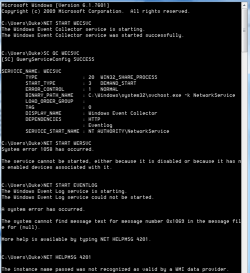
I just responded to this - and the response sems to have gotten lost somewhere in webland....

run the following commands in an elevated command prompt.

NET START WECSVC
SC QC WECSVC
NET START WERSVC
SC QC WERSVC
NET START EVENTLOG
SC QC EVENTLOG


copy and pates the results to your reply, and we'll se what happens
 

My Computer My Computer

At a glance

Win 7 x64 Home Premium (and x86 VirtualBox VM...i3 370M/i7 6500U8GB - finally :)/8GBit's an i3, dude!/dual Intel&nVidia
Computer type
Laptop
Computer Manufacturer/Model Number
Asus K52F or Lenovo B51-80
OS
Win 7 x64 Home Premium (and x86 VirtualBox VM)/Win10
CPU
i3 370M/i7 6500U
Motherboard
Asus/Lenovo
Memory
8GB - finally :)/8GB
Graphics Card(s)
it's an i3, dude!/dual Intel&nVidia
Sound Card
onboard
Monitor(s) Displays
15.6" built-in
Screen Resolution
1366x768/1920x1080
Hard Drives
750GB Seagate internal
Sundry external drives attached to other computers on the local network
1TB SSD on the Lenovo
PSU
n/a
Internet Speed
as much as I can get - usually on a dongle/phone, so <1MB/s
Antivirus
MSE/Defender
Browser
IE11/12/Edge/Chrome/FF(if I must)
DukeS are you fixed now? If you don't give we all will try to keep helping. Yes sometimes it does take a clean and install. Happy computing.
 

My Computer My Computer

At a glance

Windows 10 Pro. 64/ version 1709 Windows 7 Pr...Intel i7-6800K @ 4.3Corsair Platinum 16 gig @2400EVGA GTX 1070 OC
Computer type
PC/Desktop
Computer Manufacturer/Model Number
Home made Desktop
OS
Windows 10 Pro. 64/ version 1709 Windows 7 Pro/64
CPU
Intel i7-6800K @ 4.3
Motherboard
ASUS X-99 Deluxe II
Memory
Corsair Platinum 16 gig @2400
Graphics Card(s)
EVGA GTX 1070 OC
Monitor(s) Displays
Asus 27" LED LCD/VE278Q
Screen Resolution
1920-1080 or 1280-720 HDMI
Hard Drives
INTEL SSD 730-240 Gb Sata 3.0/
PSU
EVGA Platium 1200W
Case
Phanteks Luxe Tempered Glass 8 fans/ one radiator
Cooling
XSPC/ Water Cooled CPU
Keyboard
Das 4 Professional
Mouse
Logitech M705/MX Anywhere 2-S
Internet Speed
100 mbits
Antivirus
Microsoft Security Essentials/ Malwarebytes Premium 3.0/ SAS
Browser
I.E. 11 default/Firefox/ ISP Time Warner Cable/Spectrum
Other Info
LG BluRay Burner/
Sound system-KLipsch-THX/
Icy Dock ssd Hot Swap bays.
Noel -

Here's the result. I'm guessing there is a dependency on WERSVC - Windows Error Reporting Service

Going into either msconfig or services.cpl it is marked "Disabled" and changes in msconfig do not stick, changes in Services respond with "Access denied."

I went to the dependencies tab and it says none and none.

I went to the wersvc.dll and is shows Administrators and TrustedInstaller have Full Control, and that the Owner is Administrators.

MSCONFIG says it was disabled on July 8th, the same time I disabled a number of non-Microsoft services to get to a "clean" environment for SP1. If I made the change, it was unintended, and apparently I cannot undo that change. So, any tricks to get control of this guy or identify what is preventing changes?

This is listed as a symptom of the Conflicker worm, but a check of the "Conflicker EyeChart" shows no infection. (Anti-Virus has been off while trying to solve the SP1 issue.) Nevertheless, I am restoring AV and running a scan.
 

Attachments

  • EventCMDCap.png
    EventCMDCap.png
    19.6 KB · Views: 6
Last edited:

My Computer My Computer

At a glance

Windows 7 Pro x644GbNVidia
Computer Manufacturer/Model Number
HP 8710w Mobile Workstation
OS
Windows 7 Pro x64
Memory
4Gb
Graphics Card(s)
NVidia
Now we know which service is failing we can start to work out why.........
run the following commands in an Elevated Command Prompt....

SC QC WERSVC
SC QUERYEX WERSVC
SC SDSHOW WERSVC
SC QSIDTYPE WERSVC
SC QPRIVS WERSVC

Copy and paste the results to your reply.
Here are some instructions to make life easier :)
1) To open an Elevated Command Prompt Window (the CP window), click on Start, All Programs, Accessories – then right-click on Command Prompt, and select Run as Administrator. Accept the UAC prompt.
2) To run the commands easier, highlight the block of commands, and right-click on the highlight – select Copy. In the CP Windows, click on the black/white icon at top left – select Paste. The commands will run but may not complete the last command, so hit the Enter Key once.
3) To copy the results... click on the Black/White icon in the top left, and select Edit... 'Select All', and hit the Enter key - then use Ctrl+V or r-click+Paste to paste it into your response.
 

My Computer My Computer

At a glance

Win 7 x64 Home Premium (and x86 VirtualBox VM...i3 370M/i7 6500U8GB - finally :)/8GBit's an i3, dude!/dual Intel&nVidia
Computer type
Laptop
Computer Manufacturer/Model Number
Asus K52F or Lenovo B51-80
OS
Win 7 x64 Home Premium (and x86 VirtualBox VM)/Win10
CPU
i3 370M/i7 6500U
Motherboard
Asus/Lenovo
Memory
8GB - finally :)/8GB
Graphics Card(s)
it's an i3, dude!/dual Intel&nVidia
Sound Card
onboard
Monitor(s) Displays
15.6" built-in
Screen Resolution
1366x768/1920x1080
Hard Drives
750GB Seagate internal
Sundry external drives attached to other computers on the local network
1TB SSD on the Lenovo
PSU
n/a
Internet Speed
as much as I can get - usually on a dongle/phone, so <1MB/s
Antivirus
MSE/Defender
Browser
IE11/12/Edge/Chrome/FF(if I must)
Back
Top