Win7 Style Builder Problem | Problems Opening msstyles

ksdixon

New member
Member
Local time
10:55 PM
Messages
49
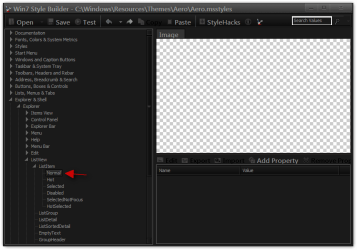
For some reason whenever I try to do anything (create a new style based on Aero, edit a visual style from Windows\Resources), it will not show preview images or object properties for anything when I try to navigate to them, as shown below.

(ListsView -> Normal is selected, and should be showing properties/preview image in the right side panels; this window isn't the active one because I had to open Snipping Tool to take this screenshot.)

Does anyone know what is wrong?


themeissue.png
 

My Computer

OS
Windows 7
That's normal for Explorer & Shell > Explorer > ListView > ListItem > Normal
Win7 Style Builder - CWindowsResourcesThemesAeroAero.msstyles.png

do you have a properties and image at Explorer & Shell > Explorer > ListView > ListItem > Hot
hot.png

Jerry
 

My Computer

Computer type
Laptop
Computer Manufacturer/Model Number
Sager NP9170
OS
Win 7 Pro x64 / Win 10 Pro
CPU
Intel(R) Core(TM) i7-3630QM CPU @ 2.40GHz
Motherboard
CLEVO P170EM
Memory
12 GB
Graphics Card(s)
(1) Intel(R) HD Graphics 4000 (2) NVIDIA GeForce GTX 675M
Sound Card
(1) Realtek High Definition Audio (2) Intel(R) Display Aud
Monitor(s) Displays
17.3
Screen Resolution
1920x1080
Hard Drives
(1) Samsung 860 EVO 500GB(OS) (1) Samsung 860 EVO 500GB(Data)
Keyboard
Backlite
Antivirus
MSE, Malwarebytes Pro
Browser
Firefox
Other Info
DESKTOP: Custom-built.
OS: Win 10 Pro x64.
CASE: Rosewill R5.
CPU: Intel I5 4670K CPU @ 3.40GHz.
CPU COOLER: Cool Master Hyper 212 EVO.
MOTHERBOARD: Asus Z87-A.
MEMORY: Kingston HyperX 2x4 GB.
GPU: Nvidia Geforce 650 TI.
PSU: Corsair TX750.
DRIVES: (1) Samsung 840 120 GB SSD (2) Western Digital blue 500 GB 7200 RPM.
whatdy'a know.... I do have properties for "Explorer & Shell > Explorer > ListView > ListItem > Hot". It seems as though I was looking in the wrong place, silly me.

Do you know where the inactive/active window boarders are for Aero?
 
Last edited:

My Computer

OS
Windows 7
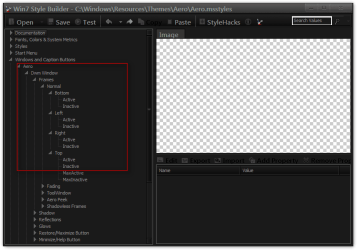
For aero
Windows and Caption Buttons > Aero > Dwm Window > Frames > Normal > Top, Left, Right, Bottom
1.png


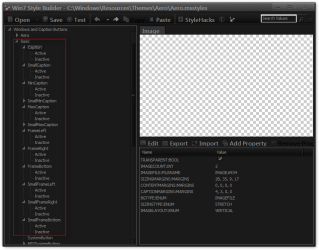
For basic
Windows and Caption Buttons > Basic > Caption to SmallFrameBottom
2.png
Jerry
 

My Computer

Computer type
Laptop
Computer Manufacturer/Model Number
Sager NP9170
OS
Win 7 Pro x64 / Win 10 Pro
CPU
Intel(R) Core(TM) i7-3630QM CPU @ 2.40GHz
Motherboard
CLEVO P170EM
Memory
12 GB
Graphics Card(s)
(1) Intel(R) HD Graphics 4000 (2) NVIDIA GeForce GTX 675M
Sound Card
(1) Realtek High Definition Audio (2) Intel(R) Display Aud
Monitor(s) Displays
17.3
Screen Resolution
1920x1080
Hard Drives
(1) Samsung 860 EVO 500GB(OS) (1) Samsung 860 EVO 500GB(Data)
Keyboard
Backlite
Antivirus
MSE, Malwarebytes Pro
Browser
Firefox
Other Info
DESKTOP: Custom-built.
OS: Win 10 Pro x64.
CASE: Rosewill R5.
CPU: Intel I5 4670K CPU @ 3.40GHz.
CPU COOLER: Cool Master Hyper 212 EVO.
MOTHERBOARD: Asus Z87-A.
MEMORY: Kingston HyperX 2x4 GB.
GPU: Nvidia Geforce 650 TI.
PSU: Corsair TX750.
DRIVES: (1) Samsung 840 120 GB SSD (2) Western Digital blue 500 GB 7200 RPM.
inactivefix.png


Excellent.

With Windows Style Builder I edited Bongo's 'No Glow 2' theme so that the inactive aero window has the same OPACITY:INT and COLORIZATIONOPACITY:INT as the active aero window frame.

Now I can see each window's title clearly in white instead of black, with text that doesn't have a glow around it and against a boarder that doesn't have a glazed/glass look, like Windows Aero does.

And I can still keep track of which is my current window by the glow on the minimize/mazimize/close buttons.

The only issue I have now is that if I change the boarder colors or un-tick 'enable transparency' in the normal Personalization window I go from working with an 'Installed Theme' to using an 'Unsaved Theme'.

noglow4.png


Even if I save this (No Glow 5) in the screenshot, it doesn't allow me to create a theme file in the 'Windows\Resources\Themes' folder so that I could quickly install this onto other computers. How would I go about creating this as a theme?
 

My Computer

OS
Windows 7
Be back in a little in a few
 

My Computer

Computer type
Laptop
Computer Manufacturer/Model Number
Sager NP9170
OS
Win 7 Pro x64 / Win 10 Pro
CPU
Intel(R) Core(TM) i7-3630QM CPU @ 2.40GHz
Motherboard
CLEVO P170EM
Memory
12 GB
Graphics Card(s)
(1) Intel(R) HD Graphics 4000 (2) NVIDIA GeForce GTX 675M
Sound Card
(1) Realtek High Definition Audio (2) Intel(R) Display Aud
Monitor(s) Displays
17.3
Screen Resolution
1920x1080
Hard Drives
(1) Samsung 860 EVO 500GB(OS) (1) Samsung 860 EVO 500GB(Data)
Keyboard
Backlite
Antivirus
MSE, Malwarebytes Pro
Browser
Firefox
Other Info
DESKTOP: Custom-built.
OS: Win 10 Pro x64.
CASE: Rosewill R5.
CPU: Intel I5 4670K CPU @ 3.40GHz.
CPU COOLER: Cool Master Hyper 212 EVO.
MOTHERBOARD: Asus Z87-A.
MEMORY: Kingston HyperX 2x4 GB.
GPU: Nvidia Geforce 650 TI.
PSU: Corsair TX750.
DRIVES: (1) Samsung 840 120 GB SSD (2) Western Digital blue 500 GB 7200 RPM.
With Windows Style Builder I edited Bongo's 'No Glow 2' theme so that the inactive aero window has the same OPACITY:INT and COLORIZATIONOPACITY:INT as the active aero window frame.
I never thought about that good catch


The only issue I have now is that if I change the boarder colors or un-tick 'enable transparency' in the normal Personalization window I go from working with an 'Installed Theme' to using an 'Unsaved Theme'.
That is because you changed it
Even if I save this (No Glow 5) in the screenshot, it doesn't allow me to create a theme file in the 'Windows\Resources\Themes' folder so that I could quickly install this onto other computers. How would I go about creating this as a theme?
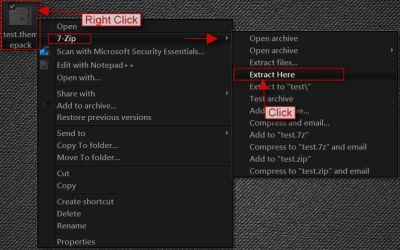
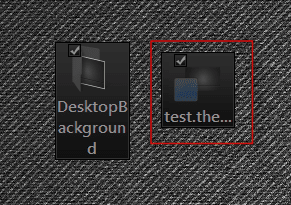
What you will need to do is after you save it in Personalization with Save as then be using the 1 you just saved then Right click and then Save theme for sharing give it the name of theme(No_Glow) save to to the desktop it's is just a .zip folder named .themepack download 7-Zip 7-Zip install it then Right click on the .themepack and use 7 Zip to extract to to your desktop what you need is the .theme file
1a.png2.png
and a copy of the theme folder in Windows\Resources\Themes just the folder now you have the theme folder and the .theme file for the other PC to put in Windows\Resources\Themes.
Jerry
 

My Computer

Computer type
Laptop
Computer Manufacturer/Model Number
Sager NP9170
OS
Win 7 Pro x64 / Win 10 Pro
CPU
Intel(R) Core(TM) i7-3630QM CPU @ 2.40GHz
Motherboard
CLEVO P170EM
Memory
12 GB
Graphics Card(s)
(1) Intel(R) HD Graphics 4000 (2) NVIDIA GeForce GTX 675M
Sound Card
(1) Realtek High Definition Audio (2) Intel(R) Display Aud
Monitor(s) Displays
17.3
Screen Resolution
1920x1080
Hard Drives
(1) Samsung 860 EVO 500GB(OS) (1) Samsung 860 EVO 500GB(Data)
Keyboard
Backlite
Antivirus
MSE, Malwarebytes Pro
Browser
Firefox
Other Info
DESKTOP: Custom-built.
OS: Win 10 Pro x64.
CASE: Rosewill R5.
CPU: Intel I5 4670K CPU @ 3.40GHz.
CPU COOLER: Cool Master Hyper 212 EVO.
MOTHERBOARD: Asus Z87-A.
MEMORY: Kingston HyperX 2x4 GB.
GPU: Nvidia Geforce 650 TI.
PSU: Corsair TX750.
DRIVES: (1) Samsung 840 120 GB SSD (2) Western Digital blue 500 GB 7200 RPM.
Thanks for all your help. This is great, I can finally use Win7 in the way I have wanted since Vista came out.

The only issue that still bugs me is the horrid sky blue selection color in Windows Explorer.
The color itself is just a case of getting the shade right on the replacement colors in Windows Style Builder. If I were to change that to black (to match the window border color), how might I change the color of highlighted/selected files to white instead?
 

My Computer

OS
Windows 7
I actually really like that theme the way you modified it, please send me the theme after you changed the selection colour to (I'm guessing grey/black)
 

My Computer

Computer Manufacturer/Model Number
iRush Pro
OS
Windows 7 Ultimate x64
CPU
Intel Core i5 2500K Processor
Motherboard
Intel H67 Chipset Motherboard (Micro ATX)
Memory
2x4GB DDR3 1333Mhz Memory
Graphics Card(s)
Novatech Radeon 6770 1GB Graphics Card
Hard Drives
1TB
PSU
Novatech 500W
Case
Novatech ATX Gaming Case
Cooling
-
Keyboard
Novatech Wired Keyboard
Mouse
Novatech Wired Mouse
Internet Speed
VirginMedia 10MB/s
Sure thing, Faceofjoe421, although there will still be some selected items which show up as the default Vista/Win7 sky blue color because I'm finding Windows Style Builder incredibly hard to navigate and find what I want to. The Start Menu's hover-over color, for example, still shows as blue, but most other areas are mid-dark grey (tree nav in explorer, right content area in explorer, tree and content area in open/save popup box).

https://rapidshare.com/files/2197025487/Easy_Read_Theme.7z
 

My Computer

OS
Windows 7

My Computer

Computer Manufacturer/Model Number
iRush Pro
OS
Windows 7 Ultimate x64
CPU
Intel Core i5 2500K Processor
Motherboard
Intel H67 Chipset Motherboard (Micro ATX)
Memory
2x4GB DDR3 1333Mhz Memory
Graphics Card(s)
Novatech Radeon 6770 1GB Graphics Card
Hard Drives
1TB
PSU
Novatech 500W
Case
Novatech ATX Gaming Case
Cooling
-
Keyboard
Novatech Wired Keyboard
Mouse
Novatech Wired Mouse
Internet Speed
VirginMedia 10MB/s
Also is there any way you can change the Inactive Window Border to white frame with black text?
 

My Computer

Computer Manufacturer/Model Number
iRush Pro
OS
Windows 7 Ultimate x64
CPU
Intel Core i5 2500K Processor
Motherboard
Intel H67 Chipset Motherboard (Micro ATX)
Memory
2x4GB DDR3 1333Mhz Memory
Graphics Card(s)
Novatech Radeon 6770 1GB Graphics Card
Hard Drives
1TB
PSU
Novatech 500W
Case
Novatech ATX Gaming Case
Cooling
-
Keyboard
Novatech Wired Keyboard
Mouse
Novatech Wired Mouse
Internet Speed
VirginMedia 10MB/s
Not sure on that, since there doesn't seem to be a color property for the inactive window aero frame - it just seems to go off what you choose in the Personalize screen. Although... one of those two opacity values I edited was what changed the window from being a pale white/grey into being fully black like the active window. If one messed around with that they might be able to get the inactive window to turn paler/whiter - although I suspect it would just turn more transparent instead.

No idea yet how to edit the text color of the aero frames (aka window boards) yet. Love it being white personally though, they now stand out against lots of different colored frames.
 

My Computer

OS
Windows 7
I have noticed one thing keeps happening.

At first I had to End Task on the dwm.exe (Desktop Window Manager) process in Task Manager when Windows spontaneously changed to Windows Basic theme and wouldn't change back. It's happened again now that I shut my PC off for the night and came back to it today.

One section of the Windows Explorer user interface goes back to the Windows Classic look for some reason. It is the ''Organize'' bar, as I call it:

affectedarea.png


In aero this has a blue-ish hue and the buttons are placed differently. No idea why this happens, just thought it was something worth mentioning.
 

My Computer

OS
Windows 7
Oh and by the way, the theme files you gave me do not work, and I am doing it right as I tested it with Bongo's original NoGlow theme and it worked.

Are you sure you sent me the right theme?
 

My Computer

Computer Manufacturer/Model Number
iRush Pro
OS
Windows 7 Ultimate x64
CPU
Intel Core i5 2500K Processor
Motherboard
Intel H67 Chipset Motherboard (Micro ATX)
Memory
2x4GB DDR3 1333Mhz Memory
Graphics Card(s)
Novatech Radeon 6770 1GB Graphics Card
Hard Drives
1TB
PSU
Novatech 500W
Case
Novatech ATX Gaming Case
Cooling
-
Keyboard
Novatech Wired Keyboard
Mouse
Novatech Wired Mouse
Internet Speed
VirginMedia 10MB/s
Yeah, I sent you the msstyle/theme that I created after having made all the alterations; but I didn't think they would work as I keep having to re-make the changes myself.
 

My Computer

OS
Windows 7
I've got the program myself now but have no clue what to do (there needs to be a tutorial) :(
 

My Computer

Computer Manufacturer/Model Number
iRush Pro
OS
Windows 7 Ultimate x64
CPU
Intel Core i5 2500K Processor
Motherboard
Intel H67 Chipset Motherboard (Micro ATX)
Memory
2x4GB DDR3 1333Mhz Memory
Graphics Card(s)
Novatech Radeon 6770 1GB Graphics Card
Hard Drives
1TB
PSU
Novatech 500W
Case
Novatech ATX Gaming Case
Cooling
-
Keyboard
Novatech Wired Keyboard
Mouse
Novatech Wired Mouse
Internet Speed
VirginMedia 10MB/s

My Computer

Computer type
Laptop
Computer Manufacturer/Model Number
Sager NP9170
OS
Win 7 Pro x64 / Win 10 Pro
CPU
Intel(R) Core(TM) i7-3630QM CPU @ 2.40GHz
Motherboard
CLEVO P170EM
Memory
12 GB
Graphics Card(s)
(1) Intel(R) HD Graphics 4000 (2) NVIDIA GeForce GTX 675M
Sound Card
(1) Realtek High Definition Audio (2) Intel(R) Display Aud
Monitor(s) Displays
17.3
Screen Resolution
1920x1080
Hard Drives
(1) Samsung 860 EVO 500GB(OS) (1) Samsung 860 EVO 500GB(Data)
Keyboard
Backlite
Antivirus
MSE, Malwarebytes Pro
Browser
Firefox
Other Info
DESKTOP: Custom-built.
OS: Win 10 Pro x64.
CASE: Rosewill R5.
CPU: Intel I5 4670K CPU @ 3.40GHz.
CPU COOLER: Cool Master Hyper 212 EVO.
MOTHERBOARD: Asus Z87-A.
MEMORY: Kingston HyperX 2x4 GB.
GPU: Nvidia Geforce 650 TI.
PSU: Corsair TX750.
DRIVES: (1) Samsung 840 120 GB SSD (2) Western Digital blue 500 GB 7200 RPM.

My Computer

Computer Manufacturer/Model Number
iRush Pro
OS
Windows 7 Ultimate x64
CPU
Intel Core i5 2500K Processor
Motherboard
Intel H67 Chipset Motherboard (Micro ATX)
Memory
2x4GB DDR3 1333Mhz Memory
Graphics Card(s)
Novatech Radeon 6770 1GB Graphics Card
Hard Drives
1TB
PSU
Novatech 500W
Case
Novatech ATX Gaming Case
Cooling
-
Keyboard
Novatech Wired Keyboard
Mouse
Novatech Wired Mouse
Internet Speed
VirginMedia 10MB/s

My Computer

Computer type
Laptop
Computer Manufacturer/Model Number
Sager NP9170
OS
Win 7 Pro x64 / Win 10 Pro
CPU
Intel(R) Core(TM) i7-3630QM CPU @ 2.40GHz
Motherboard
CLEVO P170EM
Memory
12 GB
Graphics Card(s)
(1) Intel(R) HD Graphics 4000 (2) NVIDIA GeForce GTX 675M
Sound Card
(1) Realtek High Definition Audio (2) Intel(R) Display Aud
Monitor(s) Displays
17.3
Screen Resolution
1920x1080
Hard Drives
(1) Samsung 860 EVO 500GB(OS) (1) Samsung 860 EVO 500GB(Data)
Keyboard
Backlite
Antivirus
MSE, Malwarebytes Pro
Browser
Firefox
Other Info
DESKTOP: Custom-built.
OS: Win 10 Pro x64.
CASE: Rosewill R5.
CPU: Intel I5 4670K CPU @ 3.40GHz.
CPU COOLER: Cool Master Hyper 212 EVO.
MOTHERBOARD: Asus Z87-A.
MEMORY: Kingston HyperX 2x4 GB.
GPU: Nvidia Geforce 650 TI.
PSU: Corsair TX750.
DRIVES: (1) Samsung 840 120 GB SSD (2) Western Digital blue 500 GB 7200 RPM.
Back
Top