Win7 Style Builder Problem | Problems Opening msstyles

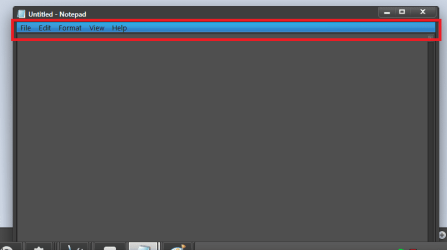
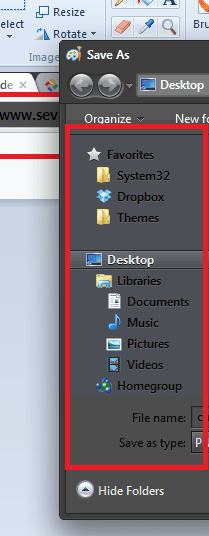
can you have a look at this and tell me if it will work if not please correct it. i also want the inactive a bit lighter.

edit - after a bit of messing about i finally figured it out

but how do i change the color of it when inactive and change the text of it?

also when i click it to view the path, how do i change that color?

another edit - i changed the text color, but it is only white when maximised
 

Attachments

  • example.png
    example.png
    285 bytes · Views: 171
Last edited:

My Computer

OS
win7 pro 32bit
Memory
3gb
Hard Drives
2x140gb
Internet Speed
5mb per sec
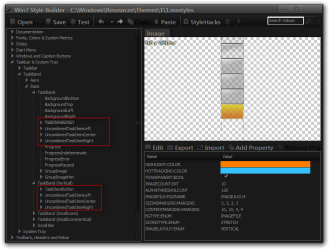
but how do i change the color of it when inactive and change the text of it?
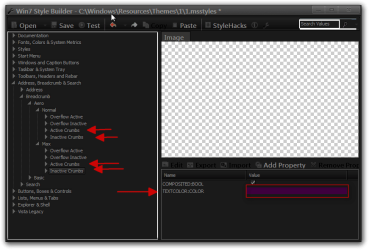
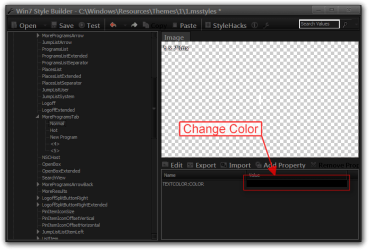
Address, Breadcrumb & Search > Address > AddressBand > Basic > AddressBand > <1> the top image of the 4 should control both active and inactive.


Text Color
Win7 Style Builder - CWindowsResourcesThemes11.msstyles.png

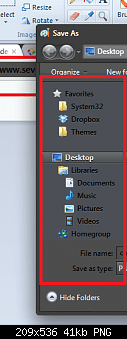
also when i click it to view the path, how do i change that color?
2.png


Jerry
 

My Computer

Computer type
Laptop
Computer Manufacturer/Model Number
Sager NP9170
OS
Win 7 Pro x64 / Win 10 Pro
CPU
Intel(R) Core(TM) i7-3630QM CPU @ 2.40GHz
Motherboard
CLEVO P170EM
Memory
12 GB
Graphics Card(s)
(1) Intel(R) HD Graphics 4000 (2) NVIDIA GeForce GTX 675M
Sound Card
(1) Realtek High Definition Audio (2) Intel(R) Display Aud
Monitor(s) Displays
17.3
Screen Resolution
1920x1080
Hard Drives
(1) Samsung 860 EVO 500GB(OS) (1) Samsung 860 EVO 500GB(Data)
Keyboard
Backlite
Antivirus
MSE, Malwarebytes Pro
Browser
Firefox
Other Info
DESKTOP: Custom-built.
OS: Win 10 Pro x64.
CASE: Rosewill R5.
CPU: Intel I5 4670K CPU @ 3.40GHz.
CPU COOLER: Cool Master Hyper 212 EVO.
MOTHERBOARD: Asus Z87-A.
MEMORY: Kingston HyperX 2x4 GB.
GPU: Nvidia Geforce 650 TI.
PSU: Corsair TX750.
DRIVES: (1) Samsung 840 120 GB SSD (2) Western Digital blue 500 GB 7200 RPM.
well i found a theme that looks so alike to what i had in mind. just a few things.

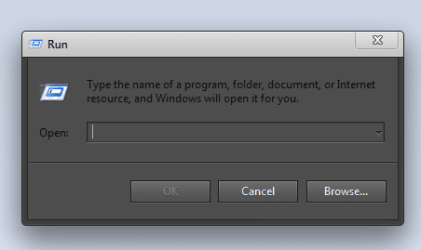
1 1.png change the main titlebar color to black. i know how to change text
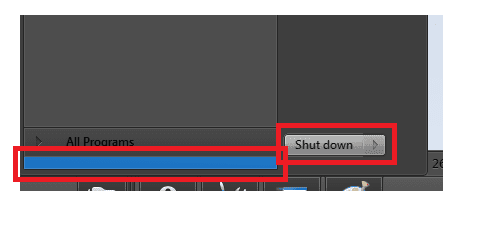
2 2.png change start menu blue bar to grey and get rid of the border around shutdown
3 3.png i changed folderband color but it didnt apply to vsb folderband
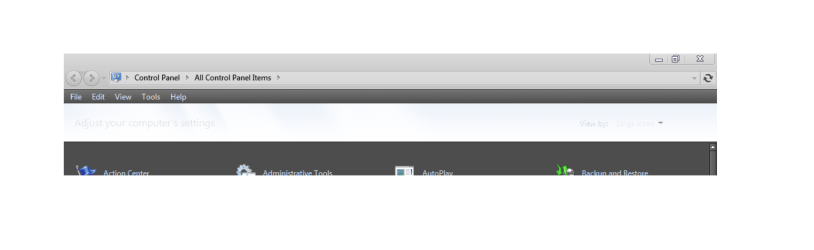
4 4.png the top bar on control panel is too hard to see because it is white
5 5.png how to make notification area top bar match with the sides and bottom
 

My Computer

OS
win7 pro 32bit
Memory
3gb
Hard Drives
2x140gb
Internet Speed
5mb per sec
well i found a theme that looks so alike to what i had in mind. just a few things.

1 View attachment 196911 change the main titlebar color to black. i know how to change text
2 View attachment 196912 change start menu blue bar to grey and get rid of the border around shutdown
3 View attachment 196913 i changed folderband color but it didnt apply to vsb folderband
4 View attachment 196914 the top bar on control panel is too hard to see because it is white
5 View attachment 196915 how to make notification area top bar match with the sides and bottom

I am using the numbers some of your images do not match the numbers.
1 & 5
Windows and Caption Buttons > Aero > Dwm Window > Frames > Normal > Top > Active edit the image

2
Start Menu > Panels > Aero > Top > OpenBox
Start Menu > Panels > Aero > Top > OpenBoxExtended
logoff
Start Menu > Panels > Basic > LogoffSplitButtonRight
Start Menu > Panels > Basic > LogoffSplitButtonRightExtended
Start Menu > Panels > Basic > LogoffSplitButtonLeft
Start Menu > Panels > Basic > LogoffSplitButtonLeftExtended

3
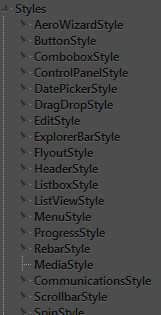
Toolbars, Headers and Rebar > Rebar > Media > Background

4
is not part of WBS is in shell32.dll in C:\Windows\System32 it's 1 of these Bitmap # 634,635, 700


Jerry
 

My Computer

Computer type
Laptop
Computer Manufacturer/Model Number
Sager NP9170
OS
Win 7 Pro x64 / Win 10 Pro
CPU
Intel(R) Core(TM) i7-3630QM CPU @ 2.40GHz
Motherboard
CLEVO P170EM
Memory
12 GB
Graphics Card(s)
(1) Intel(R) HD Graphics 4000 (2) NVIDIA GeForce GTX 675M
Sound Card
(1) Realtek High Definition Audio (2) Intel(R) Display Aud
Monitor(s) Displays
17.3
Screen Resolution
1920x1080
Hard Drives
(1) Samsung 860 EVO 500GB(OS) (1) Samsung 860 EVO 500GB(Data)
Keyboard
Backlite
Antivirus
MSE, Malwarebytes Pro
Browser
Firefox
Other Info
DESKTOP: Custom-built.
OS: Win 10 Pro x64.
CASE: Rosewill R5.
CPU: Intel I5 4670K CPU @ 3.40GHz.
CPU COOLER: Cool Master Hyper 212 EVO.
MOTHERBOARD: Asus Z87-A.
MEMORY: Kingston HyperX 2x4 GB.
GPU: Nvidia Geforce 650 TI.
PSU: Corsair TX750.
DRIVES: (1) Samsung 840 120 GB SSD (2) Western Digital blue 500 GB 7200 RPM.
im nearly there :)

1 1.png remove glow from paint (not text) - save undo redo

2 5.png i changed all font colors to white, but now it is hard to see the text from opera web browser - thats the only bit i want black

3 3.png change blue band to color of choice

4 and 5 4.png2.png

make text white
 

My Computer

OS
win7 pro 32bit
Memory
3gb
Hard Drives
2x140gb
Internet Speed
5mb per sec
1- I do not know
2- I do not have opera
3- Lists, Menus & Tabs > Menu > BarBackground
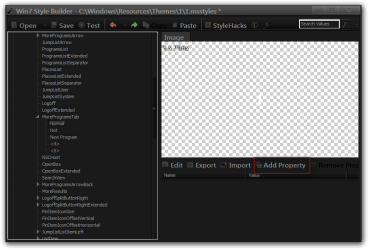
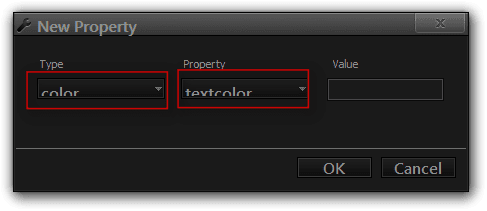
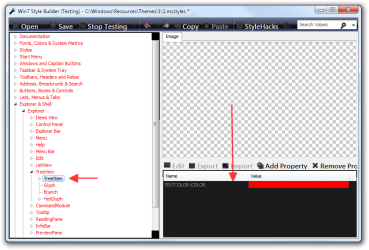
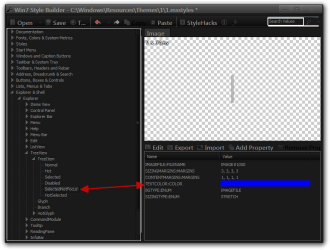
4-5- Need to add text color properties(look at screenshots)to
Start Menu > Panels > Basic > MoreProgramsTab > Normal
Start Menu > Panels > Basic > MoreProgramsTab > Hot
Explorer & Shell > Explorer > TreeView > TreeItem
Jerry
1.png

2.png

3.png
 

My Computer

Computer type
Laptop
Computer Manufacturer/Model Number
Sager NP9170
OS
Win 7 Pro x64 / Win 10 Pro
CPU
Intel(R) Core(TM) i7-3630QM CPU @ 2.40GHz
Motherboard
CLEVO P170EM
Memory
12 GB
Graphics Card(s)
(1) Intel(R) HD Graphics 4000 (2) NVIDIA GeForce GTX 675M
Sound Card
(1) Realtek High Definition Audio (2) Intel(R) Display Aud
Monitor(s) Displays
17.3
Screen Resolution
1920x1080
Hard Drives
(1) Samsung 860 EVO 500GB(OS) (1) Samsung 860 EVO 500GB(Data)
Keyboard
Backlite
Antivirus
MSE, Malwarebytes Pro
Browser
Firefox
Other Info
DESKTOP: Custom-built.
OS: Win 10 Pro x64.
CASE: Rosewill R5.
CPU: Intel I5 4670K CPU @ 3.40GHz.
CPU COOLER: Cool Master Hyper 212 EVO.
MOTHERBOARD: Asus Z87-A.
MEMORY: Kingston HyperX 2x4 GB.
GPU: Nvidia Geforce 650 TI.
PSU: Corsair TX750.
DRIVES: (1) Samsung 840 120 GB SSD (2) Western Digital blue 500 GB 7200 RPM.
your reply to 3 didn't work well it did but it looked weird
weird.png

4 and 5 only changed all programs button text color not vsb text color even after restarting vsb
 

My Computer

OS
win7 pro 32bit
Memory
3gb
Hard Drives
2x140gb
Internet Speed
5mb per sec
your reply to 3 didn't work well it did but it looked weird
View attachment 196961

4 and 5 only changed all programs button text color not vsb text color even after restarting vsb

I download opera change text (screenshot)
Win7 Style Builder - CWindowsResourcesThemes11.msstyles.png

3 could be the way you edited the image or the Sizing Margins there.

5 did you add the properties at the right place (screenshot)
3.png

Jerry
 

My Computer

Computer type
Laptop
Computer Manufacturer/Model Number
Sager NP9170
OS
Win 7 Pro x64 / Win 10 Pro
CPU
Intel(R) Core(TM) i7-3630QM CPU @ 2.40GHz
Motherboard
CLEVO P170EM
Memory
12 GB
Graphics Card(s)
(1) Intel(R) HD Graphics 4000 (2) NVIDIA GeForce GTX 675M
Sound Card
(1) Realtek High Definition Audio (2) Intel(R) Display Aud
Monitor(s) Displays
17.3
Screen Resolution
1920x1080
Hard Drives
(1) Samsung 860 EVO 500GB(OS) (1) Samsung 860 EVO 500GB(Data)
Keyboard
Backlite
Antivirus
MSE, Malwarebytes Pro
Browser
Firefox
Other Info
DESKTOP: Custom-built.
OS: Win 10 Pro x64.
CASE: Rosewill R5.
CPU: Intel I5 4670K CPU @ 3.40GHz.
CPU COOLER: Cool Master Hyper 212 EVO.
MOTHERBOARD: Asus Z87-A.
MEMORY: Kingston HyperX 2x4 GB.
GPU: Nvidia Geforce 650 TI.
PSU: Corsair TX750.
DRIVES: (1) Samsung 840 120 GB SSD (2) Western Digital blue 500 GB 7200 RPM.
thank you so much jerry.

now all i need to do is make the taskbar buttons look like the ones in the them 'soft 7' to blend in with this as i do not like these ones. basically i just mean like how the buttons look normally and when hovered and selected

however the fix you found to opera changed my navigation bar explorer textcolor too and chrome :( and general font colors

i also need to change uac menubar color to white and the main information to white (not the titlebar text)
 

Attachments

  • 2.png
    2.png
    15 KB · Views: 9
  • chrome.png
    chrome.png
    8.6 KB · Views: 4
Last edited:

My Computer

OS
win7 pro 32bit
Memory
3gb
Hard Drives
2x140gb
Internet Speed
5mb per sec
Here are where taskbar buttons are at (screenshot) you can export the buttons from soft 7 and import them into your theme.
1.png

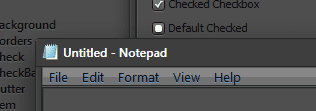
The text color for this 6.png is the same as the opera fix and here (screenshot) I will try to find the other one later.
Jerry
4.png
 

My Computer

Computer type
Laptop
Computer Manufacturer/Model Number
Sager NP9170
OS
Win 7 Pro x64 / Win 10 Pro
CPU
Intel(R) Core(TM) i7-3630QM CPU @ 2.40GHz
Motherboard
CLEVO P170EM
Memory
12 GB
Graphics Card(s)
(1) Intel(R) HD Graphics 4000 (2) NVIDIA GeForce GTX 675M
Sound Card
(1) Realtek High Definition Audio (2) Intel(R) Display Aud
Monitor(s) Displays
17.3
Screen Resolution
1920x1080
Hard Drives
(1) Samsung 860 EVO 500GB(OS) (1) Samsung 860 EVO 500GB(Data)
Keyboard
Backlite
Antivirus
MSE, Malwarebytes Pro
Browser
Firefox
Other Info
DESKTOP: Custom-built.
OS: Win 10 Pro x64.
CASE: Rosewill R5.
CPU: Intel I5 4670K CPU @ 3.40GHz.
CPU COOLER: Cool Master Hyper 212 EVO.
MOTHERBOARD: Asus Z87-A.
MEMORY: Kingston HyperX 2x4 GB.
GPU: Nvidia Geforce 650 TI.
PSU: Corsair TX750.
DRIVES: (1) Samsung 840 120 GB SSD (2) Western Digital blue 500 GB 7200 RPM.
taskbar importing worked. but how do i make the more than one window open taskbar item from soft theme import?
 

My Computer

OS
win7 pro 32bit
Memory
3gb
Hard Drives
2x140gb
Internet Speed
5mb per sec
but how do i make the more than one window open taskbar item from soft theme import?
I do not understand what you are saying here, can you clarify this more.
Jerry
 

My Computer

Computer type
Laptop
Computer Manufacturer/Model Number
Sager NP9170
OS
Win 7 Pro x64 / Win 10 Pro
CPU
Intel(R) Core(TM) i7-3630QM CPU @ 2.40GHz
Motherboard
CLEVO P170EM
Memory
12 GB
Graphics Card(s)
(1) Intel(R) HD Graphics 4000 (2) NVIDIA GeForce GTX 675M
Sound Card
(1) Realtek High Definition Audio (2) Intel(R) Display Aud
Monitor(s) Displays
17.3
Screen Resolution
1920x1080
Hard Drives
(1) Samsung 860 EVO 500GB(OS) (1) Samsung 860 EVO 500GB(Data)
Keyboard
Backlite
Antivirus
MSE, Malwarebytes Pro
Browser
Firefox
Other Info
DESKTOP: Custom-built.
OS: Win 10 Pro x64.
CASE: Rosewill R5.
CPU: Intel I5 4670K CPU @ 3.40GHz.
CPU COOLER: Cool Master Hyper 212 EVO.
MOTHERBOARD: Asus Z87-A.
MEMORY: Kingston HyperX 2x4 GB.
GPU: Nvidia Geforce 650 TI.
PSU: Corsair TX750.
DRIVES: (1) Samsung 840 120 GB SSD (2) Western Digital blue 500 GB 7200 RPM.
inactivefix.png

Excellent.

With Windows Style Builder I edited Bongo's 'No Glow 2' theme so that the inactive aero window has the same OPACITY:INT and COLORIZATIONOPACITY:INT as the active aero window frame.

Now I can see each window's title clearly in white instead of black, with text that doesn't have a glow around it and against a boarder that doesn't have a glazed/glass look, like Windows Aero does.

And I can still keep track of which is my current window by the glow on the minimize/mazimize/close buttons.

win8vk.png


I'm now on Windows 8 Consumer Preview, and looking to repeat this process.
Once again, all I want is for the Inactive Titlebar to have the same level of color and non-opacity as the Active Titlebar. For there to be no 'aero glow' around the text itself, and for the text to be white on both titlebars, so that I can still read it if I turn the titlebar color to black in the Personalize menu.

However the combination of WindowsStyleBuilder and Windows 8 seem to be messing this up for me.
First thing I notice, when loading Bongo's 'No_Glow_2.theme' in the Personalize window, is that this time around the title bar text is not white like it was in Windows 7. Thankfully the theme does still retain it's ability to have no glow on the titlebar text.

Secondly, when I import the 'No_Glow_2.msstyle' into WindowsStyleBuilder - and straight away save it without making any changes - I receive an error message when I click yes to the prompt asking if I want to use the visual style now. The error message talks about how I may have added or edited a property incorrectly.

This seems strange, and prevents me from making any alterations, because I cannot use the saved .msstyle file due to it not loading; and thus cannot go on to save it from the Personalize menu and create it as a proper .theme file.
 

My Computer

OS
Windows 7
WSB does not work on Windows 8 the .msstyles are different, hoping they update WSB.
Jerry
 

My Computer

Computer type
Laptop
Computer Manufacturer/Model Number
Sager NP9170
OS
Win 7 Pro x64 / Win 10 Pro
CPU
Intel(R) Core(TM) i7-3630QM CPU @ 2.40GHz
Motherboard
CLEVO P170EM
Memory
12 GB
Graphics Card(s)
(1) Intel(R) HD Graphics 4000 (2) NVIDIA GeForce GTX 675M
Sound Card
(1) Realtek High Definition Audio (2) Intel(R) Display Aud
Monitor(s) Displays
17.3
Screen Resolution
1920x1080
Hard Drives
(1) Samsung 860 EVO 500GB(OS) (1) Samsung 860 EVO 500GB(Data)
Keyboard
Backlite
Antivirus
MSE, Malwarebytes Pro
Browser
Firefox
Other Info
DESKTOP: Custom-built.
OS: Win 10 Pro x64.
CASE: Rosewill R5.
CPU: Intel I5 4670K CPU @ 3.40GHz.
CPU COOLER: Cool Master Hyper 212 EVO.
MOTHERBOARD: Asus Z87-A.
MEMORY: Kingston HyperX 2x4 GB.
GPU: Nvidia Geforce 650 TI.
PSU: Corsair TX750.
DRIVES: (1) Samsung 840 120 GB SSD (2) Western Digital blue 500 GB 7200 RPM.
Back
Top